



Long-Press Preview (iOS Peek) — Free Hold-to-Preview Snippet
Long-Press Preview (iOS-Style Peek) · Modals · Plain HTML, CSS & JS · Live preview
Copy & paste
Source Code
<div class="ltp-wrap">
  <p class="ltp-hint">Press and hold a card (mouse or touch) to peek at its full content</p>
  <div class="ltp-grid">
    <article class="ltp-card" data-preview="A full case study covering discovery, design iterations, and the final shipped redesign \u2014 including the metrics that moved after launch.">
      <span class="ltp-tag">Case study</span>
      <h3>Redesigning checkout</h3>
      <p>Conversion research and the flow that replaced it\u2026</p>
    </article>
    <article class="ltp-card" data-preview="A deep dive into the token pipeline: naming conventions, the build step that generates platform-specific output, and how design and engineering stay in sync.">
      <span class="ltp-tag">Engineering</span>
      <h3>Our design token pipeline</h3>
      <p>How tokens flow from Figma to production\u2026</p>
    </article>
    <article class="ltp-card" data-preview="Interviews with three teams who moved off spreadsheets, what broke in the first month, and the checklist we now hand every new customer.">
      <span class="ltp-tag">Customers</span>
      <h3>Migrating off spreadsheets</h3>
      <p>Three teams share what actually happened\u2026</p>
    </article>
  </div>
</div>
<div class="ltp-peek" id="ltpPeek">
  <p class="ltp-peek-label" id="ltpPeekLabel"></p>
  <p class="ltp-peek-text" id="ltpPeekText"></p>
</div>*{box-sizing:border-box;margin:0;padding:0}
body{font-family:system-ui,-apple-system,sans-serif;background:#0e1018;color:#e6e8f2;min-height:100vh;padding:26px;display:flex;justify-content:center}
.ltp-wrap{width:100%;max-width:640px}
.ltp-hint{font-size:12.5px;color:#7a8099;margin-bottom:16px;font-weight:600}
.ltp-grid{display:grid;grid-template-columns:repeat(auto-fit,minmax(180px,1fr));gap:14px}
.ltp-card{position:relative;border-radius:14px;padding:16px;background:#171a26;border:1px solid #252a3c;cursor:pointer;-webkit-user-select:none;user-select:none;touch-action:pan-y;transition:transform .15s,background .15s}
.ltp-card.pressing{transform:scale(.97);background:#1e2334}
.ltp-tag{display:inline-block;font-size:10px;font-weight:700;letter-spacing:.06em;text-transform:uppercase;color:#93c5fd;background:rgba(147,197,253,.1);padding:3px 8px;border-radius:99px;margin-bottom:8px}
.ltp-card h3{font-size:14.5px;margin-bottom:5px;line-height:1.35}
.ltp-card p{font-size:12px;color:#8b91ab;line-height:1.5}
.ltp-peek{position:fixed;z-index:50;max-width:280px;background:#1c2032;border:1px solid #333a56;border-radius:14px;padding:16px;box-shadow:0 22px 50px -12px rgba(0,0,0,.65);opacity:0;transform:scale(.9) translateY(6px);pointer-events:none;transition:opacity .16s ease,transform .16s cubic-bezier(.2,.9,.3,1.1)}
.ltp-peek.show{opacity:1;transform:scale(1) translateY(0)}
.ltp-peek-label{font-size:10.5px;font-weight:700;letter-spacing:.06em;text-transform:uppercase;color:#93c5fd;margin-bottom:6px}
.ltp-peek-text{font-size:13px;line-height:1.55;color:#cdd2e6}var cards = Array.prototype.slice.call(document.querySelectorAll('.ltp-card'));
var peek = document.getElementById('ltpPeek');
var peekLabel = document.getElementById('ltpPeekLabel');
var peekText = document.getElementById('ltpPeekText');
var PRESS_MS = 500;
var MOVE_TOLERANCE = 10; // px \u2014 a hold that drifts more than this cancels
var timer = null;
var activeCard = null;
var startX = 0, startY = 0;
var shown = false;
function pointerXY(e) {
var t = e.touches ? e.touches[0] : e;
return { x: t.clientX, y: t.clientY };
}
function positionPeek(x, y) {
var w = 280, pad = 12;
var left = Math.min(window.innerWidth - w - pad, Math.max(pad, x - w / 2));
var top = y - 18;
var flip = top < 140; // not enough room above \u2014 show below the press point instead
peek.style.left = left + 'px';
peek.style.top = (flip ? y + 22 : top - 150) + 'px';
}
function showPeek(card, x, y) {
peekLabel.textContent = card.querySelector('.ltp-tag').textContent;
peekText.textContent = card.dataset.preview;
positionPeek(x, y);
peek.classList.add('show');
shown = true;
}
function hidePeek() {
peek.classList.remove('show');
shown = false;
}
function clearPress() {
if (timer) { clearTimeout(timer); timer = null; }
if (activeCard) { activeCard.classList.remove('pressing'); activeCard = null; }
}
// Real pointerdown + timer, only committing to a "long press" if the pointer
// stays down past PRESS_MS AND has not drifted more than MOVE_TOLERANCE \u2014
// a quick tap or a scroll gesture must never trigger the peek.
function onPressStart(e) {
var p = pointerXY(e);
startX = p.x; startY = p.y;
activeCard = e.currentTarget;
activeCard.classList.add('pressing');
timer = setTimeout(function () {
if (!activeCard) return;
showPeek(activeCard, startX, startY);
}, PRESS_MS);
}
function onPressMove(e) {
if (!activeCard) return;
var p = pointerXY(e);
var dist = Math.hypot(p.x - startX, p.y - startY);
if (dist > MOVE_TOLERANCE) {
clearPress();
hidePeek();
} else if (shown) {
positionPeek(p.x, p.y);
}
}
function onPressEnd() {
clearPress();
hidePeek();
}
cards.forEach(function (card) {
card.addEventListener('pointerdown', onPressStart);
card.addEventListener('pointermove', onPressMove);
card.addEventListener('pointerup', onPressEnd);
card.addEventListener('pointercancel', onPressEnd);
card.addEventListener('pointerleave', function () { if (!shown) clearPress(); });
card.addEventListener('contextmenu', function (e) { e.preventDefault(); }); // long-press shouldn't open the OS menu
});Extend with AI
Take This Snippet Further With AI
The AI prompt for this one is for Patreon supporters ($3 a month), along with a site with no ads. Supporters enter the passcode once and it is remembered in this browser.
What's included
Features
About this UI Snippet
Long-Press Preview — The Touch Equivalent of a Hover Tooltip
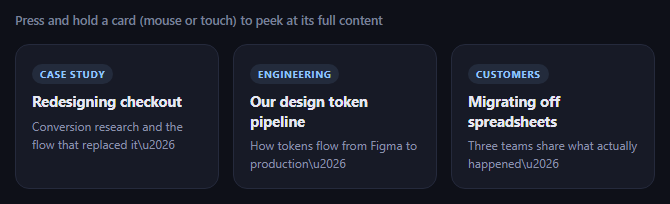
Touchscreens have no hover state, so a tooltip that only appears on :hover is invisible on mobile. This snippet is iOS's "Peek" pattern rebuilt in plain JavaScript: pressing and holding a card past a real time threshold, without dragging, pops up a preview of its expanded content near where you pressed — release and it disappears. It uses genuine pointerdown timing and movement tracking, not a CSS :active state or a fixed-delay animation.
A timer that can be cancelled
pointerdown starts a setTimeout for PRESS_MS (500ms) and immediately marks the card as .pressing for visual feedback. If the pointer lifts (pointerup) or leaves before that timer fires, clearPress() cancels it — so a normal tap, which lifts in well under 500ms, never triggers a peek at all. Only a press held continuously past the threshold ever calls showPeek().
Movement tolerance distinguishes a hold from a scroll
A long press has to reject drags and scroll gestures too, not just quick taps. onPressMove computes the distance from the press's starting point with Math.hypot, and any movement past MOVE_TOLERANCE (10px) cancels the pending timer and hides an already-shown peek — so starting to scroll the page, or dragging past the card, correctly falls through to normal scrolling instead of triggering (or getting stuck showing) a preview.
Positioned near the press point, with edge awareness
positionPeek clamps the peek horizontally so it never overflows the viewport's left or right edge, and checks whether there's enough room above the press point (top < 140) to flip the peek below it instead — the same edge-awareness a well-built context menu needs, applied to a preview bubble instead of a menu.
Release dismisses immediately
pointerup and pointercancel both call onPressEnd, which clears any pending timer and hides the peek if it's showing — there's no separate "tap elsewhere to dismiss" step, since a peek is meant to be a momentary preview tied entirely to the press, exactly like iOS's own Peek gesture.
Customizing it
Tune PRESS_MS and MOVE_TOLERANCE, add a "Pop" step where a second press-through commits to full navigation (iOS's Peek-and-Pop), or swap the plain text preview for rendered HTML. Pair it with long-press confirm with radial fill for a different real hold-timing mechanic, or image magnifier for a hover-based preview on desktop.
Step by step
How to Use
- 1Paste HTML, CSS, and JSA grid of cards renders with a press-and-hold hint.
- 2Press and hold a cardNothing happens for the first 500ms besides a subtle press state.
- 3Keep holding past 500msA preview peek appears near where you pressed.
- 4ReleaseThe peek disappears immediately.
- 5Drag or scroll insteadMovement past a small tolerance cancels the peek entirely.
- 6Tune the feelChange PRESS_MS and MOVE_TOLERANCE.
Real-world uses
Common Use Cases
setTimeout for a true hold threshold.Math.hypot distinguishing a deliberate hold from a drag or scroll gesture.:hover tooltips are simply invisible on phones.Got questions?
Frequently Asked Questions
pointerdown starts a setTimeout for a fixed duration (500ms by default). A normal tap releases well before that timer fires, and pointerup immediately cancels the pending timer via clearTimeout, so the preview never appears. Only a press held continuously past the full duration lets the timer run to completion and call showPeek() — a quick tap and a long press are structurally different outcomes of the same timer, not two separate detection paths.
Every pointermove event while a press is active computes the straight-line distance from the press's starting coordinates using Math.hypot. If that distance exceeds MOVE_TOLERANCE (10px), the pending timer is cancelled and any already-shown peek is hidden immediately — so starting to scroll the page, or dragging away from the card, correctly cancels the gesture instead of accidentally showing (or leaving stuck) a preview.
positionPeek() centers the peek horizontally on the press coordinate, then clamps that position so the peek's fixed width never overflows the viewport's left or right edge. It also checks whether there's enough vertical room above the press point; if not, it flips the peek to appear below the press point instead, the same edge-awareness pattern used in a well-built context menu.
On many touch browsers, holding a finger in place for roughly half a second also triggers the operating system's own long-press callout menu (e.g. "Copy", "Share") via the contextmenu event, which would visually collide with this snippet's own custom peek. Calling e.preventDefault() on contextmenu suppresses that native menu so only the custom preview appears.
Keep the timer id and the press-start coordinates in refs (not state, since they update on every pointermove without needing a re-render), and keep only the shown boolean and preview content in state so React re-renders the peek's visibility and text. Attach the pointer handlers per card via refs or event delegation, and clear the timer in a cleanup function on unmount.