

Resizable, Draggable Floating Modal Window — Real Desktop-Style Window Behavior
Resizable, Draggable Floating Modal Window · Modals · Plain HTML, CSS & JS · Live preview
Copy & paste
Source Code
<div class="demo">
  <button class="open-btn" id="openWinBtn">Open floating window</button>

  <div class="win-overlay" id="winOverlay">
    <div class="float-win" id="floatWin" role="dialog" aria-modal="false" aria-labelledby="winTitle" style="width: 340px; height: 240px; top: 60px; left: 60px;">
      <div class="win-titlebar" id="winTitlebar">
        <span id="winTitle">Notes.txt</span>
        <button class="win-close" id="winClose" aria-label="Close window">×</button>
      </div>
      <div class="win-body">
        <p>Drag this window by its title bar. Drag any edge or corner to resize it — the window respects a minimum width and height so it can never be shrunk into nothing.</p>
        <textarea class="win-textarea" placeholder="Type here..."></textarea>
      </div>
      <div class="win-resize-handle win-resize-e" data-dir="e"></div>
      <div class="win-resize-handle win-resize-s" data-dir="s"></div>
      <div class="win-resize-handle win-resize-se" data-dir="se"></div>
      <div class="win-resize-handle win-resize-w" data-dir="w"></div>
      <div class="win-resize-handle win-resize-n" data-dir="n"></div>
    </div>
  </div>
</div>
* { box-sizing: border-box; margin: 0; padding: 0; }
body { font-family: system-ui, sans-serif; background: #f8fafc; display: flex; align-items: center; justify-content: center; min-height: 100vh; padding: 24px; }
.demo { position: relative; }
.open-btn { padding: 10px 20px; border: none; border-radius: 10px; background: #4f46e5; color: #fff; font-size: 13.5px; font-weight: 700; cursor: pointer; font-family: inherit; }
.open-btn:hover { background: #4338ca; }
.win-overlay { position: fixed; inset: 0; display: none; z-index: 50; }
.win-overlay.open { display: block; }
.float-win { position: absolute; min-width: 260px; min-height: 180px; background: #fff; border-radius: 12px; box-shadow: 0 30px 70px rgba(15,23,42,0.35); display: flex; flex-direction: column; overflow: hidden; border: 1px solid #e2e8f0; }
.win-titlebar { display: flex; align-items: center; justify-content: space-between; padding: 10px 12px; background: #f1f5f9; border-bottom: 1px solid #e2e8f0; cursor: move; font-size: 12.5px; font-weight: 700; color: #334155; user-select: none; }
.win-close { border: none; background: transparent; font-size: 16px; color: #94a3b8; cursor: pointer; width: 22px; height: 22px; border-radius: 6px; line-height: 1; }
.win-close:hover { background: #fee2e2; color: #b91c1c; }
.win-body { flex: 1; padding: 14px; display: flex; flex-direction: column; gap: 10px; overflow: auto; }
.win-body p { font-size: 12px; color: #64748b; line-height: 1.6; }
.win-textarea { flex: 1; resize: none; border: 1.5px solid #e2e8f0; border-radius: 8px; padding: 10px; font-size: 12.5px; font-family: inherit; min-height: 60px; }
.win-textarea:focus-visible { outline: none; border-color: #6366f1; }
.win-resize-handle { position: absolute; }
.win-resize-e { top: 6px; bottom: 6px; right: -3px; width: 6px; cursor: ew-resize; }
.win-resize-w { top: 6px; bottom: 6px; left: -3px; width: 6px; cursor: ew-resize; }
.win-resize-n { left: 6px; right: 6px; top: -3px; height: 6px; cursor: ns-resize; }
.win-resize-s { left: 6px; right: 6px; bottom: -3px; height: 6px; cursor: ns-resize; }
.win-resize-se { right: -3px; bottom: -3px; width: 14px; height: 14px; cursor: nwse-resize; }const openBtn = document.getElementById('openWinBtn');
const overlay = document.getElementById('winOverlay');
const win = document.getElementById('floatWin');
const titlebar = document.getElementById('winTitlebar');
const closeBtn = document.getElementById('winClose');
const MIN_W = 260;
const MIN_H = 180;
openBtn.addEventListener('click', () => { overlay.classList.add('open'); });
closeBtn.addEventListener('click', () => { overlay.classList.remove('open'); });
// --- Dragging by the title bar ---
let dragState = null;
titlebar.addEventListener('pointerdown', (e) => {
if (e.target === closeBtn) return;
const rect = win.getBoundingClientRect();
dragState = { startX: e.clientX, startY: e.clientY, startLeft: rect.left, startTop: rect.top };
titlebar.setPointerCapture(e.pointerId);
});
titlebar.addEventListener('pointermove', (e) => {
if (!dragState) return;
const dx = e.clientX - dragState.startX;
const dy = e.clientY - dragState.startY;
win.style.left = dragState.startLeft + dx + 'px';
win.style.top = dragState.startTop + dy + 'px';
});
titlebar.addEventListener('pointerup', () => { dragState = null; });
titlebar.addEventListener('pointercancel', () => { dragState = null; });
// --- Resizing from any edge or corner ---
// Every handle shares one resize routine, parameterized only by which edges
// ("directions") it affects. A corner handle like "se" simply combines the
// logic of its two edge handles (e and s) rather than needing separate code.
let resizeState = null;
document.querySelectorAll('.win-resize-handle').forEach((handle) => {
handle.addEventListener('pointerdown', (e) => {
e.stopPropagation();
const rect = win.getBoundingClientRect();
resizeState = {
dir: handle.dataset.dir,
startX: e.clientX,
startY: e.clientY,
startW: rect.width,
startH: rect.height,
startLeft: rect.left,
startTop: rect.top,
};
handle.setPointerCapture(e.pointerId);
});
handle.addEventListener('pointermove', (e) => {
if (!resizeState) return;
const dx = e.clientX - resizeState.startX;
const dy = e.clientY - resizeState.startY;
const { dir } = resizeState;
if (dir.includes('e')) {
win.style.width = Math.max(MIN_W, resizeState.startW + dx) + 'px';
}
if (dir.includes('s')) {
win.style.height = Math.max(MIN_H, resizeState.startH + dy) + 'px';
}
if (dir.includes('w')) {
// Resizing from the west edge moves the left position too — the
// window's right edge must stay fixed while its left edge tracks the
// pointer, so both width and left are derived from the same delta,
// clamped together so the window can't invert past its minimum width.
const newWidth = Math.max(MIN_W, resizeState.startW - dx);
win.style.width = newWidth + 'px';
win.style.left = resizeState.startLeft + (resizeState.startW - newWidth) + 'px';
}
if (dir.includes('n')) {
const newHeight = Math.max(MIN_H, resizeState.startH - dy);
win.style.height = newHeight + 'px';
win.style.top = resizeState.startTop + (resizeState.startH - newHeight) + 'px';
}
});
handle.addEventListener('pointerup', () => { resizeState = null; });
handle.addEventListener('pointercancel', () => { resizeState = null; });
});Extend with AI
Take This Snippet Further With AI
The AI prompt for this one is for Patreon supporters ($3 a month), along with a site with no ads. Supporters enter the passcode once and it is remembered in this browser.
What's included
Features
About this UI Snippet
Draggable, Resizable Windows — Building Real Desktop-Style Interaction on the Web
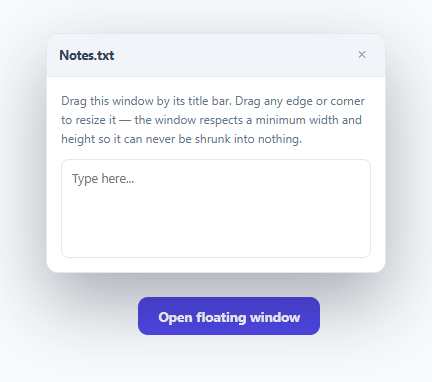
Most web modals are fixed in place — centered, non-movable, non-resizable. Some tools genuinely need more: a floating panel a user can drag out of the way and resize like a real desktop window, useful for things like a notes panel, a live preview, or a debugging console that shouldn't block the content behind it. This snippet implements both drag-to-move and resize-from-any-edge using the Pointer Events API and correct edge-anchoring math.
Pointer Events with setPointerCapture, not mousemove on document
Both the drag and resize handlers call setPointerCapture(e.pointerId) on pointerdown, which routes all subsequent pointer events (pointermove, pointerup) to that same element even if the pointer moves outside its bounds mid-drag — a real problem with a small resize handle, since a fast mouse movement can easily outrun a 6px-wide edge strip. Without capture, moving the pointer just past the handle's edge during a fast drag would silently stop the resize; with it, the resize (or drag) keeps tracking correctly for the entire gesture no matter how far the pointer strays from the original handle.
Resizing computes new dimensions from the drag's *start* state, not incrementally
Every resize calculation is resizeState.startW + dx (or minus, depending on direction) — the delta is always measured against the position and size captured at the moment the drag *began*, never accumulated frame-by-frame from the previous frame's already-updated size. This avoids a subtle class of drift bug where small rounding or event-timing inconsistencies could compound over a long drag; because every frame recomputes from the same fixed starting snapshot, the result is always exactly consistent with how far the pointer has actually moved in total.
Why resizing from the west or north edge also moves the window's position
Dragging the *right* edge only needs to change width — the window's top-left corner stays put. But dragging the *left* edge is different: for the window to visually stay anchored at its unchanged right edge while its left edge tracks the pointer, both the width and the left position must update together, derived from the same delta. The code computes the new width first (clamped to the minimum), then sets left based on exactly how much that clamped width actually differs from the start width — not based on the raw, unclamped pointer delta — which is what keeps the window's right edge perfectly stationary even once the minimum-width clamp kicks in.
One shared resize routine for every handle
Rather than writing separate logic for each of the five resize handles (north, south, east, west, and the southeast corner), every handle shares one pointermove handler that checks which characters are present in its data-dir string ('e', 's', 'se', etc.) and applies only the relevant edge logic. The southeast corner handle needs no special-case code at all — it simply has both 'e' and 's' in its direction string, so both the east-edge and south-edge branches of the shared logic run for it automatically.
Step by step
How to Use
- 1Click "Open floating window"A draggable, resizable panel appears over the page, positioned near the top-left of the viewport.
- 2Drag the title barMoves the entire window; the drag tracks correctly even at high pointer speed thanks to pointer capture.
- 3Drag any edge or the bottom-right cornerResizes the window from that side. Dragging the left or top edge also correctly repositions the window so its opposite edge stays fixed.
- 4Try shrinking the window past its minimum sizeWidth and height stop shrinking at MIN_W/MIN_H, and position stops adjusting accordingly, so the window can never collapse to nothing.
- 5Close and reopenClick the × in the title bar; reopening resets to the initial size and position defined in the inline style attribute.
Real-world uses
Common Use Cases
Got questions?
Frequently Asked Questions
setPointerCapture routes every subsequent pointer event to the element that captured it, even once the pointer moves outside that element's bounds — critical for a narrow resize handle, since a fast drag can easily move the cursor past a 6px-wide edge strip mid-gesture. Without capture, the resize would silently stop the instant the pointer left the handle.
For the window to look like it's being resized from the left (with its right edge staying fixed), both the width and the left offset must change together. The code derives the new left position from exactly how much the clamped new width differs from the starting width, keeping the right edge perfectly stationary even when the minimum-width clamp is active.
Deriving every frame's size from the same original starting width/height and the total pointer delta since the drag began avoids compounding rounding or timing drift that an incremental frame-over-frame approach could introduce over a long drag gesture.
MIN_W and MIN_H constants are applied via Math.max() on every width/height calculation, so the window can never shrink below 260px wide or 180px tall regardless of how far the pointer is dragged past that limit.
Yes — Pointer Events unify mouse, touch, and pen input under one API, so the same drag and resize handlers work identically for a finger drag on a touchscreen as they do for a mouse.
Store win.style.top/left/width/height to localStorage on pointerup for both the drag and resize handlers, and read those values back to set the window's initial inline style the next time it opens.