


Bulk Delete Confirm Dialog with Undo Countdown — Two-Stage Destructive Action Pattern
Bulk Action Confirm Dialog — Undo Countdown · Modals · Plain HTML, CSS & JS · Live preview
Copy & paste
Source Code
<div class="demo">
  <button class="trigger" id="openBtn">Delete 7 selected items</button>

  <div class="overlay" id="overlay">
    <div class="dialog" role="alertdialog" aria-modal="true" aria-labelledby="dTitle" aria-describedby="dDesc">
      <div class="dialog-icon">
        <svg width="20" height="20" viewBox="0 0 24 24" fill="none" stroke="currentColor" stroke-width="2.2" stroke-linecap="round" stroke-linejoin="round"><path d="M3 6h18M8 6V4a2 2 0 0 1 2-2h4a2 2 0 0 1 2 2v2m3 0-1 14a2 2 0 0 1-2 2H7a2 2 0 0 1-2-2L4 6"/></svg>
      </div>
      <h2 id="dTitle">Delete 7 items?</h2>
      <p id="dDesc">This will permanently remove the selected items from your workspace. You can undo this within the next few seconds.</p>

      <div class="dialog-actions">
        <button class="btn ghost" id="cancelBtn">Cancel</button>
        <button class="btn danger" id="confirmBtn">Delete items</button>
      </div>
    </div>

    <div class="undo-toast" id="undoToast" role="status" aria-live="polite">
      <div class="undo-text">
        <strong>7 items deleted</strong>
        <span>Undo available for <span id="undoSecs">5</span>s</span>
      </div>
      <button class="undo-btn" id="undoBtn">Undo</button>
      <div class="undo-bar"><div class="undo-bar-fill" id="undoFill"></div></div>
    </div>
  </div>
</div>
* { box-sizing: border-box; margin: 0; padding: 0; }
body { font-family: system-ui, sans-serif; background: #f8fafc; display: flex; align-items: center; justify-content: center; min-height: 100vh; padding: 24px; }
.trigger { background: #fee2e2; color: #b91c1c; border: 1px solid #fecaca; padding: 10px 18px; border-radius: 10px; font-size: 13.5px; font-weight: 700; cursor: pointer; font-family: inherit; }
.trigger:hover { background: #fecaca; }
.overlay { position: fixed; inset: 0; background: rgba(15,23,42,0.5); display: none; align-items: center; justify-content: center; flex-direction: column; z-index: 50; }
.overlay.open { display: flex; }
.dialog { width: 340px; max-width: calc(100vw - 40px); background: #fff; border-radius: 18px; padding: 26px 24px 22px; text-align: center; box-shadow: 0 24px 60px rgba(15,23,42,0.3); animation: pop 0.18s ease; }
@keyframes pop { from { opacity: 0; transform: scale(0.94); } to { opacity: 1; transform: scale(1); } }
.dialog-icon { width: 44px; height: 44px; margin: 0 auto 14px; border-radius: 50%; background: #fee2e2; color: #dc2626; display: flex; align-items: center; justify-content: center; }
.dialog h2 { font-size: 16px; font-weight: 800; color: #111827; margin-bottom: 8px; }
.dialog p { font-size: 12.5px; color: #64748b; line-height: 1.6; margin-bottom: 20px; }
.dialog-actions { display: flex; gap: 10px; }
.btn { flex: 1; border: none; padding: 10px; border-radius: 10px; font-size: 13px; font-weight: 700; cursor: pointer; font-family: inherit; }
.btn.ghost { background: #f1f5f9; color: #334155; }
.btn.ghost:hover { background: #e2e8f0; }
.btn.danger { background: #dc2626; color: #fff; }
.btn.danger:hover { background: #b91c1c; }
.undo-toast { position: fixed; bottom: 26px; left: 50%; transform: translateX(-50%) translateY(0); width: 300px; max-width: calc(100vw - 40px); background: #0f172a; color: #fff; border-radius: 14px; padding: 14px 16px 12px; display: none; flex-direction: column; gap: 10px; box-shadow: 0 16px 36px rgba(15,23,42,0.35); overflow: hidden; }
.undo-toast.show { display: flex; animation: slideUp 0.22s ease; }
@keyframes slideUp { from { opacity: 0; transform: translateX(-50%) translateY(12px); } to { opacity: 1; transform: translateX(-50%) translateY(0); } }
.undo-text { display: flex; align-items: center; justify-content: space-between; gap: 12px; }
.undo-text strong { font-size: 13px; }
.undo-text span { font-size: 11.5px; color: #94a3b8; white-space: nowrap; }
.undo-btn { align-self: flex-start; background: #6366f1; color: #fff; border: none; padding: 6px 14px; border-radius: 8px; font-size: 12px; font-weight: 700; cursor: pointer; font-family: inherit; }
.undo-btn:hover { background: #4f46e5; }
.undo-bar { height: 3px; background: rgba(255,255,255,0.12); border-radius: 3px; margin-top: 2px; }
.undo-bar-fill { height: 100%; width: 100%; background: #6366f1; border-radius: 3px; transform-origin: left; }
.undo-bar-fill.count { animation: shrink 5s linear forwards; }
@keyframes shrink { to { transform: scaleX(0); } }const openBtn = document.getElementById('openBtn');
const cancelBtn = document.getElementById('cancelBtn');
const confirmBtn = document.getElementById('confirmBtn');
const undoBtn = document.getElementById('undoBtn');
const overlay = document.getElementById('overlay');
const dialog = overlay.querySelector('.dialog');
const undoToast = document.getElementById('undoToast');
const undoFill = document.getElementById('undoFill');
const undoSecs = document.getElementById('undoSecs');
let timer = null;
let secondsLeft = 5;
function openDialog() {
overlay.classList.add('open');
dialog.style.display = 'block';
undoToast.classList.remove('show');
confirmBtn.focus();
}
function closeOverlay() {
overlay.classList.remove('open');
}
function startUndoWindow() {
dialog.style.display = 'none';
undoToast.classList.add('show');
overlay.classList.add('open');
secondsLeft = 5;
undoSecs.textContent = secondsLeft;
undoFill.classList.remove('count');
void undoFill.offsetWidth; // restart CSS animation
undoFill.classList.add('count');
clearInterval(timer);
timer = setInterval(() => {
secondsLeft -= 1;
undoSecs.textContent = Math.max(secondsLeft, 0);
if (secondsLeft <= 0) {
clearInterval(timer);
finalizeDelete();
}
}, 1000);
}
function finalizeDelete() {
undoToast.classList.remove('show');
closeOverlay();
}
function performUndo() {
clearInterval(timer);
undoToast.classList.remove('show');
closeOverlay();
}
openBtn.addEventListener('click', openDialog);
cancelBtn.addEventListener('click', closeOverlay);
confirmBtn.addEventListener('click', startUndoWindow);
undoBtn.addEventListener('click', performUndo);
overlay.addEventListener('click', (e) => {
if (e.target === overlay) closeOverlay();
});
document.addEventListener('keydown', (e) => {
if (e.key === 'Escape' && overlay.classList.contains('open')) closeOverlay();
});Extend with AI
Take This Snippet Further With AI
The AI prompt for this one is for Patreon supporters ($3 a month), along with a site with no ads. Supporters enter the passcode once and it is remembered in this browser.
What's included
Features
About this UI Snippet
Bulk Action Confirm Dialog with an Undo Countdown — A Two-Stage Safety Net
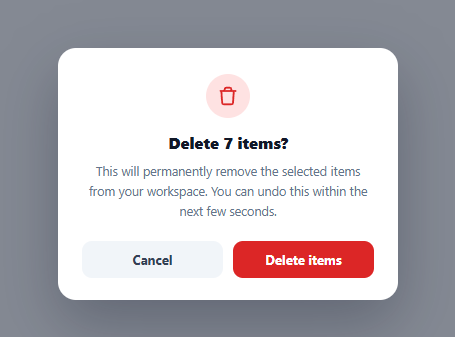
Destructive bulk actions usually get one safety net: a confirm dialog asking "are you sure?" This snippet adds a second one on top of it — after the user confirms, the dialog doesn't immediately finalize the action. Instead it hands off to an undo toast with a visible countdown, so a user who clicks "Delete" reflexively (or realizes a mistake a second later) still has a real window to reverse it before anything is truly gone.
Why a confirm dialog alone isn't always enough
A modal confirm step protects against truly accidental clicks, but it does nothing for the very common case of a user confidently clicking "Delete" and only realizing their mistake — wrong selection, wrong button — a moment *after* confirming. An undo window catches exactly that second category of error, which a yes/no dialog structurally cannot.
The countdown bar is the same duration as the JS timer, driven by CSS
The shrinking bar underneath the undo toast uses a CSS @keyframes shrink animation with animation: shrink 5s linear forwards, set to the identical five-second duration as the setInterval countdown running in JavaScript. Using a CSS animation for the visual bar (rather than updating its width from JS on every tick) keeps the fill perfectly smooth at 60fps regardless of how often the interval callback fires, while the JS timer independently handles the actual "seconds left" number and the moment the action finalizes.
Restarting an already-completed CSS animation
Because the undo window can be triggered more than once in a session, the code removes the .count class, forces a reflow with void undoFill.offsetWidth, and re-adds .count — the reflow-forcing line is a well-known trick to make the browser "forget" that the animation already finished, so restarting the same class re-triggers it from the beginning instead of doing nothing (which is what re-adding an already-present class would otherwise do).
Three clean exits, one shared cleanup path
The undo window can end three ways: the countdown reaches zero and finalizeDelete() runs, the user clicks "Undo" and performUndo() runs, or — in a production version — the user navigates away entirely. Both explicit paths call clearInterval(timer) before doing anything else, which matters because without it, a stale interval from a previous bulk-delete could keep ticking in the background and fire its callback against a toast that's no longer showing.
Where a modal-based undo beats a toast-only pattern
A plain undo *snackbar* (with no preceding confirm step) is fine for low-stakes, easily-reversible actions. For a genuinely destructive bulk operation, pairing an explicit confirm dialog with a visible, countdown-timed undo window gives a user two distinct moments to reconsider — the deliberate "are you sure" click, and the brief grace period immediately after — which is a meaningfully stronger safety pattern for anything a user would be upset to lose permanently.
Step by step
How to Use
- 1Update the trigger button and item countChange "Delete 7 selected items" and the matching numbers inside the dialog to reflect your real selection count.
- 2Adjust the undo window lengthChange both the 5s in the CSS @keyframes shrink animation duration and the secondsLeft = 5 starting value in JS together — they must stay in sync.
- 3Wire finalizeDelete() to your real delete callThis is where the actual API request or state mutation should fire once the countdown reaches zero with no undo.
- 4Wire performUndo() to restore stateIf your app optimistically removed the items from view already, this is where you'd restore them instead of just closing the toast.
- 5Test Escape and click-outside behaviorConfirm both close the confirm dialog appropriately before an action has been confirmed.
Real-world uses
Common Use Cases
Got questions?
Frequently Asked Questions
For genuinely destructive, hard-to-reverse actions, pairing both steps gives two separate moments for a user to catch a mistake — the deliberate confirm click, and the grace period right after. A toast-only pattern is fine for lower-stakes actions, but a confirm step first is a stronger safety net for anything a user would be upset to lose.
There's a small race condition inherent to any timer-based UI; in this implementation performUndo() calls clearInterval(timer) immediately, so as long as the click handler fires before the interval's own callback for that tick, the undo wins. For a production system, guard the actual delete call server-side against a request that arrives after undo was already processed.
A CSS @keyframes animation runs on the compositor thread and updates every frame (60fps), giving a perfectly smooth shrinking bar, whereas updating width from a 1-second JS interval would produce a visibly stepped, jumpy bar.
Update both the animation-duration in the CSS @keyframes shrink rule and the secondsLeft starting value in JavaScript to the same new number — they are two independent timers that must be kept manually in sync.
Yes — it has role="status" and aria-live="polite", so its appearance and content are announced automatically without moving keyboard focus away from wherever the user currently is.
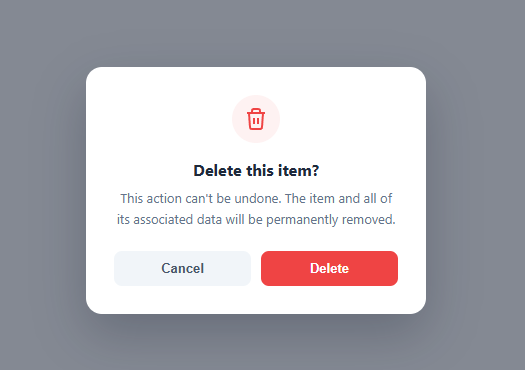
Yes — the pattern is identical for one item or many; just update the copy ("Delete this item?" instead of "Delete 7 items?") and the trigger logic that determines the count.