


Grab-to-Pause Auto-Scroll Ticker — HTML CSS JS Snippet
Grab-to-Pause Auto-Scroll Ticker · Carousels · Plain HTML, CSS & JS · Live preview
What's included
Features
About this UI Snippet
Grab-to-Pause Auto-Scroll Ticker — One Position Variable, Two Different Writers
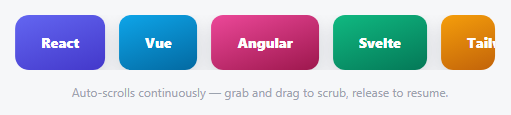
A typical infinite ticker either auto-scrolls *or* is draggable — rarely both at once, seamlessly. This one keeps a single pos variable that two completely different code paths are allowed to write to: a requestAnimationFrame loop advances it automatically by SPEED pixels per millisecond when nobody's touching it, and a pointer/touch drag handler overwrites it directly with the cursor's position when someone is. Because both paths write to the *exact same variable*, grabbing the ticker mid-scroll and releasing it resumes autoplay from precisely wherever the drag left off — there's no separate "resume point" to calculate.
The loop trick: duplicate once, wrap the position
To scroll infinitely from a *finite* set of chips, every chip is cloned once and appended after the originals — so the track visually contains two identical copies back to back. apply() then wraps pos into the range [0, loopWidth) with ((pos % loopWidth) + loopWidth) % loopWidth (the double-modulo handles negative pos correctly, which plain % in JavaScript doesn't). The instant pos would scroll past one full copy's width, the wrap makes it jump back to the equivalent position in the first copy — and because the second copy is pixel-identical to the first, that jump is completely invisible.
Autoplay pauses itself simply by not advancing
There's no explicit "pause" state variable — the tick() loop just checks if (!dragging) before adding to pos at all. While dragging is true, the rAF loop keeps running (so it's instantly ready to resume) but skips the auto-advance line entirely, letting the drag handler be the only thing touching pos for that whole gesture.
Step by step
How to Use
- 1Paste HTML, CSS, and JSA row of technology chips scrolls continuously and smoothly to the left, looping seamlessly forever.
- 2Click and hold anywhere on the tickerAuto-scrolling stops instantly and the ticker follows your cursor precisely.
- 3Drag left or rightScrub through the chips manually in either direction, well beyond the normal auto-scroll range.
- 4ReleaseAuto-scrolling resumes immediately from exactly wherever you released it — no jump or reset.
- 5Add a seventh chipAdd one more .ast-chip element — the clone-and-loop logic picks it up automatically on the next page load.
Real-world uses
Common Use Cases
Got questions?
Frequently Asked Questions
Change the SPEED constant (pixels per millisecond) — a larger number scrolls faster, a smaller one slower. Since it's time-based rather than frame-based, the speed stays consistent regardless of the display's refresh rate.
loopWidth is measured directly from the real rendered widths of the original chips (plus their gaps) on every measure() call — it doesn't assume equal widths, so any mix of chip sizes still wraps at exactly the right pixel offset.
Resetting position abruptly (position = 0) would produce a visible jump the instant the reset happens. Having a second, identical copy immediately following the first means the wrap-around lands on pixel-identical content, so the "reset" is invisible.
Yes — negate the SPEED constant, or flip the sign in the tick() function's pos += line, to reverse the automatic scroll direction; dragging is unaffected either way since it directly follows the cursor.
Continuous motion can be distracting or disorienting for some users — add a prefers-reduced-motion check that skips starting the requestAnimationFrame loop (leaving the ticker static but still draggable) for users who've requested reduced motion.
Build with AI
Build, Understand, Optimize, and Extend It With AI
Paste this snippet's HTML, CSS, and JS into an AI coding assistant like Claude and ask it to explain exactly how cloning the chip set once and wrapping the position with a double-modulo formula produces a seamless infinite loop from a finite number of elements, and why a plain single modulo (%) wouldn't correctly handle a negative drag position in JavaScript. It's also worth asking the assistant to add a prefers-reduced-motion check that keeps the ticker static (but still draggable) for users who've requested reduced motion, or to add momentum so releasing after a fast drag continues scrolling briefly before settling back into the steady autoplay speed.
Prompt to recreate it
Copy this into your AI assistant of choice to build the effect from scratch, or as a jumping-off point for your own variant:
Build a continuously auto-scrolling, infinitely looping ticker of chip elements in plain HTML, CSS, and vanilla JavaScript that can be grabbed and dragged at any moment to take manual control, resuming automatic scrolling from the exact released position — no library.

Requirements:
- A horizontal row of chip elements, where the full set of original chips is duplicated once (cloned and appended immediately after the originals) so the track contains two identical, back-to-back copies of the content — this is what enables a seamless infinite loop from a finite number of elements.
- A single shared numeric position variable representing horizontal scroll offset, which is wrapped into the range from zero up to (but not including) one full copy's total width using a correctly negative-safe modulo calculation, so the position can grow or shrink without bound while the visually applied offset always stays within one seamless loop cycle.
- A requestAnimationFrame loop that, using real elapsed time between frames (not a fixed per-frame increment), continuously advances the position variable at a constant pixel-per-millisecond rate whenever the ticker is not currently being dragged, and applies the wrapped position as a CSS transform on every frame.
- Pointer-based (with touch fallback) drag handling: on pointerdown, record the starting cursor position and the position variable's current value; while dragging, overwrite the position variable directly based on the cursor's movement delta from that starting point, completely overriding the automatic advancement for the duration of the drag; on release, simply stop overriding it, allowing the requestAnimationFrame loop to resume automatically advancing from whatever value the position variable was left at.
- The total width of one copy of the content must be measured from the real rendered widths of the original (non-cloned) elements, recalculated on window resize, not assumed or hardcoded.
Want to tighten it up first? Run this prompt through the AI Prompt Studio to score it across 8 quality dimensions, catch anti-patterns, and tune the wording for Claude, ChatGPT, or Gemini before you paste it in.
Source Code
<div class="ast-wrap" id="astWrap">
  <div class="ast-track" id="astTrack">
    <div class="ast-chip" style="background:linear-gradient(160deg,#6366f1,#4338ca)">React</div>
    <div class="ast-chip" style="background:linear-gradient(160deg,#0ea5e9,#0369a1)">Vue</div>
    <div class="ast-chip" style="background:linear-gradient(160deg,#ec4899,#9d174d)">Angular</div>
    <div class="ast-chip" style="background:linear-gradient(160deg,#10b981,#047857)">Svelte</div>
    <div class="ast-chip" style="background:linear-gradient(160deg,#f59e0b,#b45309)">Tailwind</div>
    <div class="ast-chip" style="background:linear-gradient(160deg,#8b5cf6,#5b21b6)">GSAP</div>
  </div>
  <p class="ast-hint">Auto-scrolls continuously — grab and drag to scrub, release to resume.</p>
</div>*{box-sizing:border-box;margin:0;padding:0}
body{font-family:system-ui,-apple-system,sans-serif;background:#f6f7f9;min-height:100vh;display:flex;align-items:center;justify-content:center;padding:24px}
.ast-wrap{width:100%;max-width:480px}
.ast-track{display:flex;gap:14px;overflow:hidden;border-radius:14px;cursor:grab;touch-action:none}
.ast-track.ast-grabbing{cursor:grabbing}
.ast-chip{flex:0 0 auto;padding:18px 26px;border-radius:12px;color:#fff;font-weight:800;font-size:14px;box-shadow:0 8px 18px rgba(15,23,42,.14);user-select:none}
.ast-hint{text-align:center;color:#9ca3af;font-size:12px;margin-top:14px}var track = document.getElementById('astTrack');
var wrap = document.getElementById('astWrap');
var SPEED = 0.6; // px per ms — continuous autoplay rate
var pos = 0;
var dragging = false;
var lastFrame = null;
var rafId = null;
var loopWidth = 0;
// Duplicate the chip set once so the track can scroll a full "copy width"
// and then jump back by exactly that width with no visible seam, producing
// an infinite loop from a finite set of elements.
var originalChips = Array.prototype.slice.call(track.children);
originalChips.forEach(function (chip) { track.appendChild(chip.cloneNode(true)); });
function measure() {
loopWidth = 0;
for (var i = 0; i < originalChips.length; i++) {
loopWidth += track.children[i].getBoundingClientRect().width + 14; // + gap
}
}
function apply() {
// Wrap pos into [0, loopWidth) so it can grow or shrink without bound while
// the visual position stays within one seamless loop cycle.
var wrapped = ((pos % loopWidth) + loopWidth) % loopWidth;
track.style.transform = 'translateX(' + (-wrapped) + 'px)';
}
function tick(now) {
if (!dragging) {
if (lastFrame !== null) pos += SPEED * (now - lastFrame);
lastFrame = now;
apply();
} else {
lastFrame = now;
}
rafId = requestAnimationFrame(tick);
}
var startX = 0, startPos = 0;
function pointerDown(e) {
dragging = true;
track.classList.add('ast-grabbing');
startX = e.touches ? e.touches[0].clientX : e.clientX;
startPos = pos;
}
function pointerMove(e) {
if (!dragging) return;
var x = e.touches ? e.touches[0].clientX : e.clientX;
pos = startPos - (x - startX);
apply();
}
function pointerUp() {
dragging = false;
track.classList.remove('ast-grabbing');
}
track.addEventListener('pointerdown', pointerDown);
window.addEventListener('pointermove', pointerMove);
window.addEventListener('pointerup', pointerUp);
track.addEventListener('touchstart', pointerDown, { passive: true });
window.addEventListener('touchmove', pointerMove, { passive: true });
window.addEventListener('touchend', pointerUp);
window.addEventListener('resize', measure);
measure();
rafId = requestAnimationFrame(tick);