

Autoplay Progress-Bar Carousel — HTML CSS JS Snippet
Autoplay Progress-Bar Carousel · Carousels · Plain HTML, CSS & JS · Live preview
What's included
Features
About this UI Snippet
Autoplay Progress-Bar Carousel — Pause-in-Place, Not Pause-and-Restart
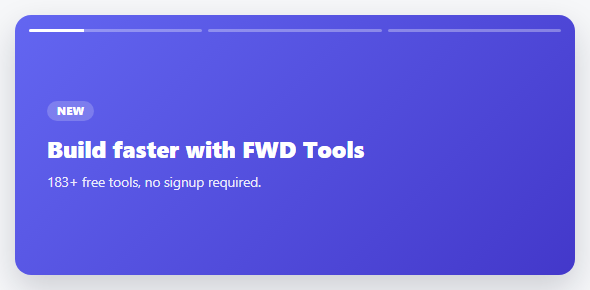
A plain autoplaying carousel is annoying to read because it never waits for you. This one borrows the segmented top progress bars from Instagram/YouTube Shorts — so a visitor can *see* how much time is left on the current slide — and, more importantly, it pauses exactly where the fill stopped on hover and resumes from that same point on mouse-out, rather than restarting the slide's timer from zero.
Reading the fill back out of the DOM
The hard part of "resume from where it paused" is that the fill's width was mid-transition when the mouse entered — there's no JS variable holding "73% filled." The fix: on mouseenter, read the *live computed width* of the fill (getComputedStyle(activeFill).width) at that exact instant, immediately cancel the transition, and lock the fill at that literal pixel value. On mouseleave, the same computed width is compared against the bar's total width to work out what fraction is left, which becomes both the remaining transition duration and the setTimeout delay for auto-advancing — so the bar and the actual advance timer never drift apart.
Why every animation start forces a reflow
Each time a bar's fill needs to (re)start filling, the code sets its width to 0%, calls void fill.offsetWidth (reading a layout property forces the browser to apply the 0% *before* anything else happens), and only then re-applies the transition and sets the target width. Skip that forced reflow and the browser can coalesce the "reset to 0" and "animate to 100%" into one no-op change, since both happened in the same JavaScript tick.
Step by step
How to Use
- 1Paste HTML, CSS, and JSA hero carousel starts autoplaying, its first progress bar filling across the top.
- 2Watch it advanceWhen a bar finishes filling, the hero crossfades to the next slide automatically.
- 3Hover over the heroThe fill freezes exactly where it is, and a "Paused" hint appears in the corner.
- 4Move the mouse awayThe fill resumes from the exact point it paused — not from zero — and advancing continues on schedule.
- 5Add a fourth slideAdd one more .apc-slide — a matching progress segment is generated automatically.
Real-world uses
Common Use Cases
Got questions?
Frequently Asked Questions
Change the DURATION constant (milliseconds). It drives both the visible fill speed and the actual auto-advance timer, so they always stay in sync regardless of the value.
That would work for a simple pause, but resuming afterward needs to know exactly how much time is left to set a matching setTimeout for the next slide — reading the live computed width and doing the remaining-time math is what keeps the visible bar and the actual advance timer in agreement.
Not out of the box — mouseenter/mouseleave don't fire reliably on touch. Add a touchstart handler that calls the same pause logic and a tap-elsewhere or timeout to resume, mirroring the desktop pattern.
Yes — add the same auto-generated dots pattern used in this library's other carousels, and have a dot click set current and call render() plus restart().
Add prefers-reduced-motion handling that disables autoplay entirely for users who've requested it, and ensure any added navigation controls (dots, arrows) are real, labeled buttons — autoplay content should always be pausable by keyboard too, not just by hover.
Build with AI
Build, Understand, Optimize, and Extend It With AI
Paste this snippet's HTML, CSS, and JS into an AI coding assistant like Claude and ask it to explain exactly how getComputedStyle is used to capture the fill's exact paused position, and why that value has to be read before the transition is cancelled rather than after. It's also worth asking the assistant to add prefers-reduced-motion support that disables autoplay for users who've requested it, or to add clickable dots/arrows alongside the existing hover-pause behavior so a visitor can also jump manually between slides.
Prompt to recreate it
Copy this into your AI assistant of choice to build the effect from scratch, or as a jumping-off point for your own variant:
Build an autoplaying hero carousel in plain HTML, CSS, and vanilla JavaScript with Stories/Shorts-style segmented progress bars across the top — no library.

Requirements:
- Several full-bleed hero slides stacked on top of each other, crossfading via an opacity transition, with only one visible (active) at a time.
- A row of thin progress bar segments above the slides, generated dynamically from the slide count — the segment for the current slide fills from empty to full over a fixed duration using a CSS width transition, segments for already-shown slides display fully filled, and upcoming ones display empty.
- When the active segment finishes filling, automatically advance to the next slide (wrapping back to the first after the last) and begin filling the new segment.
- On mouse hover over the whole carousel, the currently-filling segment must freeze at its exact current fill position — read the actual live rendered width at that moment rather than estimating or resetting to a fixed value — and the auto-advance timer must be cancelled.
- On mouse leave, the segment must resume filling smoothly from that exact frozen position (not restart from zero) toward 100%, and a new auto-advance timer must be set for only the remaining time needed to finish that fill, calculated from how much of the bar was already filled when the pause began.
- Display a small visible text indicator confirming to the user that autoplay is currently paused, shown only while hovering.
- Every time a segment needs to start (or restart) its fill animation, force a layout reflow between resetting its width to zero and applying the new transition, so the reset is guaranteed to render before the fill animation begins.
Want to tighten it up first? Run this prompt through the AI Prompt Studio to score it across 8 quality dimensions, catch anti-patterns, and tune the wording for Claude, ChatGPT, or Gemini before you paste it in.
Source Code
<div class="apc-hero" id="apcHero">
<div class="apc-bars" id="apcBars"></div>
<div class="apc-track" id="apcTrack">
<div class="apc-slide" style="background:linear-gradient(135deg,#6366f1,#4338ca)"><span class="apc-eyebrow">New</span><h1>Build faster with webdevpuneet.com</h1><p>183+ free tools, no signup required.</p></div>
<div class="apc-slide" style="background:linear-gradient(135deg,#0ea5e9,#0369a1)"><span class="apc-eyebrow">Popular</span><h1>1788+ copy-paste UI snippets</h1><p>HTML, CSS & JS, ready to export.</p></div>
<div class="apc-slide" style="background:linear-gradient(135deg,#ec4899,#9d174d)"><span class="apc-eyebrow">Free</span><h1>Learn to code, visually</h1><p>Interactive playgrounds for every language.</p></div>
</div>
<div class="apc-pause-hint" id="apcHint">Paused</div>
</div>*{box-sizing:border-box;margin:0;padding:0}
body{font-family:system-ui,-apple-system,sans-serif;background:#f6f7f9;min-height:100vh;display:flex;align-items:center;justify-content:center;padding:24px}
.apc-hero{position:relative;width:100%;max-width:560px;height:260px;border-radius:16px;overflow:hidden;box-shadow:0 14px 34px rgba(15,23,42,.18)}
.apc-bars{position:absolute;top:14px;left:14px;right:14px;display:flex;gap:6px;z-index:3}
.apc-bar{flex:1;height:3px;border-radius:3px;background:rgba(255,255,255,.32);overflow:hidden}
.apc-bar-fill{height:100%;width:0%;background:#fff}
.apc-bar.done .apc-bar-fill{width:100%}
.apc-track{position:relative;width:100%;height:100%}
.apc-slide{position:absolute;inset:0;display:flex;flex-direction:column;justify-content:center;padding:44px 32px;opacity:0;transition:opacity .5s ease}
.apc-slide.active{opacity:1;z-index:1}
.apc-eyebrow{align-self:flex-start;font-size:10.5px;font-weight:800;letter-spacing:.06em;text-transform:uppercase;color:#fff;background:rgba(255,255,255,.2);padding:3px 10px;border-radius:20px;margin-bottom:12px}
.apc-slide h1{color:#fff;font-size:23px;font-weight:800;margin-bottom:8px;max-width:340px}
.apc-slide p{color:rgba(255,255,255,.88);font-size:13.5px}
.apc-pause-hint{position:absolute;bottom:14px;right:16px;font:700 10.5px system-ui,sans-serif;color:#fff;background:rgba(0,0,0,.35);padding:4px 10px;border-radius:20px;opacity:0;transition:opacity .2s;z-index:3}
.apc-pause-hint.show{opacity:1}var slides = document.querySelectorAll('.apc-slide');
var barsWrap = document.getElementById('apcBars');
var hero = document.getElementById('apcHero');
var hint = document.getElementById('apcHint');
var DURATION = 3500;
var current = 0;
var paused = false;
var timer = null;
slides.forEach(function () {
var bar = document.createElement('div');
bar.className = 'apc-bar';
bar.innerHTML = '<div class="apc-bar-fill"></div>';
barsWrap.appendChild(bar);
});
var bars = document.querySelectorAll('.apc-bar');
function render() {
slides.forEach(function (s, i) { s.classList.toggle('active', i === current); });
bars.forEach(function (b, i) {
var fill = b.querySelector('.apc-bar-fill');
fill.style.transition = 'none';
b.classList.toggle('done', i < current);
if (i < current) { fill.style.width = '100%'; }
else if (i > current) { fill.style.width = '0%'; }
else {
fill.style.width = '0%';
void fill.offsetWidth;
if (!paused) {
fill.style.transition = 'width ' + DURATION + 'ms linear';
requestAnimationFrame(function () { fill.style.width = '100%'; });
}
}
});
}
function next() { current = (current + 1) % slides.length; render(); restart(); }
function restart() {
clearTimeout(timer);
if (paused) return;
timer = setTimeout(next, DURATION);
}
hero.addEventListener('mouseenter', function () {
paused = true;
clearTimeout(timer);
hint.classList.add('show');
var activeFill = bars[current].querySelector('.apc-bar-fill');
var computed = getComputedStyle(activeFill).width;
activeFill.style.transition = 'none';
activeFill.style.width = computed;
});
hero.addEventListener('mouseleave', function () {
paused = false;
hint.classList.remove('show');
var activeFill = bars[current].querySelector('.apc-bar-fill');
var currentWidth = parseFloat(getComputedStyle(activeFill).width);
var trackWidth = parseFloat(getComputedStyle(bars[current]).width);
var remainingMs = DURATION * (1 - currentWidth / trackWidth);
void activeFill.offsetWidth;
activeFill.style.transition = 'width ' + remainingMs + 'ms linear';
activeFill.style.width = '100%';
timer = setTimeout(next, remainingMs);
});
render();
restart();