


Embla Carousel Fade Hero Slider — Free Crossfade Banner Snippet
Embla Carousel Fade Hero Slider · Carousels · Plain HTML, CSS & JS · Live preview
What's included
Features
About this UI Snippet
Embla Carousel Fade Hero — Crossfading Slides With Honest Controls
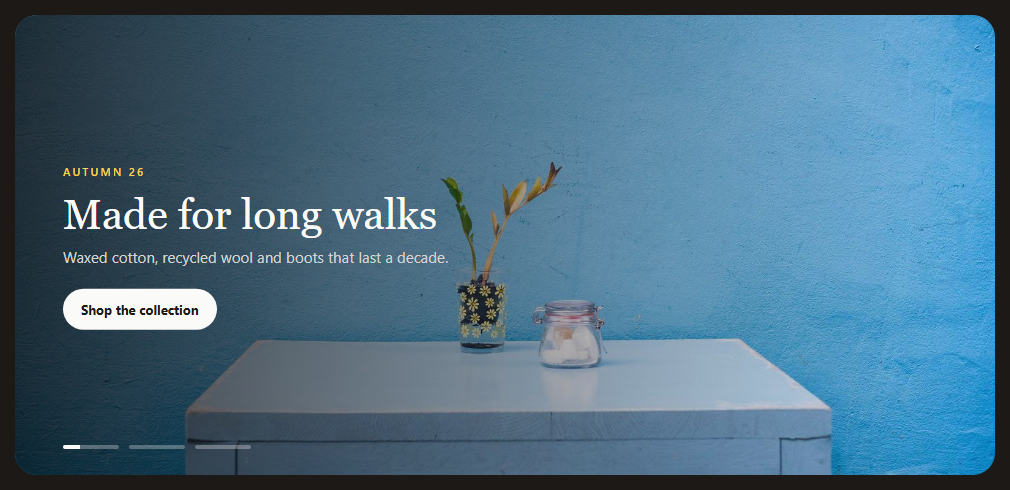
Hero banners usually crossfade rather than slide: a full-bleed image moving sideways feels busy, while a fade feels calm and editorial. Embla's official Fade plugin turns any Embla carousel into a crossfade without changing the markup.
Fade is a plugin, the structure stays
EmblaCarouselFade() is added to the plugins array next to Autoplay. The slides are still a normal flex row inside the container; the plugin positions each slide over the first and animates opacity instead of translating the container. Dragging still works: a swipe crossfades to the next slide. The duration option controls the speed of the fade.
Indicators that show time
The three line indicators double as progress bars. The active one plays a CSS scaleX animation whose length comes from a --efh-delay custom property set from the same DELAY constant used by Autoplay. Toggling aria-selected off and on (with a forced reflow in between) restarts the animation on each slide change. When autoplay stops, an is-paused class pauses the animation with animation-play-state.
Hidden slides mustn't be focusable
A fading carousel keeps every slide in the DOM, just transparent. Without care, pressing Tab would move focus to a call-to-action link on an invisible slide. On every change the snippet sets aria-hidden on inactive slides and removes their links from the tab order.
Pausing
Autoplay pauses on hover (stopOnMouseEnter), on keyboard focus, and doesn't start for users who prefer reduced motion. Legibility comes from a left-to-right gradient overlay so the copy stays readable over any photo.
Step by step
How to Use
- 1Load Embla and pluginsInclude the Embla core, Fade and Autoplay UMD builds.
- 2Paste the snippetA hero with three crossfading slides starts playing.
- 3Use the indicatorsClick a line to jump; the active line fills over the slide's duration.
- 4Hover or tab inAutoplay and the progress line pause.
- 5Change timingEdit DELAY for autoplay and duration for fade speed.
Real-world uses
Common Use Cases
efh-copy captions with your campaign art.Got questions?
Frequently Asked Questions
Load embla-carousel-fade and pass EmblaCarouselFade() in the plugins array. Keep the normal viewport, container and slide markup; the plugin handles positioning and opacity.
Yes. Dragging moves between slides, which crossfade rather than slide. Set watchDrag: false in the options if you want to disable it.
Use Embla's duration option. Lower values are faster; the snippet uses 30.
Fading keeps all slides in the DOM. Without aria-hidden and tabIndex -1 on inactive slides, keyboard users could tab to invisible links and screen readers would read every slide.
A CSS custom property holds the same delay value used by the Autoplay plugin, and the active line runs a linear scaleX animation of that length. Autoplay stop and play events toggle a paused class that pauses the animation.
Build with AI
Build, Understand, Optimize, and Extend It With AI
Paste this snippet into an AI assistant like Claude and ask it to explain how the Fade plugin changes Embla's behaviour and why hidden slides need aria-hidden. Ask it to add a subtle Ken Burns zoom on the active image, text that animates in after each fade, or a video background for one slide. It can also check the contrast of the text over your own photos.
Prompt to recreate it
Copy this into your AI assistant of choice to build the effect from scratch, or as a jumping-off point for your own variant:
Build a full-width hero banner carousel with Embla Carousel v8 plus its Fade and Autoplay plugins (loaded from a CDN as UMD) in plain HTML, CSS and JavaScript.

Requirements:
- Three slides with a background photo, gradient scrim, eyebrow text, heading, paragraph and call-to-action link.
- Crossfade between slides with the Fade plugin, looping, with dragging still possible.
- Autoplay every five seconds, pausing on hover and when keyboard focus is inside, and not starting for users who prefer reduced motion.
- Line-shaped indicator buttons; the active one fills over the autoplay delay using a CSS animation whose duration comes from a custom property, restarts on each slide change and pauses while autoplay is stopped.
- Mark inactive slides aria-hidden and remove their links from the tab order.
- Adjust spacing and heading size for small screens.
Want to tighten it up first? Run this prompt through the AI Prompt Studio to score it across 8 quality dimensions, catch anti-patterns, and tune the wording for Claude, ChatGPT, or Gemini before you paste it in.
Source Code
<section class="efh" aria-roledescription="carousel" aria-label="Collection highlights">
  <div class="efh-viewport" id="efhViewport">
    <div class="efh-container">
      <div class="efh-slide" role="group" aria-roledescription="slide" aria-label="1 of 3">
        <img src="https://picsum.photos/id/1068/1600/900" alt="">
        <div class="efh-copy"><span>Autumn 26</span><h2>Made for long walks</h2><p>Waxed cotton, recycled wool and boots that last a decade.</p><a href="#" class="efh-cta">Shop the collection</a></div>
      </div>
      <div class="efh-slide" role="group" aria-roledescription="slide" aria-label="2 of 3">
        <img src="https://picsum.photos/id/1029/1600/900" alt="">
        <div class="efh-copy"><span>Workshop</span><h2>Repaired, not replaced</h2><p>Send any piece back and we'll fix it for free, for life.</p><a href="#" class="efh-cta">How repairs work</a></div>
      </div>
      <div class="efh-slide" role="group" aria-roledescription="slide" aria-label="3 of 3">
        <img src="https://picsum.photos/id/1044/1600/900" alt="">
        <div class="efh-copy"><span>Journal</span><h2>Notes from the coast</h2><p>A week of field testing in wind, rain and very little sun.</p><a href="#" class="efh-cta">Read the story</a></div>
      </div>
    </div>
  </div>
  <div class="efh-nav" id="efhNav" role="tablist" aria-label="Choose slide"></div>
</section>*{box-sizing:border-box;margin:0;padding:0}
body{font-family:Georgia,'Times New Roman',serif;background:#1c1917;min-height:100vh;display:flex;align-items:center;justify-content:center;padding:24px}
.efh{position:relative;width:100%;max-width:980px;border-radius:22px;overflow:hidden}
.efh-viewport{overflow:hidden}
/* The Fade plugin stacks slides on top of each other with transforms, so
the container still needs Embla's normal flex layout. */
.efh-container{display:flex;touch-action:pan-y pinch-zoom}
.efh-slide{flex:0 0 100%;min-width:0;position:relative;height:460px}
.efh-slide img{position:absolute;inset:0;width:100%;height:100%;object-fit:cover;user-select:none;-webkit-user-drag:none}
.efh-slide::after{content:'';position:absolute;inset:0;background:linear-gradient(90deg,rgba(12,10,9,.78) 0%,rgba(12,10,9,.35) 55%,rgba(12,10,9,0) 100%)}
.efh-copy{position:absolute;z-index:1;left:48px;top:50%;transform:translateY(-50%);max-width:420px;color:#fafaf9}
.efh-copy span{font:600 11px system-ui;letter-spacing:.2em;text-transform:uppercase;color:#fcd34d}
.efh-copy h2{font-size:42px;line-height:1.05;margin:12px 0 10px;font-weight:400}
.efh-copy p{font:15px/1.5 system-ui;color:#d6d3d1}
.efh-cta{display:inline-block;margin-top:20px;background:#fafaf9;color:#1c1917;font:700 13px system-ui;padding:12px 18px;border-radius:999px;text-decoration:none}
.efh-cta:focus-visible{outline:2px solid #fcd34d;outline-offset:3px}
.efh-nav{position:absolute;z-index:2;left:48px;bottom:26px;display:flex;gap:10px}
.efh-nav button{position:relative;width:56px;height:4px;border:0;border-radius:999px;background:rgba(250,250,249,.3);cursor:pointer;overflow:hidden;padding:0}
.efh-nav button::after{content:'';position:absolute;inset:0;background:#fafaf9;transform:scaleX(0);transform-origin:left}
.efh-nav button[aria-selected="true"]::after{animation:efhFill var(--efh-delay,5000ms) linear forwards}
.efh.is-paused .efh-nav button[aria-selected="true"]::after{animation-play-state:paused}
.efh-nav button:focus-visible{outline:2px solid #fcd34d;outline-offset:4px}
@keyframes efhFill{to{transform:scaleX(1)}}
@media (max-width:640px){.efh-copy{left:22px;right:22px}.efh-copy h2{font-size:30px}.efh-nav{left:22px}}
@media (prefers-reduced-motion:reduce){.efh-nav button[aria-selected="true"]::after{animation:none;transform:scaleX(1)}}var DELAY = 5000;
var root = document.querySelector('.efh');
root.style.setProperty('--efh-delay', DELAY + 'ms');
var reduce = window.matchMedia('(prefers-reduced-motion: reduce)').matches;
// Fade() replaces sliding with a crossfade. The slides still live in a
// flex row; the plugin translates each one back over the first and
// animates opacity instead of the container's position.
var autoplay = EmblaCarouselAutoplay({ delay: DELAY, stopOnInteraction: false, stopOnMouseEnter: true, playOnInit: !reduce });
var embla = EmblaCarousel(document.getElementById('efhViewport'), { loop: true, duration: 30 }, [EmblaCarouselFade(), autoplay]);
var nav = document.getElementById('efhNav');
var slides = embla.slideNodes();
slides.forEach(function (_, i) {
var b = document.createElement('button');
b.type = 'button';
b.setAttribute('role', 'tab');
b.setAttribute('aria-label', 'Show slide ' + (i + 1));
b.addEventListener('click', function () { embla.scrollTo(i); });
nav.appendChild(b);
});
function select() {
var sel = embla.selectedScrollSnap();
Array.prototype.forEach.call(nav.children, function (b, i) {
// Re-setting aria-selected restarts the CSS fill animation because the
// ::after rule stops matching and then matches again.
b.setAttribute('aria-selected', 'false');
if (i === sel) { b.offsetWidth; b.setAttribute('aria-selected', 'true'); }
});
// Only the visible slide's link should be reachable with Tab: hidden
// slides are still in the DOM, just transparent.
slides.forEach(function (s, i) {
s.setAttribute('aria-hidden', i === sel ? 'false' : 'true');
s.querySelectorAll('a').forEach(function (a) { a.tabIndex = i === sel ? 0 : -1; });
});
}
embla.on('select', select);
select();
embla.on('autoplay:stop', function () { root.classList.add('is-paused'); });
embla.on('autoplay:play', function () { root.classList.remove('is-paused'); });
if (reduce) root.classList.add('is-paused');
root.addEventListener('focusin', function () { autoplay.stop(); });
root.addEventListener('focusout', function (e) { if (!root.contains(e.relatedTarget) && !reduce) autoplay.play(); });
document.querySelectorAll('.efh-cta').forEach(function (a) { a.addEventListener('click', function (e) { e.preventDefault(); }); });