

Embla Carousel Autoplay with Progress Bar and Pause Control — Free Snippet
Embla Carousel Autoplay with Progress Bar and Pause Control · Carousels · Plain HTML, CSS & JS · Live preview
What's included
Features
About this UI Snippet
Embla Autoplay Done Right — A Visible Timer and a Real Pause Button
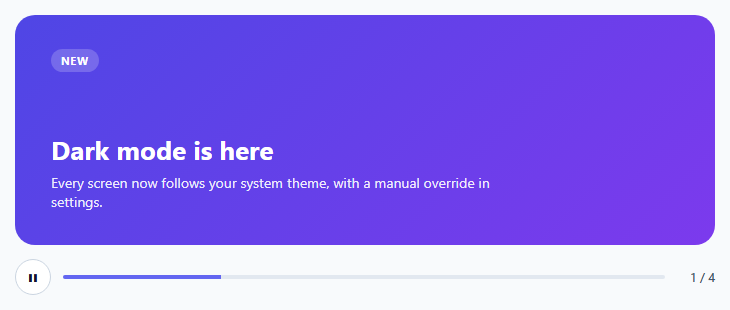
Autoplaying carousels have a bad reputation, mostly earned by slides that change while you are reading and can't be stopped. The fix isn't to ban autoplay but to make it honest: show how long until the next slide, pause when someone is interacting, and give an explicit pause control. This snippet does all three with Embla's official Autoplay plugin.
Autoplay is a plugin instance
EmblaCarouselAutoplay({...}) creates the plugin, passed as the third argument to EmblaCarousel. stopOnInteraction: false makes a swipe restart the countdown instead of disabling autoplay permanently, and stopOnMouseEnter pauses while the pointer is over the slides.
The progress bar uses the plugin's clock
A common approach runs a separate setInterval for the bar, which drifts out of sync with the real slide change. Here the bar listens to the plugin's own events. autoplay:timerset fires whenever a countdown starts; the handler reads autoplay.timeUntilNext() and animates scaleX from the elapsed fraction to 1 over exactly the remaining time. autoplay:timerstopped freezes the bar in place, so a hover pause visibly holds the bar where it was.
The first event happens before you are listening
Plugins initialise inside the EmblaCarousel(...) call, so the very first autoplay:timerset fires before any embla.on(...) line runs. Without a manual startBar() after wiring the listeners, the bar would sit empty for the whole first slide. This applies to any plugin event you care about at startup.
Animating transform, not width
The fill animates transform: scaleX() with a left origin, which runs on the compositor and avoids layout work on every frame.
Pause for everyone
WCAG 2.2.2 requires moving content to be pausable. The play/pause button updates its label, and focus inside the carousel pauses it too, so keyboard users get the same break as mouse users. If the user prefers reduced motion, autoplay doesn't start at all (playOnInit: false) but remains available through the button.
Step by step
How to Use
- 1Load Embla and the pluginInclude embla-carousel and embla-carousel-autoplay UMD builds.
- 2Paste the snippetFour gradient announcement slides start cycling every four seconds.
- 3Hover or focusThe timer and progress bar pause; they resume when you leave.
- 4Press pauseAutoplay stops until you press play again.
- 5Change timingEdit DELAY; the bar follows automatically.
Real-world uses
Common Use Cases
timerset and timeUntilNext values to drive the bar.timerstopped.scaleX rather than width to stay compositor-friendly.Got questions?
Frequently Asked Questions
Load the embla-carousel-autoplay plugin, create it with EmblaCarouselAutoplay({ delay }) and pass it in the plugins array: EmblaCarousel(viewport, options, [autoplay]).
Listen to the autoplay:timerset event, read autoplay.timeUntilNext() and animate the bar over that many milliseconds. Listen to autoplay:timerstopped to freeze it. Using the plugin's own events keeps the bar exactly in sync.
When true (the default), autoplay stops permanently after the user drags. When false, dragging only restarts the countdown, and autoplay continues.
It can be if users can pause it. WCAG 2.2.2 requires a mechanism to pause moving content that lasts more than five seconds. Provide a pause button, pause on hover and focus, and respect prefers-reduced-motion.
Call autoplay.stop() and autoplay.play() on the plugin instance, or embla.plugins().autoplay.stop(). isPlaying() tells you the current state.
Build with AI
Build, Understand, Optimize, and Extend It With AI
Share this snippet with an AI assistant like Claude and ask it to explain why the progress bar listens to timerset instead of running its own timer. Ask it to add per-slide durations (a longer delay for slides with more text), a circular timer instead of a bar, or pausing when the tab is hidden with the Page Visibility API. It can also check the pause behaviour against WCAG 2.2.2.
Prompt to recreate it
Copy this into your AI assistant of choice to build the effect from scratch, or as a jumping-off point for your own variant:
Build an autoplaying announcement carousel with Embla Carousel v8 and its Autoplay plugin (both loaded from a CDN as UMD scripts) in plain HTML, CSS and JavaScript.

Requirements:
- Four full-width gradient slides with a tag, heading and short text, looping.
- Autoplay every four seconds; dragging restarts the countdown rather than disabling autoplay; hovering pauses it.
- A progress bar under the carousel driven by the plugin's timer events: on timer start, animate from the elapsed fraction to full over the remaining time; on timer stop, freeze in place; reset on slide change. Animate transform scaleX, not width.
- A play/pause button with an updating aria-label, and pausing while keyboard focus is inside the carousel.
- Don't start autoplay when the user prefers reduced motion, but keep the play button working.
- Show a "2 / 4" slide counter.
Want to tighten it up first? Run this prompt through the AI Prompt Studio to score it across 8 quality dimensions, catch anti-patterns, and tune the wording for Claude, ChatGPT, or Gemini before you paste it in.
Source Code
<section class="eap" aria-roledescription="carousel" aria-label="Announcements">
<div class="eap-viewport" id="eapViewport">
<div class="eap-container">
<article class="eap-slide" style="--c1:#4f46e5;--c2:#7c3aed"><span class="eap-tag">New</span><h3>Dark mode is here</h3><p>Every screen now follows your system theme, with a manual override in settings.</p></article>
<article class="eap-slide" style="--c1:#0891b2;--c2:#0d9488"><span class="eap-tag">Webinar</span><h3>Scaling design systems</h3><p>Thursday 17:00 UTC — live Q&A with the platform team.</p></article>
<article class="eap-slide" style="--c1:#db2777;--c2:#e11d48"><span class="eap-tag">Offer</span><h3>30% off annual plans</h3><p>Upgrade before the end of the month to lock in the lower price.</p></article>
<article class="eap-slide" style="--c1:#ea580c;--c2:#ca8a04"><span class="eap-tag">Guide</span><h3>Migrating to v5</h3><p>A step-by-step checklist with codemods for the breaking changes.</p></article>
</div>
</div>
<div class="eap-bar">
<button class="eap-play" id="eapPlay" type="button" aria-label="Pause autoplay">❚❚</button>
<div class="eap-progress" aria-hidden="true"><div class="eap-fill" id="eapFill"></div></div>
<div class="eap-num" id="eapNum"></div>
</div>
</section>*{box-sizing:border-box;margin:0;padding:0}
body{font-family:system-ui,-apple-system,sans-serif;background:#f8fafc;min-height:100vh;display:flex;align-items:center;justify-content:center;padding:24px}
.eap{width:100%;max-width:700px}
.eap-viewport{overflow:hidden;border-radius:20px}
.eap-container{display:flex;touch-action:pan-y pinch-zoom}
.eap-slide{flex:0 0 100%;min-width:0;min-height:230px;padding:34px 36px;color:#fff;background:linear-gradient(135deg,var(--c1),var(--c2));display:flex;flex-direction:column;justify-content:flex-end}
.eap-tag{align-self:flex-start;font-size:11px;font-weight:700;letter-spacing:.06em;text-transform:uppercase;background:rgba(255,255,255,.2);padding:4px 10px;border-radius:999px;margin-bottom:auto}
.eap-slide h3{font-size:26px;margin-top:24px}
.eap-slide p{font-size:14px;opacity:.9;margin-top:6px;max-width:460px}
.eap-bar{display:flex;align-items:center;gap:12px;margin-top:14px}
.eap-play{width:36px;height:36px;border-radius:50%;border:1px solid #cbd5e1;background:#fff;cursor:pointer;font-size:11px;color:#0f172a;flex:0 0 auto}
.eap-play:focus-visible{outline:2px solid #6366f1;outline-offset:2px}
.eap-progress{flex:1;height:4px;border-radius:999px;background:#e2e8f0;overflow:hidden}
.eap-fill{height:100%;width:100%;background:#6366f1;transform-origin:left;transform:scaleX(0)}
.eap-num{font:600 12px system-ui;color:#475569;font-variant-numeric:tabular-nums;min-width:38px;text-align:right}var DELAY = 4000;
var reduce = window.matchMedia('(prefers-reduced-motion: reduce)').matches;
// Autoplay is a plugin: pass an instance in the third argument.
// stopOnInteraction:false means a swipe restarts the timer rather than
// switching autoplay off for good; stopOnMouseEnter pauses while hovered.
var autoplay = EmblaCarouselAutoplay({
delay: DELAY,
stopOnInteraction: false,
stopOnMouseEnter: true,
playOnInit: !reduce,
});
var embla = EmblaCarousel(document.getElementById('eapViewport'), { loop: true }, [autoplay]);
var fill = document.getElementById('eapFill');
var num = document.getElementById('eapNum');
var playBtn = document.getElementById('eapPlay');
var total = embla.slideNodes().length;
var userPaused = reduce;
// The bar is driven by the plugin's own timer, not a separate one, so it
// can never drift out of step with the real slide change. timerset fires
// whenever a new countdown starts; timerstopped when it is cancelled.
function startBar() {
var remaining = autoplay.timeUntilNext();
if (remaining === null) return;
fill.style.transition = 'none';
fill.style.transform = 'scaleX(' + (1 - remaining / DELAY) + ')';
fill.getBoundingClientRect(); // commit the start position before animating
fill.style.transition = 'transform ' + remaining + 'ms linear';
fill.style.transform = 'scaleX(1)';
}
function freezeBar() {
var current = getComputedStyle(fill).transform;
fill.style.transition = 'none';
fill.style.transform = current === 'none' ? 'scaleX(0)' : current;
}
embla.on('autoplay:timerset', startBar);
embla.on('autoplay:timerstopped', freezeBar);
embla.on('select', function () {
fill.style.transition = 'none';
fill.style.transform = 'scaleX(0)';
num.textContent = (embla.selectedScrollSnap() + 1) + ' / ' + total;
});
num.textContent = '1 / ' + total;
// The first countdown starts DURING EmblaCarousel(...), before the
// listeners above exist, so its timerset event was missed. Start the bar
// for that first slide by hand.
startBar();
function setPlaying(playing) {
playBtn.textContent = playing ? '❚❚' : '▶';
playBtn.setAttribute('aria-label', playing ? 'Pause autoplay' : 'Play autoplay');
}
setPlaying(!userPaused);
playBtn.addEventListener('click', function () {
userPaused = !userPaused;
if (userPaused) autoplay.stop(); else autoplay.play();
setPlaying(!userPaused);
});
// WCAG 2.2.2: moving content must be pausable. Keyboard users get the same
// pause as mouse users: focus inside the carousel stops the timer.
var section = document.querySelector('.eap');
section.addEventListener('focusin', function () { autoplay.stop(); });
section.addEventListener('focusout', function (e) {
if (!section.contains(e.relatedTarget) && !userPaused) autoplay.play();
});