



Swiper Nested Horizontal and Vertical — Free JS Snippet
Swiper Nested Horizontal and Vertical Sliders · Carousels · Plain HTML, CSS & JS · Live preview
What's included
Features
About this UI Snippet
Swiper Nested Horizontal and Vertical Sliders — HTML, CSS & JavaScript
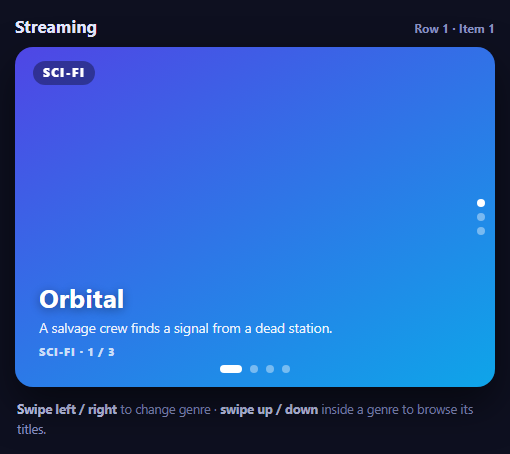
Streaming apps, app stores and photo browsers all use the same layout: swipe sideways to change category, swipe vertically to move through what is inside one. Two axes of movement in a single component is a natural pattern for touch, and Swiper supports it by nesting one swiper inside another. The difficulty is not the nesting itself but making the gestures unambiguous, because a finger drag is rarely a perfect horizontal or vertical line.
The structure is one outer horizontal swiper whose slides each contain an inner vertical swiper. Because the two run on different axes, they largely stay out of each other's way — Swiper only asks for the special nested: true flag when both run the same direction — and each inner swiper is independent: it has its own position, pagination and wheel handling, which is why moving to another genre and back returns to the title you left. The inner swipers are created in a loop over each .nh-inner element, and the pagination for each is found relative to that element rather than by a shared selector, which is the usual bug when several swipers on a page all control the first one's dots.
The subtle setting is touchAngle. It is the maximum angle from the swipe axis, in degrees, at which a touch counts as a swipe for that swiper. The outer horizontal swiper uses 35 degrees, so a gesture must be quite flat to change genre; the inner vertical swiper accepts up to 55 degrees, so a slightly slanted upward flick still scrolls the titles. The two values overlap only in a narrow band, and that bias — favouring vertical browsing inside a card while making genre changes deliberate — is what stops a diagonal swipe from flicking the user to the wrong genre. Tune both numbers with a real thumb on a real phone.
On desktop, each inner swiper accepts the mouse wheel with forceToAxis so horizontal trackpad movement does not scroll it and releaseOnEdges so the wheel is not trapped at the first or last title. The position indicator in the header reads outer.activeIndex and the active inner swiper's activeIndex, refreshing when either changes. Slides use gradients and text only, and the outer pagination is styled as pills so the two sets of bullets — sideways along the bottom, vertical on the right — are visually distinct.
Step by step
How to Use
- 1Swipe sidewaysSwipe left or right to move between genres. The header shows which row you are on.
- 2Swipe up and downSwipe vertically inside a genre to move through its titles; each has its own dots on the right.
- 3Try a diagonal swipeDrag at an angle. The touch-angle limits decide which slider takes the gesture.
- 4Come back to a genreMove away and back. Each genre remembers the title you left it on.
- 5Use the wheelOn desktop, scroll the wheel over a card to step through its titles.
Real-world uses
Common Use Cases
touchAngle tuned so diagonal swipes go to the correct axis.Got questions?
Frequently Asked Questions
When the inner and outer swipers run in the same direction. For horizontal-inside-vertical or vertical-inside-horizontal, they do not conflict and the flag is not needed.
It sets the maximum angle from the swipe axis, in degrees, for a touch to count as a swipe. Lower values require flatter gestures.
A shared selector such as ".swiper-pagination" matches the first element. Find each swiper's pagination relative to its own container.
Enable mousewheel with releaseOnEdges: true so it hands control back at the first and last slide.
Yes. Each is an independent instance, so its position is kept while the outer swiper moves elsewhere.
Keep the inner instances in an array and read outer.activeIndex and inners[outer.activeIndex].activeIndex.
Yes. Use the JSX, Vue, Angular or Tailwind export buttons on this page to convert the markup and styles. The behaviour comes from Swiper, so in a framework project install it with npm install swiper (its React and Vue components take the same options) instead of the CDN tag, use the Swiper and SwiperSlide components, or create it in useEffect / onMounted / ngAfterViewInit, and release it with destroy() when the component unmounts.
Build with AI
Build, Understand, Optimize, and Extend It With AI
Ask an AI assistant like Claude to preload the next row when it comes into view, remember the last position in session storage, or make the layout switch axes on desktop.
Prompt to recreate it
Copy this into your AI assistant of choice to build the effect from scratch, or as a jumping-off point for your own variant:
Build nested Swiper sliders with Swiper 11 loaded from a CDN (bundle script and CSS).

Requirements:
- Create an outer horizontal swiper with four genre slides, each containing an inner vertical swiper with three title slides; give the container a fixed height.
- Create the inner swipers in a loop, each with its own pagination element found relative to its container, mousewheel with forceToAxis and releaseOnEdges, and touchAngle 55; set touchAngle 35 on the outer swiper.
- Show a live "Row n · Item m" indicator updated on slideChange of the outer and inner swipers.
- Style the outer pagination as pills at the bottom and the inner bullets vertically on the right; add keyboard and a11y to the outer swiper.
Want to tighten it up first? Run this prompt through the AI Prompt Studio to score it across 8 quality dimensions, catch anti-patterns, and tune the wording for Claude, ChatGPT, or Gemini before you paste it in.
Source Code
<div class="nh-wrap">
<div class="nh-top"><b>Streaming</b><span id="nhPos" aria-live="polite">Row 1 · Item 1</span></div>
<div class="swiper nh-outer" id="nhOuter">
<div class="swiper-wrapper" id="nhRows"></div>
<div class="swiper-pagination"></div>
</div>
<p class="nh-help"><strong>Swipe left / right</strong> to change genre · <strong>swipe up / down</strong> inside a genre to browse its titles.</p>
</div>body { background: #0e1020; padding: 18px; font-family: system-ui, sans-serif; }
.nh-wrap { max-width: 480px; margin: 0 auto; }
.nh-top { display: flex; justify-content: space-between; align-items: baseline; color: #e6e9ff; margin-bottom: 10px; }
.nh-top b { font-size: 17px; } .nh-top span { font: 700 12px/1 system-ui, sans-serif; color: #8b93c0; }
.nh-outer { height: 340px; border-radius: 18px; overflow: hidden; box-shadow: 0 18px 40px rgba(0,0,0,.5); }
.nh-outer > .swiper-wrapper > .swiper-slide { background: #171a33; }
.nh-genre { position: absolute; top: 14px; left: 18px; z-index: 3; font: 800 11.5px/1 system-ui, sans-serif; letter-spacing: .14em; text-transform: uppercase; color: #fff; background: rgba(0,0,0,.35); padding: 6px 10px; border-radius: 999px; }
.nh-inner { height: 100%; }
.nh-inner .swiper-slide { display: flex; flex-direction: column; justify-content: flex-end; padding: 26px 24px 30px; color: #fff; }
.nh-inner .swiper-slide h3 { margin: 0 0 5px; font-size: 26px; line-height: 1.1; text-shadow: 0 2px 10px rgba(0,0,0,.4); }
.nh-inner .swiper-slide p { margin: 0; font-size: 13.5px; opacity: .9; }
.nh-inner .swiper-slide small { margin-top: 10px; font: 800 11px/1 system-ui, sans-serif; letter-spacing: .08em; opacity: .75; }
.nh-inner .swiper-pagination-bullet { background: #fff; opacity: .4; }
.nh-inner .swiper-pagination-bullet-active { opacity: 1; }
.nh-inner .swiper-pagination { right: 10px; }
.nh-outer > .swiper-pagination { bottom: 10px; }
.nh-outer > .swiper-pagination .swiper-pagination-bullet { background: #fff; opacity: .4; }
.nh-outer > .swiper-pagination .swiper-pagination-bullet-active { opacity: 1; width: 22px; border-radius: 6px; }
.nh-help { margin: 12px 2px 0; font-size: 12.5px; line-height: 1.6; color: #8b93c0; } .nh-help strong { color: #c7cdf2; }const GENRES = [
{ g: 'Sci-fi', a: '#4f46e5,#0ea5e9', items: [['Orbital', 'A salvage crew finds a signal from a dead station.'], ['The Last Relay', 'Six minutes of oxygen. One working radio.'], ['Terraform', 'Building a world for people who may never arrive.']] },
{ g: 'Comedy', a: '#f59e0b,#ef4444', items: [['Open Plan', 'Chaos in an office that forgot its own product.'], ['Brunch Club', 'Four friends, one reservation, zero patience.'], ['Sorry, Wrong Wedding', 'When the plus-one is the best man.']] },
{ g: 'Documentary', a: '#10b981,#0d9488', items: [['Deep Blue', 'Filming the ocean floor for the first time.'], ['The Bakers of Lyon', 'One street, forty ovens, five generations.'], ['Signal to Noise', 'The people who keep the internet running.']] },
{ g: 'Thriller', a: '#7c3aed,#db2777', items: [['Blackout', 'A city loses power. Someone planned it.'], ['Cold Case Cafe', 'A waitress recognises a face from 1994.'], ['The Understudy', 'She knows every line, and one secret.']] },
];
document.getElementById('nhRows').innerHTML = GENRES.map(function (row, ri) {
const inner = row.items.map(function (it, ii) {
return '<div class="swiper-slide" style="background:linear-gradient(' + (150 + ii * 25) + 'deg,' + row.a + ')"><h3>' + it[0] + '</h3><p>' + it[1] + '</p><small>' + row.g.toUpperCase() + ' · ' + (ii + 1) + ' / ' + row.items.length + '</small></div>';
}).join('');
return '<div class="swiper-slide"><span class="nh-genre">' + row.g + '</span>' +
'<div class="swiper nh-inner" data-row="' + ri + '"><div class="swiper-wrapper">' + inner + '</div><div class="swiper-pagination"></div></div></div>';
}).join('');
const pos = document.getElementById('nhPos');
const inners = [];
const outer = new Swiper('#nhOuter', {
direction: 'horizontal',
speed: 450,
spaceBetween: 0,
pagination: { el: '#nhOuter > .swiper-pagination', clickable: true },
keyboard: { enabled: true },
a11y: { enabled: true },
// Give the outer swiper a chance to claim the gesture only when the inner one cannot use it.
touchAngle: 35, // gestures steeper than 35 degrees from horizontal are ignored by the OUTER swiper
});
// Each genre gets its own vertical swiper. Different directions do not conflict, so no 'nested' flag is needed,
// but the angle threshold above is what stops a slightly diagonal swipe changing genre by accident.
document.querySelectorAll('.nh-inner').forEach(function (el) {
const s = new Swiper(el, {
direction: 'vertical',
speed: 400,
mousewheel: { forceToAxis: true, releaseOnEdges: true },
pagination: { el: el.querySelector('.swiper-pagination'), clickable: true },
touchAngle: 55,
resistanceRatio: 0.5,
});
s.on('slideChange', report);
inners.push(s);
});
function report() {
const r = outer.activeIndex;
pos.textContent = 'Row ' + (r + 1) + ' · Item ' + (inners[r].activeIndex + 1);
}
outer.on('slideChange', report);
report();