

Embla Carousel Thumbnail Gallery — Free Synced Thumbnails Snippet
Embla Carousel Thumbnail Gallery · Carousels · Plain HTML, CSS & JS · Live preview
What's included
Features
About this UI Snippet
Embla Carousel Thumbnails — Two Carousels, One Source of Truth
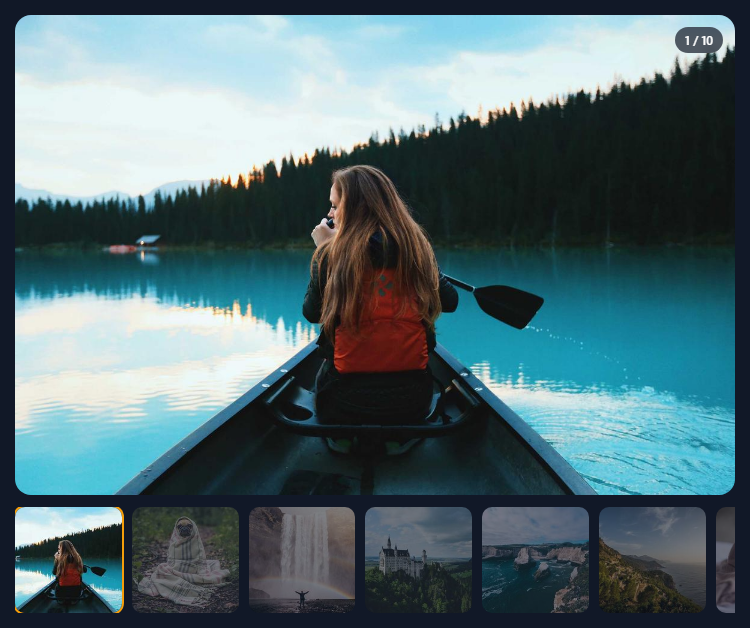
A thumbnail gallery is really two carousels that have to agree: a large one that shows the current photo and a small strip of previews that both shows where you are and lets you jump. The usual source of bugs is letting both control each other. This snippet makes the main carousel the single source of truth.
Two instances, different behaviour
The main carousel shows one full-width slide at a time. The thumbnail strip is its own Embla instance with dragFree: true, so it glides with momentum like a native scrolling list instead of snapping thumbnail by thumbnail, and containScroll: 'keepSnaps' keeps each thumbnail individually addressable.
One-way flow
Thumbnails only ever call main.scrollTo(i). The main carousel's select event then updates everything else: it scrolls the strip to the active thumbnail with thumbs.scrollTo(i), marks it with aria-current, and updates the "3 / 10" counter. Because data flows one way, swiping the main photo, clicking a thumbnail and pressing an arrow key all end in the same state.
Click versus drag
Flicking the thumbnail strip ends with a pointer-up on some thumbnail, which the browser reports as a click. Embla v8 handles this itself: it listens for click in the capture phase on its container and stops the click that ends a drag, so the thumbnail handlers never see it and a flick doesn't jump the main photo. (Embla v7 exposed this as clickAllowed(), which older tutorials still use; it no longer exists in v8.)
Accessible thumbnails
Each thumbnail is a real <button> with a label; its image has empty alt text because the button already describes it. The counter is a polite live region.
Responsive strip
Thumbnails are 22% wide on phones and 16% on larger screens, changed purely in CSS.
Step by step
How to Use
- 1Load EmblaInclude embla-carousel.umd.js from the CDN.
- 2Paste the snippetA main photo carousel renders above a thumbnail strip.
- 3Click a thumbnailThe main carousel scrolls to that photo.
- 4Swipe or use arrow keysThe strip follows and highlights the active thumbnail.
- 5Use your imagesReplace IDS, or render your own slides and thumbnails in the same order.
Real-world uses
Common Use Cases
aria-current and a highlight ring for keyboard and screen reader users.Got questions?
Frequently Asked Questions
Create two Embla instances. Thumbnail clicks call main.scrollTo(index). In the main carousel's select event, call thumbs.scrollTo(main.selectedScrollSnap()) and update the active thumbnail. Keeping updates one-directional avoids loops.
Not in Embla v8. It adds a capture-phase click listener to its container that stops the click ending a drag. Code written for v7 often calls clickAllowed(), which was removed in v8 and throws if called.
With dragFree, Embla lets the carousel glide with momentum and stop anywhere instead of snapping to the nearest slide. It suits thumbnail strips and long rows.
It keeps every slide's own snap point instead of trimming snaps at the ends. That way scrollTo(i) works for every thumbnail index, including the first and last few.
Use button elements with an aria-label for each thumbnail, mark the active one with aria-current, give decorative thumbnail images empty alt text, and announce the current position in a live region.
Build with AI
Build, Understand, Optimize, and Extend It With AI
Give this snippet to an AI assistant like Claude and ask it to explain the one-way data flow between the two carousels and how Embla v8 stops a drag from registering as a click. Ask it to add zoom-on-click with a lightbox, vertical thumbnails beside the main image on desktop, or lazy loading so only nearby photos download. It can also help wire the gallery to product variants, swapping the image set when a colour is chosen.
Prompt to recreate it
Copy this into your AI assistant of choice to build the effect from scratch, or as a jumping-off point for your own variant:
Build a synced thumbnail photo gallery with Embla Carousel v8 (loaded from a CDN as UMD) in plain HTML, CSS and JavaScript.

Requirements:
- Render ten photos into a main carousel that shows one full-width slide at a time, and ten matching square thumbnails into a second carousel below it.
- Make the thumbnail carousel drag-free with snaps kept for every thumbnail.
- Thumbnails are buttons with aria-labels; clicking one scrolls the main carousel to that photo, relying on Embla v8 to suppress the click that ends a drag of the strip.
- Treat the main carousel as the source of truth: on its select event, scroll the thumbnail strip to the active thumbnail, mark it with aria-current and a highlight ring, and update a "3 / 10" counter in a polite live region.
- Support left and right arrow keys.
- Show about four thumbnails on phones and six on wider screens using CSS only.
Want to tighten it up first? Run this prompt through the AI Prompt Studio to score it across 8 quality dimensions, catch anti-patterns, and tune the wording for Claude, ChatGPT, or Gemini before you paste it in.
Source Code
<div class="etg">
  <div class="etg-main">
    <div class="etg-viewport" id="etgMain">
      <div class="etg-container" id="etgSlides"></div>
    </div>
    <div class="etg-count" id="etgCount" aria-live="polite"></div>
  </div>
  <div class="etg-thumbs">
    <div class="etg-viewport" id="etgThumbs">
      <div class="etg-container" id="etgThumbList"></div>
    </div>
  </div>
</div>*{box-sizing:border-box;margin:0;padding:0}
body{font-family:system-ui,-apple-system,sans-serif;background:#111827;min-height:100vh;display:flex;align-items:center;justify-content:center;padding:24px}
.etg{width:100%;max-width:720px}
.etg-main{position:relative}
.etg-viewport{overflow:hidden}
.etg-main .etg-viewport{border-radius:16px}
.etg-container{display:flex;touch-action:pan-y pinch-zoom}
.etg-slide{flex:0 0 100%;min-width:0}
.etg-slide img{display:block;width:100%;aspect-ratio:3/2;object-fit:cover;background:#1f2937;user-select:none;-webkit-user-drag:none}
.etg-count{position:absolute;top:12px;right:12px;background:rgba(17,24,39,.7);color:#fff;font:600 12px system-ui;padding:5px 10px;border-radius:999px;backdrop-filter:blur(6px)}
.etg-thumbs{margin-top:12px}
.etg-thumbs .etg-container{margin-left:-10px}
.etg-thumb{flex:0 0 22%;min-width:0;padding-left:10px}
@media (min-width:600px){.etg-thumb{flex-basis:16%}}
.etg-thumb button{display:block;width:100%;padding:0;border:0;background:none;cursor:pointer;border-radius:10px;overflow:hidden;opacity:.45;transition:opacity .2s,transform .2s;outline-offset:2px}
.etg-thumb button img{display:block;width:100%;aspect-ratio:1;object-fit:cover;background:#1f2937}
.etg-thumb button[aria-current="true"]{opacity:1;box-shadow:0 0 0 2px #f59e0b}
.etg-thumb button:hover{opacity:.8}
.etg-thumb button:focus-visible{outline:2px solid #f59e0b}var IDS = [1011, 1025, 1035, 1040, 1050, 1057, 1062, 1069, 1074, 1084];
var slidesEl = document.getElementById('etgSlides');
var thumbsEl = document.getElementById('etgThumbList');
IDS.forEach(function (id, i) {
slidesEl.insertAdjacentHTML('beforeend',
'<div class="etg-slide"><img src="https://picsum.photos/id/' + id + '/1200/800" alt="Gallery photo ' + (i + 1) + '"></div>');
thumbsEl.insertAdjacentHTML('beforeend',
'<div class="etg-thumb"><button type="button" aria-label="Show photo ' + (i + 1) + '">' +
'<img src="https://picsum.photos/id/' + id + '/200/200" alt=""></button></div>');
});
// Two independent Embla instances. The main one shows one slide at a time;
// the thumbnail strip is drag-free so it can be flicked like a native list.
var main = EmblaCarousel(document.getElementById('etgMain'), { loop: false });
var thumbs = EmblaCarousel(document.getElementById('etgThumbs'), {
containScroll: 'keepSnaps',
dragFree: true,
});
var countEl = document.getElementById('etgCount');
var buttons = thumbsEl.querySelectorAll('button');
// Clicking a thumbnail drives the main carousel. No drag check is needed:
// Embla v8 listens for click in the CAPTURE phase on its container and
// stops the click that ends a drag, so flicking the strip never reaches
// these handlers. (v7's clickAllowed() no longer exists.)
buttons.forEach(function (btn, i) {
btn.addEventListener('click', function () { main.scrollTo(i); });
});
// The main carousel is the single source of truth. Whenever it settles on
// a slide, mark the matching thumbnail and scroll the strip to reveal it.
function onSelect() {
var i = main.selectedScrollSnap();
thumbs.scrollTo(i);
buttons.forEach(function (b, j) { b.setAttribute('aria-current', j === i ? 'true' : 'false'); });
countEl.textContent = (i + 1) + ' / ' + IDS.length;
}
main.on('select', onSelect).on('reInit', onSelect);
onSelect();
// Arrow keys anywhere on the page step the main carousel.
document.addEventListener('keydown', function (e) {
if (e.key === 'ArrowLeft') main.scrollPrev();
if (e.key === 'ArrowRight') main.scrollNext();
});