

Embla Carousel Parallax Slides — Free Scroll-Linked Parallax Snippet
Embla Carousel Parallax Slides · Carousels · Plain HTML, CSS & JS · Live preview
What's included
Features
About this UI Snippet
Embla Carousel Parallax — Images That Lag Behind Their Frames

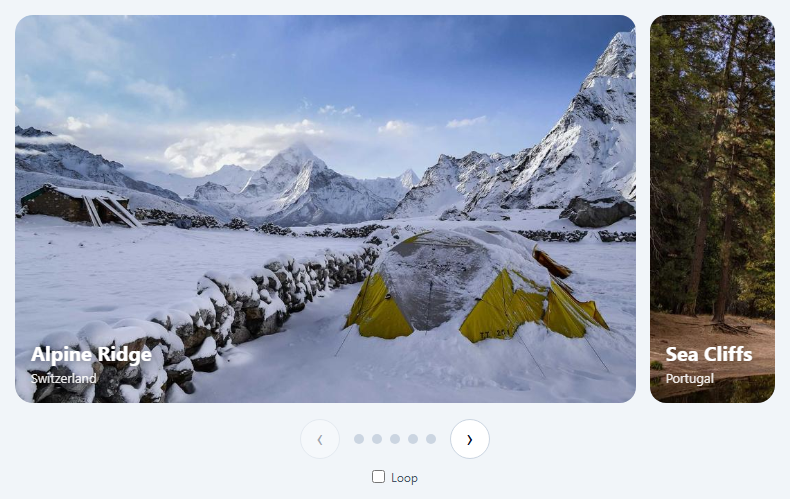
Parallax in a carousel means the photo inside each card moves a little slower than the card itself while you drag, so the image seems to sit behind a window. It's subtle, and that subtlety is why it looks expensive. The technique is worth learning because the same maths drives scale, opacity and rotation effects.
Where each slide is relative to the centre
Embla exposes scrollProgress(), a number from 0 to 1 for the whole track, and scrollSnapList(), the progress value at which each snap is centred. Subtracting gives diff for each snap: 0 when centred, positive to the right, negative to the left. Translating the inner image by diff * -tweenFactor * 100% moves it against the scroll direction.
Why the image layer is wider than the frame
The frame clips with overflow: hidden, and the image layer is extended 30% beyond each side (inset: 0 -30%). Without that bleed, the moving image would reveal an empty edge.
slideRegistry maps snaps to slides
A snap can contain more than one slide. engine.slideRegistry[snapIndex] lists the slide indexes for each snap, so every slide in a snap gets the same offset.
The loop correction
With loop: true, Embla repositions slides at the ends to create the seamless loop. A repositioned slide would compute its diff from the far side of the track and jump. The slideLooper.loopPoints check detects slides currently moved by the looper and recalculates diff across the wrap.
Only work on visible slides
During scroll events the loop skips slides not in slidesInView(), keeping the per-frame work small. The tween also runs on reInit and slideFocus so tabbing through slides stays correct.
Motion preferences
If the user prefers reduced motion, the tween does nothing and the carousel behaves normally.
Step by step
How to Use
- 1Load EmblaInclude embla-carousel.umd.js from the CDN.
- 2Paste the snippetSix looping photo cards render.
- 3Drag slowlyWatch each image shift inside its frame as it moves.
- 4Tune the strengthRaise or lower TWEEN_FACTOR_BASE; widen the layer bleed if edges appear.
- 5Reuse the mathsSwap translateX for scale or opacity to build other effects.
Real-world uses
Common Use Cases
epx-cap captions.loopPoints correction is built in, the parallax never jumps when the carousel wraps from the last slide to the first.scrollProgress maths drives scale, opacity and rotation effects. Master it here, then reuse it for other carousel animations, keeping the reduced-motion support already included.Got questions?
Frequently Asked Questions
On every scroll event, compute each snap's distance from the current position with scrollSnapList()[i] - scrollProgress(), then translate an inner image layer by that distance times a negative factor. The frame clips the image, which moves more slowly than the slide.
With loop enabled, Embla moves slides to the other end of the track. Their distance must be measured across the wrap. Check engine.slideLooper.loopPoints for the slide and adjust the distance using 1 + progress or 1 - progress depending on the direction.
internalEngine() exposes Embla's internal parts, such as slideRegistry and slideLooper. The official parallax and scale examples use it, but it isn't covered by semantic versioning guarantees, so re-test after upgrading Embla.
The image moves sideways inside its frame. Extending it beyond the frame on both sides gives it room to move without revealing a gap at the edge.
It only updates transforms of slides in view, and transforms are handled by the compositor. For heavy pages you can also skip the effect on low-power devices or when the user prefers reduced motion.
Build with AI
Build, Understand, Optimize, and Extend It With AI
Paste this snippet into an AI assistant like Claude and ask it to walk through how diff is calculated and why the loop correction is needed. Ask it to turn the parallax into a vertical carousel, add a subtle zoom to the centred slide, or apply the tween to caption text so it moves in the opposite direction. It can also explain the risks of relying on internalEngine() across Embla upgrades.
Prompt to recreate it
Copy this into your AI assistant of choice to build the effect from scratch, or as a jumping-off point for your own variant:
Build a looping parallax photo carousel with Embla Carousel v8 (loaded from a CDN as UMD) in plain HTML, CSS and JavaScript on a dark background.

Requirements:
- Six photo slides at 72% width with rounded frames that clip their content, and captions.
- Inside each frame, an image layer that extends 30% beyond each side.
- On scroll, compute each snap's distance from the current scroll progress and translate that slide's image layer by distance × −factor × 100%, with the factor scaled by the number of snaps.
- Use the engine's slide registry to map snaps to slides, update only slides in view during scroll, and correct distances for slides that the loop has moved to the other end.
- Re-run the calculation on reInit and slideFocus.
- Add previous and next buttons, and skip the effect entirely when the user prefers reduced motion.
Want to tighten it up first? Run this prompt through the AI Prompt Studio to score it across 8 quality dimensions, catch anti-patterns, and tune the wording for Claude, ChatGPT, or Gemini before you paste it in.
Source Code
<div class="epx">
  <div class="epx-viewport" id="epxViewport">
    <div class="epx-container" id="epxContainer"></div>
  </div>
  <div class="epx-foot">
    <span>Drag, swipe or use the arrows — images move slower than their frames</span>
    <div>
      <button type="button" id="epxPrev" aria-label="Previous">←</button>
      <button type="button" id="epxNext" aria-label="Next">→</button>
    </div>
  </div>
</div>*{box-sizing:border-box;margin:0;padding:0}
body{font-family:system-ui,-apple-system,sans-serif;background:#0c0a09;min-height:100vh;display:flex;align-items:center;justify-content:center;padding:24px;color:#e7e5e4}
.epx{width:100%;max-width:820px}
.epx-viewport{overflow:hidden}
.epx-container{display:flex;touch-action:pan-y pinch-zoom;margin-left:-16px}
.epx-slide{flex:0 0 72%;min-width:0;padding-left:16px}
.epx-frame{position:relative;border-radius:18px;overflow:hidden;height:380px}
/* The layer is wider than its frame so it has room to move without
exposing an edge. The image inside is what shifts sideways. */
.epx-layer{position:absolute;inset:0 -30%;display:flex;justify-content:center}
.epx-layer img{width:100%;height:100%;object-fit:cover;user-select:none;-webkit-user-drag:none;will-change:transform}
.epx-cap{position:absolute;left:18px;bottom:16px;right:18px;font-size:12px;letter-spacing:.14em;text-transform:uppercase;color:#fff;text-shadow:0 1px 10px rgba(0,0,0,.6)}
.epx-cap b{display:block;font-size:22px;letter-spacing:0;text-transform:none;margin-top:3px}
.epx-foot{display:flex;justify-content:space-between;align-items:center;gap:12px;margin-top:16px;font-size:12px;color:#a8a29e}
.epx-foot button{width:40px;height:40px;border-radius:50%;border:1px solid #44403c;background:#1c1917;color:#e7e5e4;font-size:16px;cursor:pointer;margin-left:6px}
.epx-foot button:hover{border-color:#f59e0b;color:#fbbf24}
.epx-foot button:focus-visible{outline:2px solid #f59e0b;outline-offset:2px}var SLIDES = [
{ id: 1016, place: 'Utah', name: 'Canyon Light' },
{ id: 1022, place: 'Lapland', name: 'Northern Sky' },
{ id: 1047, place: 'Tokyo', name: 'City Grid' },
{ id: 1056, place: 'Morocco', name: 'Desert Road' },
{ id: 1067, place: 'Oslo', name: 'Harbour Walk' },
{ id: 1080, place: 'Kyoto', name: 'Quiet Street' },
];
var container = document.getElementById('epxContainer');
SLIDES.forEach(function (s) {
container.insertAdjacentHTML('beforeend',
'<div class="epx-slide"><div class="epx-frame"><div class="epx-layer">' +
'<img src="https://picsum.photos/id/' + s.id + '/1200/800" alt="' + s.name + ', ' + s.place + '"></div>' +
'<div class="epx-cap">' + s.place + '<b>' + s.name + '</b></div></div></div>');
});
var embla = EmblaCarousel(document.getElementById('epxViewport'), { loop: true, dragFree: false });
var reduce = window.matchMedia('(prefers-reduced-motion: reduce)').matches;
// How strongly images lag behind their frames. Multiplying by the number
// of snaps keeps the effect the same strength whatever the slide count.
var TWEEN_FACTOR_BASE = 0.2;
var tweenFactor = 0;
var layers = [];
function setup() {
tweenFactor = TWEEN_FACTOR_BASE * embla.scrollSnapList().length;
layers = embla.slideNodes().map(function (s) { return s.querySelector('.epx-layer'); });
}
function tween(eventName) {
if (reduce) return;
var engine = embla.internalEngine();
var progress = embla.scrollProgress();
var inView = embla.slidesInView();
var isScroll = eventName === 'scroll';
embla.scrollSnapList().forEach(function (snap, snapIndex) {
// diff: how far this snap is from the current scroll position, where
// 0 means "centred" and +/- values mean "to the right/left".
var diff = snap - progress;
engine.slideRegistry[snapIndex].forEach(function (slideIndex) {
if (isScroll && inView.indexOf(slideIndex) === -1) return;
// With loop on, Embla moves slides around the ends. A slide that has
// been looped reports a diff from the wrong side, so correct it.
if (engine.options.loop) {
engine.slideLooper.loopPoints.forEach(function (lp) {
var target = lp.target();
if (slideIndex === lp.index && target !== 0) {
if (Math.sign(target) === -1) diff = snap - (1 + progress);
if (Math.sign(target) === 1) diff = snap + (1 - progress);
}
});
}
var translate = diff * (-1 * tweenFactor) * 100;
layers[slideIndex].style.transform = 'translateX(' + translate + '%)';
});
});
}
setup();
tween();
embla
.on('reInit', setup)
.on('reInit', tween)
.on('scroll', tween)
.on('slideFocus', tween);
document.getElementById('epxPrev').addEventListener('click', function () { embla.scrollPrev(); });
document.getElementById('epxNext').addEventListener('click', function () { embla.scrollNext(); });