

Embla Carousel Variable-Width Chips with Scroll Progress — Free Snippet
Embla Carousel Variable-Width Chips with Scroll Progress · Carousels · Plain HTML, CSS & JS · Live preview
What's included
Features
About this UI Snippet
Embla Carousel for Chip Rows — Variable Widths, Momentum and a Progress Bar
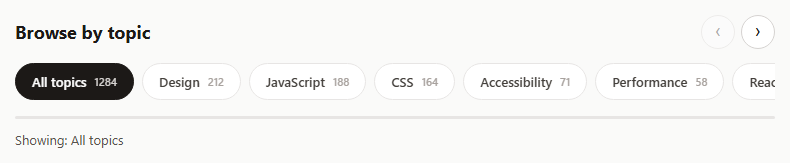
Carousels aren't only for big images. A row of filter chips or category pills that overflows on mobile is the same problem at a smaller scale: it needs to scroll smoothly, show that there is more, and stay usable with a mouse, a trackpad, touch and a keyboard. Embla handles all of that without forcing a fixed slide width.
Slides can be any width
Each chip is flex: 0 0 auto, so it sizes to its own text. Embla measures every slide individually and builds snaps from real sizes, so there is no configuration for variable widths. Gaps come from gap on the container.
Drag-free with trimmed ends
dragFree: true lets the row glide with momentum and stop anywhere, which feels like a native scroller. containScroll: 'trimSnaps' stops at the real ends so there is never empty space after the last chip.
A progress bar that shows how much is left
scrollProgress() returns 0 at the start and 1 at the end of the scrollable range. The bar's scaleX follows it on every scroll event. It is clamped because the value briefly goes past 0 or 1 when you drag beyond an edge.
Wheel support without trapping the page
A horizontal carousel ignores vertical mouse wheels by default, which makes it feel broken to desktop users. The snippet maps vertical wheel movement to scrollPrev and scrollNext, but only while the row can still move in that direction. At either end, the event isn't prevented and the page scrolls normally.
Keyboard focus follows
Tabbing onto a chip that is off-screen scrolls it into view, using the engine's slide registry to find the snap that contains that chip. Selection uses aria-selected, and the chosen topic is announced in a live region.
Step by step
How to Use
- 1Load EmblaInclude embla-carousel.umd.js from the CDN.
- 2Paste the snippetA row of topic chips with arrows and a progress bar renders.
- 3Scroll the rowDrag, flick, use the arrows or the mouse wheel.
- 4Pick a topicClick a chip; the selection is announced below.
- 5Tab throughOff-screen chips scroll into view as they receive focus.
Real-world uses
Common Use Cases
flex: 0 0 auto.scrollProgress().Got questions?
Frequently Asked Questions
Yes. Size each slide with CSS, for example flex: 0 0 auto, and Embla measures every slide to build its snaps. No special option is needed.
Call scrollProgress() in a scroll event handler. It returns 0 at the start and 1 at the end; clamp it because it can overshoot slightly while dragging past an edge.
Listen for wheel events on the viewport with passive: false, and when the vertical delta is larger, call scrollNext or scrollPrev and prevent the default. Only prevent it while the carousel can still move, so the page can scroll at the ends.
Normal dragging snaps to the nearest slide when released. dragFree lets the carousel keep gliding with momentum and stop anywhere, which suits chip rows and long lists.
Both work in Embla v8. Container gap is simpler for variable-width content; padding on slides with a negative container margin is the older pattern and is also supported.
Build with AI
Build, Understand, Optimize, and Extend It With AI
Give this snippet to an AI assistant like Claude and ask it to explain why variable widths need no configuration and why the wheel handler only prevents default while the row can move. Ask it to add fading edge shadows that appear only when there is more content, multi-select filters with a clear button, or syncing the selected chip with the URL. It can also review whether listbox and option are the right roles for your filter.
Prompt to recreate it
Copy this into your AI assistant of choice to build the effect from scratch, or as a jumping-off point for your own variant:
Build a horizontally scrolling row of topic filter chips with Embla Carousel v8 (loaded from a CDN as UMD) in plain HTML, CSS and JavaScript.

Requirements:
- Sixteen chips with a topic name and article count, each sized to its own content, with a CSS gap between them.
- Drag-free momentum scrolling, aligned to the start, with the row stopping at its real ends.
- A thin progress bar under the row driven by the carousel's scroll progress, clamped between 0 and 1.
- Previous and next arrow buttons that disable at the ends.
- Map vertical mouse-wheel movement to scrolling the row, but let the page scroll once the row reaches an end.
- Clicking a chip selects it (aria-selected) and announces the chosen topic in a polite live region.
- When a chip receives keyboard focus, scroll it into view.
Want to tighten it up first? Run this prompt through the AI Prompt Studio to score it across 8 quality dimensions, catch anti-patterns, and tune the wording for Claude, ChatGPT, or Gemini before you paste it in.
Source Code
<div class="evw">
  <div class="evw-head">
    <h2>Browse by topic</h2>
    <div class="evw-arrows">
      <button type="button" id="evwPrev" aria-label="Scroll topics left">‹</button>
      <button type="button" id="evwNext" aria-label="Scroll topics right">›</button>
    </div>
  </div>
  <div class="evw-viewport" id="evwViewport">
    <div class="evw-container" id="evwList" role="listbox" aria-label="Topics"></div>
  </div>
  <div class="evw-progress" aria-hidden="true"><div class="evw-bar" id="evwBar"></div></div>
  <p class="evw-out" id="evwOut" aria-live="polite">Showing: All topics</p>
</div>*{box-sizing:border-box;margin:0;padding:0}
body{font-family:system-ui,-apple-system,sans-serif;background:#fafaf9;min-height:100vh;display:flex;align-items:center;justify-content:center;padding:24px}
.evw{width:100%;max-width:760px}
.evw-head{display:flex;justify-content:space-between;align-items:center;margin-bottom:14px}
.evw-head h2{font-size:18px;color:#1c1917}
.evw-arrows{display:flex;gap:6px}
.evw-arrows button{width:34px;height:34px;border-radius:50%;border:1px solid #d6d3d1;background:#fff;font-size:18px;cursor:pointer;color:#1c1917}
.evw-arrows button:disabled{opacity:.35;cursor:default}
.evw-arrows button:focus-visible{outline:2px solid #ea580c;outline-offset:2px}
.evw-viewport{overflow:hidden}
.evw-container{display:flex;touch-action:pan-y pinch-zoom;gap:8px}
/* flex:0 0 auto lets every chip size to its own text: Embla measures each
slide individually, so variable widths just work. */
.evw-chip{flex:0 0 auto;min-width:0;display:flex;align-items:center;gap:8px;border:1px solid #e7e5e4;background:#fff;border-radius:999px;padding:9px 16px;font:600 13px system-ui;color:#44403c;cursor:pointer;white-space:nowrap;transition:background .15s,color .15s,border-color .15s}
.evw-chip small{font-weight:500;color:#a8a29e}
.evw-chip:hover{border-color:#fdba74}
.evw-chip[aria-selected="true"]{background:#1c1917;color:#fff;border-color:#1c1917}
.evw-chip[aria-selected="true"] small{color:#d6d3d1}
.evw-chip:focus-visible{outline:2px solid #ea580c;outline-offset:2px}
.evw-progress{height:3px;background:#e7e5e4;border-radius:999px;margin-top:16px;overflow:hidden}
.evw-bar{height:100%;width:100%;background:#ea580c;transform-origin:left;transform:scaleX(0)}
.evw-out{font-size:13px;color:#57534e;margin-top:12px}var TOPICS = [
['All topics', 1284], ['Design', 212], ['JavaScript', 188], ['CSS', 164], ['Accessibility', 71],
['Performance', 58], ['React', 142], ['Animation', 96], ['Typography', 39], ['Career', 44],
['Testing', 52], ['DevOps', 33], ['Web APIs', 47], ['Security', 29], ['AI tools', 61], ['Freelancing', 26],
];
var list = document.getElementById('evwList');
TOPICS.forEach(function (t, i) {
list.insertAdjacentHTML('beforeend',
'<button type="button" class="evw-chip" role="option" aria-selected="' + (i === 0) + '" data-i="' + i + '">' +
t[0] + ' <small>' + t[1] + '</small></button>');
});
// dragFree: glide with momentum and stop anywhere, like a native scroller.
// containScroll 'trimSnaps' stops the row at its real ends (no blank space).
var embla = EmblaCarousel(document.getElementById('evwViewport'), {
dragFree: true,
containScroll: 'trimSnaps',
align: 'start',
});
var bar = document.getElementById('evwBar');
var prev = document.getElementById('evwPrev');
var next = document.getElementById('evwNext');
// scrollProgress() is 0 at the start and 1 at the end of the scrollable
// range; clamping hides the small overshoot while dragging past an edge.
function progress() {
var p = Math.max(0, Math.min(1, embla.scrollProgress()));
bar.style.transform = 'scaleX(' + p.toFixed(4) + ')';
prev.disabled = !embla.canScrollPrev();
next.disabled = !embla.canScrollNext();
}
embla.on('init', progress).on('reInit', progress).on('scroll', progress).on('select', progress);
progress();
prev.addEventListener('click', function () { embla.scrollPrev(); });
next.addEventListener('click', function () { embla.scrollNext(); });
// Vertical mouse wheels do nothing to a horizontal carousel by default.
// Map vertical wheel movement onto the carousel only while the row can
// still move, so the page scrolls normally once the row hits an end.
var viewport = document.getElementById('evwViewport');
viewport.addEventListener('wheel', function (e) {
if (Math.abs(e.deltaX) > Math.abs(e.deltaY)) return;
var goingNext = e.deltaY > 0;
if (goingNext ? !embla.canScrollNext() : !embla.canScrollPrev()) return;
e.preventDefault();
if (goingNext) embla.scrollNext(); else embla.scrollPrev();
}, { passive: false });
var out = document.getElementById('evwOut');
list.addEventListener('click', function (e) {
var chip = e.target.closest('.evw-chip');
if (!chip) return;
list.querySelectorAll('.evw-chip').forEach(function (c) { c.setAttribute('aria-selected', c === chip ? 'true' : 'false'); });
var t = TOPICS[Number(chip.dataset.i)];
out.textContent = 'Showing: ' + t[0] + ' (' + t[1] + ' articles)';
});
// Keep the focused chip visible when tabbing through a long row.
list.addEventListener('focusin', function (e) {
var chip = e.target.closest('.evw-chip');
if (chip) embla.scrollTo(embla.internalEngine().slideRegistry.findIndex(function (s) { return s.indexOf(Number(chip.dataset.i)) !== -1; }));
});