






Background Boxes — Free HTML CSS JS Interactive Grid Snippet
Background Boxes · Animations · Plain HTML, CSS & JS · Live preview
Copy & paste
Source Code
<section class="bb-hero">
  <div class="bb-grid" id="bbGrid" aria-hidden="true"></div>
  <div class="bb-fade" aria-hidden="true"></div>
  <div class="bb-content">
    <h1>Hover the grid</h1>
    <p>Cells light up in random colors under your cursor — a living interactive backdrop.</p>
    <button type="button" class="bb-btn">Explore</button>
  </div>
</section>*{box-sizing:border-box;margin:0;padding:0}
body{font-family:system-ui,-apple-system,sans-serif;background:#05050b;color:#fff}
.bb-hero{position:relative;min-height:100vh;overflow:hidden;display:flex;align-items:center;justify-content:center;text-align:center}
.bb-grid{position:absolute;inset:0;display:grid;transform:skewX(-48deg) rotate(0deg) scale(1.6);transform-origin:center}
.bb-cell{border-right:1px solid rgba(255,255,255,.05);border-bottom:1px solid rgba(255,255,255,.05);transition:background-color .15s ease}
.bb-fade{position:absolute;inset:0;background:radial-gradient(ellipse at center,transparent 25%,#05050b 72%);pointer-events:none}
.bb-content{position:relative;z-index:1;padding:0 20px;max-width:560px;pointer-events:none}
.bb-content h1{font-size:clamp(34px,8vw,68px);font-weight:900;letter-spacing:-.03em;background:linear-gradient(120deg,#fff,#818cf8);-webkit-background-clip:text;background-clip:text;color:transparent}
.bb-content p{margin-top:14px;font-size:16px;color:#9a9ab8;line-height:1.55}
.bb-btn{margin-top:24px;pointer-events:auto;background:#6366f1;color:#fff;border:none;border-radius:12px;padding:13px 26px;font-family:inherit;font-size:15px;font-weight:800;cursor:pointer;transition:transform .15s,background .2s}
.bb-btn:hover{background:#4f46e5;transform:translateY(-2px)}var grid = document.getElementById('bbGrid');
var COLORS = ['#6366f1','#ec4899','#22d3ee','#34d399','#fbbf24','#fb7185','#a78bfa','#60a5fa'];
var COLS = 24, ROWS = 16, SIZE = 56; // cell size in px
grid.style.gridTemplateColumns = 'repeat(' + COLS + ',' + SIZE + 'px)';
grid.style.gridTemplateRows = 'repeat(' + ROWS + ',' + SIZE + 'px)';
var cells = [];
for (var i = 0; i < COLS * ROWS; i++) {
var c = document.createElement('div');
c.className = 'bb-cell';
grid.appendChild(c);
cells.push(c);
}
// On hover, flash the cell a random color, then let it fade back via transition.
// Event delegation keeps us to a single listener for hundreds of cells.
grid.addEventListener('pointerover', function (e) {
var cell = e.target;
if (!cell.classList.contains('bb-cell')) return;
cell.style.backgroundColor = COLORS[Math.floor(Math.random() * COLORS.length)];
});
grid.addEventListener('pointerout', function (e) {
var cell = e.target;
if (!cell.classList.contains('bb-cell')) return;
// Delay clearing slightly so quick passes leave a brief trail.
setTimeout(function () { cell.style.backgroundColor = ''; }, 400);
});Extend with AI
Take This Snippet Further With AI
The AI prompt for this one is for Patreon supporters ($3 a month), along with a site with no ads. Supporters enter the passcode once and it is remembered in this browser.
What's included
Features
About this UI Snippet
Background Boxes — Cursor-Lit Skewed Grid Backdrop
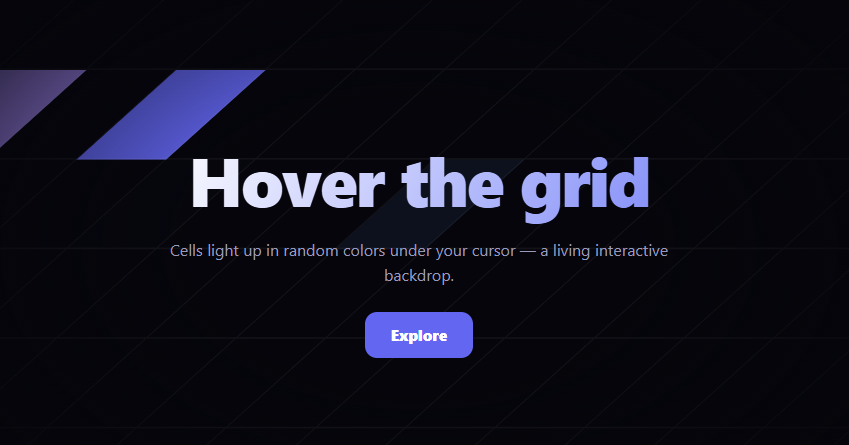
Background boxes is the interactive hero backdrop where a large skewed grid of cells lights up in random colors as your cursor sweeps across it, leaving a brief trail of color that fades away — a playful, living surface behind your headline. This snippet builds it with plain HTML, CSS, and a compact vanilla JavaScript handler that stays fast even with hundreds of cells.
Generating the grid
The grid is created in JavaScript: a loop appends COLS × ROWS (here 24 × 16 = 384) plain <div> cells into a CSS grid whose column and row tracks are set to a fixed pixel size. Each cell has only a faint right and bottom border, so together they form a clean graph-paper lattice. Building the cells in code rather than hand-writing 384 divs keeps the markup tiny and the dimensions trivially adjustable through three constants.
The signature skew
What turns a plain grid into the recognizable "boxes" look is the container transform: skewX(-48deg) scale(1.6). The skew shears the whole lattice into a dynamic parallelogram angle, and the scale-up ensures the skewed grid still covers the full hero with no empty corners. This single transform on the container is what gives the backdrop its distinctive diagonal energy.
Lighting cells with event delegation
Rather than attaching a listener to every one of the hundreds of cells, the snippet uses event delegation: two listeners on the grid container catch pointerover and pointerout events as they bubble up, and a class check confirms the target is a cell. On pointerover the cell's background-color is set to a random color from the palette; on pointerout it's cleared. Delegation means the cost stays constant no matter how large the grid grows — adding more cells doesn't add more listeners.
The fading color trail
Each cell has a transition on background-color, so when the color is cleared the cell fades back to transparent instead of snapping. The clear is also delayed by 400ms with a setTimeout, so a quick cursor pass leaves a short-lived trail of lit cells rather than only ever showing the single cell directly under the pointer. The combination of the delay and the transition is what creates the comet-tail effect.
The vignette and content layering
A radial .bb-fade layer darkens the grid toward the edges so the lit cells appear to emerge from darkness and the hard grid boundary is hidden. The content sits above at a higher z-index and is set pointer-events: none (except the button) so moving the cursor over the headline still passes through to light the grid underneath — the text never blocks the interaction.
Customizing it
Change COLS, ROWS, and SIZE to resize the lattice, edit the skew angle for a different slant, swap the COLORS palette, or tune the 400ms clear delay to lengthen or shorten the trail. Adjust the vignette stops to focus more or less tightly. Pair it with a text generate headline or a shimmer button for a vivid interactive hero.
Step by step
How to Use
- 1Paste HTML, CSS, and JSA skewed grid hero renders behind a centered headline.
- 2Sweep your cursorCells light up in random colors under the pointer.
- 3Move quicklyA short trail of lit cells fades out behind you.
- 4Hover the headlineThe grid still lights up through the text.
- 5Resize the latticeChange COLS, ROWS, and SIZE constants.
- 6Recolor and re-skewEdit the palette and the skew angle.
Real-world uses
Common Use Cases
Got questions?
Frequently Asked Questions
Through event delegation. Instead of a listener on every cell, two listeners on the grid container catch pointerover and pointerout as they bubble, and a class check confirms the target is a cell. The cost stays constant regardless of grid size, so adding more cells never adds more listeners.
Each cell has a CSS transition on background-color, and the color is cleared on pointerout after a 400ms setTimeout. The delay keeps recently-hovered cells lit briefly while you move on, and the transition fades them out smoothly, producing a short comet-tail trail rather than only the single cell under the pointer.
The container has transform: skewX(-48deg) scale(1.6). The skew shears the lattice into a dynamic diagonal parallelogram — the recognizable boxes look — and the scale ensures the skewed grid still covers the whole hero with no empty corners. It's a single transform on the container.
The content layer is set to pointer-events: none (except the button), so pointer events pass through the text to the grid beneath. That means moving the cursor over the headline still triggers the cells underneath, and the text never blocks the interaction.
Render the cells from an array sized by your constants, and attach delegated pointerover/pointerout handlers on the grid container (or use the framework's event binding with a target check). Set the cell color via inline style or a brief state map, clearing it on a timeout. The skew and vignette are pure CSS. In Tailwind, build the grid with grid utilities and apply the skew with an arbitrary transform value.