


Blur Focus Pull — Words Sharpen One by One With CSS
Blur Focus Pull · Text Animation · Plain HTML, CSS & JS · Live preview
Copy & paste
Source Code
<main class="stage">
  <p class="eyebrow">Studio reel · Scene 04</p>
  <h1 class="focus" id="focus">Every detail snaps into focus</h1>
  <p class="focus sub" id="sub">Slow words, sharp results. Watch the lens find each one in turn.</p>
  <div class="controls">
    <label class="lens">Lens blur
      <input type="range" id="blur" min="4" max="28" value="14" aria-label="Blur strength in pixels">
      <output id="out">14px</output>
    </label>
    <button type="button" class="replay" id="replay">Pull focus again</button>
  </div>
</main>*{box-sizing:border-box;margin:0;padding:0}
body{min-height:100vh;display:grid;place-items:center;background:radial-gradient(ellipse at 50% 30%,#1c2433,#0a0e16 70%);font-family:system-ui,sans-serif;color:#eef2f8}
.stage{max-width:760px;padding:32px 22px;display:grid;gap:18px;justify-items:center;text-align:center}
.eyebrow{font-size:12px;letter-spacing:.3em;text-transform:uppercase;color:#7dd3fc}
.focus{font-size:clamp(34px,7vw,64px);font-weight:800;line-height:1.08;letter-spacing:-.02em}
.focus.sub{font-size:clamp(16px,2.4vw,20px);font-weight:400;line-height:1.6;color:#a8b3c4;max-width:560px;letter-spacing:0}
.w{display:inline-block;margin-right:.26em;filter:blur(var(--blur,14px));opacity:0;transform:scale(1.12);transition:filter .9s cubic-bezier(.2,.7,.2,1),opacity .9s ease,transform 1.1s cubic-bezier(.2,.7,.2,1);transition-delay:var(--d,0s)}
.on .w{filter:blur(0);opacity:1;transform:none}
.controls{display:flex;flex-wrap:wrap;gap:16px;align-items:center;justify-content:center;margin-top:14px}
.lens{display:flex;align-items:center;gap:10px;font-size:13px;color:#a8b3c4}
.lens input{accent-color:#38bdf8;width:140px}
.lens output{min-width:38px;font-variant-numeric:tabular-nums;color:#eef2f8}
.replay{font:600 13px system-ui,sans-serif;color:#06202e;background:#7dd3fc;border:0;border-radius:999px;padding:10px 22px;cursor:pointer}
.replay:focus-visible,.lens input:focus-visible{outline:2px solid #fff;outline-offset:3px}
@media (prefers-reduced-motion:reduce){.w{filter:none;transform:none;transition:opacity .3s}}var targets = [document.getElementById('focus'), document.getElementById('sub')];
var range = document.getElementById('blur');
var out = document.getElementById('out');
// Wrap every word once; the original text stays in aria-label so screen readers read the sentence whole
targets.forEach(function (el) {
var text = el.textContent.trim();
el.setAttribute('aria-label', text);
el.innerHTML = text.split(/\s+/).map(function (w) {
return '<span class="w" aria-hidden="true">' + w + '</span>';
}).join(' ');
});
function pull() {
var n = 0;
targets.forEach(function (el) {
el.classList.remove('on');
el.querySelectorAll('.w').forEach(function (w) {
w.style.setProperty('--d', (n++ * 0.16) + 's'); // one word every 160ms across both lines
});
});
void document.body.offsetWidth; // restart the transition
targets.forEach(function (el) { el.classList.add('on'); });
}
range.addEventListener('input', function () {
document.documentElement.style.setProperty('--blur', range.value + 'px');
out.textContent = range.value + 'px';
});
document.getElementById('replay').addEventListener('click', pull);
setTimeout(pull, 250);Extend with AI
Take This Snippet Further With AI
Ask an AI coding assistant to explain how a single custom property per word, used as transition-delay, replaces a chain of timeouts, and why the replay function reads document.body.offsetWidth before re-adding the class. It's also worth asking where blur filters get expensive and how to limit the cost on mobile.
Prompt to recreate it
Copy this into your AI assistant of choice to build the effect from scratch, or as a jumping-off point for your own variant:
Build a "focus pull" text reveal in plain HTML, CSS and JavaScript where a headline and a subtitle come into sharp focus one word at a time.

Requirements:
- JavaScript splits each target element's text into words wrapped in inline-block spans, stores the original sentence in aria-label, and hides the spans from assistive technology.
- Each word starts with filter blur set from a CSS custom property, opacity 0 and a scale of about 1.12, then transitions to no blur, full opacity and no scale when the parent gets an "on" class. Blur and opacity run about 0.9s, the scale a little longer.
- Each word gets a transition delay from a per-word custom property that counts up by about 0.16s continuously across both lines.
- A range slider controls the starting blur (about 4 to 28px) by writing the custom property on the root element and showing the value.
- A "Pull focus again" button removes the on class, forces a reflow by reading a layout property, then adds it back to replay.
- Under prefers-reduced-motion, remove the blur and scale and use only a short opacity fade.
Want to tighten it up first? Run this prompt through the AI Prompt Studio to score it across 8 quality dimensions, catch anti-patterns, and tune the wording for Claude, ChatGPT, or Gemini before you paste it in.
What's included
Features
--d variable feeds transition-delay, so the CSS transition handles the whole sequence.aria-label, and prefers-reduced-motion swaps the blur for a short fade.About this UI Snippet
Blur Focus Pull — Word-by-Word CSS Filter Blur-to-Sharp Reveal
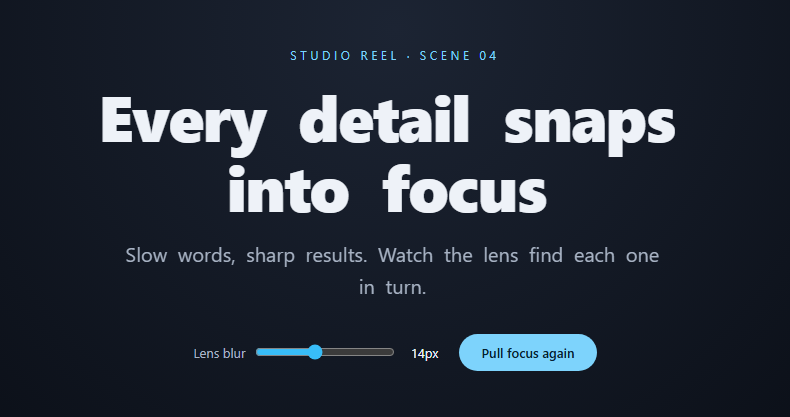
Film cuts to a shot that starts soft, and the camera pulls focus until the subject sharpens. This snippet gives a headline the same entrance. Every word begins out of focus, slightly enlarged and invisible, and resolves one after another until the full sentence is crisp. It reads as calm and expensive rather than flashy, which is why it suits product films, studios and anything premium.
Three properties move together
Each word span transitions filter: blur(), opacity and transform: scale() at once. The scale starts at 1.12 and eases back to 1, which makes the word feel as if it's pulling away from the lens as it sharpens. Blur and opacity run for 0.9s; the scale runs a little longer at 1.1s, so the movement outlasts the sharpening and the finish feels soft instead of abrupt.
The delay is the animation
JavaScript wraps each word and sets a --d custom property that counts up by 0.16s across the headline and then the subtitle, as one continuous sequence. The transition uses transition-delay: var(--d), so there are no timers and no animation library, and the sequence can be restarted by removing the on class, forcing a reflow, and adding it back.
A blur slider, because strength matters
The range input writes --blur on the root element, so the starting blur can run from a gentle 4px to a heavy 28px without touching the CSS. Blur on large text is the expensive part of this effect, so the slider doubles as a quick way to find the cheapest strength that still looks good. The sentence stays readable to screen readers via aria-label, and reduced-motion visitors get a short fade with no blur.
Step by step
How to Use
- 1Paste the three blocksA dark stage appears and the two lines come into focus about a quarter second after load, one word every 160ms.
- 2Replace the copyEdit the text inside
#focusand#sub. The script splits it into words automatically, so no manual spans are needed. - 3Adjust the paceChange
0.16inpull()to speed up or slow down the word-to-word delay. Values between 0.08 and 0.25 read well on short headlines. - 4Choose the starting blurSet the default in the CSS fallback (
var(--blur, 14px)) and in the slider'svalue. Remove the slider markup if you want a fixed strength. - 5Trigger on scroll insteadDelete the
setTimeoutand callpull()from an IntersectionObserver when the heading enters the viewport.
Real-world uses
Common Use Cases
Got questions?
Frequently Asked Questions
Large blur radii on big text cost GPU time while they animate. Keep the radius under about 20px, animate only a few words at once, and avoid it on low-power mobile heroes if you notice dropped frames.
filter and transform need a box to apply to; plain inline text won't scale correctly. inline-block plus a right margin keeps normal word spacing.
Add a separate offset to the counter before the second target, for example start n at 10, or run pull() on each element from its own observer.
The words are real text in the DOM from the start (only styled invisible), and the sentence is also in aria-label. For critical headings, keep the final state in the markup so it still shows without JavaScript.