


Copy & paste
Source Code
<div class="wrap">
<div class="pass">
<div class="pass-main">
<div class="airline">
<div class="logo">
<svg width="20" height="20" viewBox="0 0 24 24" fill="#fff"><path d="M21 16v-2l-8-5V3.5a1.5 1.5 0 0 0-3 0V9l-8 5v2l8-2.5V19l-2 1.5V22l3.5-1 3.5 1v-1.5L13 19v-5.5L21 16z"/></svg>
</div>
<span class="airline-name">Skyward Air</span>
<span class="flight-class">Business</span>
</div>
<div class="route">
<div class="endpoint">
<span class="code">SFO</span>
<span class="city">San Francisco</span>
<span class="time">08:45</span>
</div>
<div class="path">
<div class="path-line">
<span class="dot"></span>
<svg class="plane" width="22" height="22" viewBox="0 0 24 24" fill="currentColor"><path d="M22 16v-2l-8-5V3.5a1.5 1.5 0 0 0-3 0V9l-8 5v2l8-2.5V19l-2 1.5V22l3.5-1 3.5 1v-1.5L14 19v-5.5L22 16z"/></svg>
<span class="dot"></span>
</div>
<span class="duration">5h 30m · Nonstop</span>
</div>
<div class="endpoint end">
<span class="code">JFK</span>
<span class="city">New York</span>
<span class="time">17:15</span>
</div>
</div>
<div class="details">
<div class="detail"><span class="d-label">Passenger</span><span class="d-val">A. MORGAN</span></div>
<div class="detail"><span class="d-label">Flight</span><span class="d-val">SK 482</span></div>
<div class="detail"><span class="d-label">Date</span><span class="d-val">14 JUN</span></div>
<div class="detail"><span class="d-label">Gate</span><span class="d-val hl">B12</span></div>
</div>
</div>
<div class="pass-stub">
<div class="perforation"></div>
<div class="stub-content">
<div class="stub-row"><span class="d-label">Seat</span><span class="d-val big">4A</span></div>
<div class="stub-row"><span class="d-label">Boarding</span><span class="d-val">08:15</span></div>
<div class="stub-row"><span class="d-label">Group</span><span class="d-val">1</span></div>
<div class="barcode">
<span></span><span></span><span></span><span></span><span></span><span></span><span></span><span></span><span></span><span></span><span></span><span></span><span></span><span></span><span></span><span></span><span></span><span></span><span></span><span></span><span></span><span></span><span></span><span></span>
</div>
<span class="ticket-no">SK482 · ETKT 0142847290</span>
</div>
</div>
</div>
</div>* { box-sizing: border-box; margin: 0; padding: 0; }
body { font-family: system-ui, sans-serif; background: linear-gradient(135deg,#1e3a8a,#3b82f6); min-height: 100vh; display: flex; align-items: center; justify-content: center; padding: 24px; }
.wrap { width: 100%; max-width: 720px; }
.pass { display: flex; border-radius: 20px; overflow: hidden; box-shadow: 0 30px 80px rgba(0,0,0,0.35); }
.pass-main { flex: 1; background: #fff; padding: 28px; }
.airline { display: flex; align-items: center; gap: 10px; margin-bottom: 28px; }
.logo { width: 34px; height: 34px; background: linear-gradient(135deg,#2563eb,#1e40af); border-radius: 9px; display: flex; align-items: center; justify-content: center; }
.airline-name { font-size: 16px; font-weight: 800; color: #1e293b; }
.flight-class { margin-left: auto; font-size: 11px; font-weight: 700; color: #2563eb; background: rgba(37,99,235,0.1); padding: 4px 12px; border-radius: 20px; letter-spacing: 0.5px; }
.route { display: flex; align-items: center; justify-content: space-between; margin-bottom: 30px; }
.endpoint { display: flex; flex-direction: column; }
.endpoint.end { align-items: flex-end; }
.code { font-size: 38px; font-weight: 900; color: #0f172a; line-height: 1; letter-spacing: -1px; }
.city { font-size: 12px; color: #94a3b8; margin-top: 4px; }
.time { font-size: 15px; font-weight: 700; color: #475569; margin-top: 8px; }
.path { flex: 1; display: flex; flex-direction: column; align-items: center; padding: 0 18px; }
.path-line { display: flex; align-items: center; width: 100%; gap: 4px; color: #2563eb; }
.path-line .dot { width: 7px; height: 7px; border-radius: 50%; background: #2563eb; flex-shrink: 0; }
.path-line::before, .path-line::after { content: ''; flex: 1; height: 2px; background: repeating-linear-gradient(90deg,#cbd5e1 0,#cbd5e1 4px,transparent 4px,transparent 8px); }
.plane { transform: rotate(0deg); flex-shrink: 0; }
.duration { font-size: 11px; color: #94a3b8; margin-top: 10px; white-space: nowrap; }
.details { display: grid; grid-template-columns: repeat(4,1fr); gap: 14px; border-top: 1px dashed #e2e8f0; padding-top: 20px; }
.detail { display: flex; flex-direction: column; gap: 4px; }
.d-label { font-size: 10px; font-weight: 700; color: #94a3b8; text-transform: uppercase; letter-spacing: 0.5px; }
.d-val { font-size: 14px; font-weight: 700; color: #1e293b; }
.d-val.hl { color: #2563eb; }
.d-val.big { font-size: 26px; }
.pass-stub { width: 220px; background: #2563eb; color: #fff; position: relative; display: flex; align-items: center; }
.perforation { position: absolute; left: 0; top: 0; bottom: 0; width: 2px; background: repeating-linear-gradient(180deg,rgba(255,255,255,0.5) 0,rgba(255,255,255,0.5) 6px,transparent 6px,transparent 12px); }
.pass-stub::before, .pass-stub::after { content: ''; position: absolute; left: -11px; width: 22px; height: 22px; border-radius: 50%; background: #2c4fc4; }
.pass-stub::before { top: -11px; background: linear-gradient(135deg,#1e3a8a,#3b82f6); }
.pass-stub::after { bottom: -11px; background: linear-gradient(135deg,#1e3a8a,#3b82f6); }
.stub-content { padding: 28px 24px; width: 100%; }
.stub-row { display: flex; justify-content: space-between; align-items: baseline; margin-bottom: 16px; }
.stub-row .d-label { color: rgba(255,255,255,0.6); }
.stub-row .d-val { color: #fff; }
.barcode { display: flex; gap: 2px; height: 52px; align-items: stretch; margin: 20px 0 10px; }
.barcode span { flex: 1; background: #fff; }
.barcode span:nth-child(2n) { flex: 0.5; }
.barcode span:nth-child(3n) { flex: 1.5; }
.barcode span:nth-child(5n) { flex: 0.4; }
.ticket-no { font-size: 9px; color: rgba(255,255,255,0.6); font-family: ui-monospace, monospace; letter-spacing: 0.5px; }
@media (max-width: 560px) { .pass { flex-direction: column; } .pass-stub { width: 100%; } .perforation { left: 0; right: 0; top: 0; bottom: auto; width: auto; height: 2px; background: repeating-linear-gradient(90deg,rgba(255,255,255,0.5) 0,rgba(255,255,255,0.5) 6px,transparent 6px,transparent 12px); } .pass-stub::before { left: -11px; top: -11px; } .pass-stub::after { left: auto; right: -11px; top: -11px; bottom: auto; } }Extend with AI
Take This Snippet Further With AI
The AI prompt for this one is for Patreon supporters ($3 a month), along with a site with no ads. Supporters enter the passcode once and it is remembered in this browser.
What's included
Features
About this UI Snippet
Boarding Pass — Flight Route, Perforated Tear-Off Stub & CSS Barcode
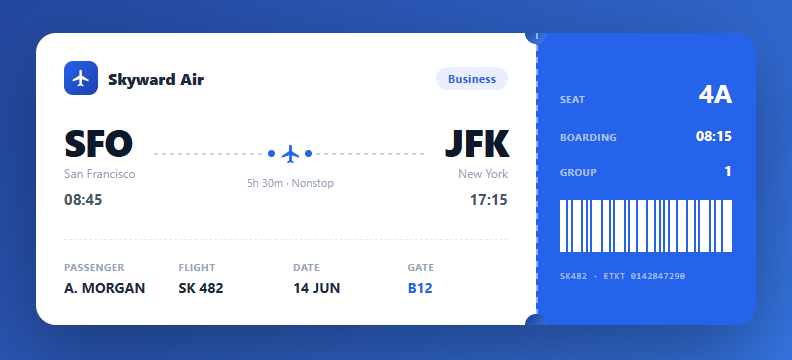
A boarding pass card is a high-craft UI piece that appears in travel apps, flight booking confirmations, event tickets, and design portfolios. This snippet recreates a realistic airline boarding pass entirely in HTML and CSS: an airline header, a departure-to-arrival route with an animated flight path, passenger and flight details, and a colour-contrasting tear-off stub with a pure-CSS barcode and notched perforation.
The two-part ticket structure
The pass is a flex container split into a white main section and a coloured stub. This mirrors a real boarding pass where the stub is the part torn off and retained at the gate. On narrow screens, a media query stacks the two parts vertically and rotates the perforation to a horizontal tear line — a thoughtful responsive adaptation that keeps the ticket metaphor intact.
The perforated tear edge
The perforation between the two parts is built from a repeating-linear-gradient that creates a dashed dotted line, plus two circular notches punched into the top and bottom of the seam using ::before and ::after pseudo-elements coloured to match the page background. These notches are the visual signature of a tear-off ticket — the same technique used for the gift card and other coupon designs.
The flight route visualisation
The route shows large three-letter airport codes (SFO, JFK), city names, and times. Between them, a flight path uses a dashed repeating-gradient line with a plane icon centred and a dot at each end. The dashed line evokes a flight trajectory on a map, and the plane sits at the midpoint pointing toward the destination.
The pure-CSS barcode
The barcode is a row of span elements with varying flex widths driven by nth-child selectors (every 2nd, 3rd, and 5th bar gets a different width). This produces an irregular, realistic barcode pattern without any image or library. It is decorative here, but in production you would replace it with a real scannable code from the QR code generator.
Typography and detail hierarchy
The design uses a clear hierarchy: oversized airport codes anchor the eye, uppercase micro-labels (Passenger, Flight, Gate) sit above their values, and the gate number is highlighted in the brand blue. font-weight and size contrast carry the information architecture, a technique that makes dense ticket data scannable at a glance.
Step by step
How to Use
- 1Update the flight detailsEdit the airport codes (SFO, JFK), city names, departure and arrival times, and the duration text to match your flight.
- 2Set passenger and gate infoChange the Passenger name, Flight number, Date, and Gate in the details grid. The gate uses a highlighted blue style to draw attention.
- 3Edit the stubUpdate the Seat, Boarding time, and Group on the coloured stub. The seat number uses an oversized style as the most important stub value.
- 4Brand the passChange the airline name and logo, and recolour the stub and accents by editing the brand blue values. The gradient page background can match your brand too.
- 5Add a real barcodeReplace the decorative CSS barcode with a real one — generate a Code128 or QR code from the ticket number using a library like JsBarcode or qrcode, and insert the resulting image or canvas in place of the span bars.
- 6Export for your frameworkClick "JSX" for a React component that accepts a flight prop object. Click "Vue" for a Vue 3 SFC. Click "Tailwind" for a React + Tailwind version.
Real-world uses
Common Use Cases
Got questions?
Frequently Asked Questions
Two techniques combine. The dashed line down the seam is a repeating-linear-gradient that alternates a visible colour and transparent every few pixels, producing a dotted perforation. The circular notches at the top and bottom of the seam are ::before and ::after pseudo-elements on the stub: each is a circle (border-radius: 50%) positioned half-off the left edge and filled with the same colour as the page background, so they read as holes punched into the ticket. Together they recreate the look of a real tear-off stub.
It is decorative — a row of span bars with varying widths set by nth-child rules to look like a real barcode without any image. For a scannable boarding pass, replace it with a genuine code generated from the ticket data: use JsBarcode for a Code128 barcode or the qrcode library for a QR code, rendering to a canvas or SVG. Airlines typically use the Aztec or PDF417 2D formats for boarding passes, which encode the full IATA BCBP data string.
A media query at 560px switches the flex direction from row to column, so the stub drops below the main section instead of sitting beside it. The perforation, originally a vertical line, is rotated to a horizontal repeating-gradient across the new seam, and the two circular notches are repositioned to the left and right of the top edge. This keeps the tear-off ticket metaphor intact on narrow screens where a side-by-side layout would be too cramped.
Accept a flight prop object: { airline, class, from: {code, city, time}, to: {code, city, time}, duration, passenger, flightNo, date, gate, seat, boarding, group, ticketNo }. Render the static markup from those values. For a real barcode, render a Barcode component (from react-barcode or similar) passing the ticket number. Generate Wallet passes server-side and offer Add to Wallet buttons alongside the visual card.