



Bootstrap Audit Log Viewer — Free HTML CSS JS Snippet
Bootstrap Audit Log Viewer · Dashboards · Plain HTML, CSS & JS · Live preview
Copy & paste
Source Code
<div class="container py-5 d-flex justify-content-center">
  <div class="card bsaudit-card">
    <div class="card-body p-3">
      <div class="d-flex gap-2 mb-2">
        <input type="search" class="form-control form-control-sm" id="bsauditSearch" placeholder="Search actor or action...">
        <select class="form-select form-select-sm" id="bsauditType" style="max-width:130px;">
          <option value="">All types</option>
          <option value="security">Security</option>
          <option value="content">Content</option>
          <option value="billing">Billing</option>
        </select>
      </div>
      <p class="small text-muted mb-2" id="bsauditCount"></p>
      <ul class="list-unstyled mb-0" id="bsauditList"></ul>
    </div>
  </div>
</div>
.bsaudit-card { width: 440px; max-width: 100%; border: 1px solid #eceef1; border-radius: 14px; }
.bsaudit-row { padding: 8px 0; border-bottom: 1px solid #f1f2f5; font-size: 12.5px; }
.bsaudit-row:last-child { border-bottom: none; }
.bsaudit-time { color: #9ca3af; font: 600 10.5px ui-monospace, monospace; }
.bsaudit-row mark { background: #fde68a; padding: 0 1px; border-radius: 2px; }const LOG = [
{ actor: 'Dana Reyes', action: 'signed in from a new device', type: 'security', time: '2 min ago', tone: 'warning' },
{ actor: 'Marcus Lee', action: 'published "Q3 Roadmap"', type: 'content', time: '18 min ago', tone: 'success' },
{ actor: 'Priya Nair', action: 'updated billing card', type: 'billing', time: '1 hr ago', tone: 'secondary' },
{ actor: 'Sofia Chen', action: 'deleted "Draft: onboarding copy"', type: 'content', time: '3 hr ago', tone: 'danger' },
{ actor: 'Wale Adeyemi', action: 'reset their password', type: 'security', time: 'Yesterday', tone: 'warning' },
{ actor: 'Dana Reyes', action: 'invited [email protected]', type: 'security', time: 'Yesterday', tone: 'secondary' },
{ actor: 'Ken Sato', action: 'downgraded to Starter plan', type: 'billing', time: '2 days ago', tone: 'danger' },
];
const search = document.getElementById('bsauditSearch');
const typeFilter = document.getElementById('bsauditType');
const list = document.getElementById('bsauditList');
const count = document.getElementById('bsauditCount');
function escapeHtml(s) { return s.replace(/&/g, '&').replace(/</g, '<').replace(/>/g, '>'); }
function highlight(text, q) {
if (!q) return escapeHtml(text);
const escaped = q.replace(/[.*+?^${}()|[\]\\]/g, '\\$&');
return escapeHtml(text).replace(new RegExp('(' + escaped + ')', 'ig'), '<mark>$1</mark>');
}
function render() {
const q = search.value.trim();
const type = typeFilter.value;
const qLower = q.toLowerCase();
const matches = LOG.filter(entry => {
const typeOk = !type || entry.type === type;
const textOk = !q || entry.actor.toLowerCase().includes(qLower) || entry.action.toLowerCase().includes(qLower);
return typeOk && textOk;
});
count.textContent = matches.length + ' of ' + LOG.length + ' events';
list.innerHTML = matches.map(entry =>
'<li class="bsaudit-row"><span class="badge text-bg-' + entry.tone + ' me-1">' + entry.type + '</span>' +
'<strong>' + highlight(entry.actor, q) + '</strong> ' + highlight(entry.action, q) +
' <span class="bsaudit-time">· ' + entry.time + '</span></li>'
).join('') || '<li class="bsaudit-row text-muted">No matching events.</li>';
}
search.addEventListener('input', render);
typeFilter.addEventListener('change', render);
render();Extend with AI
Take This Snippet Further With AI
The AI prompt for this one is for Patreon supporters ($3 a month, 7 days free), along with a site with no ads. Supporters enter the passcode once and it is remembered in this browser.
What's included
Features
About this UI Snippet
Bootstrap Audit Log Viewer — HTML, CSS & JavaScript
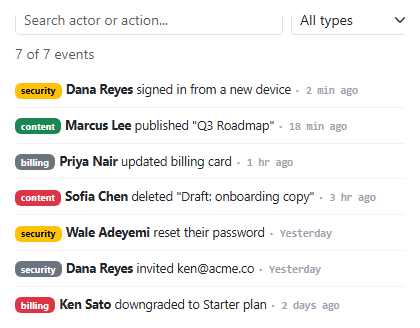
Search text and the type dropdown filter the exact same LOG array together inside one render() call — matches only keeps an entry where both typeOk and textOk are true, so searching "dana" while the type filter is set to "Content" correctly shows nothing (Dana's visible actions here are security-type), rather than the two filters accidentally behaving as an OR and returning a confusing mixed result.
The search box matches against both the actor's name and the action text in one pass, and every match gets the same safe-highlighting treatment used in bootstrap-search-results-highlighting — the query is escaped before being used to build a RegExp (so a search containing a regex-special character can't break or misbehave), and the source text is HTML-escaped before highlighting (so an actor name or action text can never be misinterpreted as markup).
Each entry's tone field is independent of its type field — a security event can be a routine invite (secondary) or a genuinely concerning new-device sign-in (warning), which is why tone is stored per entry rather than derived automatically from type; two events of the same category don't necessarily carry the same real-world severity.
Step by step
How to Use
- 1Load the snippetAll 7 audit events show, each tagged with a colored type badge and a relative time.
- 2Type "dana" in the search boxThe list narrows live to Dana's two events, with "Dana" highlighted in yellow in each.
- 3Select "Content" from the type dropdown while still searching "dana"The list empties, since none of Dana's visible events are content-type — both filters apply together.
- 4Clear the search and leave "Content" selectedOnly the content-type events show, regardless of actor.
- 5Reset both filtersAll 7 events reappear, and the count reads "7 of 7 events".
Real-world uses
Common Use Cases
Got questions?
Frequently Asked Questions
They combine with AND logic — an entry must satisfy both the current search text and the current type selection (when either is set) to appear, which is why searching one actor while filtering to an unrelated type can correctly return zero results.
Yes — the query is escaped before being used to build a RegExp, the same technique used in bootstrap-search-results-highlighting, so typing a character like "(" or "*" searches for it literally instead of breaking or matching unpredictably.
Two events of the same type can carry very different real-world significance — a routine invite and a suspicious new-device sign-in are both "security" events, but only one deserves a warning-colored badge, which is why tone is set per entry rather than inferred from type.
Yes. Keep LOG as static data, track search and type filter in component state, and derive the filtered/highlighted list in the render function using the same combined AND-filter and escape-then-highlight approach.