

Bootstrap OTP Login Form — Free HTML CSS JS Snippet
Bootstrap OTP Login Form · Forms · Plain HTML, CSS & JS · Live preview
Copy & paste
Source Code
<div class="container py-5 d-flex justify-content-center">
<div class="card bsotp-card">
<div class="card-body p-4">
<div id="bsotpStep1">
<h5 class="fw-bold mb-1 text-center">Log in</h5>
<p class="text-muted small mb-3 text-center">Enter your email or phone to receive a one-time code.</p>
<label class="form-label small fw-semibold" for="bsotpContact">Email or phone</label>
<input type="text" class="form-control mb-3" id="bsotpContact" placeholder="[email protected]">
<div class="small text-danger mb-2 d-none" id="bsotpContactError">Enter a valid email or phone number.</div>
<button class="btn btn-dark w-100 fw-bold" id="bsotpSendBtn">Send code</button>
</div>
<div id="bsotpStep2" class="d-none">
<h5 class="fw-bold mb-1 text-center">Enter the code</h5>
<p class="text-muted small mb-3 text-center">We sent a 6-digit code to <span id="bsotpTarget" class="fw-semibold"></span>.</p>
<div class="d-flex gap-2 justify-content-center mb-3" id="bsotpDigits">
<input type="text" inputmode="numeric" maxlength="1" class="form-control text-center bsotp-box">
<input type="text" inputmode="numeric" maxlength="1" class="form-control text-center bsotp-box">
<input type="text" inputmode="numeric" maxlength="1" class="form-control text-center bsotp-box">
<input type="text" inputmode="numeric" maxlength="1" class="form-control text-center bsotp-box">
<input type="text" inputmode="numeric" maxlength="1" class="form-control text-center bsotp-box">
<input type="text" inputmode="numeric" maxlength="1" class="form-control text-center bsotp-box">
</div>
<p class="small text-center mb-3" id="bsotpStatus"> </p>
<button class="btn btn-dark w-100 fw-bold mb-2" id="bsotpVerifyBtn" disabled>Verify & log in</button>
<p class="small text-muted text-center mb-0">
<a href="javascript:void(0)" id="bsotpBack">← Change contact</a>
·
<a href="javascript:void(0)" id="bsotpResend">Resend code</a>
<span id="bsotpTimer" class="text-muted"></span>
</p>
</div>
</div>
</div>
</div>.bsotp-card { width: 400px; border: 1px solid #eceef1; border-radius: 14px; }
.bsotp-box { width: 44px; height: 52px; font-size: 20px; font-weight: 700; padding: 0; }
#bsotpStep2 { animation: bsotpFadeIn .25s ease; }
@keyframes bsotpFadeIn { from { opacity: 0; transform: translateY(6px); } to { opacity: 1; transform: translateY(0); } }const CORRECT_CODE = '135790';
const RESEND_SECONDS = 30;
const step1 = document.getElementById('bsotpStep1');
const step2 = document.getElementById('bsotpStep2');
const contactInput = document.getElementById('bsotpContact');
const contactError = document.getElementById('bsotpContactError');
const sendBtn = document.getElementById('bsotpSendBtn');
const targetLabel = document.getElementById('bsotpTarget');
const boxes = Array.from(document.querySelectorAll('.bsotp-box'));
const verifyBtn = document.getElementById('bsotpVerifyBtn');
const status = document.getElementById('bsotpStatus');
const backLink = document.getElementById('bsotpBack');
const resendLink = document.getElementById('bsotpResend');
const timerLabel = document.getElementById('bsotpTimer');
let countdownId = null;
function isValidContact(value) {
const email = /^[^\s@]+@[^\s@]+\.[^\s@]+$/;
const phone = /^[0-9+()\-\s]{7,}$/;
return email.test(value) || phone.test(value);
}
function currentCode() {
return boxes.map(b => b.value).join('');
}
function checkComplete() {
verifyBtn.disabled = currentCode().length !== 6;
}
function startCountdown() {
let remaining = RESEND_SECONDS;
resendLink.classList.add('disabled', 'text-muted');
resendLink.style.pointerEvents = 'none';
timerLabel.textContent = ' (' + remaining + 's)';
clearInterval(countdownId);
countdownId = setInterval(() => {
remaining -= 1;
if (remaining <= 0) {
clearInterval(countdownId);
timerLabel.textContent = '';
resendLink.classList.remove('disabled', 'text-muted');
resendLink.style.pointerEvents = 'auto';
} else {
timerLabel.textContent = ' (' + remaining + 's)';
}
}, 1000);
}
// Revealing step 2 is a swap, not a navigation: step 1 is hidden and step 2's
// d-none is removed, which also re-triggers the CSS fade-in animation.
function revealStep2() {
targetLabel.textContent = contactInput.value.trim();
step1.classList.add('d-none');
step2.classList.remove('d-none');
boxes.forEach(b => { b.value = ''; b.classList.remove('is-invalid'); });
checkComplete();
boxes[0].focus();
status.textContent = '\u00a0';
status.className = 'small text-center mb-3';
startCountdown();
}
sendBtn.addEventListener('click', () => {
const value = contactInput.value.trim();
const valid = isValidContact(value);
contactInput.classList.toggle('is-invalid', !valid);
contactError.classList.toggle('d-none', valid);
if (valid) revealStep2();
});
boxes.forEach((box, i) => {
box.addEventListener('input', () => {
box.value = box.value.replace(/[^0-9]/g, '').slice(0, 1);
if (box.value && i < boxes.length - 1) boxes[i + 1].focus();
checkComplete();
});
box.addEventListener('keydown', e => {
if (e.key === 'Backspace' && !box.value && i > 0) boxes[i - 1].focus();
});
box.addEventListener('paste', e => {
const text = (e.clipboardData || window.clipboardData).getData('text').replace(/[^0-9]/g, '');
if (text.length < 2) return;
e.preventDefault();
text.slice(0, 6).split('').forEach((ch, idx) => { if (boxes[idx]) boxes[idx].value = ch; });
checkComplete();
boxes[Math.min(text.length, 6) - 1].focus();
});
});
verifyBtn.addEventListener('click', () => {
const ok = currentCode() === CORRECT_CODE;
status.textContent = ok ? 'Logged in successfully.' : 'Incorrect code — try again.';
status.className = 'small text-center mb-3 ' + (ok ? 'text-success' : 'text-danger');
boxes.forEach(b => b.classList.toggle('is-invalid', !ok));
});
backLink.addEventListener('click', () => {
clearInterval(countdownId);
step2.classList.add('d-none');
step1.classList.remove('d-none');
});
resendLink.addEventListener('click', () => {
if (resendLink.classList.contains('disabled')) return;
boxes.forEach(b => { b.value = ''; b.classList.remove('is-invalid'); });
boxes[0].focus();
checkComplete();
status.textContent = 'A new code was sent.';
status.className = 'small text-center mb-3 text-muted';
startCountdown();
});Extend with AI
Take This Snippet Further With AI
The AI prompt for this one is for Patreon supporters ($3 a month), along with a site with no ads. Supporters enter the passcode once and it is remembered in this browser.
What's included
Features
About this UI Snippet
Bootstrap OTP Login Form — HTML, CSS & JavaScript
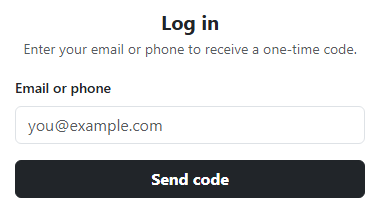
This snippet models login as two distinct states inside one .card, not two pages: #bsotpStep1 collects a contact value in a Bootstrap form-control, and #bsotpStep2 — initially hidden with d-none — holds the six-box OTP entry. Clicking Send code runs isValidContact(), a small function that checks the typed value against either an email regex or a loose phone-number regex, so both formats are accepted. On success, revealStep2() toggles the d-none classes on both steps in one function, writes the entered contact into #bsotpTarget so the confirmation text is genuinely dynamic ("We sent a 6-digit code to [email protected]"), resets the six boxes, and focuses the first one. Because #bsotpStep2 carries a bsotpFadeIn keyframe animation triggered on d-none removal, the transition between steps reads as a reveal rather than an abrupt layout jump.
The six OTP boxes reuse the auto-advance / backspace-to-previous / full-paste-distribution pattern — typing a digit moves focus forward, Backspace on an empty box moves focus back, and a paste event listener spreads a multi-digit clipboard value across all six boxes starting from index 0. What's specific to this snippet is the resend flow: startCountdown() sets a 30-second RESEND_SECONDS timer, disables the Resend link by adding the disabled/text-muted classes and setting pointerEvents: 'none' (a class alone doesn't stop clicks on an <a>, so the inline style is required), and updates #bsotpTimer every second via setInterval with a live "(29s)" style countdown. When it reaches zero, clearInterval fires and the link's disabled styling and pointer-events lock are both removed, re-enabling it.
A pitfall this handles explicitly: switching back to step 1 via the "Change contact" link must stop the running countdown with clearInterval(countdownId) — otherwise a stale timer from a previous OTP request would keep ticking in the background and could re-enable a resend link that no longer exists in the visible step, or worse, leak an interval that never gets cleared across repeated back-and-forth navigation. Keeping countdownId in module scope and clearing it on every fresh startCountdown() call (not just on navigating back) also prevents two overlapping intervals from both writing to #bsotpTimer if Resend is somehow triggered twice in a row.
The contact validation itself deliberately accepts two very different shapes of input through one function rather than forcing the user to pick "email" or "phone" up front: isValidContact() runs the trimmed value through an email regex first, and only if that fails, through a looser phone regex accepting digits, spaces, parentheses, plus signs, and hyphens of at least seven characters. Returning true from either check is enough, so a login page doesn't need a separate toggle or tab for "email" vs "phone" login — the same input field and the same Send code button handle both, which mirrors how most real-world OTP login screens are built today. Because checkComplete() is called from within the shared input listener attached to every box in the same boxes.forEach loop that also handles digit-stripping and auto-advance, the Verify button's disabled state is always recalculated immediately after any keystroke, paste, or programmatic reset, rather than relying on a separate validation pass triggered only on submit.
Step by step
How to Use
- 1Load the snippetA single-step card appears asking for an email or phone number, with a Send code button.
- 2Type an invalid value and click Send codeThe field outlines red and an inline error appears below it; nothing advances.
- 3Type a valid email and click Send codeThe card fades into step two, showing six empty digit boxes and your entered contact echoed back in the subtext.
- 4Type the code 135790Focus auto-advances between boxes as you type, and the Verify button enables once all six are filled.
- 5Watch the Resend linkIt appears grayed out with a live "(30s)" countdown next to it that ticks down every second until it re-enables itself.
- 6Click Verify & log inA green success message appears for the correct code, or a red error with all six boxes outlined invalid for any other code.
Real-world uses
Common Use Cases
Got questions?
Frequently Asked Questions
That snippet shows the six-digit boxes immediately as a single-step form. This one models the realistic two-step login: a contact field first, then an animated reveal of the OTP boxes only after a valid contact is submitted, plus a live resend countdown that the 2FA snippet does not include.
Yes. In React, replace the two d-none toggles with a step state variable and useEffect for the setInterval cleanup (clearInterval in the effect's return function); in Vue, use ref for the step and onUnmounted to clear the interval; in Angular, manage the interval in ngOnDestroy so it is not left running after the component is destroyed.
Yes — clicking "Change contact" calls clearInterval on the stored countdownId before returning to step one, and starting a new send always calls startCountdown() fresh, which itself clears any prior interval first, so no two timers ever run simultaneously.
The email check requires a basic [email protected] shape via regex, and the phone check accepts 7 or more characters made up of digits, spaces, parentheses, plus signs, and hyphens — loose enough for most international formats without pretending to be a full validation library.
Keep the two-step HTML structure and all JS untouched, then swap .card/.card-body and .form-control for Tailwind utilities like rounded-xl border p-6 and border rounded px-3 py-2, and replace the .bsotp-box sizing with Tailwind's w-11 h-13 text-center classes.
Yes, 135790 for this front-end demo — in production, Send code would call your backend to actually dispatch an OTP, and Verify would POST the entered digits to a real endpoint instead of comparing against a constant.