



Bootstrap Usage-Based Pricing Calculator — Free Snippet
Bootstrap Usage-Based Pricing Calculator · Pricing · Plain HTML, CSS & JS · Live preview
About this UI Snippet
Bootstrap Usage-Based Pricing Calculator — HTML, CSS & JavaScript

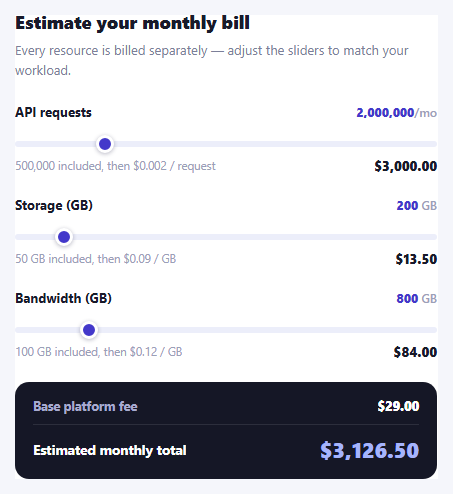
Usage-based pricing ("$0.02 per API call, plus $9 per seat") is hard for a visitor to mentally compute — this snippet does the arithmetic live. Two real Bootstrap 5.3 form-range sliders control API call volume and active seat count; every input event recalculates calls * PER_CALL + seats * PER_SEAT and updates both the slider labels and the total, all from two named rate constants at the top of the script rather than numbers scattered through the calculation.
Both sliders share one recalc() function rather than each having its own handler — the same pattern used elsewhere in this collection's cart and pricing snippets — which is what guarantees moving either slider always reflects both current values, never a stale one left over from before the other slider moved.
What's included
Features
Step by step
How to Use
- 1Load the snippetClick the snippet in the sidebar Library tab. The preview loads at 50,000 calls, 3 seats, $1,027/mo.
- 2Drag the API calls sliderThe call count and the total both update live as you drag, before you release the slider.
- 3Drag the seats sliderThe seat count and total update the same way — and the API-call contribution stays correctly included.
- 4Adjust the ratesChange PER_CALL or PER_SEAT in the JS panel to match your own real pricing.
Real-world uses
Common Use Cases
Got questions?
Frequently Asked Questions
Yes — they're Bootstrap 5.3's actual form-range input styling on native HTML range inputs, loaded from the real CDN, not a custom slider widget.
While dragging — the input event (not change) fires continuously as the slider moves, so the total recalculates in real time, not just once you let go.
Edit the PER_CALL and PER_SEAT constants near the top of the JS panel — both are read directly by recalc(), so nothing else needs to change.
Sharing one recalc() function means moving either slider always recomputes the total using both current values — if each slider had its own separate handler, one could easily use a stale value for the other.
Yes — add a third form-range input, a PER_GB rate constant, and one more term in the total calculation inside recalc(); attach the same input listener to the new slider.
Copy & paste
Source Code
<div class="container py-5" style="max-width:520px">
  <div class="card bscalc-card">
    <div class="card-body p-4">
      <h5 class="fw-bold mb-1">Estimate your monthly cost</h5>
      <p class="text-muted small mb-4">$0.02 per API call, plus $9/mo per active seat.</p>

      <label class="form-label small fw-semibold d-flex justify-content-between">
        <span>API calls / month</span><span id="bscalcCallsVal">50,000</span>
      </label>
      <input type="range" class="form-range mb-3" id="bscalcCalls" min="0" max="500000" step="10000" value="50000">

      <label class="form-label small fw-semibold d-flex justify-content-between">
        <span>Active seats</span><span id="bscalcSeatsVal">3</span>
      </label>
      <input type="range" class="form-range mb-4" id="bscalcSeats" min="1" max="50" step="1" value="3">

      <div class="bscalc-total d-flex justify-content-between align-items-baseline">
        <span class="text-muted small">Estimated monthly cost</span>
        <span class="bscalc-price">$<span id="bscalcPrice">1,027</span></span>
      </div>
    </div>
  </div>
</div>
.bscalc-card { border: 1px solid #eceef1; border-radius: 14px; }
.bscalc-total { border-top: 1px dashed #e5e7eb; padding-top: 16px; }
.bscalc-price { font-size: 26px; font-weight: 800; color: #111827; }
.form-range::-webkit-slider-thumb { background: #6366f1; }
.form-range::-moz-range-thumb { background: #6366f1; }const callsInput = document.getElementById('bscalcCalls');
const seatsInput = document.getElementById('bscalcSeats');
const callsVal = document.getElementById('bscalcCallsVal');
const seatsVal = document.getElementById('bscalcSeatsVal');
const priceEl = document.getElementById('bscalcPrice');
const PER_CALL = 0.02;
const PER_SEAT = 9;
function recalc() {
const calls = Number(callsInput.value);
const seats = Number(seatsInput.value);
callsVal.textContent = calls.toLocaleString();
seatsVal.textContent = seats;
const total = calls * PER_CALL + seats * PER_SEAT;
priceEl.textContent = Math.round(total).toLocaleString();
}
[callsInput, seatsInput].forEach(el => el.addEventListener('input', recalc));
recalc();Extend with AI
Take This Snippet Further With AI
Hand this snippet's HTML, CSS, and JS to an AI coding assistant like Claude and ask it to add tiered/volume pricing (a lower per-call rate above a usage threshold) instead of a flat rate, or to add a comparison showing how the estimate compares to a competitor's flat-rate plan. It's also a good exercise to ask the assistant to sync the slider values to the URL query string so an estimate can be shared via link.
Prompt to recreate it
Copy this into your AI assistant of choice to build the effect from scratch, or as a jumping-off point for your own variant:
Build a Bootstrap 5.3 usage-based pricing calculator, using the real Bootstrap CDN framework (bootstrap.min.css and bootstrap.bundle.min.js), not custom CSS made to resemble Bootstrap.

Requirements:
- A card containing two real Bootstrap form-range sliders — one for a usage metric (e.g. API calls per month, range 0 to 500,000) and one for a seat/user count (range 1 to 50) — each with a live label showing its current formatted value.
- Two named rate constants (a per-unit rate for the usage metric, a per-seat rate) used in a single shared recalculation function.
- Both sliders must trigger recalculation on every input event (not just on release/change), updating a prominently displayed estimated total that combines both current slider values correctly.
- The total and the usage-metric label must be formatted with thousands separators for readability at large values.
Want to tighten it up first? Run this prompt through the AI Prompt Studio to score it across 8 quality dimensions, catch anti-patterns, and tune the wording for Claude, ChatGPT, or Gemini before you paste it in.