



Cave Flyer Game: 6 Levels, Gems, Stars and Power-Ups
Cave Flyer Game · Games · Plain HTML, CSS & JS · Live preview
For supporters
Source Code
Want the source code?
Play the game for free. Become a WebDevPuneet supporter to unlock the complete HTML, CSS and JavaScript source code, the exports (HTML, React, Vue, Angular, Tailwind) and Fork.
Extend with AI
Take This Snippet Further With AI
The AI prompt for this one is for Patreon supporters ($3 a month), along with a site with no ads. Supporters enter the passcode once and it is remembered in this browser.
What's included
Features
About this UI Snippet
Cave Flyer: Six Levels of One-Button Thrust Physics, Hazards and Game Feel
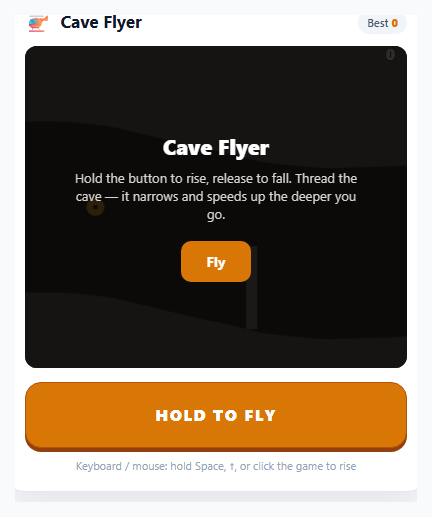
The one-button "helicopter" game is a lesson in doing the most with the least: one input (hold to rise, release to fall) against a tunnel that keeps tightening. This snippet builds a complete level-based version on one HTML5 <canvas> with no libraries and no image files. You fly a small helicopter through six procedurally generated caves, collect gems in chains for a combo multiplier, dodge spikes, sliding gates and bats, pick up a shield, a magnet or slow-motion, and reach the glowing exit portal at the end of each level to earn up to three stars. It plays with a hold button, Space or the up arrow, or a press anywhere on the game.
Levels are data
Each level is one object in the LEVELS array: a name, a colour theme (crystal, magma or abyss), a length in pixels, a gap that runs from a wide start value to a narrow end value, a speed that runs from slow to fast, and the chance per slice of spikes, gates, bats, power-ups and gem trails. Level 1 has only a few spikes and a wide cave; gates arrive in level 2, bats in level 3, and the last level has a gap down to 96 pixels at close to five pixels per frame. Adding a seventh level means adding one more object. A level ends when the craft crosses the portal at world x = length, and the last 250 pixels before it are kept free of hazards so the run-in feels like a reward.
Stars, level select and saved progress
When you reach the portal you get one star for finishing, a second for collecting at least half of the gems that were generated, and a third for 80% or more. Stars, the best score per level and the number of unlocked levels are saved as one JSON object in localStorage (inside try/catch). The start screen shows a six-button level grid with locks and stars, "Play" continues from the first level you have not cleared, and the clear screen offers "Next level" or "Levels". A crash gives a hint and lets you retry the same level.
Hold-to-thrust physics on one axis
The craft only moves vertically and is driven by one flag. Every frame, if flying is true an upward LIFT acceleration is added to its velocity, otherwise a downward GRAV is added, and the velocity is clamped and added to the position. The craft is never set to a height; it is always accelerating one way or the other, so you hover by feathering the button. The same flag is set by the hold button, the keyboard and a press on the canvas, and cleared on pointer up, cancel and leave, so thrust can never get stuck on.
A procedural cave from recycled slices
The cave is a list of thin vertical slices, each storing a ceiling and a floor height. genSlice() makes the next one by moving the cave's centre with a bounded random walk (so the tunnel curves instead of jittering), narrowing the gap along the level, and occasionally widening it into a calm chamber. Slices that scroll off the left are removed and new ones are added on the right, so memory stays constant. Hazards and pickups live in world coordinates and are spawned as each slice is made, kept out of gem trails and spaced with a cooldown so the cave stays fair.
Cheap, fair collision and a lot of game feel
The wall height is interpolated between slices at three points across the craft, so you cannot clip a corner. Each spike is tested as four circles from its base to its tip, gates as two rectangles and bats as one circle, and skimming a spike gives a "CLOSE!" bonus. A shield absorbs one hit and destroys the hazard. Gems chain into a x5 combo, the magnet pulls gems in, and slow-motion slows the world but not your craft. The screen shakes and the craft bursts into sparks when you crash, the darkness deepens along the level with only a circle of light around the helicopter, and glowing crystals, parallax silhouettes, a spinning rotor and a progress bar add depth. Sound effects and a rotor hum come from the Web Audio API, with a mute button, and the game pauses on P, a button or a tab switch.
Step by step
How to Use
- 1Pick a level and take offPress Play to continue, or choose a level from the grid (later levels unlock as you clear earlier ones). Hold the HOLD TO FLY button, Space or the up arrow, or press anywhere on the game, to rise. Release to fall, and feather the button to hover.
- 2Grab gems and build a comboGem trails follow the middle of the cave in a wave. Collect them one after another within about two seconds to raise the multiplier up to x5.
- 3Dodge the hazardsAvoid spikes on the ceiling and floor, sliding gates (fly through the moving hole) and bats. Flying close to a spike without touching it gives a CLOSE! bonus.
- 4Use the power-upsA shield absorbs one hit, the magnet pulls gems in for seven seconds, and slow-motion slows the world for five seconds.
- 5Reach the portal for starsThe glowing portal ends the level. You get one star for finishing, two for collecting half of the gems and three for 80% or more, and the next level unlocks.
- 6Pause, retry and replayPress P or the pause button to pause (it also pauses when you switch tabs). A crash lets you retry the level, and your stars and best scores are saved in your browser.
Real-world uses
Common Use Cases
Got questions?
Frequently Asked Questions
Each level is an object in the LEVELS array with a name, a biome (0, 1 or 2), a length in pixels, gap and speed as [start, end] pairs, and spawn chances for spikes, gates, bats, power-ups and gem trails, plus a darkness value. The gap and speed are interpolated along the level, so the cave tightens and speeds up toward the portal. Add an object to add a level.
The game counts the gems it generates in a level and the ones you collect. Finishing gives one star, collecting at least half gives two, and 80% or more gives three. The best stars and score per level and the number of unlocked levels are stored in localStorage under cave-flyer-progress.
The craft is always accelerating, upward while the button is held and downward when it is released, and the velocity is clamped. Because it is acceleration rather than a fixed speed, short taps give small corrections and feathering the button lets you hover, which is what makes tight gaps possible.
The cave is a list of slices. Each frame the ones that have left the screen are removed from the front and new ones are generated at the back by moving the centre with a bounded random walk. Hazards and pickups are spawned with each new slice and removed once they are behind the camera, so only what is on screen is kept.
Change its gap pair (a bigger minimum is easier), its speed pair, and the spike, gate and bat chances. Setting gate or bat to 0 removes them, and a longer length makes a level longer. GRAV and LIFT near the top of the JS change how the craft handles in every level.
After the cave is drawn, a radial gradient is painted over the whole canvas, clear in a circle just ahead of the craft and fading to a dark colour at the edges. The darkness value grows along the level, so the end of a level is harder to read. Gems, crystals and sparks are drawn afterwards with additive blending so they glow in the dark.