



Sky Hopper Game — HTML Canvas Endless Climber in JS
Sky Hopper Game · Games · Plain HTML, CSS & JS · Live preview
For supporters
Source Code
Want the source code?
Play the game for free. Become a WebDevPuneet supporter to unlock the complete HTML, CSS and JavaScript source code, the exports (HTML, React, Vue, Angular, Tailwind) and Fork.
Extend with AI
Take This Snippet Further With AI
The AI prompt for this one is for Patreon supporters ($3 a month), along with a site with no ads. Supporters enter the passcode once and it is remembered in this browser.
What's included
Features
About this UI Snippet
Sky Hopper — Auto-Bounce Physics, Stompable Enemies and an Endless Generated Climb
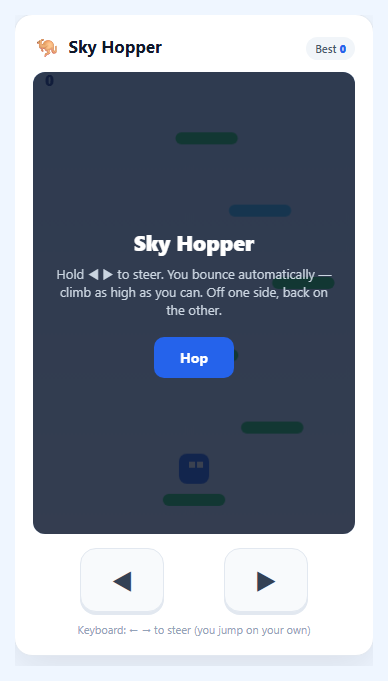
Sky Hopper is an endless vertical climber in the Doodle Jump tradition, drawn on a single HTML5 <canvas> with no libraries. The hopper never stops bouncing, so the only input is left and right. That makes it learnable in a second, and the difficulty comes from the world instead: it is generated as you rise, platforms get narrower and further apart, sliding ones get faster, and past roughly 130 m birds and spiked orbs start drifting through the gaps.
Bounce physics with a one-way landing test
The simulation runs on a fixed 1/60-second step. Gravity adds 0.36 px per step to the vertical speed, a normal bounce launches at -10.6 (an apex of about 156 px) and a spring pad at -16.5 (about 378 px). The landing test only runs while the hopper is falling, and it only fires when the previous step's feet were above a platform's top edge and this step's feet are at or below it. That is why you can rise straight up through a platform and only land when coming down. The test insets each platform by 6 px per side so a toe on the edge is a miss, and spring pads are raised 8 px so your feet sit on the pad rather than inside it.
Steering with momentum
Holding left or right accelerates the hopper by 0.6 px per step up to 4.6; letting go applies a 0.86 drag, so it glides to a stop. Leaving one edge of the screen brings you back on the other, and a second copy of the hopper is drawn on the far side while it straddles the edge so it never pops.
A camera that only moves up
The camera eases toward a point 40% down the view, but only upward. The ease (22% of the remaining distance per step) keeps big spring launches smooth. Because it never scrolls back, falling past the bottom edge ends the run, unless a shield is active, in which case it pops and throws you back up.
Generating a level that can always be finished
Each new row of platforms is placed above the previous one by a random gap. Early gaps run 50 to 78 px and widen to 70 to 124 px at 900 m, always under the 156 px bounce so no row is out of reach. A difficulty value (height divided by 900 m) shrinks platforms from 66 to 52 px, raises the chance of crumbling platforms from 6% to 22% and of sliding platforms from 10% to 30%, and speeds the sliders up. Early rows sometimes get a second platform to keep the first climb forgiving. A crumbling platform still gives a full bounce before it breaks, so it is always a safe stepping stone. Anything that scrolls below the view is discarded.
Platforms, power-ups and enemies
Green platforms are solid, blue ones slide, amber ones crack apart into tumbling fragments right after your bounce, and purple ones carry a visible coil that squashes and launches you much higher. Stars are worth 10 points. A propeller lifts you for 2.6 seconds, makes you immune and bulldozes anything in your way. A shield absorbs one hit or one fall. Birds can be stomped from above for 25 points and a free bounce, but touching one from the side kills you. Spiked orbs cannot be stomped at all, so you steer around them.
Altitude biomes and parallax
The sky blends smoothly between Meadow Sky, High Clouds, Sunset Ridge (500 m) and Starfield (900 m), and a banner announces each one. Cloud layers drift at three parallax speeds, the sun fades out as you climb, and stars and a ringed planet fade in near the top. A dashed line marks every 100 m, and a gold line marks your best height from a previous run.
Controls, sound and saving
Steer with the arrow keys or A and D, with the two on-screen buttons, or by holding the left or right half of the canvas on a touch screen. P or Escape pauses, M mutes, and the game also pauses on its own when the tab loses focus. All sound is synthesised with WebAudio, so nothing is downloaded. Your best score, best height and mute setting are saved in localStorage, and the canvas scales with devicePixelRatio and honours prefers-reduced-motion.
Step by step
How to Use
- 1Start the climbPress "Hop" or Space. startGame() rebuilds the world, unlocks audio (browsers require a click first) and drops the hopper onto the bottom platform. It bounces on its own from the first frame.
- 2Steer three waysUse the arrow keys or A and D, the two on-screen buttons, or hold the left or right half of the canvas with a finger. All three set the same left/right state, and holding two sources together does not double the speed.
- 3Read the platformsGreen is solid. Blue slides. Amber cracks apart after one bounce, so do not plan to land on it twice. Purple has a spring coil and launches you about 2.4 times higher, which is how you skip a hard stretch.
- 4Collect and stompGrab stars for 10 points each. Pick up a propeller for 2.6 seconds of invulnerable lift or a shield to survive one hit or one fall. Land on a bird from above to stomp it for 25 points; steer around spiked orbs.
- 5Beat your markerDashed lines mark every 100 m and a gold line marks your best height. The first crossing of each sky (200, 500 and 900 m) shows a banner. Score is height in metres plus 10 per star and 25 per stomp.
- 6Tune the feelChange GRAV, JUMP_V, SPRING_V, MOVE and DRAG for the bounce and steering feel. The gap range in genRow() and the odds in rollType() set how hard the climb gets, and BIOMES holds the sky colours.
Real-world uses
Common Use Cases
Got questions?
Frequently Asked Questions
The hopper bounces automatically every time it lands, so the whole control surface is left and right. That keeps the game playable with one thumb on a phone, and it moves the skill into aiming your descent at the next platform instead of timing a press.
No. Each row is placed above the last by at most 124 px, while a normal bounce rises about 156 px, and horizontal wrap means a platform is never far sideways. Crumbling platforms still give a full bounce before breaking, so every row stays reachable.
Land on a bird from above while falling to stomp it, score 25 and bounce again. Spiked orbs cannot be stomped. A shield absorbs one hit or one fall, and a propeller makes you immune while it lasts, destroying whatever you fly through.
Yes. Hold the left or right half of the canvas, or use the two buttons underneath, with Pointer Events and touch-action disabled so the page does not scroll. The canvas scales with devicePixelRatio, and the game pauses if you switch apps.
Your best score, your best height and the sound setting are stored in localStorage, and the best height appears as a gold line during later runs. Every read and write is wrapped in try/catch, so the game still runs where storage is blocked.