
For supporters
Source Code
Want the source code?
Play the game for free. Become a WebDevPuneet supporter to unlock the complete HTML, CSS and JavaScript source code, the exports (HTML, React, Vue, Angular, Tailwind) and Fork.
Extend with AI
Take This Snippet Further With AI
The AI prompt for this one is for Patreon supporters ($3 a month), along with a site with no ads. Supporters enter the passcode once and it is remembered in this browser.
What's included
Features
About this UI Snippet
Checkers vs Computer — Forced Jumps, Multi-Jumps, a Minimax AI with 12 Levels and a Daily Match
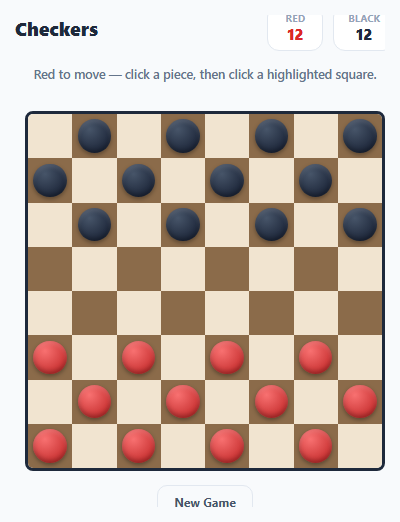
Checkers (draughts) is a game of forced captures, and that rule is what makes it a good programming exercise. This version is a full game: you play red against a computer with twelve difficulty levels, or play a friend on the same screen. It enforces the real rules (forced jumps, multi-jumps that must be completed, kings, a draw rule), animates every move, gives hints, and has stars, a daily match and saved progress. It is plain HTML, CSS and JavaScript with no libraries, images or audio files.
The board as 64 numbers
The position is a flat array of 64 numbers: 0 for empty, 1 and 2 for a red man and king, and -1 and -2 for black. genMoves() returns every legal move as a complete sequence, such as { path: [41, 32, 23], caps: [36, 27] }. Because a whole multi-jump is one move, the interface, the AI and the move log all use the same objects. If any jump exists, only jumps are returned, which is the forced-capture rule. While generating a chain, a jumped piece is marked as a ghost so it cannot be jumped twice, and a man that reaches the far row becomes a king and its move ends there.
Multi-jumps that cannot be abandoned
Many simple checkers programs let you switch pieces halfway through a multi-jump. Here, nextSquares() looks at the squares chosen so far and shows only the squares that continue a legal sequence. Once you have started a chain, clicking another piece is refused with a message, and the move is applied only when a complete sequence has been chosen. Each jump is drawn as soon as you click it, and the captured piece shrinks away.
A minimax opponent with a dial for strength
The computer uses iterative deepening negamax with alpha-beta pruning. evaluate() scores material (a king is worth 1.7 men), how far each man has advanced, a guarded home row and control of the centre. At the edge of the search it keeps going while captures are pending, so it never stops in the middle of an exchange. Each level in the LEVELS array sets the search depth (1 to 9 moves), a time limit and a noise value. Noise adds a random amount to each candidate move's score, which makes the lower levels play like a distracted human instead of a perfect player with a shallow horizon. Level 12 searches nine plies, within a time cap that keeps the page responsive.
Hints, undo, stars and the daily match
The Hint button runs the same search for you at depth 6 and highlights the start and end squares. Undo takes back your last move together with the computer's reply. Winning gives one star, a second star if you used no hints or undos, and a third if you lost no more than the level's par number of pieces. A win unlocks the next level. The Daily Match plays four seeded random moves from the start position, so everyone faces the same opening each day, and winning on consecutive days builds a streak. There is also a pass-and-play mode.
Draws, feel and saving
A game with 40 moves each without a capture or a man move is a draw, which stops endless king shuffling. Moves slide across the board, captured pieces shrink away, kinging crowns a piece with a glow, and a short wooden click and chimes come from a Web Audio synth. Your last move is highlighted, pieces that must jump pulse, and a move list shows the game in notation such as d6xb4. Stars, your record and the streak are saved to localStorage inside try/catch, and the whole game scales to short preview areas.
Step by step
How to Use
- 1Pick a level, the Daily Match or two playersThe menu shows 12 levels in four tiers, from the Cadet who plays almost randomly to the Grandmaster who searches nine moves ahead. Level 1 is open at first and each win unlocks the next. The gold card starts the daily match and the green card is a two-player game on one screen.
- 2Move your piecesYou play red, at the bottom, and move first. Click a piece and then a highlighted square. Men move diagonally forward, and a man that reaches the far row becomes a king (shown with a crown) that can move in all four diagonal directions.
- 3Jump when you canCaptures are forced: if a jump is available, you must take one, and the pieces that can jump pulse. Red-marked squares are jumps. After a jump, if the same piece can jump again, you have to keep going with that piece.
- 4Beat the computerCapture all its pieces or leave it with no legal move. The right panel shows how many pieces each side has left and the last moves in notation. If neither side captures or advances a man for 40 moves each, the game is a draw.
- 5Use hints and undo carefullyHint (H) highlights a strong move and you get three per game. Undo (U) takes back your last move and the computer reply. Both are useful for learning but they cost you the second star.
- 6Earn stars and keep the streakOne star for a win, one more for no hints or undos, one more for losing no more than the par number of pieces. Winning the Daily Match on consecutive days builds a streak, and Copy result gives a share line.
Real-world uses
Common Use Cases
Got questions?
Frequently Asked Questions
chooseMove() runs an iterative deepening negamax search with alpha-beta pruning. It searches one ply, then two, and so on up to the level depth, and keeps the result of the last depth it finished before the time cap. Positions are scored by evaluate(): material (a king is worth 170 and a man 100), how far men have advanced, a guarded home row and the centre. On the weaker levels a random amount (the noise) is added to each move score, so it sometimes picks a worse move.
American checkers: 8x8 board, men move and capture diagonally forward, kings move in all four diagonal directions one square at a time, captures are mandatory, a multi-jump must be finished with the same piece, a man that reaches the far row becomes a king and its move ends there. If no capture or man move happens for 40 moves each, the game is a draw. There are no flying kings.
Because the rules do not allow it. A move is a whole sequence of jumps, and after you have started one, nextSquares() only shows squares that continue a legal sequence. A click elsewhere shows a reminder. The board is only changed when a complete sequence has been chosen.
Beating a level gives one star. You get a second star if you used no hints and no undos, and a third if you lost no more than the level par number of pieces (6 on the first levels, down to 2 on the last ones). A draw or a defeat gives no stars. A level unlocks when the previous one has at least one star.
Edit the LEVELS array: depth is how many plies the computer searches, noise is the random score added to its candidate moves, ms is its thinking time cap and par is the number of pieces you may lose for the third star. Tiers hold three levels each, so add levels in threes or edit TIERS. To change how it plays, tune the numbers in evaluate().
Yes. All localStorage access is in try/catch, so a blocked storage only means progress is not saved, and every sound call is wrapped. Squares respond to pointer events, so touch works, and on narrow screens the side panel moves under the board and the page scrolls. The computer thinks within a time cap, so the page stays responsive.