



Conditional Branching Form Fields — Show/Hide Sections Based on Prior Answers
Conditional Branching Form Fields — Show Only What Applies · Forms · Plain HTML, CSS & JS · Live preview
Copy & paste
Source Code
<form class="demo branch-form" id="branchForm">
  <fieldset class="f-group">
    <legend>Are you signing up as a business?</legend>
    <div class="radio-row">
      <label><input type="radio" name="accountType" value="personal" checked /> Personal</label>
      <label><input type="radio" name="accountType" value="business" /> Business</label>
    </div>
  </fieldset>

  <div class="branch-block" id="businessFields" hidden>
    <div class="f-row">
      <label for="companyName">Company name</label>
      <input type="text" id="companyName" name="companyName" placeholder="Acme Inc." />
    </div>
    <div class="f-row">
      <label for="teamSize">Team size</label>
      <select id="teamSize" name="teamSize">
        <option value="1-10">1–10</option>
        <option value="11-50">11–50</option>
        <option value="51+">51+</option>
      </select>
    </div>

    <fieldset class="f-group nested">
      <legend>Do you need an invoice?</legend>
      <div class="radio-row">
        <label><input type="radio" name="needsInvoice" value="yes" /> Yes</label>
        <label><input type="radio" name="needsInvoice" value="no" checked /> No</label>
      </div>
    </fieldset>

    <div class="branch-block nested" id="invoiceFields" hidden>
      <div class="f-row">
        <label for="vatId">VAT / Tax ID</label>
        <input type="text" id="vatId" name="vatId" placeholder="EU123456789" />
      </div>
      <div class="f-row">
        <label for="billingAddr">Billing address</label>
        <input type="text" id="billingAddr" name="billingAddr" placeholder="123 Main St, City" />
      </div>
    </div>
  </div>

  <button type="submit" class="submit-btn">Continue</button>
</form>
* { box-sizing: border-box; margin: 0; padding: 0; }
body { font-family: system-ui, sans-serif; background: #f8fafc; display: flex; align-items: center; justify-content: center; min-height: 100vh; padding: 24px; }
.branch-form { width: 400px; max-width: 100%; background: #fff; border: 1px solid #e2e8f0; border-radius: 16px; padding: 22px; display: flex; flex-direction: column; gap: 16px; }
.f-group { border: none; padding: 0; display: flex; flex-direction: column; gap: 8px; }
.f-group legend { font-size: 13px; font-weight: 700; color: #111827; padding: 0; margin-bottom: 2px; }
.radio-row { display: flex; gap: 16px; }
.radio-row label { display: flex; align-items: center; gap: 6px; font-size: 13px; color: #475569; cursor: pointer; }
.radio-row input[type="radio"] { accent-color: #6366f1; }
.branch-block { display: flex; flex-direction: column; gap: 12px; padding: 14px; border-radius: 12px; background: #f8fafc; border: 1px dashed #e2e8f0; animation: slideIn 0.22s ease; }
.branch-block.nested { background: #eef2ff; border-color: #c7d2fe; }
@keyframes slideIn { from { opacity: 0; transform: translateY(-6px); } to { opacity: 1; transform: translateY(0); } }
.f-row { display: flex; flex-direction: column; gap: 5px; }
.f-row label { font-size: 12px; font-weight: 700; color: #334155; }
.f-row input, .f-row select { padding: 9px 11px; border: 1.5px solid #e2e8f0; border-radius: 9px; font-size: 13px; font-family: inherit; background: #fff; }
.f-row input:focus-visible, .f-row select:focus-visible { outline: none; border-color: #6366f1; box-shadow: 0 0 0 3px rgba(99,102,241,0.15); }
.submit-btn { padding: 11px; border: none; border-radius: 10px; background: #4f46e5; color: #fff; font-size: 13.5px; font-weight: 700; cursor: pointer; font-family: inherit; }
.submit-btn:hover { background: #4338ca; }const form = document.getElementById('branchForm');
const businessFields = document.getElementById('businessFields');
const invoiceFields = document.getElementById('invoiceFields');
// Every conditional block owns a "required-when-visible" set of fields.
// Rather than hardcoding required on the markup (which would block submission
// even while a section is hidden), required is toggled in lockstep with
// visibility so validation always matches what the user can actually see.
const businessRequiredFields = ['companyName'];
const invoiceRequiredFields = ['vatId', 'billingAddr'];
function setBlockVisible(block, requiredFieldIds, visible) {
block.hidden = !visible;
requiredFieldIds.forEach((id) => {
const el = document.getElementById(id);
if (!el) return;
el.required = visible;
if (!visible) el.value = ''; // clear hidden fields so stale data can't be submitted later
});
}
function updateBusinessBranch() {
const isBusiness = form.accountType.value === 'business';
setBlockVisible(businessFields, businessRequiredFields, isBusiness);
if (!isBusiness) {
// Collapsing the parent branch must also collapse anything nested inside it,
// otherwise a hidden parent could still leave an invoice section visible.
updateInvoiceBranch();
}
}
function updateInvoiceBranch() {
const isBusiness = form.accountType.value === 'business';
const wantsInvoice = form.needsInvoice.value === 'yes';
setBlockVisible(invoiceFields, invoiceRequiredFields, isBusiness && wantsInvoice);
}
form.accountType.forEach((radio) => radio.addEventListener('change', updateBusinessBranch));
form.needsInvoice.forEach((radio) => radio.addEventListener('change', updateInvoiceBranch));
form.addEventListener('submit', (e) => {
e.preventDefault();
const data = Object.fromEntries(new FormData(form).entries());
alert('Submitted:\n' + JSON.stringify(data, null, 2));
});
updateBusinessBranch();Extend with AI
Take This Snippet Further With AI
The AI prompt for this one is for Patreon supporters ($3 a month), along with a site with no ads. Supporters enter the passcode once and it is remembered in this browser.
What's included
Features
About this UI Snippet
Conditional Branching Forms — Fields That Appear Only When Relevant
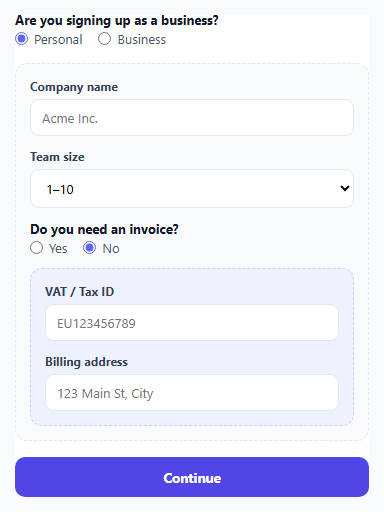
A long form that shows every possible field up front — regardless of whether it applies — asks users to mentally filter out irrelevant questions themselves. Conditional (or "branching") forms flip this: a field only appears once an earlier answer makes it relevant, and disappears again if that answer changes. This snippet implements a genuine two-level branch — a business/personal toggle reveals company fields, and a nested yes/no question inside that branch reveals invoice fields only when both conditions are true.
The core problem: required attributes and visibility must move together
The most common bug in hand-rolled conditional forms is a mismatch between what's *visible* and what's *required*. If required is hardcoded in the markup, a hidden field can silently block form submission the user can't see why is failing. If required is never toggled at all, a genuinely mandatory field (like company name for a business account) can be skipped entirely by switching back to personal after typing nothing. setBlockVisible() solves this by toggling .hidden and each field's .required property in the exact same function call — they can never drift out of sync because there is only one code path that changes either.
Clearing hidden fields prevents stale data from leaking into submission
When a branch collapses, setBlockVisible() also clears the value of every field inside it. Without this, a user could fill in a VAT ID, switch back to "no invoice needed," and — if the field were merely hidden rather than cleared — that stale VAT ID would still be present in FormData on submission, silently included in data that has nothing to do with what the user actually confirmed. Clearing on hide guarantees the submitted payload always reflects only what's currently visible and intentional.
Why the nested branch has to re-evaluate on its parent's change, not just its own
updateBusinessBranch() explicitly calls updateInvoiceBranch() whenever the *parent* toggle changes to personal — not because the invoice radio itself changed, but because collapsing the business section must also collapse anything nested inside it. Without this cascading call, switching from business-with-invoice back to personal would leave the invoice fields block technically still visible (since nothing directly told it to hide), floating disconnected from a parent section that no longer exists on screen.
A single source of truth for "is this field required right now"
Both updateBusinessBranch() and updateInvoiceBranch() independently recompute the *current* combined condition (isBusiness, and isBusiness && wantsInvoice) from the live radio state every time they run, rather than trusting a cached boolean from a previous call. This means the branching logic is always derived fresh from the form's actual current state, so it can't drift out of sync no matter which radio the user changes or in what order.
Step by step
How to Use
- 1Select "Business" on the first questionThe company name and team size fields slide into view, and company name becomes a required field.
- 2Switch to "Yes" on "Do you need an invoice?"A second, nested branch reveals the VAT ID and billing address fields — only reachable once the business branch is active.
- 3Switch back to "Personal"Both the business fields and the nested invoice fields collapse together, their values clear, and their required attributes turn off.
- 4Submit the formOnly fields relevant to the currently visible branches are validated and included in the submitted data — nothing hidden blocks or leaks through.
- 5Add your own branchesFollow the setBlockVisible() pattern: pair each conditional block with the list of field ids that should become required exactly when it is visible.
Real-world uses
Common Use Cases
Got questions?
Frequently Asked Questions
It gets cleared. setBlockVisible() sets el.value = "" for every field in a branch the moment that branch is hidden, so switching answers back and forth never leaves stale, irrelevant data sitting in the form ready to be silently submitted.
A hidden-but-required field still blocks native form validation from succeeding, and the user has no visual explanation for why submission is failing. Toggling required in sync with visibility avoids both a false validation block and, in the opposite case, silently skipping a field that should have been mandatory.
updateBusinessBranch() explicitly calls updateInvoiceBranch() whenever the parent toggle changes, so the nested section always re-evaluates and collapses correctly even though its own radio input never fired a change event.
Follow the same pattern: give the new block its own required-fields array, write an update function that recomputes its condition from all relevant ancestor and own-level form state, and call that update function both from its own change listener and from its parent's update function so collapsing cascades correctly.
Yes — because required is only ever true on fields that are currently visible, the browser's native validation (and :invalid styling) only ever applies to fields the user can actually see and interact with.