




Scroll Timeline Nav Progress Indicator — Native CSS, No JS
Scroll Timeline Nav Progress Indicator · Scroll · Plain HTML, CSS & JS · Live preview
Copy & paste
Source Code
<nav class="stn-nav">
<div class="stn-brand">Amber Docs</div>
<ul class="stn-links">
<li>Overview</li><li>Setup</li><li>API</li><li>Examples</li><li>FAQ</li>
</ul>
<div class="stn-track"><div class="stn-fill"></div></div>
</nav>
<main class="stn-page">
<section class="stn-block"><h1>Overview</h1><p>This nav bar tracks total page scroll progress with an underline fill driven purely by CSS scroll-driven animations — no scroll listeners computing percentages on the main thread.</p></section>
<section class="stn-block"><h2>Setup</h2><p>Drop the nav in as a sticky header. The thin track beneath the links fills left-to-right as the visitor scrolls down the page, giving a persistent sense of position without a separate progress bar.</p></section>
<section class="stn-block"><h2>API</h2><p>Under the hood it's the same <code>animation-timeline: scroll()</code> primitive as a full-width reading bar, just styled as a slim underline anchored to the nav instead of the very top of the viewport.</p></section>
<section class="stn-block"><h2>Examples</h2><p>Try resizing the window, then scroll again — the fill still tracks correctly because the browser recalculates the scroll range natively, with no JS to keep in sync.</p></section>
<section class="stn-block"><h2>FAQ</h2><p>You've reached the end of the page — the underline fill should now read as fully complete across the whole nav width.</p></section>
</main>*{box-sizing:border-box;margin:0;padding:0}
body{font-family:system-ui,-apple-system,sans-serif;background:#12100a;color:#f3ead9}
.stn-nav{position:sticky;top:0;z-index:50;display:flex;align-items:center;gap:28px;padding:18px 28px;background:rgba(18,16,10,.9);backdrop-filter:blur(10px);border-bottom:1px solid #2c2618}
.stn-brand{font-weight:800;letter-spacing:-.01em;font-size:15px;color:#fbbf24}
.stn-links{display:flex;gap:22px;list-style:none;flex:1}
.stn-links li{font-size:13px;color:#c9bfa4;cursor:default;transition:color .2s}
.stn-links li:hover{color:#fbbf24}
.stn-track{position:absolute;left:0;right:0;bottom:0;height:3px;background:#241f13}
.stn-fill{
height:100%;width:100%;transform-origin:0% 50%;
background:linear-gradient(90deg,#fbbf24,#f97316);
animation:stn-grow auto linear;
animation-timeline:scroll(root);
}
@keyframes stn-grow{from{transform:scaleX(0)}to{transform:scaleX(1)}}
@supports not (animation-timeline: scroll()){
.stn-fill{animation:none;transform:scaleX(0);background:#574a24}
}
.stn-page{max-width:680px;margin:0 auto;padding:60px 24px 40vh}
.stn-block{padding:56px 0;border-bottom:1px solid #241f13}
.stn-block h1{font-size:clamp(30px,5vw,46px);letter-spacing:-.02em;margin-bottom:14px;color:#fde68a}
.stn-block h2{font-size:24px;letter-spacing:-.01em;margin-bottom:14px;color:#fde68a}
.stn-block p{color:#c9bfa4;line-height:1.8;font-size:16px}
code{background:rgba(251,191,36,.12);color:#fcd34d;padding:2px 6px;border-radius:5px;font-size:.9em;font-family:ui-monospace,Consolas,monospace}// No JavaScript drives the nav underline — it's purely CSS
// (animation-timeline: scroll(root) on .stn-fill). This script only
// logs support status to the console for debugging convenience.
const supported = typeof CSS !== 'undefined' && CSS.supports('animation-timeline: scroll()');
console.log('[nav-progress] native scroll-timeline supported:', supported);
// Highlight the current nav link based on scroll position, purely as a
// secondary enhancement — unrelated to the underline fill mechanism.
const links = document.querySelectorAll('.stn-links li');
const sections = document.querySelectorAll('.stn-block');
const highlight = () => {
let activeIndex = 0;
sections.forEach((sec, i) => {
if (sec.getBoundingClientRect().top < 120) activeIndex = i;
});
links.forEach((li, i) => li.style.color = i === activeIndex ? '#fbbf24' : '');
};
document.addEventListener('scroll', highlight, { passive: true });
highlight();Extend with AI
Take This Snippet Further With AI
The AI prompt for this one is for Patreon supporters ($3 a month), along with a site with no ads. Supporters enter the passcode once and it is remembered in this browser.
What's included
Features
About this UI Snippet
Scroll Timeline Nav Progress — A CSS-Only Underline That Tracks Page Scroll
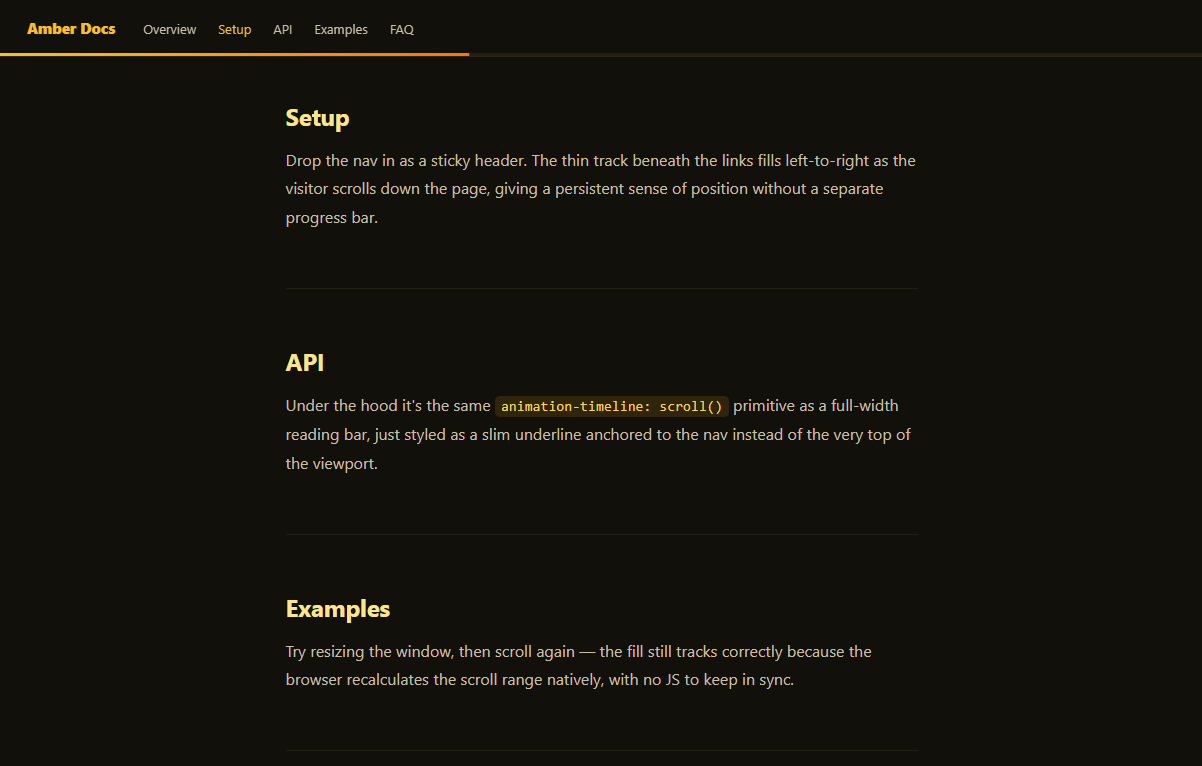
Sticky navigation bars often pair with some form of scroll indicator — a progress bar, an active-link highlight, or both. This snippet builds the progress half with a single native CSS feature: a thin underline beneath the nav that fills left-to-right in lockstep with total page scroll, using animation-timeline: scroll() instead of a scroll event handler doing percentage math on every frame.
A fill bound to the nav, not the viewport
Unlike a full-width top-of-page bar (see CSS Scroll-Driven Progress Bar), this indicator lives inside the nav itself as a 3px .stn-track/.stn-fill pair pinned to the bottom edge. The fill still uses the exact same mechanism — a keyframe animation scaling from scaleX(0) to scaleX(1), retimed by animation-timeline: scroll(root) so its progress equals the document's scroll fraction. Placing it inside a position: sticky nav means it always reads as attached to the navigation, not as a separate UI element competing for attention.
Why it belongs next to a nav
Putting the progress signal directly under the links people are already looking at (rather than a bar at the very top edge of the screen, easy to miss) makes it a more natural companion to navigation — it reads as "how far through this page am I" right where the reader's eyes already rest. It pairs well with a lightweight active-section highlight, which this snippet layers on top using a small, separate scroll listener — deliberately kept apart from the CSS-only fill so the core progress mechanism stays untouched by JavaScript.
Two techniques, cleanly separated
The demo intentionally shows both approaches side by side: the underline fill is 100% CSS and needs no JavaScript to function, while the "which link is active" highlight is a conventional scroll listener, because determining which section a heading belongs to is exactly the kind of layout-dependent logic that native scroll timelines don't yet solve on their own. This is a good habit generally — reach for scroll-driven CSS animations for continuous visual mappings like fills, rotations, or scale, and keep discrete logic (which item is "active") in JavaScript.
Pairing with other scroll effects
Combine this nav with a hero built on Parallax Hero Section below the fold, or a content grid using Scroll Reveal Grid — the nav's underline will continue to reflect total page position regardless of what scroll-triggered animations are happening further down, since it reads directly from the document scroller rather than any particular section.
Customizing it
Swap the underline for a dot that moves along a horizontal track using translateX instead of scaleX, change scroll(root) to a named timeline on an inner scroll container for app-shell layouts, or theme the gradient to match your brand.
Step by step
How to Use
- 1Paste the HTML, CSS, and JSA sticky nav with an underline track renders — no CDN needed.
- 2Scroll the pageThe amber-to-orange underline fills beneath the nav links.
- 3Watch the active linkA separate scroll listener highlights the nearest section's link.
- 4Resize the browserThe fill keeps tracking correctly with no JS recalculation needed.
- 5Inspect the CSSOnly .stn-fill uses animation-timeline; the highlight logic is plain JS.
- 6Restyle itSwap the underline for a dot, or change scroll(root) to a container.
Real-world uses
Common Use Cases
scaleX mapped from document scroll fraction.@supports preventing unsupported browsers from showing a stuck bar.Got questions?
Frequently Asked Questions
Both use the same animation-timeline: scroll(root) mechanism, but this indicator is scoped to sit directly beneath a sticky nav rather than spanning the very top edge of the viewport. Visually it reads as part of the navigation rather than a separate UI element, which suits documentation and product-tour layouts where the nav is already the anchor for orientation.
Determining which section is "current" depends on comparing each section's bounding position to the viewport, which is layout-dependent logic that scroll-driven CSS animations don't express well on their own — CSS timelines are built for continuous value mappings like a fill or rotation, not discrete state like "which of these five items is active." Keeping that logic in a small scroll listener keeps each technique doing what it's best at.
Yes. Because the browser recomputes the scroll(root) timeline's range natively whenever the document's scrollable height changes, resizing the window (which reflows content and changes total page height) doesn't require any JavaScript recalculation — the native timeline stays correct automatically.
Yes — change scroll(root) to scroll(nearest), and make sure the .stn-fill element's nearest scrollable ancestor is the panel you want to track rather than the document. This is useful for app-shell layouts where the nav sits outside a scrollable content pane.
The underline fill is pure CSS and ports directly into any component's stylesheet. The active-link highlight scroll listener moves into a mount effect (useEffect, onMounted, or ngAfterViewInit) and should clean up its scroll listener on unmount to avoid leaks when the nav is unmounted during route changes.