


GLB AR-Style Pedestal Viewer — Free Three.js glTF "Placed Object" Snippet
GLB AR-Style Pedestal Viewer · Media · Plain HTML, CSS & JS · Live preview
Copy & paste
Source Code
<div class="gap-wrap">
<canvas id="gapCanvas"></canvas>
<div class="gap-badge">
<span class="gap-badge-dot"></span> Placed on pedestal
</div>
<div class="gap-hint">Drag to orbit · Ctrl/Cmd + scroll to zoom</div>
<div class="gap-zoom">
<span class="gap-zoom-label">+</span>
<input type="range" id="gapZoom" class="gap-zoom-slider" min="0" max="100" step="1" />
<span class="gap-zoom-label">−</span>
</div>
<button id="gapRecenter" class="gap-recenter">Recenter</button>
</div>*{box-sizing:border-box;margin:0;padding:0}
body{font-family:system-ui,-apple-system,sans-serif;min-height:100vh;display:flex;align-items:center;justify-content:center;background:#0a0b12;color:#fff;padding:24px}
.gap-wrap{position:relative;width:min(640px,94vw);height:min(520px,80vh);border-radius:22px;overflow:hidden;background:radial-gradient(65% 65% at 50% 60%,#161a24,#0a0b12);border:1px solid rgba(255,255,255,.08)}
#gapCanvas{display:block;width:100%;height:100%;cursor:grab}
#gapCanvas:active{cursor:grabbing}
.gap-badge{position:absolute;top:18px;left:18px;display:flex;align-items:center;gap:8px;font-size:12px;font-weight:700;color:#bbf7d0;background:rgba(10,12,20,.6);padding:8px 14px;border-radius:999px;backdrop-filter:blur(6px);border:1px solid rgba(74,222,128,.35)}
.gap-badge-dot{width:7px;height:7px;border-radius:50%;background:#4ade80;box-shadow:0 0 0 0 rgba(74,222,128,.6);animation:gapPulse 2s infinite}
@keyframes gapPulse{0%{box-shadow:0 0 0 0 rgba(74,222,128,.55)}70%{box-shadow:0 0 0 8px rgba(74,222,128,0)}100%{box-shadow:0 0 0 0 rgba(74,222,128,0)}}
.gap-hint{position:absolute;left:50%;bottom:18px;transform:translateX(-50%);font-size:11.5px;font-weight:600;color:#b7c0da;background:rgba(10,12,20,.55);padding:7px 14px;border-radius:999px;backdrop-filter:blur(6px);border:1px solid rgba(255,255,255,.08)}
.gap-zoom{position:absolute;right:18px;top:18px;bottom:64px;width:32px;display:flex;flex-direction:column;align-items:center;gap:8px;background:rgba(10,12,20,.55);border:1px solid rgba(255,255,255,.1);border-radius:999px;padding:10px 0;backdrop-filter:blur(6px)}
.gap-zoom-label{font-size:12px;font-weight:700;color:#b7c0da;line-height:1;user-select:none}
.gap-zoom-slider{flex:1;width:6px;-webkit-appearance:slider-vertical;writing-mode:vertical-lr;direction:rtl;accent-color:#4ade80;cursor:pointer}
.gap-recenter{position:absolute;top:18px;right:18px;padding:8px 14px;border-radius:999px;border:1px solid rgba(255,255,255,.15);background:rgba(10,12,20,.6);color:#e2e8f0;font-size:12px;font-weight:600;cursor:pointer;backdrop-filter:blur(6px)}
.gap-recenter:hover{background:rgba(255,255,255,.08)}const canvas = document.getElementById('gapCanvas');
const renderer = new THREE.WebGLRenderer({ canvas, antialias: true, alpha: true });
renderer.setPixelRatio(Math.min(window.devicePixelRatio, 2));
const scene = new THREE.Scene();
const camera = new THREE.PerspectiveCamera(38, 1, 0.1, 50);
const HOME_POSITION = new THREE.Vector3(1.9, 1.3, 3.1);
camera.position.copy(HOME_POSITION);
const controls = new THREE.OrbitControls(camera, renderer.domElement);
controls.enableDamping = true;
controls.dampingFactor = 0.08;
controls.target.set(0, 0.5, 0);
controls.minDistance = 1.8;
controls.maxDistance = 7;
controls.maxPolarAngle = Math.PI / 2.05; // never let the camera dip below the pedestal
// OrbitControls' own wheel-zoom is turned off on purpose: left on, it calls
// preventDefault() on every wheel event over the canvas, which would block
// normal page scrolling around this card. Zoom is reimplemented below as an
// explicit, opt-in gesture (a slider, and Ctrl/Cmd + scroll) instead.
controls.enableZoom = false;
const zoomSlider = document.getElementById('gapZoom');
function setZoomDistance(distance) {
const clamped = THREE.MathUtils.clamp(distance, controls.minDistance, controls.maxDistance);
const offset = camera.position.clone().sub(controls.target);
offset.setLength(clamped || 0.001);
camera.position.copy(controls.target).add(offset);
const t = (clamped - controls.minDistance) / (controls.maxDistance - controls.minDistance);
zoomSlider.value = String(Math.round((1 - t) * 100));
}
setZoomDistance(camera.position.distanceTo(controls.target));
zoomSlider.addEventListener('input', () => {
const t = 1 - Number(zoomSlider.value) / 100;
setZoomDistance(controls.minDistance + t * (controls.maxDistance - controls.minDistance));
});
canvas.addEventListener('wheel', (e) => {
if (!e.ctrlKey && !e.metaKey) return; // plain scroll always passes through to the page
e.preventDefault();
const current = camera.position.distanceTo(controls.target);
setZoomDistance(current + e.deltaY * 0.01);
}, { passive: false });
document.getElementById('gapRecenter').addEventListener('click', () => {
camera.position.copy(HOME_POSITION);
controls.target.set(0, 0.5, 0);
setZoomDistance(camera.position.distanceTo(controls.target));
});
scene.add(new THREE.AmbientLight(0x445066, 0.7));
const key = new THREE.DirectionalLight(0xffffff, 1.9);
key.position.set(4, 6, 5);
scene.add(key);
const fill = new THREE.DirectionalLight(0x93c5fd, 0.5);
fill.position.set(-5, 2, 3);
scene.add(fill);
const PEDESTAL_TOP = 0;
const PEDESTAL_RADIUS = 1.15;
// The pedestal itself: a simple cylinder standing in for a plinth or AR
// "floor anchor," topped with a soft radial gradient contact-shadow disc
// instead of a real shadow map, which keeps the demo dependency-free.
const pedestal = new THREE.Mesh(
new THREE.CylinderGeometry(PEDESTAL_RADIUS, PEDESTAL_RADIUS * 1.12, 0.5, 40),
new THREE.MeshStandardMaterial({ color: 0x1b2030, roughness: 0.85, metalness: 0.1 })
);
pedestal.position.y = PEDESTAL_TOP - 0.25;
scene.add(pedestal);
const shadowCanvas = document.createElement('canvas');
shadowCanvas.width = shadowCanvas.height = 256;
const sctx = shadowCanvas.getContext('2d');
const gradient = sctx.createRadialGradient(128, 128, 10, 128, 128, 128);
gradient.addColorStop(0, 'rgba(0,0,0,0.55)');
gradient.addColorStop(1, 'rgba(0,0,0,0)');
sctx.fillStyle = gradient;
sctx.fillRect(0, 0, 256, 256);
const shadowTexture = new THREE.CanvasTexture(shadowCanvas);
const contactShadow = new THREE.Mesh(
new THREE.CircleGeometry(PEDESTAL_RADIUS * 0.92, 40),
new THREE.MeshBasicMaterial({ map: shadowTexture, transparent: true, depthWrite: false })
);
contactShadow.rotation.x = -Math.PI / 2;
contactShadow.position.y = PEDESTAL_TOP + 0.002;
scene.add(contactShadow);
// A slowly rotating "placement ring" beneath the model, the same visual
// language real AR-placement UIs (e.g. mobile AR product viewers) use to
// signal "this object is anchored here."
const ring = new THREE.Mesh(
new THREE.RingGeometry(PEDESTAL_RADIUS * 0.75, PEDESTAL_RADIUS * 0.82, 48),
new THREE.MeshBasicMaterial({ color: 0x4ade80, transparent: true, opacity: 0.55, side: THREE.DoubleSide })
);
ring.rotation.x = -Math.PI / 2;
ring.position.y = PEDESTAL_TOP + 0.005;
scene.add(ring);
let model = null;
// Khronos' official sample-asset "BoomBox" — a real, freely-licensed .glb
// small enough and detailed enough to read convincingly as a product
// "placed" on a pedestal, the same interaction AR product previews use.
const MODEL_URL = 'https://cdn.jsdelivr.net/gh/KhronosGroup/glTF-Sample-Assets@main/Models/BoomBox/glTF-Binary/BoomBox.glb';
const loader = new THREE.GLTFLoader();
loader.load(
MODEL_URL,
(gltf) => {
model = gltf.scene;
// Auto-fit rather than a hardcoded scale factor: different .glb exports
// (and loader versions) can decode the same source asset at wildly
// different raw sizes, so measuring the loaded geometry and scaling it
// to a known target height is far more reliable than guessing a number.
const box = new THREE.Box3().setFromObject(model);
const size = box.getSize(new THREE.Vector3());
const maxDim = Math.max(size.x, size.y, size.z) || 1;
model.scale.setScalar(1.15 / maxDim);
const fitted = new THREE.Box3().setFromObject(model);
model.position.y += PEDESTAL_TOP - fitted.min.y; // rest its base on the pedestal top
scene.add(model);
},
undefined,
(err) => {
// Honest failure state: if the CDN model can't load, swap in a simple
// placeholder so the pedestal is never left empty.
console.error('GLB failed to load, showing a placeholder instead:', err);
const placeholder = new THREE.Mesh(
new THREE.IcosahedronGeometry(0.55, 0),
new THREE.MeshStandardMaterial({ color: 0x4ade80, roughness: 0.4, metalness: 0.3 })
);
placeholder.position.y = PEDESTAL_TOP + 0.55;
model = placeholder;
scene.add(placeholder);
}
);
function resize() {
const w = canvas.clientWidth, h = canvas.clientHeight;
renderer.setSize(w, h, false);
camera.aspect = w / h;
camera.updateProjectionMatrix();
}
function animate(t) {
requestAnimationFrame(animate);
ring.rotation.z = t * 0.00025; // a slow, ambient placement-ring spin
controls.update();
renderer.render(scene, camera);
}
resize();
window.addEventListener('resize', resize);
requestAnimationFrame(animate);Extend with AI
Take This Snippet Further With AI
The AI prompt for this one is for Patreon supporters ($3 a month), along with a site with no ads. Supporters enter the passcode once and it is remembered in this browser.
What's included
Features
About this UI Snippet
GLB AR-Style Pedestal Viewer — A "Placed Object" Presentation, Without WebXR
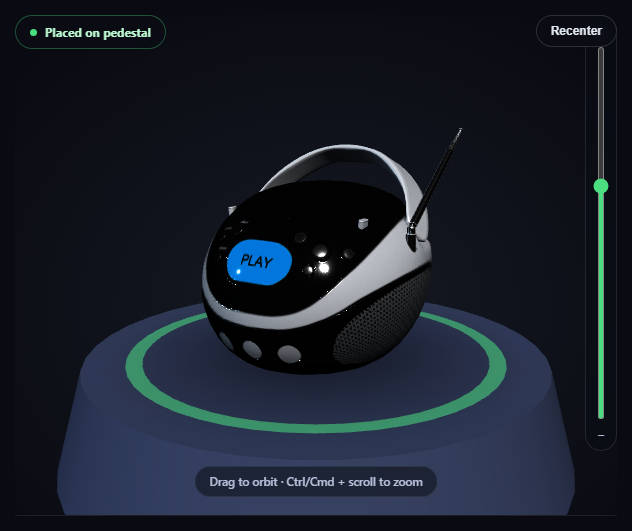
Real mobile AR product viewers use a specific visual vocabulary to say "this object is anchored in your space": a soft contact shadow, a subtle ring or reticle under the object, and a small status indicator confirming placement. This snippet borrows that exact language for a plain desktop/web 3D viewer — no camera permission, no WebXR session, no device motion required — by presenting a real loaded .glb model resting on a pedestal with all three of those cues built from ordinary Three.js primitives.
A canvas-drawn radial gradient instead of a real shadow map
Real-time shadow mapping is overkill for a simple "this sits here" cue. Instead, a small offscreen <canvas> is drawn once with a radial gradient — dark near the center, fully transparent at the edge — turned into a THREE.CanvasTexture, and mapped onto a flat circle positioned just above the pedestal's top surface. It reads immediately as a soft contact shadow without a single shadow-casting light or render pass.
A placement ring borrowed directly from real AR UI
A thin RingGeometry sits beneath the model, given a slow, continuous rotation inside the render loop (ring.rotation.z = t * 0.00025) — the same subtle "anchored and alive" animation real AR product placement UIs use to confirm an object is actively tracked, adapted here to a pedestal instead of a real-world floor plane.
A capped polar angle keeps the camera above the pedestal
controls.maxPolarAngle is set just under Math.PI / 2, which prevents OrbitControls from ever dragging the camera down below the pedestal's top surface — a small constraint that keeps every possible camera angle looking like a believable "product on a stand" shot instead of an underside view that breaks the illusion.
Auto-fit onto the pedestal's own top surface
Rather than a hardcoded scale and height, the model is measured with THREE.Box3 after loading, scaled to a fixed target size, then shifted vertically so its lowest point sits exactly at PEDESTAL_TOP — the same known Y coordinate the contact shadow and ring are both already positioned at, so the three pieces always line up regardless of the loaded model's native proportions.
A one-click recenter, not a stuck camera
A "Recenter" button resets the camera back to HOME_POSITION and the orbit target back to the pedestal, so a visitor who's dragged the view somewhere disorienting always has an obvious way back — a small but real usability detail real AR viewers also include.
A named, honest fallback if the model fails
If the .glb can't load, the real error is logged and a simple icosahedron takes the model's exact placed position on the pedestal, so the "placed object" illusion holds even without the real asset.
Customizing it
Swap MODEL_URL for any other product-scaled .glb, adjust PEDESTAL_RADIUS to match a differently-proportioned object, or pair this with GLB product color configurator for a "place, then customize" flow.
Step by step
How to Use
- 1Add all three CDN scriptsthree.min.js, GLTFLoader.js, and OrbitControls.js.
- 2Paste HTML, CSS, and JSThe BoomBox loads resting on the pedestal with a soft contact shadow.
- 3Drag on the canvasOrbit around the placed object; the camera never dips below the pedestal top.
- 4Use the slider or Ctrl/Cmd + scroll to zoomPlain scroll always scrolls the page; zoom is a separate, opt-in gesture.
- 5Click "Recenter"Instantly returns the camera to its original placed-object framing.
- 6Swap the model URLPoint MODEL_URL at any other .glb to "place" a different object.
Real-world uses
Common Use Cases
maxPolarAngle keeping every orbit angle looking believable.Got questions?
Frequently Asked Questions
No — it never requests camera access, device motion, or a WebXR session. It borrows the visual language real AR product viewers use (a soft contact shadow, an animated placement ring, a status badge) and applies it to a normal Three.js scene with a pedestal, so it works in any browser with WebGL, no device permissions required.
A small offscreen HTML canvas is drawn once with a radial gradient (dark in the center, fully transparent at the edge), converted into a THREE.CanvasTexture, and mapped onto a flat circle positioned just above the pedestal's top surface. It reads as a soft, grounding shadow without any shadow-casting light, shadow map, or extra render pass.
After loading, the model's bounding box is measured and scaled to a fixed target size, then the model is shifted vertically so its lowest point lands exactly at PEDESTAL_TOP — the same known Y coordinate the contact shadow and placement ring are already positioned at, so all three line up correctly no matter how the source file was originally authored or scaled.
Without it, dragging far enough would let the camera swing underneath the pedestal, breaking the "object resting on a stand" illusion by revealing an underside view that was never meant to be seen. Capping the polar angle just under 90 degrees keeps every possible orbit angle looking like a believable product shot.
Set up the renderer, scene, GLTFLoader call, and OrbitControls inside a mount effect, storing the model, HOME_POSITION, and controls in refs so the Recenter button's click handler and the render loop can reach current values. Call controls.dispose() and renderer.dispose() in the cleanup function to release the WebGL context and drag listeners on unmount.