



Media Session API Controls — Free navigator.mediaSession Mini Player
Media Session API Controls · Media · Plain HTML, CSS & JS · Live preview
Copy & paste
Source Code
<section class="msc-wrap">
  <span class="msc-tag">navigator.mediaSession</span>
  <h1>Mini player</h1>
  <p id="mscStatus">Wired to the real Media Session API — supporting devices show this track on the lock screen, notification shade, and hardware media keys.</p>

  <div class="msc-player">
    <div class="msc-art" id="mscArt">♪</div>
    <div class="msc-meta">
      <strong id="mscTitle">Nebula Drift</strong>
      <span id="mscArtist">Auric Fields</span>
      <span class="msc-album" id="mscAlbum">Wandering Signals</span>
    </div>
  </div>

  <div class="msc-progress">
    <div class="msc-progress-fill" id="mscFill"></div>
  </div>
  <div class="msc-times"><span id="mscElapsed">0:00</span><span id="mscDuration">3:12</span></div>

  <div class="msc-controls">
    <button class="msc-ctrl" id="mscPrev" aria-label="Previous track">⏮</button>
    <button class="msc-ctrl main" id="mscPlay" aria-label="Play">▶</button>
    <button class="msc-ctrl" id="mscNext" aria-label="Next track">⏭</button>
  </div>

  <p class="msc-note" id="mscNote">Checking Media Session API support…</p>
</section>*{box-sizing:border-box;margin:0;padding:0}
body{font-family:system-ui,-apple-system,sans-serif;background:radial-gradient(120% 90% at 50% 0%,#1c1030,#07050d 60%);color:#fff;min-height:100vh;display:flex;align-items:center;justify-content:center;padding:26px}
.msc-wrap{width:100%;max-width:400px;text-align:center}
.msc-tag{display:inline-block;font-size:10.5px;font-weight:700;letter-spacing:.14em;text-transform:uppercase;color:#f0abfc;background:rgba(240,171,252,.1);border:1px solid rgba(240,171,252,.3);padding:5px 12px;border-radius:99px;margin-bottom:14px}
.msc-wrap h1{font-size:clamp(24px,5.5vw,30px);font-weight:800;letter-spacing:-.03em}
.msc-wrap p{font-size:13px;color:#c3aee0;margin-top:8px;line-height:1.6}
.msc-player{margin-top:22px;display:flex;align-items:center;gap:14px;text-align:left;padding:16px;border-radius:16px;background:linear-gradient(160deg,#241a3d,#120c22);border:1px solid #33265a}
.msc-art{width:64px;height:64px;border-radius:12px;background:linear-gradient(135deg,#e879f9,#7c3aed);display:flex;align-items:center;justify-content:center;font-size:26px;flex-shrink:0;transition:transform .3s}
.msc-art.spin{animation:mscSpin 6s linear infinite}
@keyframes mscSpin{to{transform:rotate(360deg)}}
.msc-meta{display:flex;flex-direction:column;gap:2px;overflow:hidden}
.msc-meta strong{font-size:15px;white-space:nowrap;overflow:hidden;text-overflow:ellipsis}
.msc-meta span{font-size:12px;color:#a996c9}
.msc-album{color:#7c6a9c!important;font-style:italic}
.msc-progress{margin-top:16px;height:5px;border-radius:99px;background:rgba(255,255,255,.08);overflow:hidden}
.msc-progress-fill{height:100%;width:0%;background:linear-gradient(90deg,#e879f9,#a78bfa);transition:width .25s linear}
.msc-times{display:flex;justify-content:space-between;font-size:11px;color:#8a76ad;margin-top:6px}
.msc-controls{display:flex;align-items:center;justify-content:center;gap:18px;margin-top:18px}
.msc-ctrl{width:44px;height:44px;border-radius:50%;border:1px solid rgba(255,255,255,.14);background:rgba(255,255,255,.05);color:#f3ecff;font-size:16px;cursor:pointer;display:flex;align-items:center;justify-content:center;transition:background .15s}
.msc-ctrl:hover{background:rgba(255,255,255,.11)}
.msc-ctrl.main{width:56px;height:56px;font-size:20px;background:linear-gradient(135deg,#e879f9,#a855f7);border-color:transparent;color:#1a0d2e}
.msc-note{font-size:11.5px;color:#7a6a9c;margin-top:18px;line-height:1.6}var statusEl = document.getElementById('mscStatus');
var noteEl = document.getElementById('mscNote');
var artEl = document.getElementById('mscArt');
var titleEl = document.getElementById('mscTitle');
var artistEl = document.getElementById('mscArtist');
var albumEl = document.getElementById('mscAlbum');
var fillEl = document.getElementById('mscFill');
var elapsedEl = document.getElementById('mscElapsed');
var durationEl = document.getElementById('mscDuration');
var playBtn = document.getElementById('mscPlay');
var prevBtn = document.getElementById('mscPrev');
var nextBtn = document.getElementById('mscNext');
var playlist = [
{ title: 'Nebula Drift', artist: 'Auric Fields', album: 'Wandering Signals', duration: 192 },
{ title: 'Glass Horizon', artist: 'Auric Fields', album: 'Wandering Signals', duration: 227 },
{ title: 'Static Bloom', artist: 'Kilo Verse', album: 'Low Orbit', duration: 168 },
];
var trackIndex = 0;
var elapsed = 0;
var playing = false;
var tickTimer = null;
var hasMediaSession = 'mediaSession' in navigator;
function formatTime(sec) {
var m = Math.floor(sec / 60);
var s = Math.floor(sec % 60);
return m + ':' + (s < 10 ? '0' : '') + s;
}
// The on-page player is the ground truth and must be fully functional on
// its own, with or without Media Session support — OS-level integration is
// a bonus layer, never a requirement for basic playback to work here.
function render() {
var track = playlist[trackIndex];
titleEl.textContent = track.title;
artistEl.textContent = track.artist;
albumEl.textContent = track.album;
durationEl.textContent = formatTime(track.duration);
elapsedEl.textContent = formatTime(elapsed);
fillEl.style.width = Math.min(100, (elapsed / track.duration) * 100) + '%';
playBtn.textContent = playing ? '⏸' : '▶';
playBtn.setAttribute('aria-label', playing ? 'Pause' : 'Play');
artEl.classList.toggle('spin', playing);
}
// Push the real MediaMetadata to the OS so lock-screen / notification-shade
// / hardware media keys reflect the current track. Purely cosmetic if
// mediaSession is unsupported — render() above already covers that case.
function updateMetadata() {
if (!hasMediaSession) return;
var track = playlist[trackIndex];
try {
navigator.mediaSession.metadata = new MediaMetadata({
title: track.title,
artist: track.artist,
album: track.album,
});
navigator.mediaSession.playbackState = playing ? 'playing' : 'paused';
} catch (err) {
// Some contexts (e.g. certain sandboxed iframes) restrict MediaMetadata
// construction or assignment; fail silently since it's a pure enhancement.
}
}
function tick() {
var track = playlist[trackIndex];
elapsed += 1;
if (elapsed >= track.duration) {
nextTrack();
return;
}
render();
}
function play() {
playing = true;
render();
updateMetadata();
clearInterval(tickTimer);
tickTimer = setInterval(tick, 1000);
}
function pause() {
playing = false;
render();
updateMetadata();
clearInterval(tickTimer);
}
function togglePlay() {
if (playing) pause(); else play();
}
function prevTrack() {
elapsed = 0;
trackIndex = (trackIndex - 1 + playlist.length) % playlist.length;
render();
updateMetadata();
}
function nextTrack() {
elapsed = 0;
trackIndex = (trackIndex + 1) % playlist.length;
render();
updateMetadata();
}
playBtn.addEventListener('click', togglePlay);
prevBtn.addEventListener('click', prevTrack);
nextBtn.addEventListener('click', nextTrack);
// Wire the real Media Session action handlers so OS-level controls (lock
// screen, notification media widget, headset/keyboard media keys, car
// head units, smartwatches) can drive this exact same player state. This
// is the part of the API whose effect is invisible in an on-page preview —
// there is no way to demonstrate a real lock-screen widget inside a
// sandboxed iframe — so it's included for correctness, not for visible
// feedback here.
if (hasMediaSession) {
try {
navigator.mediaSession.setActionHandler('play', play);
navigator.mediaSession.setActionHandler('pause', pause);
navigator.mediaSession.setActionHandler('previoustrack', prevTrack);
navigator.mediaSession.setActionHandler('nexttrack', nextTrack);
navigator.mediaSession.setActionHandler('seekto', function (details) {
if (typeof details.seekTime === 'number') {
elapsed = details.seekTime;
render();
}
});
} catch (err) {
// setActionHandler throws if a given action name is unsupported by the
// current browser; wrap defensively since support varies per-action.
}
noteEl.textContent = 'navigator.mediaSession is supported. Metadata and action handlers are wired for real, but their effect is entirely OS-level (lock screen, notification shade, hardware media keys) — nothing extra renders inside this page itself, which is why the on-page buttons above remain the only visible way to control playback here.';
} else {
noteEl.textContent = 'navigator.mediaSession is unavailable in this browser or context. That only affects OS-level integration — every button below still fully controls playback through ordinary page JavaScript.';
}
render();Extend with AI
Take This Snippet Further With AI
The AI prompt for this one is for Patreon supporters ($3 a month, 7 days free), along with a site with no ads. Supporters enter the passcode once and it is remembered in this browser.
What's included
Features
About this UI Snippet
Media Session API Controls — A Real Player With Real OS Integration
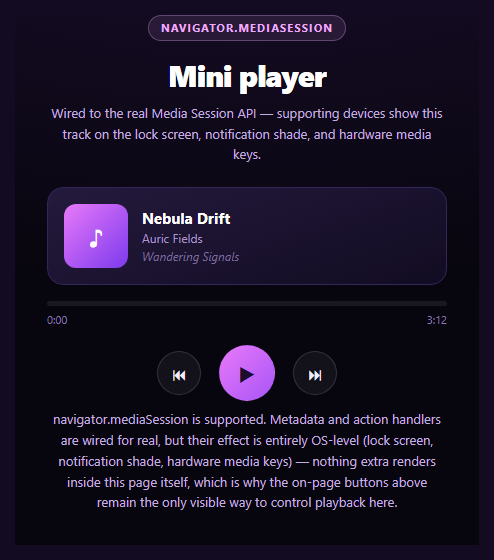
This snippet is a working mini player first, and a Media Session API demo second — because navigator.mediaSession's entire effect is invisible inside a page: it only shows up on a lock screen, in a notification shade, or when a hardware media key is pressed. The on-page buttons have to carry the whole visible demo on their own.
MediaMetadata drives OS surfaces
Every time the track changes or play state flips, updateMetadata() assigns a fresh new MediaMetadata({ title, artist, album }) to navigator.mediaSession.metadata and sets navigator.mediaSession.playbackState. On a real device with this player embedded in a real page (not a sandboxed iframe preview), that's what populates the lock-screen now-playing card and notification-shade media widget — artwork, title, and artist, kept in sync automatically as the track advances.
setActionHandler wires hardware to page state
navigator.mediaSession.setActionHandler('play', play) (and 'pause', 'previoustrack', 'nexttrack', 'seekto') registers this exact page's own functions as the targets for OS-level media controls — a Bluetooth headset's play button, a car head unit's skip button, or a keyboard's media keys all route through these same handlers, calling the identical play()/pause()/nextTrack() functions the on-page buttons call.
Why the effect can't be shown here
There's no way for a snippet running inside a preview iframe to render a real OS lock screen or notification shade — that's chrome owned entirely by the operating system, several privilege layers above what any web page can draw. So this snippet is explicit that setActionHandler and MediaMetadata are wired for real, with zero expectation that anything extra appears in the preview itself.
The on-page player never depends on Media Session
Every piece of visible functionality — play/pause, previous/next, the progress bar, elapsed time — runs through plain setInterval-driven page state and DOM updates, gated behind a hasMediaSession check only for the OS-integration calls. Strip navigator.mediaSession out entirely and the player still works exactly the same on-page; that's a deliberate design choice, not an accident.
Pair this with a screen wake lock toggle so a played track keeps the screen alive, or a canvas audio frequency bars visualizer for a fuller player UI.
Step by step
How to Use
- 1Paste HTML, CSS, and JSA working mini player with three tracks renders.
- 2Click playThe progress bar advances and elapsed time counts up.
- 3Use next/previousTrack metadata updates on-page and via MediaMetadata.
- 4Check a real deviceOn mobile with a real page, the lock screen shows this track.
- 5Try hardware media keysA keyboard or headset play/pause routes to the same handlers.
- 6Read the noteClarifies the API's effect is OS-level, not visible on-page.
Real-world uses
Common Use Cases
MediaMetadata.seekto support letting the lock screen scrub the position.Got questions?
Frequently Asked Questions
Because the Media Session API's entire visible effect lives outside the page — on the device's lock screen, in the notification shade's media widget, or triggered via hardware media keys. There is no way for any web page, including this snippet inside a preview iframe, to render or simulate that OS-owned chrome. The API is wired for real; its payoff simply isn't observable from inside the page itself.
Yes, identically. The entire play/pause/skip/progress system runs on ordinary page JavaScript (setInterval and DOM updates) gated by a hasMediaSession check only around the OS-integration calls (MediaMetadata assignment and setActionHandler registration). Removing navigator.mediaSession support changes nothing about how the on-page buttons behave.
It registers this page's own JavaScript functions (play, pause, prevTrack, nextTrack, and a seek handler) as the targets the operating system calls when the user interacts with OS-level media controls — a lock-screen button, a Bluetooth headset's play button, a car head unit, or a keyboard's media keys. Pressing one of those calls the exact same function the matching on-page button calls.
Assigning navigator.mediaSession.metadata = new MediaMetadata({ title, artist, album, artwork }) tells the OS what to display for the currently "playing" content on surfaces the page can't draw into directly, like a lock screen's now-playing card or a notification shade's media widget. This snippet updates it every time the track or play state changes so those OS surfaces stay in sync automatically.
Keep the metadata/action-handler wiring in an effect that runs once on mount (re-running setActionHandler on every render can churn OS-level registrations unnecessarily), and store playback state (track index, elapsed time, playing) in your framework's own state so on-page renders and MediaMetadata updates both derive from one source of truth. Clear the interval and consider setting mediaSession.playbackState to 'none' on unmount.