



Insurance Quote Calculator — Free Live Premium Estimator Widget
Insurance Quote Calculator · Tools · Plain HTML, CSS & JS · Live preview
Copy & paste
Source Code
<div class="iq-card">
  <div class="iq-head">
    <h2>Life insurance estimate</h2>
    <p>Move the controls — your monthly premium updates instantly.</p>
  </div>
  <div class="iq-body">
    <div class="iq-field">
      <label for="iqAge">Age range</label>
      <select id="iqAge">
        <option value="0.6" selected>18 – 29</option>
        <option value="0.8">30 – 39</option>
        <option value="1.1">40 – 49</option>
        <option value="1.6">50 – 59</option>
        <option value="2.4">60+</option>
      </select>
    </div>
    <div class="iq-field">
      <label for="iqCoverage">Coverage amount <span id="iqCoverageVal">$250,000</span></label>
      <input type="range" id="iqCoverage" min="50000" max="1000000" step="25000" value="250000" />
      <div class="iq-scale"><span>$50k</span><span>$1M</span></div>
    </div>
    <div class="iq-field">
      <label for="iqTerm">Term length</label>
      <select id="iqTerm">
        <option value="0.9">10 years</option>
        <option value="1" selected>20 years</option>
        <option value="1.15">30 years</option>
      </select>
    </div>
    <div class="iq-field iq-toggle-field">
      <label for="iqSmoker">Smoker</label>
      <button type="button" id="iqSmoker" class="iq-toggle" aria-pressed="false">No</button>
    </div>
  </div>
  <div class="iq-result">
    <div class="iq-premium">
      <span class="iq-premium-label">Estimated monthly premium</span>
      <span class="iq-premium-value" id="iqPremium">$0</span>
    </div>
    <details class="iq-math">
      <summary>Show the math</summary>
      <div class="iq-math-body" id="iqMathBody"></div>
    </details>
  </div>
</div>*{box-sizing:border-box}
body{font-family:system-ui,-apple-system,sans-serif;background:#0b0e14;color:#e7ebf3;padding:32px 16px;display:flex;justify-content:center;min-height:100vh;align-items:center}
.iq-card{width:100%;max-width:460px;background:#131722;border:1px solid #232a3a;border-radius:16px;overflow:hidden}
.iq-head{padding:22px 24px 4px}
.iq-head h2{font-size:20px;margin:0 0 4px}
.iq-head p{margin:0 0 12px;color:#8a93a8;font-size:13px}
.iq-body{padding:8px 24px 4px;display:flex;flex-direction:column;gap:18px}
.iq-field label{display:block;font-size:13px;color:#aeb6c8;margin-bottom:8px;font-weight:600}
.iq-field select{width:100%;background:#1a2030;border:1px solid #2b3348;color:#e7ebf3;padding:10px 12px;border-radius:10px;font-size:14px}
.iq-field input[type=range]{width:100%;accent-color:#5b8cff}
.iq-scale{display:flex;justify-content:space-between;font-size:11px;color:#6b7386;margin-top:4px}
#iqCoverageVal{color:#7fd8ff;font-weight:700}
.iq-toggle-field{display:flex;align-items:center;justify-content:space-between}
.iq-toggle-field label{margin-bottom:0}
.iq-toggle{background:#1a2030;border:1px solid #2b3348;color:#e7ebf3;padding:8px 18px;border-radius:999px;font-size:13px;font-weight:600;cursor:pointer;min-width:64px}
.iq-toggle[aria-pressed="true"]{background:#3a1d24;border-color:#7a2e3c;color:#ff9fb1}
.iq-result{margin-top:16px;padding:20px 24px 24px;background:#0e1119;border-top:1px solid #232a3a}
.iq-premium{display:flex;flex-direction:column;gap:4px;align-items:center;text-align:center;padding:8px 0 16px}
.iq-premium-label{font-size:12px;color:#8a93a8;letter-spacing:.03em;text-transform:uppercase}
.iq-premium-value{font-size:40px;font-weight:800;color:#7fe3a3;letter-spacing:-.02em}
.iq-math summary{cursor:pointer;color:#5b8cff;font-size:13px;font-weight:600;list-style:none}
.iq-math summary::-webkit-details-marker{display:none}
.iq-math summary::before{content:'▸ ';display:inline-block;transition:transform .15s}
.iq-math[open] summary::before{transform:rotate(90deg)}
.iq-math-body{margin-top:12px;font-size:13px;color:#aeb6c8;line-height:1.7;background:#131722;border:1px solid #232a3a;border-radius:10px;padding:14px 16px}
.iq-math-body .row{display:flex;justify-content:space-between;padding:3px 0}
.iq-math-body .row.total{border-top:1px solid #232a3a;margin-top:6px;padding-top:8px;font-weight:700;color:#e7ebf3}// Transparent premium formula — every factor is shown in the "Show the math" panel.
// monthly = (coverage / 1000) * baseRatePer1k * ageFactor * termFactor * smokerFactor
const BASE_RATE_PER_1K = 0.45; // dollars per $1,000 of coverage, per month, at baseline
const SMOKER_FACTOR = 1.75;
const ageSelect = document.getElementById('iqAge');
const coverageInput = document.getElementById('iqCoverage');
const coverageVal = document.getElementById('iqCoverageVal');
const termSelect = document.getElementById('iqTerm');
const smokerBtn = document.getElementById('iqSmoker');
const premiumEl = document.getElementById('iqPremium');
const mathBody = document.getElementById('iqMathBody');
let smoker = false;
function formatUSD(n) {
return '$' + n.toLocaleString('en-US', { maximumFractionDigits: 0 });
}
function recalc() {
const coverage = Number(coverageInput.value);
coverageVal.textContent = formatUSD(coverage);
const ageFactor = Number(ageSelect.value);
const termFactor = Number(termSelect.value);
const smokerFactor = smoker ? SMOKER_FACTOR : 1;
const units = coverage / 1000;
const base = units * BASE_RATE_PER_1K;
const monthly = base * ageFactor * termFactor * smokerFactor;
premiumEl.textContent = formatUSD(monthly) + '/mo';
mathBody.innerHTML = `
<div class="row"><span>Coverage ÷ $1,000</span><span>${units.toLocaleString()} units</span></div>
<div class="row"><span>Base rate / unit</span><span>${formatUSD(BASE_RATE_PER_1K)}</span></div>
<div class="row"><span>Base premium</span><span>${formatUSD(base)}</span></div>
<div class="row"><span>Age factor (×)</span><span>${ageFactor.toFixed(2)}</span></div>
<div class="row"><span>Term factor (×)</span><span>${termFactor.toFixed(2)}</span></div>
<div class="row"><span>Smoker factor (×)</span><span>${smokerFactor.toFixed(2)}</span></div>
<div class="row total"><span>Estimated monthly</span><span>${formatUSD(monthly)}</span></div>
`;
}
ageSelect.addEventListener('change', recalc);
coverageInput.addEventListener('input', recalc);
termSelect.addEventListener('change', recalc);
smokerBtn.addEventListener('click', () => {
smoker = !smoker;
smokerBtn.setAttribute('aria-pressed', String(smoker));
smokerBtn.textContent = smoker ? 'Yes' : 'No';
recalc();
});
recalc();Extend with AI
Take This Snippet Further With AI
The AI prompt for this one is for Patreon supporters ($3 a month, 7 days free), along with a site with no ads. Supporters enter the passcode once and it is remembered in this browser.
What's included
Features
About this UI Snippet
Insurance Quote Calculator — A Premium Estimator That Shows Its Work
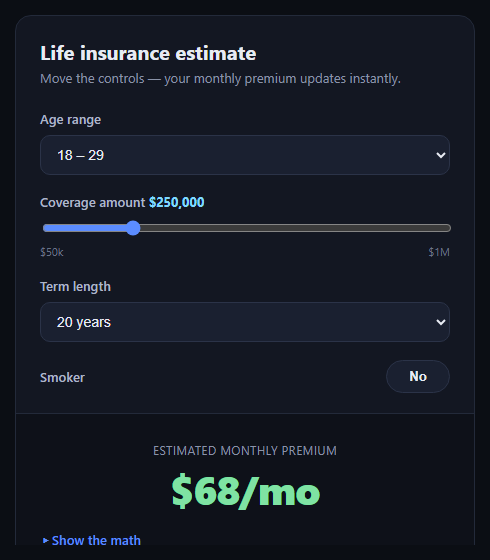
The insurance quote calculator is the widget on a carrier or comparison site that turns age, coverage amount, and term length into an estimated monthly premium — instantly, as the visitor adjusts controls, instead of forcing a form submission and a wait. This snippet builds one in plain HTML, CSS, and JavaScript with no dependencies, and deliberately exposes the formula instead of hiding it behind a black box.
Inputs that map to real risk factors
The widget collects four inputs: an age-range select, a coverage-amount range slider ($50k to $1M in $25k steps), a term-length select (10/20/30 years), and a smoker toggle. Each one maps to a numeric multiplier — ageFactor, termFactor, SMOKER_FACTOR — rather than a hidden lookup table, so the relationship between an input and the price is traceable.
A formula you can read
The premium is computed as (coverage / 1000) * baseRatePer1k * ageFactor * termFactor * smokerFactor. That's the entire pricing model, and it runs synchronously on every input event — moving the slider recalculates the premium on every tick, with no debounce needed since the arithmetic is trivial.
Show the math, not just the number
A <details> panel labeled "Show the math" renders every intermediate value: coverage converted to $1,000 units, the base rate, and each factor applied in turn, ending in a totals row. This is the core idea of the snippet — insurance pricing tools are notorious for feeling like black boxes, and rendering the arithmetic builds trust and doubles as a teaching tool for how term life pricing actually works (age and smoking status dominate; coverage scales linearly).
Native controls, no library
The age and term pickers are native <select> elements and the coverage input is a native <input type="range"> styled with accent-color — so keyboard, screen reader, and touch support come for free, and there's no dependency to load.
Instant feedback loop
Every control fires recalc() on input/change, which updates both the headline premium and the math panel in one pass, so the two never fall out of sync.
Customizing it
Swap in real actuarial rate factors, add a health-conditions field, or change the coverage step and range. Pair it with a checkout form to collect the applicant's details, or a comparison table to show multiple coverage tiers side by side.
Step by step
How to Use
- 1Paste HTML, CSS, and JSThe quote card renders with default selections.
- 2Adjust age, coverage, or termThe premium recalculates immediately.
- 3Toggle smoker statusThe multiplier changes and updates the price.
- 4Open "Show the math"See every factor applied, in order.
- 5Tune the constantsEdit BASE_RATE_PER_1K or the factor values.
Real-world uses
Common Use Cases
select and range controls without any library.Got questions?
Frequently Asked Questions
No — the factors (base rate, age, term, smoker multipliers) are illustrative constants meant to demonstrate the pattern of a transparent, live-recalculating quote widget. Replace them with your own underwriting data or an API call before using it for real quotes.
Insurance calculators are often perceived as black boxes. The "show the math" panel renders every factor applied to reach the final number, which builds trust with the visitor and can double as an educational tool showing how age and smoking status dominate term life pricing.
Yes. The range input fires an "input" event on every tick, and recalc() runs synchronously — the arithmetic is trivial, so no debounce or throttling is needed even on rapid drags.
Add a new control, give it a numeric factor value the same way ageFactor and termFactor work, multiply it into the formula in recalc(), and add a corresponding row to the math breakdown template so it stays transparent.
Yes. Move the four inputs and the premium/math markup into your component, keep the constants and recalc() logic in a function triggered by state changes (or a computed/derived value), and re-render the breakdown rows from the same intermediate values.