
Quill Rich Text Editor with Custom Toolbar and Character Limit

CodeMirror JSON Editor with Validation Gutter
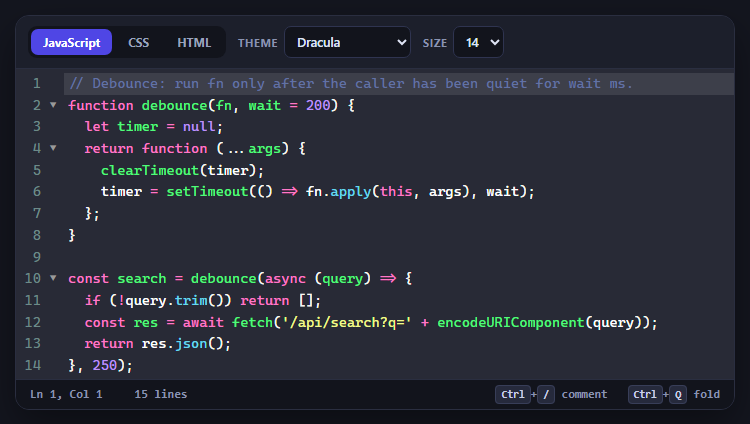
CodeMirror Code Editor with Line Numbers, Folding and Themes

Marked + DOMPurify Live Markdown Preview
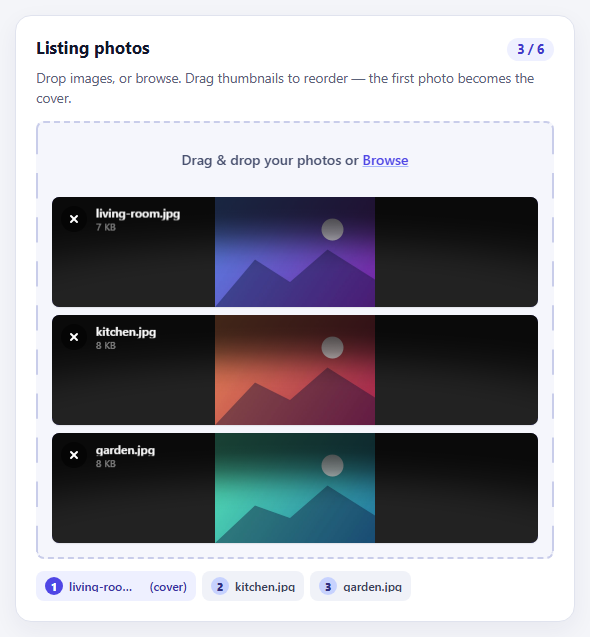
FilePond Image Upload with Preview and Reorder

Cropper.js Aspect-Ratio Presets for Social Posts
Interview Scheduler Form — Free Slot Picker & Booking Summary UI
Interview Scheduler Form · Forms · Plain HTML, CSS & JS · Live preview
What's included
Features
About this UI Snippet
Interview Scheduler Form — Interviewer, Duration & Slot Picker
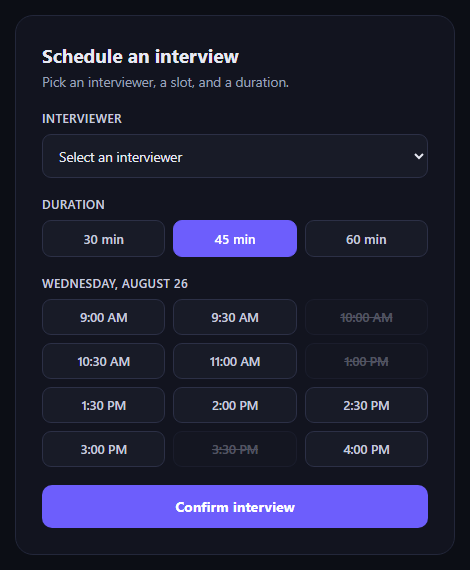
The interview scheduler form is what a candidate or coordinator fills out to book a slot: pick an interviewer, a duration, and an open time — then see a clean confirmation. This snippet builds the whole flow in plain HTML, CSS, and JavaScript.
Three independent choices, one form
An interviewer <select>, a row of duration toggle buttons, and a grid of time-slot buttons are all independently interactive, but only the submit handler checks that the required ones (interviewer and slot) are actually filled before proceeding — so partial progress never silently fails.
Slots that reflect real availability
Several .isf-slot buttons carry disabled and an .isf-slot--taken class with a strikethrough — they're excluded from the click handler's querySelectorAll('.isf-slot:not(:disabled)') selector entirely, so a taken slot can never accidentally become selectable through a stray event.
Toggle-button selection pattern
Both the duration and slot pickers use the same pattern: clicking a button clears the isf-active class from all its siblings, then applies it only to the clicked one. It's a single-select toggle group built from plain buttons instead of radio inputs, which makes the larger touch targets and custom styling easy.
Inline validation, not a popup
Submitting without an interviewer or slot reveals an inline error message rather than a browser alert, and picking a slot afterward clears that error immediately — validation feedback appears and disappears in the same visual space the user is already looking at.
A real submitted state
On valid submit, the form is hidden and replaced by a summary card showing exactly what was booked, with an "Edit details" button that swaps back to the form — so the interaction has a genuine before/after state instead of just a success toast.
Customizing it
Wire the submit handler to your booking API, generate the slot grid dynamically from a real calendar/availability feed, or add multi-day date tabs above the slot grid. Pair it with an availability scheduler for the interviewer's side, or a meeting scheduler poll for group availability.
Step by step
How to Use
- 1Paste the HTML, CSS, and JSA scheduler form with interviewer, duration, and slots render.
- 2Pick an interviewerSelect from the dropdown.
- 3Choose a durationClick 30, 45, or 60 minutes.
- 4Click an open time slotTaken slots are struck through and disabled.
- 5Submit the formMissing fields show an inline error instead of proceeding.
- 6Review the confirmationA summary card replaces the form; "Edit details" reopens it.
Real-world uses
Common Use Cases
Got questions?
Frequently Asked Questions
Taken slot buttons carry both the disabled attribute and an isf-slot--taken class in the markup. The click-handler loop only attaches listeners to buttons matched by querySelectorAll('.isf-slot:not(:disabled)'), so disabled slots never receive a click handler at all — they are excluded structurally, not just styled to look unavailable while remaining clickable.
The submit handler calls e.preventDefault(), checks whether an interviewer is selected and a slot was chosen, and if either is missing, adds an isf-show class to a paragraph that's already in the form's layout — CSS toggles its display. That keeps the user's attention and scroll position exactly where they are, rather than interrupting with a native alert() dialog that has to be dismissed separately.
The same click handler that marks a slot as selected also removes the isf-show class from the error message, on the assumption that selecting a slot resolves the "no slot selected" case. If the interviewer field is still empty, submitting again will re-trigger the error — so the message only disappears when the user has actually taken corrective action.
Replace the hardcoded .isf-slot buttons with ones generated in JavaScript from an array of { time, available } objects returned by your backend — set the disabled attribute and isf-slot--taken class based on available: false for each, then attach the same click handler to the resulting DOM nodes. The duration and validation logic don't need to change.
Hold interviewer, duration, and selectedSlot in component state, render the slot grid from an array (mapping unavailable slots to disabled buttons), and drive the submitted/summary view with a boolean flag instead of toggling the hidden attribute directly. The validation and summary-rendering logic translate directly into your framework's conditional rendering.
Build with AI
Build, Understand, Optimize, and Extend It With AI
Booking flows have a lot of small state-management decisions bundled together, so it's worth pasting this snippet's HTML, CSS, and JS into an AI coding assistant like Claude and asking it to explain why the taken time slots are excluded at the querySelectorAll level rather than just styled as disabled, and how the single-select toggle-button pattern (clearing an active class from all siblings before adding it to one) differs from using native radio inputs. The same assistant is useful for hardening the flow for a real product — ask it whether the interviewer dropdown should filter which slots show as available (so a busy interviewer's booked times gray out dynamically), how to add timezone handling if interviewer and candidate are in different zones, or how to debounce/lock the submit button to prevent a double-booking race condition when the confirmation request is in flight.
Prompt to recreate it
Copy this into your AI assistant of choice to build the effect from scratch, or as a jumping-off point for your own variant:
Build an "interview scheduler form" in plain HTML, CSS, and JavaScript — no frameworks, no dependencies.

Requirements:
- A form with: a native select dropdown to choose an interviewer, a row of toggle buttons to choose interview duration (e.g. 30/45/60 minutes, single-select — clicking one deselects the others), and a grid of time-slot toggle buttons for a specific date (single-select).
- Several time slots must be marked unavailable via the disabled attribute plus a distinct visual style (e.g. strikethrough, reduced opacity) — and the click-handling JavaScript must specifically query only the non-disabled slot buttons when attaching listeners, so disabled slots can never become selected.
- On submit, validate that both an interviewer and a time slot are selected. If either is missing, prevent the default form submission and show an inline error message already present in the page layout (not a native alert/confirm dialog) rather than proceeding; selecting a slot afterward should clear that error automatically.
- On successful submit, hide the form and show a separate confirmation/summary panel displaying the chosen interviewer, the date and time, and the duration — with an "edit details" button that hides the summary and re-shows the form.
- Keep it in a dark theme, and make sure the JavaScript only references classnames/ids that exist in the HTML you write.
Want to tighten it up first? Run this prompt through the AI Prompt Studio to score it across 8 quality dimensions, catch anti-patterns, and tune the wording for Claude, ChatGPT, or Gemini before you paste it in.
Source Code
<form class="isf-card" id="isfForm">
<h2>Schedule an interview</h2>
<p class="isf-sub">Pick an interviewer, a slot, and a duration.</p>
<div class="isf-field">
<label for="isfInterviewer">Interviewer</label>
<select id="isfInterviewer" required>
<option value="">Select an interviewer</option>
<option value="Priya Shah — Eng Manager">Priya Shah — Eng Manager</option>
<option value="Tom Reilly — Staff Engineer">Tom Reilly — Staff Engineer</option>
<option value="Aiko Tanaka — Design Lead">Aiko Tanaka — Design Lead</option>
</select>
</div>
<div class="isf-field">
<label>Duration</label>
<div class="isf-duration">
<button type="button" class="isf-dur-btn" data-mins="30">30 min</button>
<button type="button" class="isf-dur-btn isf-active" data-mins="45">45 min</button>
<button type="button" class="isf-dur-btn" data-mins="60">60 min</button>
</div>
</div>
<div class="isf-field">
<label>Wednesday, August 26</label>
<div class="isf-slots" id="isfSlots">
<button type="button" class="isf-slot">9:00 AM</button>
<button type="button" class="isf-slot">9:30 AM</button>
<button type="button" class="isf-slot isf-slot--taken" disabled>10:00 AM</button>
<button type="button" class="isf-slot">10:30 AM</button>
<button type="button" class="isf-slot">11:00 AM</button>
<button type="button" class="isf-slot isf-slot--taken" disabled>1:00 PM</button>
<button type="button" class="isf-slot">1:30 PM</button>
<button type="button" class="isf-slot">2:00 PM</button>
<button type="button" class="isf-slot">2:30 PM</button>
<button type="button" class="isf-slot">3:00 PM</button>
<button type="button" class="isf-slot isf-slot--taken" disabled>3:30 PM</button>
<button type="button" class="isf-slot">4:00 PM</button>
</div>
</div>
<p class="isf-error" id="isfError">Pick an interviewer and a time slot to continue.</p>
<button type="submit" class="isf-submit">Confirm interview</button>
</form>
<div class="isf-card isf-summary" id="isfSummary" hidden>
<div class="isf-check">✓</div>
<h2>Interview scheduled</h2>
<dl class="isf-summary-list">
<div><dt>Interviewer</dt><dd id="isfSumInterviewer"></dd></div>
<div><dt>Date & time</dt><dd id="isfSumTime"></dd></div>
<div><dt>Duration</dt><dd id="isfSumDuration"></dd></div>
</dl>
<button type="button" class="isf-submit isf-submit--ghost" id="isfEdit">Edit details</button>
</div>*{box-sizing:border-box}
body{margin:0;font-family:system-ui,-apple-system,sans-serif;background:#0c0e15;color:#e7e9f2;padding:40px 16px;display:flex;justify-content:center;min-height:100vh;align-items:center}
.isf-card{width:100%;max-width:440px;background:#12141f;border:1px solid #23273a;border-radius:18px;padding:26px}
.isf-card h2{margin:0 0 4px;font-size:19px}
.isf-sub{margin:0 0 20px;color:#9aa0b8;font-size:13.5px}
.isf-field{margin-bottom:18px}
.isf-field > label{display:block;font-size:12px;font-weight:600;color:#c7cade;margin-bottom:8px;text-transform:uppercase;letter-spacing:.03em}
#isfInterviewer{width:100%;padding:11px 12px;border-radius:9px;border:1px solid #2c3046;background:#181b27;color:#e7e9f2;font:inherit;font-size:13.5px}
.isf-duration{display:flex;gap:8px}
.isf-dur-btn{flex:1;padding:9px 0;border-radius:9px;border:1px solid #2c3046;background:#181b27;color:#c7cade;font:inherit;font-size:13px;font-weight:600;cursor:pointer}
.isf-dur-btn.isf-active{background:#6d5efc;border-color:#6d5efc;color:#fff}
.isf-slots{display:grid;grid-template-columns:repeat(3,1fr);gap:8px}
.isf-slot{padding:9px 4px;border-radius:9px;border:1px solid #2c3046;background:#181b27;color:#c7cade;font:inherit;font-size:12.5px;font-weight:600;cursor:pointer}
.isf-slot:hover:not(:disabled){border-color:#6d5efc}
.isf-slot.isf-active{background:#6d5efc;border-color:#6d5efc;color:#fff}
.isf-slot--taken{opacity:.35;cursor:not-allowed;text-decoration:line-through}
.isf-error{display:none;color:#f87171;font-size:12.5px;margin:0 0 14px}
.isf-error.isf-show{display:block}
.isf-submit{width:100%;padding:12px 0;border-radius:10px;border:none;background:#6d5efc;color:#fff;font:inherit;font-size:14px;font-weight:700;cursor:pointer}
.isf-submit:hover{background:#5c4cf0}
.isf-submit--ghost{background:transparent;border:1px solid #2c3046;color:#c7cade;margin-top:6px}
.isf-summary{text-align:center}
.isf-check{width:52px;height:52px;border-radius:50%;background:#0f2e22;color:#34d399;font-size:24px;display:flex;align-items:center;justify-content:center;margin:0 auto 14px}
.isf-summary-list{margin:18px 0;text-align:left;display:flex;flex-direction:column;gap:10px}
.isf-summary-list > div{display:flex;justify-content:space-between;border-bottom:1px solid #20232f;padding-bottom:10px;font-size:13.5px}
.isf-summary-list dt{color:#8a8fa8}
.isf-summary-list dd{margin:0;font-weight:600}const form = document.getElementById('isfForm');
const durButtons = form.querySelectorAll('.isf-dur-btn');
const slotButtons = form.querySelectorAll('.isf-slot:not(:disabled)');
const errorMsg = document.getElementById('isfError');
let selectedDuration = 45;
let selectedSlot = null;
durButtons.forEach((btn) => {
btn.addEventListener('click', () => {
durButtons.forEach((b) => b.classList.remove('isf-active'));
btn.classList.add('isf-active');
selectedDuration = Number(btn.dataset.mins);
});
});
slotButtons.forEach((btn) => {
btn.addEventListener('click', () => {
slotButtons.forEach((b) => b.classList.remove('isf-active'));
btn.classList.add('isf-active');
selectedSlot = btn.textContent;
errorMsg.classList.remove('isf-show');
});
});
form.addEventListener('submit', (e) => {
e.preventDefault();
const interviewer = document.getElementById('isfInterviewer').value;
if (!interviewer || !selectedSlot) {
errorMsg.classList.add('isf-show');
return;
}
document.getElementById('isfSumInterviewer').textContent = interviewer;
document.getElementById('isfSumTime').textContent = 'Wed, Aug 26 \u00B7 ' + selectedSlot;
document.getElementById('isfSumDuration').textContent = selectedDuration + ' minutes';
form.hidden = true;
document.getElementById('isfSummary').hidden = false;
});
document.getElementById('isfEdit').addEventListener('click', () => {
document.getElementById('isfSummary').hidden = true;
form.hidden = false;
});