


Like Burst Button — Free HTML CSS JS Heart Particle Snippet
Like Burst Button · Buttons · Plain HTML, CSS & JS · Live preview
Copy & paste
Source Code
<div class="lk-stage">
  <button type="button" class="lk-btn" id="lkBtn" aria-pressed="false">
    <span class="lk-heart" id="lkHeart">
      <svg viewBox="0 0 24 24"><path d="M12 21.35l-1.45-1.32C5.4 15.36 2 12.28 2 8.5 2 5.42 4.42 3 7.5 3c1.74 0 3.41.81 4.5 2.09C13.09 3.81 14.76 3 16.5 3 19.58 3 22 5.42 22 8.5c0 3.78-3.4 6.86-8.55 11.54L12 21.35z"/></svg>
    </span>
    <span class="lk-count" id="lkCount">128</span>
  </button>
</div>*{box-sizing:border-box;margin:0;padding:0}
body{font-family:system-ui,-apple-system,sans-serif;background:#0c0c16;display:flex;justify-content:center;align-items:center;min-height:100vh}
.lk-btn{position:relative;display:inline-flex;align-items:center;gap:9px;background:#16162a;border:1px solid #2a2a44;border-radius:999px;padding:11px 18px;font-family:inherit;font-size:15px;font-weight:700;color:#c7c7dd;cursor:pointer;transition:border-color .2s}
.lk-btn:hover{border-color:#3a3a5c}
.lk-heart{position:relative;width:24px;height:24px;display:inline-flex}
.lk-heart svg{width:24px;height:24px;fill:#5b5b73;transition:fill .15s;transform-origin:center}
.lk-btn.liked .lk-heart svg{fill:#f43f5e;animation:lkPop .42s cubic-bezier(.2,1.4,.4,1)}
@keyframes lkPop{0%{transform:scale(0)}55%{transform:scale(1.25)}100%{transform:scale(1)}}
.lk-btn.liked .lk-count{color:#f43f5e}
/* The burst particles are created in JS and animated via the Web Animations API,
so no CSS needed for them beyond the base class. */
.lk-particle{position:absolute;top:50%;left:12px;width:7px;height:7px;border-radius:50%;pointer-events:none;z-index:2}var btn = document.getElementById('lkBtn');
var heart = document.getElementById('lkHeart');
var countEl = document.getElementById('lkCount');
var liked = false, count = 128;
var COLORS = ['#f43f5e', '#fb7185', '#fbbf24', '#a78bfa', '#22d3ee'];
function burst() {
var n = 12;
for (var i = 0; i < n; i++) {
var p = document.createElement('span');
p.className = 'lk-particle';
p.style.background = COLORS[i % COLORS.length];
heart.appendChild(p);
var angle = (i / n) * Math.PI * 2 + Math.random() * 0.4;
var dist = 26 + Math.random() * 16;
p.animate(
[{ transform: 'translate(-50%,-50%) scale(1)', opacity: 1 },
{ transform: 'translate(calc(-50% + ' + Math.cos(angle) * dist + 'px),calc(-50% + ' + Math.sin(angle) * dist + 'px)) scale(0)', opacity: 0 }],
{ duration: 600 + Math.random() * 200, easing: 'cubic-bezier(.2,.7,.3,1)', fill: 'forwards' }
).onfinish = function () { this.effect.target.remove(); };
}
}
btn.addEventListener('click', function () {
liked = !liked;
btn.classList.toggle('liked', liked);
btn.setAttribute('aria-pressed', liked ? 'true' : 'false');
count += liked ? 1 : -1;
countEl.textContent = count;
if (liked) burst();
});Extend with AI
Take This Snippet Further With AI
The AI prompt for this one is for Patreon supporters ($3 a month, 7 days free), along with a site with no ads. Supporters enter the passcode once and it is remembered in this browser.
What's included
Features
About this UI Snippet
Like Burst Button — Heart Pop With a Radial Particle Burst
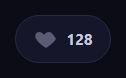
The like burst button is the satisfying social interaction — popularized by Twitter and Instagram — where tapping a heart makes it pop into color and spray a radial burst of colorful particles outward, with the count ticking up. This snippet builds it with plain HTML, CSS, and vanilla JavaScript using the Web Animations API for the particles.
The heart pop
The heart is an inline SVG that is gray at rest. On like, a .liked class fills it red and runs the lkPop keyframe, which scales it from 0 up past 1 to 1.25 and settles back to 1 on an overshooting cubic-bezier. That brief overshoot is the bounce that makes the heart feel like it springs to life rather than just recoloring. The count next to it also turns red, reinforcing the active state.
The radial particle burst
The burst is generated on each like: twelve small particle dots are created and appended over the heart, each assigned a color from a small palette. The key is the radial distribution — each particle is sent to an angle of (i / n) * 2π (evenly around the circle) with a little random jitter, at a random distance, computed with cos/sin. Animating each particle from the heart center out to its (cos·dist, sin·dist) offset while scaling to zero and fading produces the firework spray. The even angular spacing is what makes it read as a deliberate burst rather than random scatter.
Web Animations API for fire-and-forget particles
Each particle animates with element.animate(), which returns a handle with an onfinish callback used to remove the particle from the DOM when its animation completes (this.effect.target.remove()). This fire-and-forget pattern means particles clean themselves up and never accumulate, without managing CSS animation classes or animationend listeners across a dozen short-lived elements. Randomizing each particle duration slightly makes the burst dissipate organically rather than all at once.
Optimistic toggle and count
Clicking toggles the liked state and adjusts the count immediately (+1 on like, -1 on unlike) — an optimistic update that makes the UI feel instant. Unliking removes the red state without a burst, since bursts celebrate the positive action. In a real app you would fire the network request in the background and reconcile if it fails; the visual is decoupled from the round-trip.
Accessible state
The control is a real <button> with aria-pressed that flips between true and false, so assistive tech announces the like as a toggle button with its current state — the correct semantics for a like control, rather than a generic clickable element.
Customizing it
Change the particle count, colors, spread distance, and durations for a bigger or subtler burst, adjust the heart pop overshoot, recolor the liked state, or swap the heart for a star or thumbs-up. Wire the click to your real API. Pair it with a favorite button or an emoji reaction bar for a full reaction set.
Step by step
How to Use
- 1Paste HTML, CSS, and JSA like button shows a gray heart and a count.
- 2Click the heartIt pops red and sprays a burst of colorful particles.
- 3Watch the countIt ticks up immediately on like.
- 4Click againIt unlikes and the count drops, with no burst.
- 5Tune the burstChange particle count, colors, and spread.
- 6Wire your APIFire the real request in the click handler.
Real-world uses
Common Use Cases
aria-pressed.Got questions?
Frequently Asked Questions
On each like, twelve particle dots are appended over the heart, each colored from a palette and sent to an angle of (i / n) times 2 pi — evenly around the circle — with slight random jitter and a random distance. Animating each from the center to its cos and sin offset while scaling to zero and fading produces the firework spray. The even angular spacing makes it read as a deliberate burst.
Each particle is animated with the Web Animations API, whose returned handle has an onfinish callback. That callback removes the particle when its animation completes, so they clean themselves up. This fire-and-forget pattern avoids managing CSS classes and animationend listeners across a dozen short-lived elements.
The lkPop keyframe scales the heart from 0 past 1 to 1.25 and settles back to 1 on an overshooting cubic-bezier. That brief overshoot is a spring bounce, so the heart appears to spring into existence rather than simply changing color. The count turning red at the same moment reinforces the active state.
It is an optimistic update: toggling adjusts the count immediately so the UI feels instant. In a real app you fire the like request in the background and reconcile if it fails. Decoupling the visual from the round-trip is what makes the interaction feel responsive even on a slow connection.
Keep liked and count in state and toggle them on click, calling your API in the background. Trigger the burst by appending particles to a ref and animating them with element.animate, cleaning up on finish — keep this out of the render path. Use aria-pressed bound to the liked state. The heart pop is pure CSS. In Tailwind, animate the pop with a keyframe and run the particles in the handler.