


Live Cursor Name Tags — Free HTML CSS JS Snippet
Live Cursor Name Tags · Cards · Plain HTML, CSS & JS · Live preview
Copy & paste
Source Code
<div class="lcn-card">
  <div class="lcn-head">
    <div>
      <h2>Product spec draft</h2>
      <p>3 people editing</p>
    </div>
    <div class="lcn-avatars">
      <span class="lcn-avatar" style="background:#f97316">JM</span>
      <span class="lcn-avatar" style="background:#22d3ee">RS</span>
      <span class="lcn-avatar" style="background:#a78bfa">TN</span>
    </div>
  </div>

  <div class="lcn-doc" id="lcnDoc">
    <div class="lcn-line w1"></div>
    <div class="lcn-line w2"></div>
    <div class="lcn-line w3"></div>
    <div class="lcn-block"></div>
    <div class="lcn-line w2"></div>
    <div class="lcn-line w4"></div>
    <div class="lcn-line w1"></div>
    <div class="lcn-line w3"></div>

    <div class="lcn-cursor" id="cursor1" style="--c:#f97316"><svg viewBox="0 0 24 24" fill="#f97316"><path d="M4 2l14 8-6 2-2 6z"/></svg><span class="lcn-tag" style="background:#f97316">Jamie</span></div>
    <div class="lcn-cursor" id="cursor2" style="--c:#22d3ee"><svg viewBox="0 0 24 24" fill="#22d3ee"><path d="M4 2l14 8-6 2-2 6z"/></svg><span class="lcn-tag" style="background:#22d3ee">Rosa</span></div>
    <div class="lcn-cursor" id="cursor3" style="--c:#a78bfa"><svg viewBox="0 0 24 24" fill="#a78bfa"><path d="M4 2l14 8-6 2-2 6z"/></svg><span class="lcn-tag" style="background:#a78bfa">Theo</span></div>
  </div>
  <p class="lcn-note">Simulated cursors for demo purposes — no live connection.</p>
</div>*{box-sizing:border-box;margin:0;padding:0}
body{font-family:system-ui,-apple-system,sans-serif;background:#0c0f17;min-height:100vh;display:flex;align-items:center;justify-content:center;padding:24px}
.lcn-card{background:#12151f;border:1px solid #232838;border-radius:18px;padding:20px;width:100%;max-width:520px;box-shadow:0 24px 60px rgba(0,0,0,.5)}
.lcn-head{display:flex;align-items:center;justify-content:space-between;margin-bottom:14px}
.lcn-head h2{font-size:15.5px;font-weight:800;color:#f1f5f9}
.lcn-head p{font-size:11.5px;color:#64748b;margin-top:2px}
.lcn-avatars{display:flex}
.lcn-avatar{width:26px;height:26px;border-radius:50%;color:#0c0f17;font-size:10px;font-weight:800;display:flex;align-items:center;justify-content:center;margin-left:-7px;border:2px solid #12151f}
.lcn-avatar:first-child{margin-left:0}
.lcn-doc{position:relative;background:#0e1119;border:1px solid #1e2331;border-radius:12px;height:300px;padding:22px 26px;overflow:hidden}
.lcn-line{height:9px;border-radius:5px;background:#1e2431;margin-bottom:14px}
.lcn-line.w1{width:88%}
.lcn-line.w2{width:65%}
.lcn-line.w3{width:76%}
.lcn-line.w4{width:52%}
.lcn-block{height:52px;border-radius:8px;background:#171c28;border:1px dashed #2a3140;margin-bottom:14px}
.lcn-cursor{position:absolute;top:0;left:0;display:flex;align-items:flex-start;pointer-events:none;will-change:transform;transition:transform .05s linear}
.lcn-cursor svg{width:18px;height:18px;flex-shrink:0;filter:drop-shadow(0 2px 4px rgba(0,0,0,.5))}
.lcn-tag{margin-left:2px;margin-top:14px;font-size:10.5px;font-weight:800;color:#0c0f17;padding:2px 7px;border-radius:6px 6px 6px 2px;white-space:nowrap;box-shadow:0 3px 8px rgba(0,0,0,.35)}
.lcn-note{font-size:11px;color:#4b5566;text-align:center;margin-top:12px}// Pre-scripted paths (percentages of the doc area) that each simulated cursor loops through.
var PATHS = [
{ el: document.getElementById('cursor1'), points: [[10,15],[55,10],[70,40],[30,55],[15,80],[50,85],[10,15]], speed: 0.00035, offset: 0 },
{ el: document.getElementById('cursor2'), points: [[85,20],[60,45],[80,65],[92,30],[85,20]], speed: 0.0005, offset: 0.3 },
{ el: document.getElementById('cursor3'), points: [[30,25],[45,60],[20,70],[8,40],[30,25]], speed: 0.00042, offset: 0.6 },
];
var doc = document.getElementById('lcnDoc');
function pointAt(points, t) {
var n = points.length - 1;
var scaled = t * n;
var i = Math.min(Math.floor(scaled), n - 1);
var localT = scaled - i;
var a = points[i], b = points[i + 1];
return [a[0] + (b[0] - a[0]) * localT, a[1] + (b[1] - a[1]) * localT];
}
function tick(now) {
var rect = doc.getBoundingClientRect();
PATHS.forEach(function (p) {
var t = ((now * p.speed) + p.offset) % 1;
var pos = pointAt(p.points, t);
var x = (pos[0] / 100) * rect.width;
var y = (pos[1] / 100) * rect.height;
p.el.style.transform = 'translate(' + x.toFixed(1) + 'px,' + y.toFixed(1) + 'px)';
});
requestAnimationFrame(tick);
}
requestAnimationFrame(tick);Extend with AI
Take This Snippet Further With AI
The AI prompt for this one is for Patreon supporters ($3 a month), along with a site with no ads. Supporters enter the passcode once and it is remembered in this browser.
What's included
Features
About this UI Snippet
Live Cursor Name Tags — Simulated Multiplayer Cursors on a Shared Document
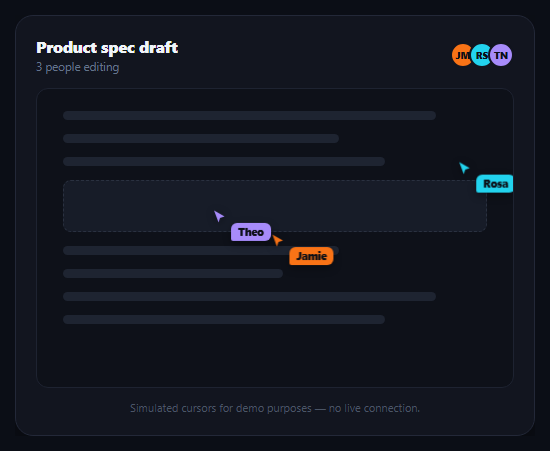
Figma, Google Docs, and Notion all share a visual signature: colored cursors with floating name tags drifting around the canvas as collaborators work. This snippet recreates that visual pattern — not a real multiplayer backend, but the exact look and motion — using plain CSS and requestAnimationFrame, so you can see and reuse the animation technique without standing up WebSockets or a presence server. Pair it with multiplayer cursors for a closer look at cursor rendering, or collaborator presence bar for who's-online UI.
Pre-scripted paths, not random motion
Each cursor follows a small array of waypoint percentages (points) that loop back to the start, rather than random jitter. Random motion reads as noisy and unrealistic; a handful of deliberate waypoints reads as a person actually scrolling and clicking through a document, which is closer to what real presence cursors look like in practice.
One time-based interpolation function
pointAt() takes the array of waypoints and a progress value t between 0 and 1, finds which segment t falls into, and linearly interpolates between that segment's two points. Because position is a pure function of time rather than accumulated per-frame movement, the animation can never drift, stutter, or accumulate floating-point error — reloading or resizing the page just re-samples the same path at the current time.
Driven by requestAnimationFrame, not setInterval
A single tick() loop reads the current timestamp, computes each cursor's position along its path, and sets a CSS transform: translate() — the one property that animates without triggering layout or paint of surrounding content. requestAnimationFrame syncs the loop to the browser's repaint cycle, so motion stays smooth and automatically pauses when the tab isn't visible, unlike a fixed-interval timer.
Staggered offsets keep it readable
Each cursor's offset shifts where it starts along its loop and each has a different speed, so the three cursors never move in lockstep or cross paths predictably — mirroring how real collaborators work at different paces in different parts of a document, which keeps the scene visually interesting rather than looking like one animation copy-pasted three times.
Reusing this for real presence
To make this real, replace the pre-scripted paths with actual cursor coordinates broadcast over a WebSocket or a service like Liveblocks/Pusher — the rendering half (the .lcn-cursor markup, the transform-based positioning, and the name tag styling) stays exactly the same; only the source of x/y changes from a scripted path to a network message.
Step by step
How to Use
- 1Paste HTML, CSS, and JSA document mockup renders with three colored cursors already gliding around it.
- 2Watch the pathsEach cursor loops through its own waypoints at a different speed and offset.
- 3Resize the windowCursor positions are read as percentages of the doc area, so they stay correctly placed.
- 4Adjust a pathEdit a cursor's points array to change its route around the document.
- 5Change the paceTune each cursor's speed value to make it drift faster or slower.
- 6Wire to real dataSwap pointAt()'s scripted lookup for live x/y coordinates from your presence backend.
Real-world uses
Common Use Cases
pointAt() deriving each position purely from elapsed time.requestAnimationFrame loop that pauses automatically.Got questions?
Frequently Asked Questions
No — this snippet simulates the visual pattern with pre-scripted paths and requestAnimationFrame, with no network connection or backend. It's meant to demonstrate and let you reuse the rendering and motion technique. For real presence, you'd broadcast actual cursor coordinates over a WebSocket or a service like Liveblocks and feed them into the same transform-based rendering.
Random per-frame jitter looks noisy and mechanical. A small loop of deliberate waypoints, interpolated smoothly between them, reads as a person actually navigating a document — closer to the motion real presence cursors exhibit in tools like Figma and Google Docs, which is the visual effect this snippet is recreating.
pointAt() derives each cursor's position as a pure function of the current timestamp and its path, rather than adding a small delta every frame. That means there's nothing to accumulate or drift — the animation is always correct no matter how much time passed since the last frame, and it can't stutter if a frame is dropped.
requestAnimationFrame automatically throttles or pauses when a tab is backgrounded, which is the correct, battery-friendly behavior. Because position is computed from the current timestamp rather than accumulated increments, the cursors resume smoothly at the correct position when the tab regains focus instead of jumping or catching up.
Keep the .lcn-cursor markup and its transform-based positioning exactly as is, but replace the pointAt()/PATHS logic with a handler that receives real x/y coordinates from your backend (WebSocket, Liveblocks, Pusher, etc.), converts them to the same percentage-of-container or pixel space, and sets the same translate() transform. Add and remove cursor elements dynamically as collaborators join and leave.