



NFT Mint Progress — Free Live Minting Card UI
NFT Mint Progress · Cards · Plain HTML, CSS & JS · Live preview
Copy & paste
Source Code
<div class="nmp-card">
<div class="nmp-art" aria-hidden="true">
<div class="nmp-art-glow"></div>
<span class="nmp-art-emoji">◆</span>
</div>
<div class="nmp-head">
<h3>Genesis Drop</h3>
<span class="nmp-status" id="nmpStatus">Live</span>
</div>
<div class="nmp-progress-row">
<span class="nmp-minted"><b id="nmpMinted">3417</b> / 5000 minted</span>
<span class="nmp-pct" id="nmpPct">68%</span>
</div>
<div class="nmp-bar" aria-hidden="true"><div class="nmp-bar-fill" id="nmpBarFill" style="width:68.34%"></div></div>
<div class="nmp-controls">
<div class="nmp-qty" id="nmpQty">
<button type="button" class="nmp-qty-btn" id="nmpMinus" aria-label="Decrease quantity">−</button>
<span class="nmp-qty-val" id="nmpQtyVal">1</span>
<button type="button" class="nmp-qty-btn" id="nmpPlus" aria-label="Increase quantity">+</button>
</div>
<button type="button" class="nmp-mint-btn" id="nmpMintBtn">
<span class="nmp-spinner" id="nmpSpinner" hidden aria-hidden="true"></span>
<span id="nmpMintLabel">Mint now · 0.08 ETH</span>
</button>
</div>
<p class="nmp-note" id="nmpNote">Price per NFT: 0.08 ETH + gas</p>
</div>*{box-sizing:border-box;margin:0;padding:0}
body{font-family:system-ui,-apple-system,sans-serif;background:#0c0a14;min-height:100vh;display:flex;align-items:center;justify-content:center;padding:32px}
.nmp-card{width:100%;max-width:360px;background:linear-gradient(165deg,#1c1530,#100c1c);border:1px solid #2c2248;border-radius:20px;padding:22px;box-shadow:0 24px 60px rgba(0,0,0,.45)}
.nmp-art{position:relative;height:150px;border-radius:14px;background:linear-gradient(145deg,#2a1f4d,#150f28);display:flex;align-items:center;justify-content:center;overflow:hidden;margin-bottom:16px}
.nmp-art-glow{position:absolute;width:180px;height:180px;background:radial-gradient(circle,rgba(168,124,255,.5),transparent 70%);filter:blur(10px);animation:nmpDrift 6s ease-in-out infinite}
@keyframes nmpDrift{0%,100%{transform:translate(-10px,-10px)}50%{transform:translate(10px,10px)}}
.nmp-art-emoji{position:relative;font-size:48px;color:#c9b6ff}
.nmp-head{display:flex;align-items:center;justify-content:space-between;margin-bottom:12px}
.nmp-head h3{font-size:16px;font-weight:800;color:#f4f1fc}
.nmp-status{font-size:11px;font-weight:800;color:#a78bfa;background:rgba(167,139,250,.14);padding:4px 10px;border-radius:999px;display:flex;align-items:center;gap:5px}
.nmp-status::before{content:'';width:6px;height:6px;border-radius:50%;background:#a78bfa;animation:nmpPulse 1.6s infinite}
@keyframes nmpPulse{0%,100%{opacity:1}50%{opacity:.3}}
.nmp-progress-row{display:flex;align-items:center;justify-content:space-between;font-size:12.5px;color:#a79fc2;margin-bottom:6px}
.nmp-minted b{color:#f4f1fc;font-variant-numeric:tabular-nums}
.nmp-pct{font-weight:800;color:#c9b6ff;font-variant-numeric:tabular-nums}
.nmp-bar{width:100%;height:8px;border-radius:999px;background:#241c3d;overflow:hidden;margin-bottom:18px}
.nmp-bar-fill{height:100%;background:linear-gradient(90deg,#a78bfa,#7c5cff);border-radius:999px;transition:width .5s ease}
.nmp-controls{display:flex;align-items:center;gap:10px;margin-bottom:12px}
.nmp-qty{display:flex;align-items:center;background:#1a1430;border:1.5px solid #2c2248;border-radius:10px;overflow:hidden;flex-shrink:0}
.nmp-qty-btn{width:34px;height:40px;border:none;background:transparent;color:#c9b6ff;font-size:16px;cursor:pointer}
.nmp-qty-btn:hover{background:#241c3d}
.nmp-qty-val{width:32px;text-align:center;font-size:14px;font-weight:800;color:#f4f1fc}
.nmp-mint-btn{flex:1;height:40px;border:none;border-radius:10px;background:linear-gradient(135deg,#a78bfa,#7c5cff);color:#fff;font-size:13.5px;font-weight:800;cursor:pointer;font-family:inherit;transition:filter .15s,transform .1s;display:flex;align-items:center;justify-content:center;gap:8px}
.nmp-mint-btn:hover{filter:brightness(1.08)}
.nmp-mint-btn:active{transform:scale(.98)}
.nmp-mint-btn:disabled{cursor:default;opacity:.85}
.nmp-mint-btn.success{background:linear-gradient(135deg,#22c55e,#15803d)}
.nmp-spinner{width:15px;height:15px;border-radius:50%;border:2px solid rgba(255,255,255,.4);border-top-color:#fff;animation:nmpSpin .7s linear infinite;flex-shrink:0}
@keyframes nmpSpin{to{transform:rotate(360deg)}}
.nmp-note{font-size:11px;color:#7a7396;text-align:center}var TOTAL_SUPPLY = 5000;
var PRICE_ETH = 0.08;
var mintedCount = 3417;
var qty = 1;
var minting = false;
var mintedEl = document.getElementById('nmpMinted');
var pctEl = document.getElementById('nmpPct');
var barFill = document.getElementById('nmpBarFill');
var qtyVal = document.getElementById('nmpQtyVal');
var minusBtn = document.getElementById('nmpMinus');
var plusBtn = document.getElementById('nmpPlus');
var mintBtn = document.getElementById('nmpMintBtn');
var mintLabel = document.getElementById('nmpMintLabel');
var spinner = document.getElementById('nmpSpinner');
var statusEl = document.getElementById('nmpStatus');
var noteEl = document.getElementById('nmpNote');
function renderProgress() {
var pct = (mintedCount / TOTAL_SUPPLY) * 100;
mintedEl.textContent = mintedCount;
pctEl.textContent = Math.round(pct) + '%';
barFill.style.width = pct.toFixed(2) + '%';
if (mintedCount >= TOTAL_SUPPLY) {
statusEl.textContent = 'Sold out';
mintBtn.disabled = true;
mintLabel.textContent = 'Sold out';
noteEl.textContent = 'All ' + TOTAL_SUPPLY + ' NFTs have been minted.';
}
}
function formatEth(amount) {
return amount.toFixed(3).replace(/0+$/, '').replace(/\.$/, '');
}
function renderQty() {
qtyVal.textContent = qty;
mintLabel.textContent = 'Mint now \u00b7 ' + formatEth(PRICE_ETH * qty) + ' ETH';
minusBtn.disabled = qty <= 1;
plusBtn.disabled = qty >= 10 || mintedCount + qty >= TOTAL_SUPPLY;
}
minusBtn.addEventListener('click', function () {
if (qty > 1) { qty--; renderQty(); }
});
plusBtn.addEventListener('click', function () {
if (qty < 10 && mintedCount + qty < TOTAL_SUPPLY) { qty++; renderQty(); }
});
mintBtn.addEventListener('click', function () {
if (minting || mintedCount >= TOTAL_SUPPLY) return;
minting = true;
mintBtn.disabled = true;
spinner.hidden = false;
mintLabel.textContent = 'Minting\u2026';
setTimeout(function () {
var mintedQty = qty;
mintedCount = Math.min(TOTAL_SUPPLY, mintedCount + mintedQty);
renderProgress();
spinner.hidden = true;
mintBtn.classList.add('success');
mintLabel.textContent = '\u2713 Minted ' + mintedQty + (mintedQty > 1 ? ' NFTs' : ' NFT');
setTimeout(function () {
minting = false;
mintBtn.classList.remove('success');
qty = 1;
if (mintedCount < TOTAL_SUPPLY) {
mintBtn.disabled = false;
renderQty();
}
}, 1800);
}, 1400);
});
renderProgress();
renderQty();Extend with AI
Take This Snippet Further With AI
The AI prompt for this one is for Patreon supporters ($3 a month), along with a site with no ads. Supporters enter the passcode once and it is remembered in this browser.
What's included
Features
About this UI Snippet
NFT Mint Progress — Supply Bar, Quantity Stepper & Mint Confirmation
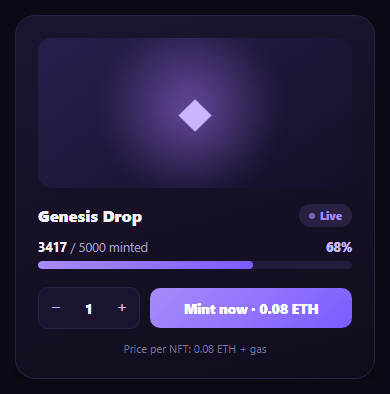
Every NFT mint page needs the same core widget: how much of the collection is gone, how many you're about to mint, and clear feedback that your transaction went through. This snippet builds that mint progress card — a live "minted / total supply" bar, a bounded quantity stepper, and a mint button that walks through a loading spinner into a genuine success confirmation — with no dependency beyond vanilla JS.
Supply progress driven by one number
mintedCount is the single source of truth. renderProgress() derives the displayed count, the percentage, and the bar's fill width all from it, so there's no way for the bar to show 68% while the text says something else. When mintedCount reaches TOTAL_SUPPLY, the same function flips the whole card into a sold-out state — disabling the mint button and swapping its label — rather than requiring a separate sold-out check elsewhere.
A quantity stepper that respects remaining supply
The +/− stepper is bounded not just by a fixed max (10 per transaction, a common anti-bot limit) but by mintedCount + qty > TOTAL_SUPPLY — so a user can never spin the quantity up to mint more NFTs than actually remain. The plus button disables the instant either limit is hit, giving immediate visual feedback instead of letting the user attempt an invalid mint.
Loading, then a genuine success state
Clicking "Mint now" swaps the button's content for a spinning loader and disables it immediately, simulating the wait for a transaction to confirm. Only after that delay does mintedCount actually increase and the progress bar update — mirroring the real sequence where supply shouldn't visually decrement until the mint transaction is confirmed, not just submitted. The success state then holds briefly with a checkmark and the exact quantity minted before resetting.
A pulsing "Live" status badge
A small pulsing dot next to the "Live" badge (built purely in CSS with an opacity keyframe) signals the drop is actively minting, independent of any specific mint action — the same pattern used for a live visitor counter, reused here to communicate an active drop rather than a static listing.
Extending it for a real drop
Swap the simulated setTimeout delay for an actual contract call (e.g. via ethers.js or viem), and read the real minted count from an on-chain totalSupply() view or an indexer instead of the local variable. Pair this card with a wallet connect button to gate minting until a wallet is connected, and a gas fee estimator to show the total cost including network fees.
Step by step
How to Use
- 1Paste HTML, CSS, and JSA mint card renders showing 3417 of 5000 minted with a 68% progress bar.
- 2Adjust the quantityUse the +/- stepper — it's capped at 10 per mint and by remaining supply.
- 3Click "Mint now"The button shows a spinner, then a success checkmark with the minted quantity, then resets.
- 4Watch the supply updateAfter a successful mint, the progress bar and minted count advance by the minted quantity.
- 5Reach sold outOnce minted count hits total supply, the button disables and the status badge reads "Sold out".
- 6Connect a real contractReplace the setTimeout delay with an actual mint transaction and read supply from an on-chain call.
Real-world uses
Common Use Cases
Got questions?
Frequently Asked Questions
Both are derived from the single mintedCount variable inside renderProgress() — the percentage, the bar's width, and the displayed count text are all computed from it in one function call, so there is no path where the bar shows a different percentage than the text implies.
The mint button disables and shows a spinner the instant it's clicked, but mintedCount is only incremented inside the setTimeout callback that follows — modeling the real-world gap between submitting a mint transaction and it actually confirming on-chain. Updating supply immediately on click would misrepresent an unconfirmed transaction as a completed mint.
The plus button's click handler and its disabled state both check mintedCount + qty against TOTAL_SUPPLY in addition to a fixed per-transaction cap (10 here, a common anti-bot limit). Once either limit is reached, the button disables so the user cannot spin the quantity past what remains.
Replace the setTimeout delay in the mint handler with an actual contract call (via ethers.js, viem, or your wallet SDK's mint function), and only advance mintedCount and show the success state after the transaction receipt confirms. Read the real minted count from the contract's totalSupply() view function or an indexer on page load and periodically, instead of the hardcoded local variable.
Hold mintedCount, qty, and minting in component state. Derive the bar width, percentage, and disabled states in render from mintedCount and qty exactly as renderProgress()/renderQty() do. Make the mint handler an async function that awaits your real transaction before updating state, showing the spinner while the await is pending.