




Logo Marquee — Free HTML CSS JS Infinite Scroll Snippet
Logo Marquee · Animations · Plain HTML, CSS & JS · Live preview
Copy & paste
Source Code
<section class="lm-section">
  <p class="lm-eyebrow">Trusted by teams at</p>
  <div class="lm-marquee" id="lmMarquee">
    <div class="lm-track" id="lmTrack"></div>
  </div>
</section>*{box-sizing:border-box;margin:0;padding:0}
body{font-family:system-ui,-apple-system,sans-serif;background:#0b0f1a;color:#e2e8f0;display:flex;align-items:center;min-height:100vh}
.lm-section{width:100%;padding:40px 0}
.lm-eyebrow{text-align:center;font-size:12px;font-weight:600;letter-spacing:.14em;text-transform:uppercase;color:#64748b;margin-bottom:26px}
.lm-marquee{overflow:hidden;-webkit-mask-image:linear-gradient(90deg,transparent,#000 10%,#000 90%,transparent);mask-image:linear-gradient(90deg,transparent,#000 10%,#000 90%,transparent)}
.lm-track{display:flex;align-items:center;gap:56px;width:max-content;animation:lmScroll 26s linear infinite}
.lm-marquee:hover .lm-track{animation-play-state:paused}
@keyframes lmScroll{to{transform:translateX(-50%)}}
.lm-logo{display:flex;align-items:center;gap:10px;color:#94a3b8;flex-shrink:0;transition:color .25s,filter .25s;filter:grayscale(1);opacity:.85}
.lm-logo:hover{color:#fff;filter:grayscale(0);opacity:1}
.lm-logo svg{width:26px;height:26px}
.lm-name{font-size:19px;font-weight:800;letter-spacing:-.02em}var BRANDS = [
{ name: 'Nimbus', icon: '<circle cx="12" cy="12" r="9"/><path d="M7 13a5 5 0 0 1 10 0" fill="none" stroke="currentColor" stroke-width="2"/>', c: '#60a5fa' },
{ name: 'Vertex', icon: '<path d="M12 3 21 19H3z"/>', c: '#a78bfa' },
{ name: 'Pulse', icon: '<path d="M2 12h5l2-6 4 12 2-6h7" fill="none" stroke="currentColor" stroke-width="2.2" stroke-linejoin="round"/>', c: '#f472b6' },
{ name: 'Quanta', icon: '<rect x="4" y="4" width="16" height="16" rx="4"/><circle cx="12" cy="12" r="3" fill="#0b0f1a"/>', c: '#34d399' },
{ name: 'Lumen', icon: '<path d="M12 2v3M12 19v3M2 12h3M19 12h3M5 5l2 2M17 17l2 2M19 5l-2 2M7 17l-2 2"/><circle cx="12" cy="12" r="4"/>', c: '#fbbf24' },
{ name: 'Forge', icon: '<path d="M4 14h10l4-8 2 4-3 6H4z"/>', c: '#fb7185' },
{ name: 'Atlas', icon: '<circle cx="12" cy="12" r="9"/><path d="M3 12h18M12 3c3 3 3 15 0 18M12 3c-3 3-3 15 0 18" fill="none" stroke="#0b0f1a" stroke-width="1.6"/>', c: '#22d3ee' },
{ name: 'Drift', icon: '<path d="M3 16c4 0 4-8 9-8s5 8 9 8" fill="none" stroke="currentColor" stroke-width="2.4" stroke-linecap="round"/>', c: '#c084fc' }
];
function logoHTML(b) {
return '<a href="#" class="lm-logo" aria-label="' + b.name + '">' +
'<svg viewBox="0 0 24 24" fill="' + b.c + '">' + b.icon + '</svg>' +
'<span class="lm-name">' + b.name + '</span></a>';
}
// Render the brand set twice so the -50% translate loops seamlessly.
var track = document.getElementById('lmTrack');
var set = BRANDS.map(logoHTML).join('');
track.innerHTML = set + set;
// Match animation duration to the number of logos for a steady pace.
track.style.animationDuration = (BRANDS.length * 3.4) + 's';Extend with AI
Take This Snippet Further With AI
The AI prompt for this one is for Patreon supporters ($3 a month), along with a site with no ads. Supporters enter the passcode once and it is remembered in this browser.
What's included
Features
About this UI Snippet
Logo Marquee — Seamless Infinite Brand Logo Scroller
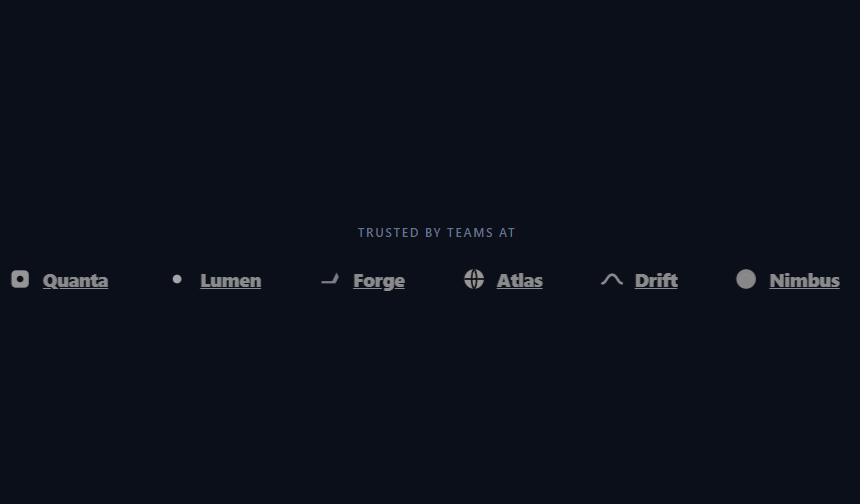
The logo marquee is the "trusted by" strip on nearly every B2B landing page: a horizontal row of customer or partner logos that scrolls continuously and loops forever. This snippet builds it in plain HTML, CSS, and a few lines of vanilla JavaScript, with a seamless loop, grayscale-to-color hover, edge fades, and pause-on-hover — and uses lightweight inline SVG marks so there are no image requests.
A seamless CSS loop
The whole scroll is driven by one CSS keyframe: lmScroll translates the track to translateX(-50%) over its duration. The reason -50% produces an endless loop is duplication — JavaScript renders the brand set twice (set + set), so the track is exactly two identical halves. When the animation reaches -50%, the first half has scrolled completely off and the second half sits precisely where the first began, so the keyframe restart is invisible. No JavaScript runs per frame; the browser's compositor handles the motion efficiently.
Pacing tied to the logo count
Rather than hard-coding a duration, JavaScript sets animationDuration to BRANDS.length * 3.4 seconds. This keeps the perceived speed steady no matter how many logos you add — twice as many logos take twice as long, so each logo spends the same amount of time on screen. Add or remove brands and the pace stays natural without manual retuning.
Grayscale to color on hover
Each logo renders desaturated and slightly dimmed via filter: grayscale(1) and reduced opacity, which is the conventional "logo wall" treatment that keeps the strip calm and uniform. On hover, the filter drops to grayscale(0) and full opacity so the pointed-at brand pops into color — a small interaction that rewards exploration. The transition on both filter and color makes the shift smooth.
Pause on hover
The track's animation is paused whenever the marquee is hovered, using the pure-CSS rule .lm-marquee:hover .lm-track { animation-play-state: paused }. That lets a visitor stop the strip to read a specific logo without any JavaScript, then it resumes seamlessly when the cursor leaves.
Edge fades with a mask
To avoid logos hard-cutting at the container edges, a horizontal mask-image gradient fades the leftmost and rightmost 10% to transparent, so brands dissolve in and out rather than popping. It's a compositing effect with no overlay elements.
Data-driven, image-free logos
All brands live in a BRANDS array of name, inline SVG path, and color, and a logoHTML function builds each link. Using inline SVG keeps the marquee crisp on any display and avoids the layout shift and extra requests of bitmap logos. To use your real customers, replace the array entries — drop in their SVG marks or swap the SVG for an <img> — and the loop, pacing, and fades keep working.
Customizing it
Change the 3.4 multiplier for a faster or slower crawl, widen the gap between logos, adjust the mask percentages for a longer fade, or remove the grayscale treatment for full-color logos. To scroll the other direction, animate to translateX(50%) from a -50% start, or flip the row with flex-direction: row-reverse. Pair it with a testimonial wall or place it under a feature tabs showcase for a complete social-proof section.
Step by step
How to Use
- 1Paste HTML, CSS, and JSA row of brand logos scrolls smoothly and loops forever.
- 2Hover a logoIt brightens from grayscale to full color.
- 3Hover the stripThe whole marquee pauses so you can read a brand.
- 4Note the edge fadesLogos dissolve in and out at the left and right.
- 5Swap in your brandsReplace the BRANDS array with real logos or images.
- 6Tune the paceAdjust the duration multiplier and logo gap.
Real-world uses
Common Use Cases
translateX(-50%) loop.animation-play-state lets people read a logo without a JavaScript timer.Got questions?
Frequently Asked Questions
The track contains the logo set rendered twice, so it is two identical halves. Animating to translateX(-50%) scrolls exactly the first half off-screen, at which point the second half sits where the first started. The keyframe then restarts at 0, which looks identical, so the loop is seamless with no JavaScript per frame.
JavaScript sets animationDuration to the logo count times 3.4 seconds. Because both the distance and the duration scale with the number of logos, each logo spends the same time on screen regardless of how many there are, so the crawl speed feels identical whether you show six brands or sixteen.
A pure-CSS rule pauses the animation on hover: .lm-marquee:hover .lm-track sets animation-play-state to paused. No JavaScript is needed — moving the cursor over the strip freezes it, and leaving resumes the scroll exactly where it stopped.
Yes. The BRANDS array holds each logo's name, inline SVG, and color. Replace those entries with your customers' SVG marks, or swap the inline SVG for an <img> tag pointing at logo files. Inline SVG keeps the strip sharp on high-DPI screens and avoids extra network requests and layout shift.
Render the doubled logo list from your data and set the animation duration via an inline style based on the array length. The CSS keyframe and hover pause work as-is. In Tailwind, define the scroll keyframe in your config, apply animate-[scroll_26s_linear_infinite], and use the group-hover utility to pause on hover with a masked container for the edge fades.