




Mobile Login Screen — Free App Sign In UI Snippet
Mobile Login Screen · Mobile · Plain HTML, CSS & JS · Live preview
Copy & paste
Source Code
<div class="mls-phone">
  <div class="mls-screen">
    <div class="mls-status"><span>9:41</span><span class="mls-batt"><i></i></span></div>
    <div class="mls-body">
      <div class="mls-brand"><div class="mls-logo"></div><span>Northwind</span></div>
      <h1 class="mls-title">Welcome back</h1>
      <p class="mls-sub">Sign in to continue to your account</p>
      <form id="mlsForm" novalidate>
        <label class="mls-field">
          <span>Email</span>
          <input type="email" id="mlsEmail" value="" placeholder="[email protected]" autocomplete="off">
          <em class="mls-err" id="mlsEmailErr"></em>
        </label>
        <label class="mls-field">
          <span>Password</span>
          <div class="mls-pw">
            <input type="password" id="mlsPw" placeholder="••••••••" autocomplete="off">
            <button type="button" class="mls-eye" id="mlsEye" aria-label="Show password">
              <svg viewBox="0 0 24 24" width="18" fill="none" stroke="currentColor" stroke-width="2"><path d="M2 12s3.5-7 10-7 10 7 10 7-3.5 7-10 7-10-7-10-7z"/><circle cx="12" cy="12" r="3"/></svg>
            </button>
          </div>
        </label>
        <a class="mls-forgot" href="#">Forgot password?</a>
        <button type="submit" class="mls-submit" id="mlsSubmit">Sign in</button>
      </form>
      <div class="mls-or"><span>or continue with</span></div>
      <div class="mls-social"><button type="button">Google</button><button type="button">Apple</button></div>
      <p class="mls-foot">No account? <a href="#">Create one</a></p>
    </div>
  </div>
</div>*{box-sizing:border-box;margin:0;padding:0}
html{scrollbar-width:none;-ms-overflow-style:none}
html::-webkit-scrollbar{display:none}
body{font-family:system-ui,-apple-system,sans-serif;background:#1e293b;display:flex;justify-content:center;align-items:center;min-height:100vh;padding:24px;scrollbar-width:none;-ms-overflow-style:none}
body::-webkit-scrollbar{display:none}
.mls-phone{width:288px;height:600px;background:#0b1220;border-radius:46px;padding:12px;box-shadow:0 30px 60px -20px rgba(0,0,0,.6),inset 0 0 0 2px #1e293b}
.mls-screen{width:100%;height:100%;border-radius:34px;overflow:hidden;background:#fff;color:#0f172a;display:flex;flex-direction:column}
.mls-status{display:flex;justify-content:space-between;align-items:center;padding:13px 24px 0;font-size:13px;font-weight:700}
.mls-batt{width:22px;height:11px;border:1.4px solid #0f172a;border-radius:3px;position:relative;display:inline-block}
.mls-batt::after{content:'';position:absolute;right:-3px;top:3px;width:2px;height:5px;background:#0f172a;border-radius:0 1px 1px 0}
.mls-batt i{position:absolute;left:1.4px;top:1.4px;bottom:1.4px;width:65%;background:#0f172a;border-radius:1px}
.mls-body{flex:1;overflow-y:auto;padding:26px 24px 20px;scrollbar-width:none;-ms-overflow-style:none}
.mls-body::-webkit-scrollbar{display:none}
.mls-brand{display:flex;align-items:center;gap:9px;margin-bottom:30px}
.mls-logo{width:30px;height:30px;border-radius:9px;background:linear-gradient(135deg,#6366f1,#22d3ee)}
.mls-brand span{font-size:15px;font-weight:800}
.mls-title{font-size:25px;font-weight:800}
.mls-sub{font-size:13px;color:#94a3b8;margin:5px 0 22px}
.mls-field{display:block;margin-bottom:15px}
.mls-field>span{font-size:11.5px;font-weight:700;color:#64748b;display:block;margin-bottom:6px}
.mls-field input{width:100%;border:1.5px solid #e2e8f0;border-radius:11px;padding:12px 13px;font-size:14px;font-family:inherit;outline:none;transition:border-color .15s}
.mls-field input:focus{border-color:#6366f1}
.mls-field.bad input{border-color:#ef4444}
.mls-err{display:block;font-size:11px;color:#ef4444;font-style:normal;margin-top:5px;min-height:13px}
.mls-pw{position:relative}
.mls-eye{position:absolute;right:8px;top:50%;transform:translateY(-50%);background:none;border:none;color:#94a3b8;cursor:pointer;padding:5px}
.mls-eye:hover{color:#475569}
.mls-forgot{display:block;text-align:right;font-size:12px;font-weight:600;color:#6366f1;text-decoration:none;margin-bottom:18px}
.mls-submit{width:100%;background:#6366f1;color:#fff;border:none;border-radius:12px;padding:14px;font-size:14.5px;font-weight:700;cursor:pointer;font-family:inherit;transition:background .15s}
.mls-submit:hover{background:#4f46e5}
.mls-submit.loading{background:#818cf8;pointer-events:none}
.mls-or{display:flex;align-items:center;gap:10px;margin:20px 0;color:#94a3b8;font-size:11.5px}
.mls-or::before,.mls-or::after{content:'';flex:1;height:1px;background:#e2e8f0}
.mls-social{display:flex;gap:10px}
.mls-social button{flex:1;border:1.5px solid #e2e8f0;background:#fff;border-radius:11px;padding:11px;font-size:13px;font-weight:700;cursor:pointer;font-family:inherit}
.mls-social button:hover{background:#f8fafc}
.mls-foot{text-align:center;font-size:12.5px;color:#64748b;margin-top:20px}
.mls-foot a{color:#6366f1;font-weight:700;text-decoration:none}var form = document.getElementById('mlsForm');
var email = document.getElementById('mlsEmail');
var emailErr = document.getElementById('mlsEmailErr');
var pw = document.getElementById('mlsPw');
var eye = document.getElementById('mlsEye');
var submit = document.getElementById('mlsSubmit');
eye.addEventListener('click', function () {
var show = pw.type === 'password';
pw.type = show ? 'text' : 'password';
eye.setAttribute('aria-label', show ? 'Hide password' : 'Show password');
eye.style.color = show ? '#6366f1' : '';
});
function validEmail(v) { return /^[^\s@]+@[^\s@]+\.[^\s@]+$/.test(v); }
form.addEventListener('submit', function (e) {
e.preventDefault();
var field = email.closest('.mls-field');
if (!validEmail(email.value)) {
field.classList.add('bad');
emailErr.textContent = email.value ? 'Enter a valid email address' : 'Email is required';
email.focus();
return;
}
field.classList.remove('bad'); emailErr.textContent = '';
if (pw.value.length < 6) { pw.focus(); pw.closest('.mls-field').classList.add('bad'); return; }
pw.closest('.mls-field').classList.remove('bad');
// Fake auth round-trip so the button shows its loading state.
submit.classList.add('loading'); submit.textContent = 'Signing in…';
setTimeout(function () { submit.classList.remove('loading'); submit.textContent = 'Signed in ✓'; }, 1300);
});
email.addEventListener('input', function () { email.closest('.mls-field').classList.remove('bad'); emailErr.textContent = ''; });Extend with AI
Take This Snippet Further With AI
The AI prompt for this one is for Patreon supporters ($3 a month), along with a site with no ads. Supporters enter the passcode once and it is remembered in this browser.
What's included
Features
About this UI Snippet
Mobile Login Screen — App Sign-In UI with Validation
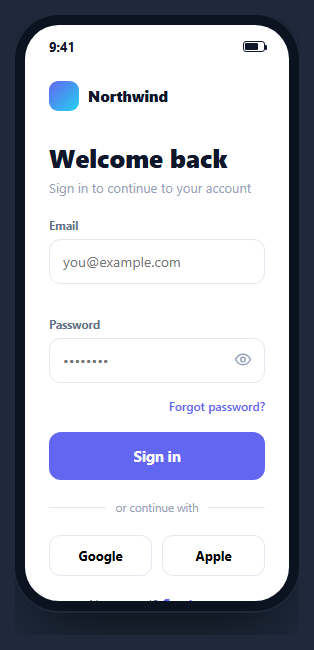
A mobile login screen is the sign-in flow of an app — branding, email and password fields, a forgot-password link, a primary submit, and social options. This snippet is a complete, working one inside a CSS phone frame, with real inline validation, a password reveal toggle, and a loading submit state, built in HTML, CSS, and vanilla JavaScript with no dependency. It's a ready starting point for any app's auth screen.
Inline validation on submit
Submitting runs lightweight validation: the email is checked against a pragmatic regex (/^[^\s@]+@[^\s@]+\.[^\s@]+$/ — non-space, an @, more non-space, a dot, a TLD), and the password for a minimum length. A failing field gets a .bad class that turns its border red and shows a specific message ("Email is required" vs "Enter a valid email address"), and focus jumps to the first problem. The error clears as soon as the user edits the field, so the form guides rather than nags.
Password show/hide
The reveal button swaps the input's type between password and text and updates its aria-label and color accordingly — the standard, accessible pattern for letting users verify what they typed without exposing it permanently. It's a single toggle with no second input.
A submit that shows progress
On a valid submit, the button enters a .loading state (disabled via pointer-events:none, lightened, label changed to "Signing in…") and, after a simulated round-trip, confirms success. In production you'd await your auth call here; the choke point is one handler, so wiring a real request is a one-line change.
The screen layout
Inside the phone frame, the screen is a scrollable column: brand row, heading, the form, an "or continue with" divider built from a flex row with ::before/::after rules, and social buttons. The status bar with a CSS battery completes the device illusion. Everything is real, focusable, keyboard-navigable DOM.
Reusing it
Drop it into a phone mockup for a marketing shot, or lift the form out of the frame to use as a responsive web login. Replace the validation and submit handler with your auth provider, keep the structure, and you have a production-ready sign-in screen.
Step by step
How to Use
- 1Paste HTML, CSS, and JSA mobile login screen renders inside a phone frame.
- 2Submit emptyThe email field turns red with a required message.
- 3Enter a bad emailValidation shows a specific invalid-email error.
- 4Toggle the passwordThe eye button reveals and hides what you typed.
- 5Submit valid dataThe button shows a loading state then confirms success.
- 6Wire your authReplace the simulated round-trip with your provider.
Real-world uses
Common Use Cases
Got questions?
Frequently Asked Questions
On submit, the email is tested against the regex /^[^\s@]+@[^\s@]+\.[^\s@]+$/ — it requires non-space characters, an @, more non-space, a dot, and a domain ending. If it fails, the field gets a red border and a specific message: "Email is required" when empty, or "Enter a valid email address" when malformed. The error clears as soon as you start editing.
The eye button flips the password input's type attribute between password and text, which reveals or masks the characters, and updates the button's aria-label and color so screen readers and sighted users both know the current state. It's a single input with a toggle, not two overlapping fields.
When validation passes, the submit button gets a loading class that lightens it, disables interaction with pointer-events:none, and changes the label to "Signing in…". The snippet simulates a round-trip with a timeout then shows success; in a real app you'd await your authentication call in that same handler.
Yes. The phone frame is just a wrapper; the form and its validation are independent. Lift the form markup out and it works as a responsive web login. The frame is useful for presentations and app mockups, but nothing in the logic depends on it.
Bind the email and password to state, run the validation in your submit handler, and toggle error classes from validation results. The password reveal flips an input type bound to a showPassword flag. Replace the timeout with your auth API call and manage the loading flag in state. Tailwind styles the fields, divider, and buttons with utilities.