

Quill Rich Text Editor with Custom Toolbar and Character Limit

CodeMirror JSON Editor with Validation Gutter

CodeMirror Code Editor with Line Numbers, Folding and Themes

Marked + DOMPurify Live Markdown Preview

FilePond Image Upload with Preview and Reorder

Cropper.js Aspect-Ratio Presets for Social Posts
Magic Link Login — Passwordless Email Sign-In
Magic Link Login · Forms · Plain HTML, CSS & JS · Live preview
Copy & paste
Source Code
<div class="mll-card">
  <div class="mll-icon">
    <svg width="24" height="24" viewBox="0 0 24 24" fill="none" stroke="#fff" stroke-width="2" stroke-linecap="round" stroke-linejoin="round"><path d="M4 4h16c1.1 0 2 .9 2 2v12c0 1.1-.9 2-2 2H4c-1.1 0-2-.9-2-2V6c0-1.1.9-2 2-2z"/><path d="M22 6l-10 7L2 6"/></svg>
  </div>

  <div id="mllForm">
    <h3>Sign in</h3>
    <p>Enter your email and we'll send you a link — no password to remember.</p>
    <input type="email" id="mllEmail" placeholder="[email protected]" autocomplete="email">
    <p class="mll-error" id="mllError" hidden></p>
    <button type="button" class="mll-submit" id="mllSubmit">
      <span id="mllSubmitLabel">Send magic link</span>
    </button>
  </div>

  <div id="mllSent" hidden>
    <h3>Check your email</h3>
    <p>We sent a sign-in link to <strong id="mllSentEmail"></strong>. Click it on this device to continue.</p>
    <button type="button" class="mll-resend" id="mllResend">Resend link</button>
    <button type="button" class="mll-back" id="mllBack">Use a different email</button>
  </div>
</div>*{box-sizing:border-box;margin:0;padding:0}
body{font-family:system-ui,-apple-system,sans-serif;background:#f1f5f9;min-height:100vh;display:flex;align-items:center;justify-content:center;padding:24px}
.mll-card{background:#fff;border-radius:18px;padding:28px;width:100%;max-width:360px;box-shadow:0 18px 44px rgba(15,23,42,.12);text-align:center}
.mll-icon{width:52px;height:52px;border-radius:14px;background:linear-gradient(135deg,#6366f1,#8b5cf6);display:flex;align-items:center;justify-content:center;margin:0 auto 16px}
.mll-card h3{font-size:17px;font-weight:800;color:#0f172a;margin-bottom:7px}
.mll-card p{font-size:13px;color:#64748b;line-height:1.55;margin-bottom:16px}
.mll-card p strong{color:#1e293b}
#mllForm input{width:100%;border:1.5px solid #e2e8f0;border-radius:10px;padding:11px 13px;font-size:14px;font-family:inherit;color:#0f172a;margin-bottom:8px;text-align:left;transition:border-color .15s,box-shadow .15s}
#mllForm input:focus{outline:none;border-color:#6366f1;box-shadow:0 0 0 3px rgba(99,102,241,.15)}
.mll-error{color:#dc2626;font-size:12px;font-weight:600;text-align:left;margin-bottom:8px !important}
.mll-submit{width:100%;background:#6366f1;color:#fff;border:none;border-radius:10px;padding:12px;font-size:14px;font-weight:700;cursor:pointer;transition:background .15s,opacity .15s;display:flex;align-items:center;justify-content:center;gap:8px}
.mll-submit:hover{background:#4f46e5}
.mll-submit:disabled{opacity:.7;cursor:default}
.mll-resend{width:100%;background:transparent;border:1.5px solid #e2e8f0;border-radius:10px;padding:10px;font-size:13.5px;font-weight:700;color:#1e293b;cursor:pointer;margin-bottom:8px;transition:background .15s}
.mll-resend:hover:not(:disabled){background:#f8fafc}
.mll-resend:disabled{color:#cbd5e1;cursor:default}
.mll-back{background:transparent;border:none;color:#94a3b8;font-size:12.5px;font-weight:600;cursor:pointer;padding:6px}
.mll-back:hover{color:#64748b}var EMAIL_RE = /^[^\s@]+@[^\s@]+\.[^\s@]+$/;
var resendCooldown = 0;
var cooldownTimer = null;
function isValidEmail(v) { return EMAIL_RE.test(v.trim()); }
document.getElementById('mllSubmit').addEventListener('click', function () {
var input = document.getElementById('mllEmail');
var error = document.getElementById('mllError');
var email = input.value.trim();
if (!email) { error.textContent = 'Enter your email address.'; error.hidden = false; return; }
if (!isValidEmail(email)) { error.textContent = 'That email address looks invalid.'; error.hidden = false; return; }
error.hidden = true;
var btn = this, label = document.getElementById('mllSubmitLabel');
btn.disabled = true; label.textContent = 'Sending…';
setTimeout(function () {
document.getElementById('mllSentEmail').textContent = email;
document.getElementById('mllForm').hidden = true;
document.getElementById('mllSent').hidden = false;
btn.disabled = false; label.textContent = 'Send magic link';
startCooldown();
}, 900);
});
function startCooldown() {
resendCooldown = 30;
var resend = document.getElementById('mllResend');
resend.disabled = true;
updateResendLabel();
clearInterval(cooldownTimer);
cooldownTimer = setInterval(function () {
resendCooldown--;
updateResendLabel();
if (resendCooldown <= 0) {
clearInterval(cooldownTimer);
resend.disabled = false;
resend.textContent = 'Resend link';
}
}, 1000);
}
function updateResendLabel() {
var resend = document.getElementById('mllResend');
resend.textContent = resendCooldown > 0 ? 'Resend link in ' + resendCooldown + 's' : 'Resend link';
}
document.getElementById('mllResend').addEventListener('click', function () {
if (this.disabled) return;
this.textContent = 'Sending…';
var self = this;
setTimeout(function () { startCooldown(); }, 600);
});
document.getElementById('mllBack').addEventListener('click', function () {
clearInterval(cooldownTimer);
document.getElementById('mllSent').hidden = true;
document.getElementById('mllForm').hidden = false;
document.getElementById('mllEmail').value = '';
document.getElementById('mllEmail').focus();
});Extend with AI
Take This Snippet Further With AI
The AI prompt for this one is for Patreon supporters ($3 a month, 7 days free), along with a site with no ads. Supporters enter the passcode once and it is remembered in this browser.
What's included
Features
About this UI Snippet
Magic Link Login — Passwordless Sign-In, Resend Cooldown & Check-Your-Email State
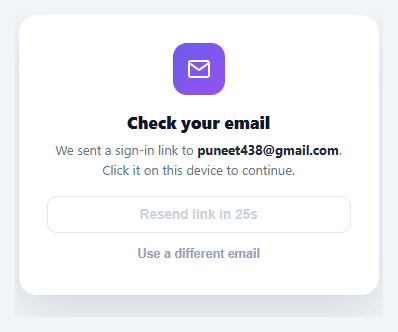
Passwordless sign-in removes the single biggest source of authentication friction — a forgotten password — by sending a one-time sign-in link to a verified email instead. This snippet builds the complete client-side flow: email validation, a simulated send, a "check your email" confirmation screen, and a resend button gated by a real countdown so it can't be spammed.
Two screens, one card
The component is really two states sharing one container: the email-entry form and the check-your-email confirmation, toggled via hidden. Rather than navigating to a new page, swapping the inner content keeps the user anchored to the same card, which matters for a flow whose entire job is to get the user comfortable waiting for an email — a page navigation here would feel like the flow had "moved on" without them.
Validation before the simulated send
A simple regex (/^[^\s@]+@[^\s@]+\.[^\s@]+$/) checks for a plausible email shape — not full RFC 5322 compliance, which is famously a rabbit hole no client-side regex fully solves, but the basic [email protected] shape that catches the vast majority of real typos. An empty field and an invalid shape get distinct messages, and the submit button disables with a "Sending…" label during the simulated 900ms delay, so the interaction reads as a real network round trip.
A resend button with teeth
The "Resend link" button isn't just decorative — clicking the original submit (or resend) starts a real 30-second countdown via setInterval, during which the resend button is disabled and shows "Resend link in 27s", ticking down live. This is a meaningful anti-abuse pattern: without it, a button that silently fires another email on every click is an easy way to accidentally (or deliberately) spam an inbox or a rate-limited API.
Going back without losing context
"Use a different email" clears the countdown timer, swaps back to the entry form, clears the input, and refocuses it — so correcting a typo'd email doesn't require a page reload and doesn't leave a stale countdown silently running in the background after the user has already navigated away from that state.
Why this beats a traditional password field
A password field comes with its own failure modes — weak passwords, reused passwords, forgotten passwords, and the support burden of a reset flow that itself usually emails a link anyway. Magic links collapse all of that into the one flow most users already trust: check email, click link, you're in. The tradeoff is a dependency on email deliverability, which is why the resend control and a clear "check your spam folder" expectation matter as much as the visual design.
Step by step
How to Use
- 1Paste HTML, CSS, and JSA "Sign in" card renders with an email input and a "Send magic link" button.
- 2Submit an invalid or empty emailAn inline error message appears below the field without sending anything.
- 3Submit a valid emailThe button shows "Sending…", then the card swaps to a "Check your email" confirmation showing the address you entered.
- 4Try resendingThe "Resend link" button is disabled with a live "Resend link in 30s" countdown immediately after sending.
- 5Wait out the cooldownOnce it reaches 0, the resend button re-enables and can be clicked to restart the cooldown.
- 6Connect a real email-sending APIReplace the setTimeout in the submit handler with a fetch call to your auth provider's magic-link endpoint, keeping the same UI state transitions.
Real-world uses
Common Use Cases
Got questions?
Frequently Asked Questions
Replace the setTimeout in the submit handler with a fetch POST to your auth provider (Supabase, Auth0, Firebase, or your own backend) passing the validated email; show the check-your-email state only after that request resolves successfully, and show the existing error element if it fails.
The magic link itself points to a callback route in your app containing a one-time token; on that page, verify the token server-side, create a session, and redirect to your authenticated area — this snippet only covers the request side of the flow, not the callback handler.
Mirror the client-side 30-second cooldown with a server-side check (e.g. a timestamp stored per email/IP) so the cooldown can't be bypassed by simply reloading the page and resubmitting, since client-side timers alone are not a security control.
Add a "Sign in with a password instead" link beneath the form that swaps to a password field, or combine with an OTP input for a code-based alternative if email delivery is unreliable for some users.
In React, track the email, error, sent, and cooldown values in useState and run the countdown with setInterval inside useEffect (clearing it on unmount); in Vue, use ref()/onUnmounted for the same cleanup; in Angular, use a component field with ngOnDestroy. The validation regex and state transitions port directly.