

Quill Rich Text Editor with Custom Toolbar and Character Limit

CodeMirror JSON Editor with Validation Gutter

CodeMirror Code Editor with Line Numbers, Folding and Themes

Marked + DOMPurify Live Markdown Preview

FilePond Image Upload with Preview and Reorder

Cropper.js Aspect-Ratio Presets for Social Posts
Multi Email Input — Recipient Chips HTML CSS JS
Multi Email Input · Forms · Plain HTML, CSS & JS · Live preview
Copy & paste
Source Code
<div class="mei-card">
  <label class="mei-label" for="meiInput">Invite teammates</label>
  <div class="mei-box" id="meiBox">
    <span class="mei-chips" id="meiChips"></span>
    <input type="text" id="meiInput" placeholder="Add emails, separated by Enter or comma" autocomplete="off">
  </div>
  <p class="mei-hint" id="meiHint">Press Enter, comma, or paste a list to add multiple at once.</p>
  <button type="button" class="mei-send" id="meiSend" disabled>Send <span id="meiCount"></span> invites</button>
</div>*{box-sizing:border-box;margin:0;padding:0}
body{font-family:system-ui,-apple-system,sans-serif;background:#f1f5f9;min-height:100vh;display:flex;align-items:flex-start;justify-content:center;padding:50px 24px}
.mei-card{background:#fff;border-radius:16px;padding:22px;width:100%;max-width:440px;box-shadow:0 18px 44px rgba(15,23,42,.1)}
.mei-label{display:block;font-size:13px;font-weight:700;color:#334155;margin-bottom:8px}
.mei-box{display:flex;flex-wrap:wrap;align-items:center;gap:6px;border:1.5px solid #e2e8f0;border-radius:11px;padding:8px 10px;min-height:46px;cursor:text;transition:border-color .15s,box-shadow .15s}
.mei-box.focus{border-color:#6366f1;box-shadow:0 0 0 3px rgba(99,102,241,.15)}
.mei-chips{display:contents}
.mei-input-grow{flex:1;min-width:140px}
.mei-box input{flex:1;min-width:140px;border:none;outline:none;font-size:13.5px;font-family:inherit;color:#0f172a;padding:5px 2px}
.mei-chip{display:inline-flex;align-items:center;gap:6px;background:#eef2ff;border:1px solid #e0e7ff;border-radius:7px;padding:4px 7px 4px 9px;font-size:12.5px;font-weight:600;color:#4338ca;max-width:100%}
.mei-chip.invalid{background:#fef2f2;border-color:#fecaca;color:#b91c1c}
.mei-chip span{overflow:hidden;text-overflow:ellipsis;white-space:nowrap}
.mei-chip button{border:none;background:none;color:inherit;cursor:pointer;font-size:13px;line-height:1;opacity:.65;padding:0}
.mei-chip button:hover{opacity:1}
.mei-hint{font-size:11.5px;color:#94a3b8;margin:9px 0 16px}
.mei-hint.error{color:#dc2626;font-weight:600}
.mei-send{width:100%;background:#6366f1;color:#fff;border:none;border-radius:10px;padding:12px;font-size:14px;font-weight:700;cursor:pointer;transition:background .15s,opacity .15s}
.mei-send:hover:not(:disabled){background:#4f46e5}
.mei-send:disabled{opacity:.45;cursor:not-allowed}var EMAIL_RE = /^[^\s@]+@[^\s@]+\.[^\s@]+$/;
var box = document.getElementById('meiBox');
var input = document.getElementById('meiInput');
var chipsEl = document.getElementById('meiChips');
var emails = []; // { value, valid }
function addEmail(raw) {
var v = raw.trim().replace(/[,;]$/, '');
if (!v) return;
if (emails.some(function (e) { return e.value.toLowerCase() === v.toLowerCase(); })) return; // dedupe
emails.push({ value: v, valid: EMAIL_RE.test(v) });
}
function commit(text) {
// Split on commas, semicolons, spaces, and newlines so a pasted list works.
text.split(/[\s,;]+/).forEach(addEmail);
input.value = '';
render();
}
function render() {
chipsEl.innerHTML = emails.map(function (e, i) {
return '<span class="mei-chip' + (e.valid ? '' : ' invalid') + '" title="' + e.value + (e.valid ? '' : ' (invalid)') + '">' +
'<span>' + e.value + '</span>' +
'<button type="button" data-i="' + i + '" aria-label="Remove">✕</button></span>';
}).join('');
var valid = emails.filter(function (e) { return e.valid; });
var invalid = emails.length - valid.length;
var send = document.getElementById('meiSend');
send.disabled = valid.length === 0 || invalid > 0;
document.getElementById('meiCount').textContent = valid.length ? valid.length : '';
var hint = document.getElementById('meiHint');
if (invalid > 0) { hint.textContent = invalid + ' address' + (invalid > 1 ? 'es are' : ' is') + ' invalid — fix or remove to continue.'; hint.className = 'mei-hint error'; }
else { hint.textContent = 'Press Enter, comma, or paste a list to add multiple at once.'; hint.className = 'mei-hint'; }
}
input.addEventListener('keydown', function (e) {
if (e.key === 'Enter' || e.key === ',' || e.key === ';') { e.preventDefault(); commit(input.value); }
else if (e.key === 'Backspace' && input.value === '' && emails.length) { emails.pop(); render(); }
});
input.addEventListener('blur', function () { if (input.value.trim()) commit(input.value); box.classList.remove('focus'); });
input.addEventListener('focus', function () { box.classList.add('focus'); });
input.addEventListener('paste', function (e) {
e.preventDefault();
commit((e.clipboardData || window.clipboardData).getData('text'));
});
chipsEl.addEventListener('click', function (e) {
var btn = e.target.closest('button[data-i]');
if (!btn) return;
emails.splice(+btn.dataset.i, 1);
render();
});
box.addEventListener('click', function (e) { if (e.target === box || e.target === chipsEl) input.focus(); });
document.getElementById('meiSend').addEventListener('click', function () {
var list = emails.filter(function (e) { return e.valid; }).map(function (e) { return e.value; });
// Send invites to the addresses in the list array here.
this.textContent = '✓ ' + list.length + ' invites sent';
});
render();Extend with AI
Take This Snippet Further With AI
The AI prompt for this one is for Patreon supporters ($3 a month, 7 days free), along with a site with no ads. Supporters enter the passcode once and it is remembered in this browser.
What's included
Features
About this UI Snippet
Multi Email Input — Validated Recipient Chips with Paste-to-Split
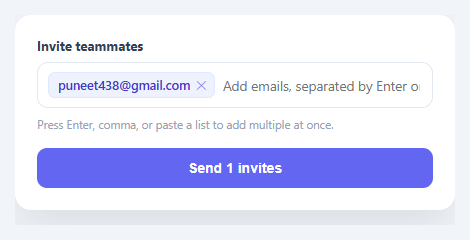
Any "invite teammates," "share with," or "CC" field needs to accept several email addresses and treat each as a distinct, removable token — not a comma-soup string the user has to edit by hand. This snippet builds that multi-email recipient input in plain HTML, CSS, and vanilla JavaScript: type or paste addresses, each becomes a chip, invalid ones are flagged in red, duplicates are dropped, and the send button gates on a clean list.
Chips instead of a comma string
As the user types and presses Enter, comma, or semicolon, the current text is committed as a chip. Each chip shows the address with a remove (✕) button, so editing the list means clicking one token — not finding and deleting the right substring in a long comma-separated value. This is the interaction pattern everyone knows from email clients' To/CC fields, and it's far less error-prone than a raw text field for entering several values.
Paste a whole list, get a whole list
The most valuable behavior is paste handling: commit() splits the input on commas, semicolons, spaces, *and* newlines, so pasting "[email protected], [email protected]; [email protected]" or a column of addresses copied from a spreadsheet instantly becomes three chips. This is the difference between a usable invite field and one where the user has to add addresses one at a time — and it's the feature most hand-built multi-inputs forget.
Per-chip validation, not all-or-nothing
Each address is validated against a pragmatic email regex as it's added, and invalid ones render as red chips you can see and fix individually rather than a single "one or more emails are invalid" error that doesn't tell you which. The send button disables while any invalid chip exists and shows the valid count ("Send 3 invites"), and the hint line names exactly how many are wrong. Validating per-token is what lets the user correct a single typo'd address in a list of twenty without re-entering everything.
Dedupe and backspace-to-edit
Adding an address that's already present is silently ignored (case-insensitively), so pasting overlapping lists doesn't create duplicate invites. And pressing Backspace in an empty input removes the last chip — the standard quick-edit gesture from real recipient fields — so correcting the most recent entry doesn't require reaching for the mouse.
Focus and click behavior that feels native
The whole box acts like one input: clicking anywhere in it (including the empty space around the chips) focuses the text field, and a focus ring wraps the entire control rather than just the inner input, so it reads as a single cohesive field. A pending value is also committed on blur, so clicking away doesn't silently lose a half-typed address.
Accessible and ready to wire up
Each remove button has an aria-label, chips carry the full address as a title for truncated values, and the component exposes the clean valid list on send — the single hook where you'd POST the invites to your API. For full accessibility you'd announce additions/removals via an ARIA live region (covered in the FAQs), but the structure is correct and keyboard-operable from the start.
Step by step
How to Use
- 1Paste HTML, CSS, and JSAn invite field renders. Type an email and press Enter or comma to turn it into a chip.
- 2Paste a listPaste several addresses separated by commas, spaces, or newlines — each becomes its own chip at once.
- 3See invalid flaggingAdd a malformed address — it shows as a red chip, and the send button disables until it's fixed or removed.
- 4Remove and editClick a chip's ✕ to remove it, or press Backspace in the empty input to delete the last one.
- 5SendWith a valid, duplicate-free list, the button shows the count ("Send 3 invites") and submits the clean array.
- 6Wire up your APIIn the send handler, POST the valid email array to your invite endpoint instead of the demo confirmation.
Real-world uses
Common Use Cases
Got questions?
Frequently Asked Questions
The paste handler intercepts the clipboard text and runs it through commit(), which splits on commas, semicolons, spaces, and newlines — so a comma-separated string or a column copied from a spreadsheet both expand into individual chips. Each split piece is validated and deduped as it's added, so a messy pasted list becomes a clean set of recipient chips.
Per-token validation lets the user see and fix exactly which address is wrong (a red chip) without disturbing the others — critical when entering many recipients, where re-typing the whole list to correct one typo is unacceptable. A single field-level "invalid" error can't point at the offending address among twenty.
Add an ARIA live region (aria-live="polite") that announces "Added [email protected]" and "Removed [email protected]" as chips change, give the input an aria-describedby pointing at the hint, and ensure each remove button's aria-label includes the address it removes. The chips and buttons are already keyboard-operable; the live region conveys the dynamic changes.
Add a max check in addEmail() that ignores new entries (and shows a message) once emails.length reaches your limit, and reflect the remaining count in the hint. For per-plan limits, pass the cap in and disable the input once reached.
In React, hold the emails array in useState and render chips with .map(), handling key events to commit/remove; in Vue, use a reactive array with v-for; in Angular, use a component array with *ngFor. The validation, paste-split, and dedupe functions are plain JavaScript that port unchanged — only the per-change re-render moves into the framework.