

Number-Key Jump Carousel — HTML CSS JS Snippet
Number-Key Jump Carousel · Carousels · Plain HTML, CSS & JS · Live preview
Copy & paste
Source Code
<div class="nkj-wrap" id="nkjWrap" tabindex="0">
  <div class="nkj-track" id="nkjTrack">
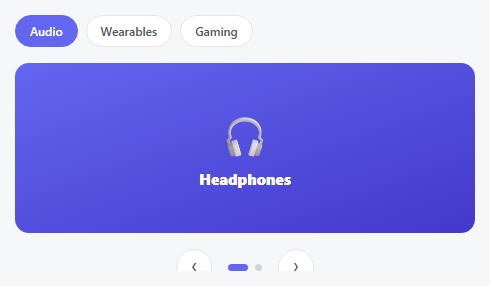
    <div class="nkj-slide" style="background:linear-gradient(160deg,#6366f1,#4338ca)"><span>🎧</span>Headphones</div>
    <div class="nkj-slide" style="background:linear-gradient(160deg,#0ea5e9,#0369a1)"><span>📷</span>Camera</div>
    <div class="nkj-slide" style="background:linear-gradient(160deg,#ec4899,#9d174d)"><span>⌚</span>Watch</div>
    <div class="nkj-slide" style="background:linear-gradient(160deg,#10b981,#047857)"><span>🎮</span>Console</div>
    <div class="nkj-slide" style="background:linear-gradient(160deg,#f59e0b,#b45309)"><span>🔊</span>Speaker</div>
  </div>
  <div class="nkj-badges" id="nkjBadges"></div>
  <p class="nkj-hint">Click here, then press 1–5 on your keyboard to jump directly to that slide.</p>
</div>*{box-sizing:border-box;margin:0;padding:0}
body{font-family:system-ui,-apple-system,sans-serif;background:#f6f7f9;min-height:100vh;display:flex;align-items:center;justify-content:center;padding:24px}
.nkj-wrap{width:100%;max-width:420px;outline:none}
.nkj-wrap:focus-visible .nkj-track{box-shadow:0 0 0 3px #6366f1}
.nkj-track{position:relative;height:220px;overflow:hidden;border-radius:16px;transition:box-shadow .15s}
.nkj-slide{position:absolute;inset:0;display:flex;flex-direction:column;align-items:center;justify-content:center;gap:10px;color:#fff;font-weight:800;font-size:16px;opacity:0;transform:scale(.96);transition:opacity .35s ease,transform .35s ease}
.nkj-slide.nkj-active{opacity:1;transform:scale(1);z-index:1}
.nkj-slide span{font-size:44px}
.nkj-badges{display:flex;justify-content:center;gap:8px;margin-top:14px}
.nkj-badge{width:26px;height:26px;border-radius:7px;background:#fff;border:1.5px solid #e3e5ea;color:#6b7080;font:700 12px ui-monospace,monospace;display:flex;align-items:center;justify-content:center;cursor:pointer;transition:border-color .15s,color .15s,background .15s}
.nkj-badge:hover{border-color:#6366f1;color:#6366f1}
.nkj-badge.active{background:#6366f1;border-color:#6366f1;color:#fff}
.nkj-hint{text-align:center;color:#9ca3af;font-size:11.5px;margin-top:12px}var wrap = document.getElementById('nkjWrap');
var slides = document.querySelectorAll('.nkj-slide');
var badgesWrap = document.getElementById('nkjBadges');
var current = 0;
slides.forEach(function (s, i) {
var badge = document.createElement('button');
badge.className = 'nkj-badge';
badge.textContent = String(i + 1);
badge.setAttribute('aria-label', 'Jump to slide ' + (i + 1));
badge.addEventListener('click', function () { goTo(i); });
badgesWrap.appendChild(badge);
});
var badges = document.querySelectorAll('.nkj-badge');
function render() {
slides.forEach(function (s, i) { s.classList.toggle('nkj-active', i === current); });
badges.forEach(function (b, i) { b.classList.toggle('active', i === current); });
}
function goTo(i) { current = i; render(); }
wrap.addEventListener('keydown', function (e) {
var n = parseInt(e.key, 10);
if (!isNaN(n) && n >= 1 && n <= slides.length) { goTo(n - 1); return; }
if (e.key === 'ArrowRight') goTo((current + 1) % slides.length);
else if (e.key === 'ArrowLeft') goTo((current - 1 + slides.length) % slides.length);
});
render();Extend with AI
Take This Snippet Further With AI
The AI prompt for this one is for Patreon supporters ($3 a month, 7 days free), along with a site with no ads. Supporters enter the passcode once and it is remembered in this browser.
What's included
Features
About this UI Snippet
Number-Key Jump Carousel — A Direct Index, Not Sequential Steps

Arrow-key navigation is sequential — five presses of Right to reach slide six. This carousel adds a genuinely different keyboard model on top of that: pressing a number key jumps *directly* to that exact slide in one keystroke, no matter how far away it currently is, mirroring how a browser's Cmd/Ctrl+1 through 9 jumps straight to a specific tab.
Reading a digit out of the key event, not a separate keymap
The keydown handler doesn't maintain a lookup table of key codes — it just runs parseInt(e.key, 10) on whatever key was pressed. If that parses to a valid number within the slide count's range, goTo(n - 1) fires immediately (converting the human-facing 1-based number to a 0-based array index). Any key that *doesn't* parse to a usable number — a letter, a modifier, punctuation — simply falls through to the separate arrow-key check below it, so the two navigation styles coexist in the same handler without interfering.
Visible badges as a discoverability aid, not just a display
A keyboard shortcut nobody knows exists provides no value — the row of numbered badges beneath the carousel isn't just a duplicate of the arrow controls seen elsewhere in this library, it's a legend confirming exactly which digit maps to which slide, and each badge doubles as a clickable target for anyone who'd rather point and click than memorize a number.
Why the wrapper needs tabindex="0"
Keydown events only fire on elements that can hold keyboard focus — a plain <div> can't, by default. Giving the wrapper tabindex="0" makes it a real, tappable-into focus target, and the focus-visible outline confirms to a keyboard user exactly when their number-key presses are actually being heard by the carousel.
Step by step
How to Use
- 1Paste HTML, CSS, and JSA carousel appears with five numbered badges (1–5) underneath it.
- 2Click into the carousel areaA focus ring appears, confirming keyboard input will now be heard.
- 3Press any number key from 1 to 5The carousel jumps directly to that exact slide — no matter how far away it currently is.
- 4Try the arrow keys tooLeft/Right still work for normal sequential stepping alongside the number-jump shortcut.
- 5Click a badge directlySame result as pressing its number key, for anyone who prefers pointing and clicking.
Real-world uses
Common Use Cases
Got questions?
Frequently Asked Questions
A single keypress can only ever represent one digit, so number-key jumping naturally caps at 9 slides this way — for more, either limit the shortcut to the first 9 with arrow keys covering the rest, or extend the handler to accumulate multi-digit input with a short typing timeout.
Keydown events only fire on elements capable of receiving keyboard focus. A plain div has no default focusability — adding tabindex="0" makes it a real, focusable, tab-reachable element so its own keydown listener actually receives key presses once it's focused.
No, and that's deliberate — the listener is attached to the wrapper itself, not the whole document, so number keys only trigger a jump while the carousel specifically has focus, avoiding accidental jumps while a user is typing a number somewhere else on the page.
Replace the parseInt check with a lookup against a fixed array of letters (e.g. ["a","b","c",...]), finding the pressed key's index in that array instead of parsing it as a number.
Badges are real, labeled buttons offering a mouse/touch equivalent to every keyboard shortcut, and the focus-visible outline gives clear visual confirmation of keyboard focus — pair with an aria-live region announcing the newly active slide's title for screen reader users.