


Order Summary — Cart Totals HTML CSS JS Snippet
Order Summary · Cards · Plain HTML, CSS & JS · Live preview
Copy & paste
Source Code
<div class="os-card">
  <div class="os-head">
    <h2 class="os-title">Order summary</h2>
    <span class="os-count" id="osCount">3 items</span>
  </div>

  <div class="os-items" id="osItems">
    <div class="os-item" data-price="89.00">
      <div class="os-thumb" style="background:linear-gradient(135deg,#6366f1,#8b5cf6)">👟</div>
      <div class="os-info">
        <div class="os-name">Aero Runner Sneakers</div>
        <div class="os-meta">Size 10 · Slate</div>
        <div class="os-qty">
          <button class="os-step" onclick="changeQty(this,-1)" aria-label="Decrease">−</button>
          <span class="os-qval">1</span>
          <button class="os-step" onclick="changeQty(this,1)" aria-label="Increase">+</button>
        </div>
      </div>
      <div class="os-side">
        <div class="os-line">$89.00</div>
        <button class="os-remove" onclick="removeItem(this)" aria-label="Remove">Remove</button>
      </div>
    </div>

    <div class="os-item" data-price="14.00">
      <div class="os-thumb" style="background:linear-gradient(135deg,#10b981,#059669)">🧦</div>
      <div class="os-info">
        <div class="os-name">Merino Crew Socks</div>
        <div class="os-meta">3-pack · Charcoal</div>
        <div class="os-qty">
          <button class="os-step" onclick="changeQty(this,-1)" aria-label="Decrease">−</button>
          <span class="os-qval">2</span>
          <button class="os-step" onclick="changeQty(this,1)" aria-label="Increase">+</button>
        </div>
      </div>
      <div class="os-side">
        <div class="os-line">$28.00</div>
        <button class="os-remove" onclick="removeItem(this)" aria-label="Remove">Remove</button>
      </div>
    </div>

    <div class="os-item" data-price="9.50">
      <div class="os-thumb" style="background:linear-gradient(135deg,#f59e0b,#f97316)">🧴</div>
      <div class="os-info">
        <div class="os-name">Sneaker Care Kit</div>
        <div class="os-meta">Cleaner + brush</div>
        <div class="os-qty">
          <button class="os-step" onclick="changeQty(this,-1)" aria-label="Decrease">−</button>
          <span class="os-qval">1</span>
          <button class="os-step" onclick="changeQty(this,1)" aria-label="Increase">+</button>
        </div>
      </div>
      <div class="os-side">
        <div class="os-line">$9.50</div>
        <button class="os-remove" onclick="removeItem(this)" aria-label="Remove">Remove</button>
      </div>
    </div>
  </div>

  <p class="os-empty" id="osEmpty">Your cart is empty.</p>

  <div class="os-promo">
    <input type="text" id="osPromo" placeholder="Promo code (try SAVE10)">
    <button onclick="applyPromo()">Apply</button>
  </div>
  <div class="os-promo-msg" id="osPromoMsg"></div>

  <div class="os-totals">
    <div class="os-row"><span>Subtotal</span><span id="osSubtotal">$0.00</span></div>
    <div class="os-row os-disc-row" id="osDiscRow"><span id="osDiscLabel">Discount</span><span id="osDiscount">−$0.00</span></div>
    <div class="os-row"><span>Tax (8%)</span><span id="osTax">$0.00</span></div>
    <div class="os-row os-total"><span>Total</span><span id="osTotal">$0.00</span></div>
  </div>

  <button class="os-checkout">Checkout</button>
</div>*{box-sizing:border-box;margin:0;padding:0}
body{font-family:system-ui,-apple-system,sans-serif;background:#f1f5f9;min-height:100vh;display:flex;align-items:center;justify-content:center;padding:24px}
.os-card{background:#fff;border:1px solid #e2e8f0;border-radius:18px;padding:22px;width:100%;max-width:400px;box-shadow:0 14px 44px rgba(15,23,42,.07)}
.os-head{display:flex;align-items:baseline;justify-content:space-between;margin-bottom:16px}
.os-title{font-size:17px;font-weight:800;color:#1e293b}
.os-count{font-size:12px;font-weight:600;color:#94a3b8}
.os-items{display:flex;flex-direction:column}
.os-item{display:flex;gap:12px;padding:14px 0;border-top:1px solid #f1f5f9;animation:os-in .25s ease}
.os-item:first-child{border-top:none}
.os-item.removing{animation:os-out .25s ease forwards}
@keyframes os-in{from{opacity:0;transform:translateY(6px)}to{opacity:1;transform:translateY(0)}}
@keyframes os-out{to{opacity:0;transform:translateX(20px);height:0;padding:0;margin:0}}
.os-thumb{width:46px;height:46px;border-radius:11px;flex-shrink:0;display:flex;align-items:center;justify-content:center;font-size:22px}
.os-info{flex:1;min-width:0}
.os-name{font-size:13px;font-weight:700;color:#1e293b}
.os-meta{font-size:11px;color:#94a3b8;margin:2px 0 8px}
.os-qty{display:inline-flex;align-items:center;border:1px solid #e2e8f0;border-radius:8px;overflow:hidden}
.os-step{width:24px;height:24px;background:#f8fafc;border:none;color:#475569;font-size:15px;font-weight:700;cursor:pointer;font-family:inherit;line-height:1;transition:background .12s}
.os-step:hover{background:#eef2ff;color:#6366f1}
.os-qval{min-width:26px;text-align:center;font-size:12px;font-weight:700;color:#1e293b;font-variant-numeric:tabular-nums}
.os-side{display:flex;flex-direction:column;align-items:flex-end;justify-content:space-between}
.os-line{font-size:14px;font-weight:800;color:#1e293b;font-variant-numeric:tabular-nums}
.os-remove{background:none;border:none;color:#cbd5e1;font-size:11px;font-weight:600;cursor:pointer;font-family:inherit;transition:color .12s}
.os-remove:hover{color:#ef4444}
.os-empty{display:none;text-align:center;color:#94a3b8;font-size:13px;padding:20px 0}
.os-card.empty .os-empty{display:block}
.os-card.empty .os-promo,.os-card.empty .os-checkout{opacity:.45;pointer-events:none}
.os-promo{display:flex;gap:8px;margin:16px 0 0}
.os-promo input{flex:1;padding:9px 11px;border:1.5px solid #e2e8f0;border-radius:9px;font-size:12px;color:#1e293b;outline:none;font-family:inherit;transition:border-color .15s}
.os-promo input:focus{border-color:#6366f1}
.os-promo button{padding:9px 16px;background:#1e293b;color:#fff;border:none;border-radius:9px;font-size:12px;font-weight:700;cursor:pointer;font-family:inherit;transition:background .15s}
.os-promo button:hover{background:#334155}
.os-promo-msg{font-size:11px;font-weight:600;min-height:15px;margin-top:6px}
.os-promo-msg.ok{color:#10b981}
.os-promo-msg.bad{color:#ef4444}
.os-totals{border-top:1px solid #f1f5f9;margin-top:14px;padding-top:14px}
.os-row{display:flex;justify-content:space-between;font-size:13px;color:#64748b;margin-bottom:8px}
.os-row span:last-child{font-variant-numeric:tabular-nums;font-weight:600;color:#475569}
.os-disc-row{display:none}
.os-disc-row.show{display:flex}
.os-disc-row span{color:#10b981!important}
.os-total{font-size:16px;font-weight:800;color:#1e293b;border-top:1.5px solid #e2e8f0;padding-top:10px;margin-top:4px}
.os-total span:last-child{color:#1e293b;font-weight:800}
.os-checkout{width:100%;margin-top:16px;padding:13px;background:#6366f1;color:#fff;border:none;border-radius:12px;font-size:15px;font-weight:700;cursor:pointer;font-family:inherit;transition:background .15s,transform .1s}
.os-checkout:hover{background:#4f46e5}
.os-checkout:active{transform:scale(.99)}var TAX_RATE = 0.08;
var PROMOS = { SAVE10: 0.10, WELCOME15: 0.15, HALF: 0.50 };
var discountRate = 0;
function fmt(n) { return '$' + n.toFixed(2); }
function changeQty(btn, delta) {
var qval = btn.parentElement.querySelector('.os-qval');
var q = Math.max(1, (+qval.textContent) + delta);
qval.textContent = q;
recalc();
}
function removeItem(btn) {
var row = btn.closest('.os-item');
row.classList.add('removing');
row.addEventListener('animationend', function () { row.remove(); recalc(); });
}
function applyPromo() {
var input = document.getElementById('osPromo');
var code = input.value.trim().toUpperCase();
var msg = document.getElementById('osPromoMsg');
if (PROMOS[code]) {
discountRate = PROMOS[code];
msg.textContent = 'Code ' + code + ' applied — ' + (discountRate * 100) + '% off!';
msg.className = 'os-promo-msg ok';
} else {
discountRate = 0;
msg.textContent = code ? 'Invalid promo code.' : 'Enter a promo code.';
msg.className = 'os-promo-msg bad';
}
recalc();
}
function recalc() {
var rows = document.querySelectorAll('.os-item:not(.removing)');
var subtotal = 0, count = 0;
rows.forEach(function (row) {
var price = parseFloat(row.dataset.price);
var qty = +row.querySelector('.os-qval').textContent;
var line = price * qty;
row.querySelector('.os-line').textContent = fmt(line);
subtotal += line;
count += qty;
});
var discount = subtotal * discountRate;
var tax = (subtotal - discount) * TAX_RATE;
var total = subtotal - discount + tax;
document.getElementById('osCount').textContent = count + (count === 1 ? ' item' : ' items');
document.getElementById('osSubtotal').textContent = fmt(subtotal);
document.getElementById('osTax').textContent = fmt(tax);
document.getElementById('osTotal').textContent = fmt(total);
var discRow = document.getElementById('osDiscRow');
if (discountRate > 0 && subtotal > 0) {
discRow.classList.add('show');
document.getElementById('osDiscLabel').textContent = 'Discount (' + (discountRate * 100) + '%)';
document.getElementById('osDiscount').textContent = '−' + fmt(discount);
} else {
discRow.classList.remove('show');
}
document.querySelector('.os-card').classList.toggle('empty', rows.length === 0);
}
recalc();Extend with AI
Take This Snippet Further With AI
The AI prompt for this one is for Patreon supporters ($3 a month), along with a site with no ads. Supporters enter the passcode once and it is remembered in this browser.
What's included
Features
recalc reads the live DOM — every item's data-price and quantity — and rewrites line totals, subtotal, tax, total, and count so numbers can never drift apart.changeQty uses Math.max(1, ...) so a line never hits zero by mistake; the dedicated Remove action handles deletion explicitly..removing class runs a slide-collapse keyframe; animationend deletes the node, and totals exclude removing rows immediately via :not(.removing).applyPromo looks codes up in a PROMOS object of percentages, sets discountRate, and shows green success or red error feedback.fmt helper formats every figure with toFixed(2), so all prices display two decimals uniformly..empty class that shows an empty-cart message and disables the promo and checkout controls.About this UI Snippet
Order Summary — Quantity Steppers, Promo-Code Discount & Live Subtotal / Tax / Total
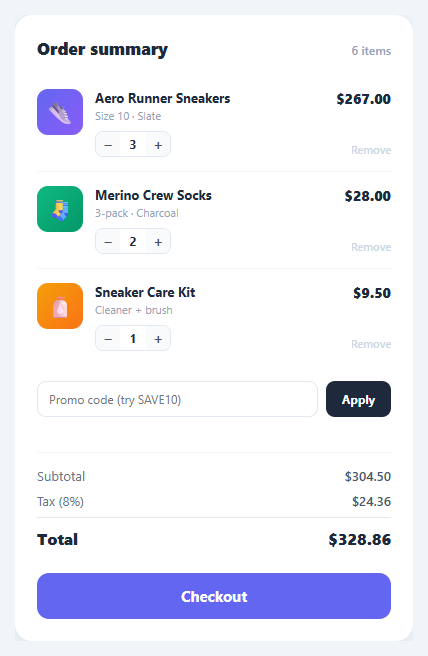
The order summary is the panel shoppers stare at before they commit. It has to answer three questions instantly and correctly: what am I buying, can I change it, and what will it cost? Any lag, rounding error, or stale total erodes trust at the exact moment it matters most. This snippet implements a complete, self-recalculating order summary in plain HTML, CSS, and vanilla JavaScript: line items with quantity steppers, remove buttons, a promo-code field with live discount, and subtotal, tax, and total rows that update on every change.
Everything flows through one recalc function. Rather than tracking totals in scattered variables, recalc reads the current DOM — every non-removing line item, its data-price, and its quantity — and rewrites every dependent number in one pass. That single-source-of-truth approach is what guarantees the displayed total can never drift out of sync with the line items.
Quantity steppers with per-line totals
Each item has a − / + stepper around a quantity value. changeQty clamps the quantity to a minimum of 1 (Math.max(1, ...)) so a line can never go to zero by accident, updates the value, and calls recalc. recalc multiplies each item's unit price by its quantity, writes the per-line total, and accumulates the subtotal — so the line price and the cart total always move together.
Remove with exit animation
The Remove button adds a .removing class that runs an os-out keyframe (slide, fade, and collapse height to zero). An animationend listener then removes the row from the DOM and recalculates. Because recalc selects .os-item:not(.removing), the row stops counting toward totals the instant it begins animating out — the numbers update immediately while the visual exit plays.
Promo code with live discount
applyPromo reads the code, upper-cases it, and looks it up in a PROMOS map of percentage discounts. A valid code sets discountRate and shows a green confirmation; an invalid one resets the rate and shows a red message. The discount row only appears (.show) when a discount is active, and its label reflects the exact percentage ("Discount (10%)"). Crucially, the order of operations is correct: discount comes off the subtotal first, then tax is calculated on the discounted amount — the standard, defensible way to compute a cart total.
Correct tax and total order of operations
recalc computes discount = subtotal × rate, then tax = (subtotal − discount) × TAX_RATE, then total = subtotal − discount + tax. All money is formatted through a single fmt helper using toFixed(2) so every figure shows two decimal places consistently.
Empty-cart state
When the last item is removed, recalc adds an .empty class that reveals an "Your cart is empty" message and dims the promo and checkout controls — a graceful end state instead of a broken-looking panel of zeros.
Pair this summary with a checkout payment form on the same page, a quantity stepper on product pages, or a mini cart dropdown in the header.
Step by step
How to Use
- 1Paste HTML, CSS, and JSAn order summary card appears with three line items, a promo field, and subtotal / tax / total rows already computed from the items.
- 2Adjust a quantityClick + or − on any item — the per-line price, the item count, the subtotal, tax, and total all update together. Quantities never drop below 1.
- 3Apply a promo codeType
SAVE10and click Apply — a green message confirms 10% off, a discount row appears, and the total drops with tax recomputed on the discounted amount. - 4Try an invalid codeType anything else and Apply — a red "Invalid promo code" message shows and no discount is applied.
- 5Remove an itemClick Remove — the row slides out and collapses, then disappears, and all totals recalculate instantly.
- 6Empty the cartRemove every item — the card switches to an "Your cart is empty" state and dims the promo and checkout buttons.
Real-world uses
Common Use Cases
Got questions?
Frequently Asked Questions
Render the .os-item rows from your cart data (server-side or via a template loop), setting each data-price and quantity from the cart, then call recalc() once on load. The function reads whatever rows exist, so it works with one item or fifty without any other change.
Replace the PROMOS lookup in applyPromo with a fetch to your endpoint that returns the discount rate (or rejects the code). Apply the returned rate to discountRate and call recalc. Always re-validate the code server-side at checkout — never trust a client-side discount as the final price.
In most jurisdictions tax is charged on the amount the customer actually pays, so the discount is applied to the subtotal first and tax is computed on the reduced figure. This snippet uses tax = (subtotal − discount) × rate. If your local rules tax the pre-discount amount, move the tax calculation above the discount subtraction.
Add a shipping row to the totals and a PROMOS entry that represents a flat amount or a free-shipping flag rather than a percentage. In recalc, branch on the discount type: subtract a fixed value, or set shipping to zero, before computing the total. Keep all of it inside recalc so the single-source-of-truth model holds.
In React, hold the items array and discountRate in useState and derive subtotal, tax, and total with useMemo so they recompute automatically — no manual recalc. In Vue, make items reactive and use computed totals. In Angular, store items on the component and compute totals in getters. The card layout and animations port unchanged.