

Page Minimap — Scrollable Overview & Viewport Indicator
Page Minimap · Navigation · Plain HTML, CSS & JS · Live preview
Copy & paste
Source Code
<main class="pm-page" id="pmPage">
  <section class="pm-sec" data-label="Intro"><h2>Introduction</h2><p>Scroll the page — the minimap on the right mirrors your position. Click or drag it to jump.</p></section>
  <section class="pm-sec" data-label="Setup"><h2>Setup</h2><p>A miniature of the page sits fixed on the right. Each block is a section, sized in proportion to its real height.</p></section>
  <section class="pm-sec pm-tall" data-label="Guide"><h2>The long guide</h2><p>This section is intentionally tall so the minimap clearly shows proportions and the viewport indicator has room to travel.</p></section>
  <section class="pm-sec" data-label="API"><h2>API</h2><p>The shaded box on the minimap is your current viewport. It moves as you scroll and you can drag it.</p></section>
  <section class="pm-sec pm-tall" data-label="Examples"><h2>Examples</h2><p>Click anywhere on the minimap to scroll there instantly; drag the indicator for fine control.</p></section>
  <section class="pm-sec" data-label="FAQ"><h2>FAQ</h2><p>The minimap rebuilds on resize so the proportions always match the real page.</p></section>
</main>
<aside class="pm-map" id="pmMap" aria-label="Page minimap">
  <div class="pm-blocks" id="pmBlocks"></div>
  <div class="pm-view" id="pmView"></div>
</aside>*{box-sizing:border-box;margin:0;padding:0}
body{font-family:system-ui,-apple-system,sans-serif;background:#0f172a;color:#e2e8f0}
.pm-page{max-width:560px;margin:0 auto;padding:24px 70px 24px 24px}
.pm-sec{background:#1e293b;border:1px solid #334155;border-radius:12px;padding:20px;margin-bottom:14px}
.pm-sec h2{font-size:19px;font-weight:800;margin-bottom:8px;color:#f1f5f9}
.pm-sec p{font-size:14px;line-height:1.6;color:#94a3b8}
.pm-tall{padding-bottom:120px}
.pm-map{position:fixed;top:50%;right:14px;transform:translateY(-50%);width:54px;background:#0b1120;border:1px solid #334155;border-radius:8px;padding:5px;cursor:pointer;user-select:none}
.pm-blocks{display:flex;flex-direction:column;gap:3px}
.pm-block{border-radius:3px;background:#334155;transition:background .15s}
.pm-block.is-active{background:#6366f1}
.pm-view{position:absolute;left:3px;right:3px;border:1.5px solid #818cf8;background:rgba(129,140,248,.18);border-radius:4px;cursor:grab;pointer-events:none}var page = document.getElementById('pmPage');
var map = document.getElementById('pmMap');
var blocksWrap = document.getElementById('pmBlocks');
var view = document.getElementById('pmView');
var secs = Array.prototype.slice.call(page.querySelectorAll('.pm-sec'));
var scale = 1, mapInner = 0, blockEls = [];
function build() {
blocksWrap.innerHTML = '';
blockEls = [];
var pageH = page.scrollHeight;
mapInner = Math.min(220, Math.max(120, pageH * 0.16));
scale = mapInner / pageH;
var gapTotal = (secs.length - 1) * 3;
secs.forEach(function (sec) {
var b = document.createElement('div');
b.className = 'pm-block';
b.style.height = Math.max(6, (sec.offsetHeight / pageH) * (mapInner - gapTotal)) + 'px';
blocksWrap.appendChild(b);
blockEls.push(b);
});
blocksWrap.style.height = mapInner + 'px';
update();
}
function update() {
var pageH = page.scrollHeight;
var winH = window.innerHeight;
var top = window.scrollY * scale + 5;
var h = Math.min(mapInner, winH * scale);
view.style.top = top + 'px';
view.style.height = h + 'px';
// mark the section nearest the viewport centre
var centre = window.scrollY + winH / 2;
var acc = page.offsetTop, activeIdx = 0;
secs.forEach(function (sec, i) { if (centre >= sec.offsetTop) activeIdx = i; });
blockEls.forEach(function (b, i) { b.classList.toggle('is-active', i === activeIdx); });
}
function scrollFromMapY(clientY) {
var rect = blocksWrap.getBoundingClientRect();
var ratio = (clientY - rect.top) / rect.height;
var target = ratio * page.scrollHeight - window.innerHeight / 2;
window.scrollTo({ top: Math.max(0, target), behavior: 'smooth' });
}
map.addEventListener('click', function (e) { scrollFromMapY(e.clientY); });
map.addEventListener('pointerdown', function (e) {
e.preventDefault();
function mv(ev) { var rect = blocksWrap.getBoundingClientRect(); var ratio = (ev.clientY - rect.top) / rect.height; window.scrollTo({ top: Math.max(0, ratio * page.scrollHeight - window.innerHeight / 2) }); }
function up() { document.removeEventListener('pointermove', mv); document.removeEventListener('pointerup', up); }
document.addEventListener('pointermove', mv);
document.addEventListener('pointerup', up);
});
window.addEventListener('scroll', update, { passive: true });
window.addEventListener('resize', build);
build();Extend with AI
Take This Snippet Further With AI
The AI prompt for this one is for Patreon supporters ($3 a month), along with a site with no ads. Supporters enter the passcode once and it is remembered in this browser.
What's included
Features
About this UI Snippet
Page Minimap — Proportional Page Overview with Draggable Viewport
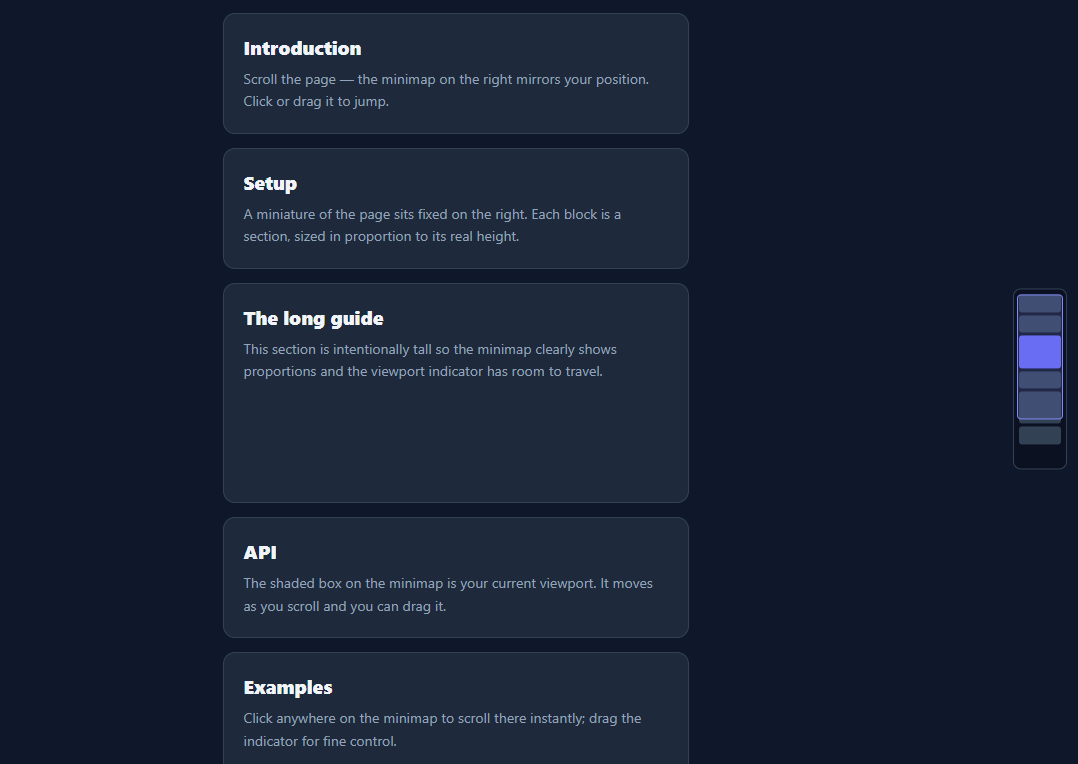
A page minimap is the miniature overview — familiar from code editors like VS Code — that shows the whole document at a glance with a box marking where you are, and lets you click or drag to jump anywhere. This snippet builds one for a scrolling page from its sections, with proportional blocks, a live viewport indicator, and drag-to-navigate, in plain HTML, CSS, and vanilla JavaScript.
Proportional, not a pixel clone
Rather than rendering a scaled screenshot of the page (expensive and fragile), the minimap represents each section as a block sized in proportion to that section's real height. A tall guide section gets a tall block; a short FAQ gets a short one. The whole stack is scaled to a fixed minimap height, so the map is a faithful structural overview that's cheap to build and easy to style.
A live viewport indicator
A translucent box on the minimap represents the current viewport. Its top is the scroll position times the scale factor, and its height is the window height times the same factor — so it grows and shrinks to reflect how much of the page is visible and slides as you scroll. Listening to scroll with a passive listener keeps it smooth without blocking scrolling.
Click and drag to navigate
Clicking anywhere on the minimap scrolls the page so that point sits at the centre of the viewport, with smooth behaviour; pressing and dragging scrolls continuously as you move, for fine control. The mapping is a single ratio — pointer position within the map equals scroll position within the page — which keeps navigation predictable in both directions.
Active-section highlight
The block nearest the viewport's centre is highlighted, giving an at-a-glance "you are here" beyond the viewport box — useful when sections are uneven. The highlight is recomputed on each scroll from the sections' offsets, so it stays accurate as content changes.
Responsive and self-rebuilding
On resize the minimap rebuilds its blocks and rescales, because section heights change with width — so the proportions always match the real page. The whole thing is a build function and a scroll update with no dependencies, a clean reference for the editor-style minimap pattern applied to long pages and docs.
Step by step
How to Use
- 1Paste HTML, CSS, and JSA long page renders with a minimap fixed on the right.
- 2ScrollThe viewport box moves and the active section block highlights.
- 3Click the mapThe page scrolls so that point centers in the viewport.
- 4Drag the mapPress and move to scrub through the page continuously.
- 5Mark sectionsEach .pm-sec becomes a proportional block automatically.
- 6ResizeThe minimap rebuilds so proportions stay accurate.
Real-world uses
Common Use Cases
Got questions?
Frequently Asked Questions
Cloning and scaling the real DOM (or a screenshot) is expensive, breaks with dynamic content, and is hard to keep in sync. Representing each section as a proportionally sized block captures the page structure faithfully at a fraction of the cost, is trivial to style, and rebuilds instantly on resize. It is the same idea as an outline view rather than a literal thumbnail.
The minimap is the page height multiplied by a scale factor. The box's top is window.scrollY times that scale, and its height is window.innerHeight times the scale, so it represents exactly the visible portion and moves as you scroll. The scroll listener is passive, so updating the box never blocks or janks the actual scrolling.
Both use one ratio: the pointer's vertical position within the minimap divided by the minimap height equals the target position within the page. Clicking scrolls (smoothly) so that target sits at the viewport centre; dragging applies the same mapping continuously on pointermove for scrubbing. This symmetry makes the map predictable to use.
Yes. Section heights depend on viewport width (text reflows), so the minimap rebuilds its blocks and recomputes the scale on resize. If your content changes dynamically, call the build function again after the change and the proportions and viewport box will re-sync to the new page height.
Measure the page and section heights after render (in an effect) and store them in state to render the blocks; recompute on a resize listener. Track scrollY in state via a passive scroll listener to position the viewport box, and implement click/drag handlers that call scrollTo with the mapped target. Tailwind users swap the classes for utilities; the scaling math is unchanged.
Yes. While the Page Minimap snippet gives you one pattern to copy, the free Responsive Navbar Builder at webdevpuneet.com/navbar-builder/ designs a whole navigation bar: logo, links and dropdown menus, a mobile hamburger menu (dropdown panel, slide-in drawer or full screen) and a scroll effect (sticky, shrink, hide on scroll or transparent). It has six presets, a live preview that runs the real code, and exports HTML + CSS + vanilla JS, React, Tailwind, Vue 3 or Angular — or you can click Fork & Edit to keep editing it in My Code.