
Product Hero — Free HTML CSS JS Email Capture Snippet
Product Hero · Heroes · Plain HTML, CSS & JS · Live preview
Copy & paste
Source Code
<section class="hero">
  <div class="pill">✦ Loved by 12,000+ product teams</div>

  <h1 class="headline">
    The <em>smarter</em> way to<br>manage your workflow
  </h1>

  <p class="sub">Streamline your entire product pipeline in one place. No more scattered tools, missed deadlines, or lost context — just clean, fast, focused work.</p>

  <form class="capture" onsubmit="handleSubmit(event)">
    <input class="email-inp" type="email" placeholder="Enter your work email…" required />
    <button type="submit" class="btn-cta">Get early access</button>
  </form>

  <p class="disclaimer">Free 14-day trial · No credit card · Cancel anytime</p>

  <div class="browser-wrap">
    <div class="browser-bar">
      <span class="dot red"></span>
      <span class="dot yellow"></span>
      <span class="dot green"></span>
      <div class="url-bar">app.yourproduct.com</div>
    </div>
    <div class="screen">
      <div class="app-top">
        <div class="app-nav">
          <div class="nav-logo"></div>
          <div class="nav-links">
            <div class="nav-item active"></div>
            <div class="nav-item"></div>
            <div class="nav-item"></div>
          </div>
          <div class="nav-btn"></div>
        </div>
      </div>
      <div class="app-body">
        <div class="sidebar-col">
          <div class="sb-item active"></div>
          <div class="sb-item"></div>
          <div class="sb-item"></div>
          <div class="sb-item"></div>
        </div>
        <div class="main-col">
          <div class="card-row">
            <div class="card-block blue"></div>
            <div class="card-block purple"></div>
            <div class="card-block green"></div>
          </div>
          <div class="table-mock">
            <div class="row-mock head"></div>
            <div class="row-mock"></div>
            <div class="row-mock"></div>
            <div class="row-mock"></div>
          </div>
        </div>
      </div>
    </div>
  </div>
</section>
* { box-sizing: border-box; margin: 0; padding: 0; }
body { font-family: system-ui, sans-serif; background: #fafafa; min-height: 100vh; }
.hero { display: flex; flex-direction: column; align-items: center; text-align: center; padding: 64px 24px 0; gap: 20px; }
.pill { display: inline-flex; align-items: center; gap: 6px; background: #f0f9ff; border: 1px solid #bae6fd; color: #0369a1; font-size: 12px; font-weight: 600; padding: 5px 14px; border-radius: 20px; }
.headline { font-size: clamp(32px, 6vw, 60px); font-weight: 900; color: #0f172a; line-height: 1.15; letter-spacing: -1.2px; max-width: 700px; }
.headline em { font-style: italic; background: linear-gradient(135deg, #6366f1, #0ea5e9); -webkit-background-clip: text; -webkit-text-fill-color: transparent; background-clip: text; }
.sub { font-size: 15px; color: #64748b; max-width: 480px; line-height: 1.75; }
.capture { display: flex; gap: 8px; width: 100%; max-width: 460px; }
.email-inp { flex: 1; padding: 13px 16px; border: 1.5px solid #e2e8f0; border-radius: 10px; font-size: 14px; color: #1e293b; background: #fff; outline: none; transition: border-color 0.15s, box-shadow 0.15s; }
.email-inp:focus { border-color: #6366f1; box-shadow: 0 0 0 3px rgba(99,102,241,0.12); }
.email-inp::placeholder { color: #94a3b8; }
.btn-cta { background: #6366f1; color: #fff; font-size: 14px; font-weight: 700; padding: 13px 22px; border-radius: 10px; border: none; cursor: pointer; white-space: nowrap; transition: background 0.15s; }
.btn-cta:hover { background: #4f46e5; }
.disclaimer { font-size: 12px; color: #94a3b8; margin-top: -4px; }
/* Browser mockup */
.browser-wrap { width: 100%; max-width: 860px; border-radius: 16px 16px 0 0; overflow: hidden; box-shadow: 0 -4px 60px rgba(0,0,0,0.1), 0 0 0 1px rgba(0,0,0,0.06); margin-top: 8px; }
.browser-bar { background: #f1f5f9; padding: 10px 16px; display: flex; align-items: center; gap: 8px; border-bottom: 1px solid #e2e8f0; }
.dot { width: 10px; height: 10px; border-radius: 50%; flex-shrink: 0; }
.dot.red { background: #ef4444; }
.dot.yellow { background: #f59e0b; }
.dot.green { background: #22c55e; }
.url-bar { flex: 1; background: #fff; border-radius: 6px; padding: 4px 12px; font-size: 11px; color: #94a3b8; text-align: center; border: 1px solid #e2e8f0; }
.screen { background: #fff; }
.app-top { padding: 12px 16px; border-bottom: 1px solid #f1f5f9; }
.app-nav { display: flex; align-items: center; gap: 16px; }
.nav-logo { width: 24px; height: 24px; background: #6366f1; border-radius: 6px; }
.nav-links { display: flex; gap: 8px; flex: 1; }
.nav-item { height: 8px; background: #e2e8f0; border-radius: 4px; width: 48px; }
.nav-item.active { background: #6366f1; }
.nav-btn { width: 60px; height: 24px; background: #6366f1; border-radius: 6px; }
.app-body { display: flex; height: 200px; }
.sidebar-col { width: 140px; border-right: 1px solid #f1f5f9; padding: 12px; display: flex; flex-direction: column; gap: 6px; flex-shrink: 0; }
.sb-item { height: 10px; background: #e2e8f0; border-radius: 5px; }
.sb-item.active { background: rgba(99,102,241,0.2); }
.main-col { flex: 1; padding: 12px; display: flex; flex-direction: column; gap: 10px; overflow: hidden; }
.card-row { display: flex; gap: 8px; }
.card-block { flex: 1; height: 56px; border-radius: 8px; }
.card-block.blue { background: rgba(14,165,233,0.12); }
.card-block.purple { background: rgba(99,102,241,0.12); }
.card-block.green { background: rgba(34,197,94,0.12); }
.table-mock { display: flex; flex-direction: column; gap: 4px; }
.row-mock { height: 10px; background: #f1f5f9; border-radius: 4px; }
.row-mock.head { background: #e2e8f0; }function handleSubmit(e) {
e.preventDefault();
const btn = e.target.querySelector('.btn-cta');
const original = btn.textContent;
btn.textContent = "✓ You're on the list!";
btn.style.background = '#22c55e';
setTimeout(() => { btn.textContent = original; btn.style.background = ''; }, 3000);
}Extend with AI
Take This Snippet Further With AI
The AI prompt for this one is for Patreon supporters ($3 a month), along with a site with no ads. Supporters enter the passcode once and it is remembered in this browser.
What's included
Features
About this UI Snippet
Product Hero Section — Email Capture Form, Browser Mockup & Light Design
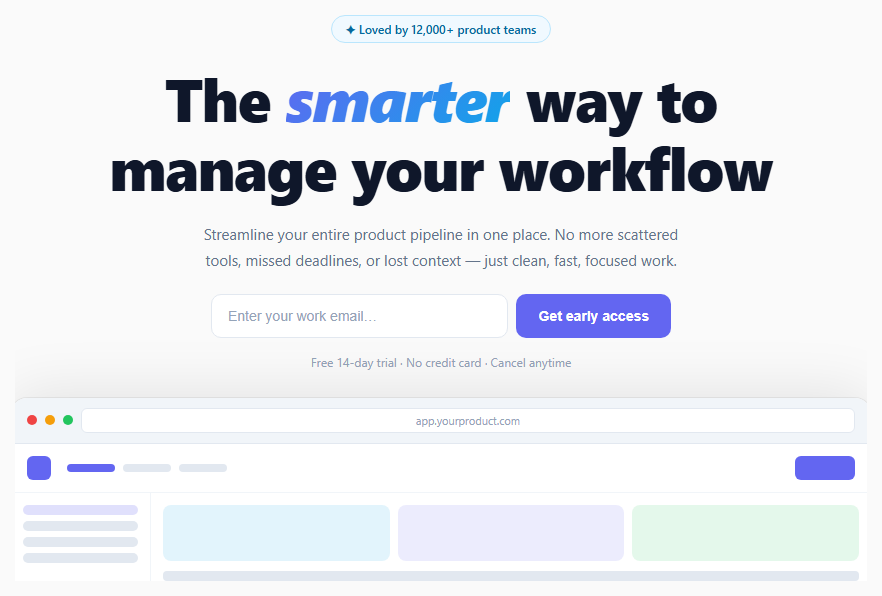
If you are building a product landing page and need to collect email sign-ups before launch, this snippet gives you a complete above-the-fold section: a trust pill badge, a large headline with italic gradient accent, a subtitle, an email capture form with success feedback, a disclaimer line, and a browser chrome mockup frame showing a placeholder app UI.
This is the standard pattern used by high-converting SaaS waitlist pages and product launches.
The email capture form
The .capture form uses display: flex so the email input and CTA button sit side by side on desktop. On submit, handleSubmit() prevents the default form action, shows a "✓ You're on the list!" success state on the button with a green background, and resets after 3 seconds. In production, replace the timeout with your actual API call to a mailing list service (Mailchimp, ConvertKit, Resend) or your own backend.
The italic gradient headline
The em element inside the headline uses the same background-clip: text technique as other gradient text snippets — but wrapped in an italic element for added visual differentiation. italic + gradient is a high-impact typographic combination that draws attention to the key differentiating word without using a separate colour or size.
The browser chrome mockup
The .browser-wrap creates a realistic browser window frame: three coloured dots (red, yellow, green), a fake URL bar, and a simulated app interface below. The app UI uses placeholder blocks (sidebar items, stat cards, table rows) to suggest a real product without requiring screenshots. This communicates "this is a real application" without needing finished designs.
The mockup sits below the fold with no bottom border-radius — it extends to the edge, creating a peek-below-the-fold effect that encourages scrolling.
Customising for your product
Replace the pill text with your actual user count or trust signal. Update the headline and subtitle. Wire the form to your email list API. Replace the browser mockup with a real screenshot — set background: url("your-screenshot.png") on .screen, background-size: cover.
A/B testing considerations
The email-capture-below-headline layout is one of the highest-converting hero patterns for pre-launch pages. Common A/B variants to test: (1) a single large "Get early access" CTA without the email input — fewer fields, higher click rate, but lower email quality; (2) moving the browser mockup to the right side for a split-hero layout. The disclaimer line ("Free 14-day trial · No credit card · Cancel anytime") consistently increases submit rate — do not remove it without testing.
Step by step
How to Use
- 1Update the trust pill and headlineChange the pill text to your real user count ("Loved by 12,000+ teams"). Edit the headline and wrap the key differentiating word in the em tag for the gradient italic effect.
- 2Wire the email form to your APIIn the JS panel, replace the setTimeout in handleSubmit() with a fetch call to your email service endpoint. The button shows a success state on the same click — no page reload needed.
- 3Replace the browser mockupTo show a real screenshot, set background: url("screenshot.png"); background-size: cover; on the .screen element. Remove the .app-top and .app-body placeholder content. Keep .browser-bar for the chrome effect.
- 4Change the gradient accentIn CSS, find .headline em and update the background gradient colours. Also update .btn-cta background and .email-inp focus border-color to match your brand accent.
- 5Update the disclaimer textEdit the .disclaimer paragraph to match your actual trial terms — "14-day free trial", "No credit card required", and "Cancel anytime" are the three standard trust signals for SaaS sign-ups.
- 6Export in your formatClick "HTML" for a standalone file, "JSX" for a React component with onSubmit handler and useState for the button feedback state, or "Tailwind" for a React + Tailwind CSS version.
Real-world uses
Common Use Cases
Got questions?
Frequently Asked Questions
Replace the setTimeout inside handleSubmit() with a fetch call: await fetch("/api/subscribe", { method: "POST", headers: {"Content-Type":"application/json"}, body: JSON.stringify({ email: e.target.querySelector(".email-inp").value }) }). Show the success state on resolve and an error state (red button) on reject. For Mailchimp, use their embedded form action URL directly as the form action attribute and submit natively, or use their API with a server-side proxy to hide your API key.
Remove the .app-top and .app-body div elements from the HTML. On the .screen element, add style="background: url('screenshot.png') center top / cover no-repeat; height: 320px;" — or set it in the CSS panel. Keep the .browser-bar for the chrome effect above the screenshot. For a sharper result, export your screenshot at 2× resolution and use the regular display size in CSS.
Add @media (max-width: 500px) { .capture { flex-direction: column; } .btn-cta { width: 100%; } } to the CSS. The input and button each take full width and stack naturally. The max-width: 460px on .capture keeps the layout compact on desktop while allowing full-width stack on mobile.
Yes. Click "JSX" to download a React component. Replace the inline onsubmit with a React onSubmit handler. Manage the button state with useState — const [submitted, setSubmitted] = useState(false). Conditionally show the success text: submitted ? "✓ You're on the list!" : "Get early access". In Next.js, wrap the form in a Client Component ("use client") since it uses state and event handlers.