





Scroll Chat Story — Free HTML CSS JS Snippet
Scroll Chat Story · Scroll · Plain HTML, CSS & JS · Live preview
Copy & paste
Source Code
<section class="scs-intro"><p>Scroll ↓</p></section>
<div class="scs-thread">
  <div class="scs-day">Tuesday, 9:14 AM</div>
  <div class="scs-msg scs-them"><div class="scs-bubble">Hey — did the deploy go out last night? 😬</div></div>
  <div class="scs-msg scs-me"><div class="scs-bubble">It did. Zero downtime, zero rollbacks.</div></div>
  <div class="scs-msg scs-them"><div class="scs-bubble">Wait, seriously? The migration too??</div></div>
  <div class="scs-msg scs-me"><div class="scs-bubble">Migration, cache warm-up, the works. The new pipeline handled all of it.</div></div>
  <div class="scs-msg scs-them"><div class="scs-bubble">We used to lose a whole weekend to this…</div></div>
  <div class="scs-msg scs-me"><div class="scs-bubble">Yep. Now it's a checkbox. ✅</div></div>
  <div class="scs-msg scs-them"><div class="scs-bubble">Okay, I'm sold. Sending the team your setup guide 🚀</div></div>
</div>
<section class="scs-outro"><p>A product pitch, told as a conversation.</p></section>*{box-sizing:border-box;margin:0;padding:0}
body{font-family:system-ui,-apple-system,sans-serif;background:#07080d;color:#fff}
.scs-intro,.scs-outro{min-height:60vh;display:flex;justify-content:center;align-items:center;color:#8a90a8;font-size:15px;letter-spacing:.1em;text-transform:uppercase}
.scs-thread{max-width:480px;margin:0 auto;padding:20px 20px 40px;display:flex;flex-direction:column;gap:18px}
.scs-day{text-align:center;font-size:12px;letter-spacing:.08em;color:#6b7188;margin-bottom:4px}
.scs-msg{display:flex;min-height:70px}
.scs-me{justify-content:flex-end}
.scs-bubble{position:relative;max-width:78%;padding:13px 17px;border-radius:20px;font-size:15px;line-height:1.5;opacity:0;transform:translateY(18px) scale(.86);transition:opacity .45s,transform .45s cubic-bezier(.34,1.56,.64,1)}
.scs-them .scs-bubble{background:#1c2138;border-bottom-left-radius:6px;transform-origin:bottom left}
.scs-me .scs-bubble{background:linear-gradient(135deg,#6366f1,#4f46e5);border-bottom-right-radius:6px;transform-origin:bottom right}
.scs-msg.is-shown .scs-bubble{opacity:1;transform:translateY(0) scale(1)}
/* typing dots shown inside the bubble before its text "arrives" */
.scs-bubble::before{content:'';position:absolute;inset:0;border-radius:inherit;background:inherit;z-index:1;transition:opacity .3s .35s}
.scs-bubble::after{content:'• • •';position:absolute;inset:0;display:flex;align-items:center;justify-content:center;letter-spacing:2px;color:rgba(255,255,255,.7);z-index:2;animation:scs-pulse 1s infinite;transition:opacity .3s .35s}
.scs-msg.is-shown .scs-bubble::before,.scs-msg.is-shown .scs-bubble::after{opacity:0;pointer-events:none}
@keyframes scs-pulse{50%{opacity:.35}}// Each message pops in when it enters the lower part of the viewport.
// Once shown it stays shown — a conversation doesn't "unhappen"
// while you re-read it, so we unobserve after reveal.
var messages = document.querySelectorAll('.scs-msg');
var observer = new IntersectionObserver(function (entries) {
entries.forEach(function (entry) {
if (entry.isIntersecting) {
entry.target.classList.add('is-shown');
observer.unobserve(entry.target);
}
});
}, { rootMargin: '0px 0px -22% 0px', threshold: 0.4 });
messages.forEach(function (msg) { observer.observe(msg); });Extend with AI
Take This Snippet Further With AI
The AI prompt for this one is for Patreon supporters ($3 a month, 7 days free), along with a site with no ads. Supporters enter the passcode once and it is remembered in this browser.
What's included
Features
About this UI Snippet
Scroll Chat Story — A Conversation That Unfolds as You Scroll
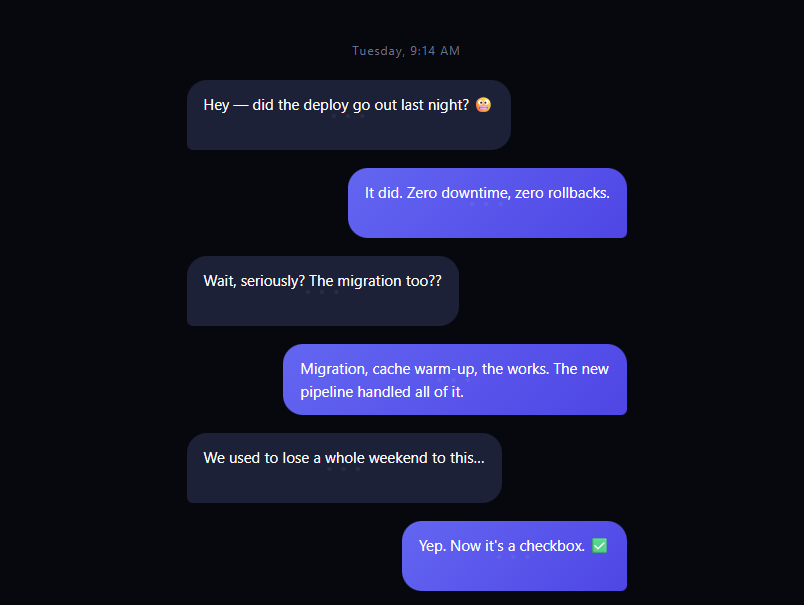
The scroll chat story tells a narrative — a testimonial, a support win, a product pitch — as a messaging thread whose bubbles arrive one at a time as you scroll. Each bubble first appears as typing dots, then resolves into its message with a springy pop, exactly like watching a live conversation. It's one of the most persuasive scroll patterns because readers process dialogue almost involuntarily. This snippet builds it with vanilla HTML, CSS, and an IntersectionObserver — no libraries.
Bubbles reveal in a reading band, not at the viewport edge
The observer uses rootMargin: '0px 0px -22% 0px' with threshold: 0.4, so a bubble fires when 40% of it is visible above the bottom 22% of the screen — comfortably inside the reading zone. Trigger-at-edge implementations reveal messages the reader can't see yet; pulling the trigger line up means each bubble pops exactly where eyes are focused.
One-shot reveals: conversations don't unhappen
After a message shows, observer.unobserve() releases it. Scrolling back up leaves the thread intact — re-reading a conversation where bubbles vanish and re-pop would break the "this already happened" fiction. This is a deliberate contrast with scrubbed effects: chat is narrative state, not scroll state, so the reveal is a ratchet rather than a scrub.
Typing dots via stacked pseudo-elements
Each bubble carries its own typing indicator with zero extra markup: ::before clones the bubble's background as a cover layer, and ::after renders pulsing dots on top. The message text underneath is present the whole time (real layout, real height — so nothing shifts when it "arrives"). When is-shown lands, both pseudo-elements fade out on a 0.35s delay — the bubble pops in *as dots*, and a beat later the dots dissolve into the message. Two transitions, one class.
The pop is a CSS spring from the bubble's tail
Bubbles animate from translateY(18px) scale(.86) with cubic-bezier(.34,1.56,.64,1) — an overshooting curve that reads as a message "landing." transform-origin is set to each bubble's tail corner (bottom-left for them, bottom-right for me), so the pop grows from where a chat app anchors its bubbles, matching iMessage/WhatsApp physics.
Sides are semantic classes
.scs-them and .scs-me handle alignment, color, tail radius, and origin — the message flow stays a flat list, so writing a new story is editing text, not layout. A min-height on each row prevents late-loading rows from collapsing the scroll distance the reveals depend on.
Why IntersectionObserver over scroll math
Seven bubbles at document-flow positions are exactly what IO was built for: the browser fires callbacks only at crossings, there's zero per-frame JS, and the pattern scales to a 50-message story without any performance thought.
Row min-height keeps the scroll distance the reveals need
Each .scs-msg has min-height: 70px even though its content is a single short bubble. Without a reserved minimum, short messages would occupy very little vertical space, compressing the scroll distance between reveals until several bubbles' trigger points landed inside the same viewport at once — breaking the one-at-a-time pacing the observer relies on. The fixed minimum guarantees each message gets enough scroll runway to read as its own beat in the conversation.
Customizing it
Write your own thread (alternate the two classes), add timestamps or avatars per row, or slow the dots-to-text delay for longer "typing." Related: the full chat UI component, the typing indicator on its own, reveal on scroll for generic entrances, and a scroll pin story for pinned narratives.
Step by step
How to Use
- 1Paste HTML, CSS, and JSThe thread renders with all bubbles hidden.
- 2Scroll into the threadEach bubble pops in as typing dots.
- 3Watch the resolveDots dissolve into the message a beat later.
- 4Scroll back upThe conversation stays — reveals are one-shot.
- 5Rewrite the storyAlternate scs-them and scs-me rows with your copy.
- 6Tune the reveal bandAdjust rootMargin to move the trigger line.
Real-world uses
Common Use Cases
Got questions?
Frequently Asked Questions
An IntersectionObserver watches each message with rootMargin: '0px 0px -22% 0px' and threshold: 0.4 — a bubble fires when 40% of it is visible above the bottom 22% of the viewport, comfortably inside the reading zone. The callback adds is-shown and CSS does all animation; JavaScript never runs per scroll frame.
After revealing, the observer unobserves each message, making reveals a one-way ratchet. That's intentional: a conversation is narrative state, not scroll state — bubbles vanishing while re-reading would break the fiction that the exchange already happened. For scrub-style behavior, skip the unobserve and toggle the class on both transitions.
Each bubble's ::before clones its background as a cover layer and ::after renders pulsing dots above it, while the real text sits underneath at full layout height. When is-shown lands, the bubble springs in and both pseudo-elements fade on a 0.35s delay — dots first, then message, with zero layout shift because the text's space always existed.
Two details: an overshooting cubic-bezier(.34,1.56,.64,1) spring from translateY(18px) scale(.86), and transform-origin set to each bubble's tail corner — bottom-left for received, bottom-right for sent — so growth radiates from where messaging apps anchor their bubbles. Straight fades or center-origin scales immediately read as generic.
Without min-height: 70px, short single-line bubbles would occupy very little vertical space, compressing the scroll distance between messages until several trigger points sat inside the same viewport simultaneously. That breaks the one-at-a-time pacing the observer depends on. The reserved minimum guarantees every message gets enough scroll runway to read as its own distinct beat.
Render messages from an array of { side, text } objects and register one IntersectionObserver in a mount effect — useEffect, onMounted, or ngAfterViewInit — observing refs collected from the list, disconnecting it in the cleanup. Keep is-shown as a class toggle (or per-item boolean set once) so reveals stay one-shot. Bubble styling maps cleanly to Tailwind, with the pseudo-element dots kept in a small CSS layer.