





Scroll Skew Velocity — Free GSAP ScrollTrigger Skew Effect
Scroll Skew Velocity · Scroll · Plain HTML, CSS & JS · Live preview
Copy & paste
Source Code
<section class="sk-intro"><h1>Scroll fast ↓</h1><p>The cards skew with your scroll velocity.</p></section>
<section class="sk-list" id="skList">
  <article class="sk-card skew"><span>01</span><h3>Momentum</h3></article>
  <article class="sk-card skew"><span>02</span><h3>Velocity</h3></article>
  <article class="sk-card skew"><span>03</span><h3>Inertia</h3></article>
  <article class="sk-card skew"><span>04</span><h3>Friction</h3></article>
  <article class="sk-card skew"><span>05</span><h3>Drift</h3></article>
  <article class="sk-card skew"><span>06</span><h3>Glide</h3></article>
</section>
<section class="sk-outro"><p>Skew eases back to zero when you stop.</p></section>*{box-sizing:border-box;margin:0;padding:0}
body{font-family:system-ui,-apple-system,sans-serif;background:#0a0b12;color:#fff}
.sk-intro,.sk-outro{min-height:70vh;display:flex;flex-direction:column;justify-content:center;align-items:center;text-align:center;gap:10px;padding:24px}
.sk-intro h1{font-size:clamp(34px,7vw,68px);letter-spacing:-.02em}
.sk-intro p,.sk-outro p{color:#9aa0b8;font-size:16px}
.sk-list{max-width:560px;margin:0 auto;padding:10vh 24px;display:flex;flex-direction:column;gap:22px}
.sk-card{display:flex;align-items:center;gap:20px;padding:30px 28px;border-radius:20px;background:linear-gradient(120deg,#171c2e,#10131d);border:1px solid #252c40;transform-origin:center;will-change:transform}
.sk-card span{font-size:14px;font-weight:800;letter-spacing:.15em;color:#7c8cff}
.sk-card h3{font-size:clamp(24px,5vw,40px);letter-spacing:-.01em}gsap.registerPlugin(ScrollTrigger);
var skews = gsap.utils.toArray('.skew');
// Quick-setters avoid creating a tween per frame — cheap, smooth updates.
var setters = skews.map(function (el) { return gsap.quickTo(el, 'skewY', { duration: 0.5, ease: 'power3' }); });
var clamp = gsap.utils.clamp(-14, 14);
ScrollTrigger.create({
onUpdate: function (self) {
// getVelocity is px/sec; scale it down to a gentle skew, clamped.
var skew = clamp(self.getVelocity() / -260);
setters.forEach(function (set) { set(skew); });
}
});Extend with AI
Take This Snippet Further With AI
The AI prompt for this one is for Patreon supporters ($3 a month, 7 days free), along with a site with no ads. Supporters enter the passcode once and it is remembered in this browser.
What's included
Features
About this UI Snippet
Scroll Skew Velocity — Cards That Lean Into Your Scroll Speed
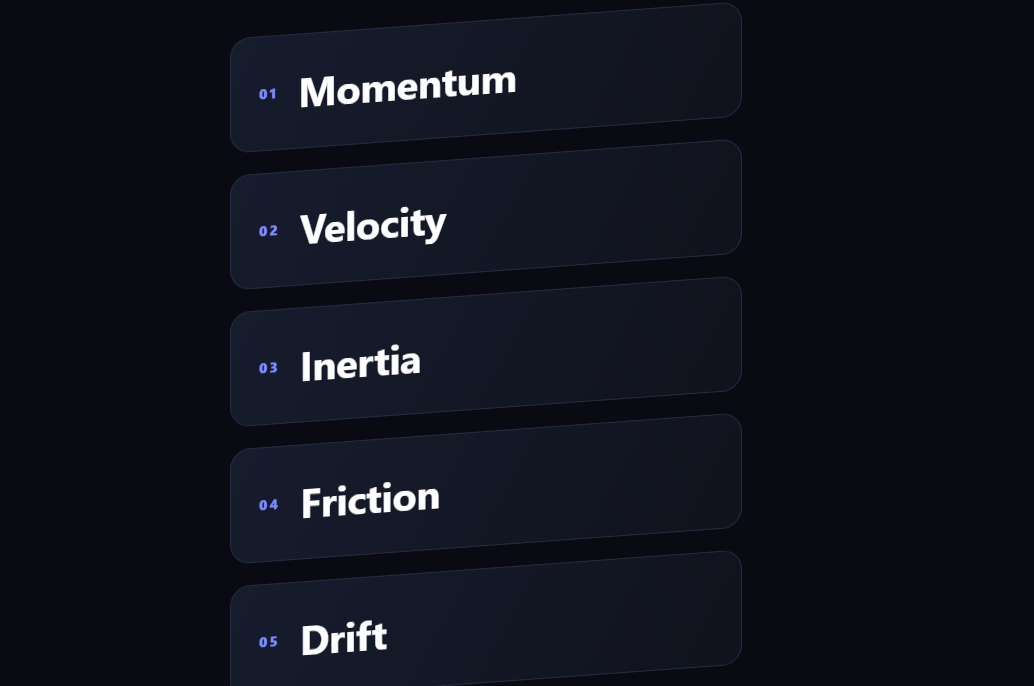
Velocity skew is the tactile effect where list items shear slightly in the direction you're scrolling and snap upright when you stop — the "the page has momentum" feel from award-winning sites. This snippet builds it with GSAP and ScrollTrigger (from a CDN), reading raw scroll velocity and mapping it to a live skew.
Reading scroll velocity
A global ScrollTrigger with an onUpdate callback runs on every scroll frame and calls self.getVelocity(), which returns the current scroll speed in pixels per second — positive scrolling down, negative scrolling up. That number is the engine of the effect: fast scrolling yields a big value, easing off yields a small one, and stopping yields zero. No manual delta tracking or timing is needed; ScrollTrigger measures it.
Mapping velocity to skew
The raw velocity is divided down (/ -260) to a sensible degree range and passed through gsap.utils.clamp(-14, 14) so even a violent flick can't shear the cards past a tasteful maximum. The negative divisor flips the sign so the cards lean the way that reads as "trailing" the scroll. This clamp-and-scale step is what keeps the effect feeling like physics rather than a glitch.
quickTo for cheap per-frame updates
Instead of creating a new tween every frame (expensive and janky), each card gets a gsap.quickTo(el, 'skewY', ...) setter — a reusable function that smoothly interpolates that one property toward whatever value you pass. On each scroll update the code calls every setter with the current skew, and GSAP eases the actual skewY toward it with a short power3 duration. That built-in easing is what makes the skew ramp up and settle smoothly, and crucially returns the cards to 0 when velocity drops, with no separate "reset" logic.
Why this is the right pattern
Skewing on scroll naively (writing transform directly from velocity) looks twitchy because raw velocity is noisy. Routing it through quickTo's interpolation low-passes the motion, and the clamp bounds it — together they turn a jittery signal into a fluid lean. ScrollTrigger's getVelocity removes the need to compute speed by hand across frames.
Composited and contained
Only transform (skewY) animates, so the browser composites the cards on the GPU with no reflow, and will-change: transform promotes them. The effect scales to many items because every card shares the same single velocity read per frame.
Customizing it
Change the divisor for more or less shear, the clamp for a tighter or looser limit, the quickTo duration for snappier or floatier recovery, or skew on skewX for a horizontal feel. Pair it with a scroll velocity marquee, a scroll reveal grid, or an animated list.
Step by step
How to Use
- 1Add the GSAP CDNsInclude gsap and ScrollTrigger from the CDN panel.
- 2Paste HTML, CSS, and JSA list of cards renders between spacers.
- 3Scroll quicklyThe cards skew in the scroll direction.
- 4Stop scrollingThe skew eases back to zero.
- 5Tune the shearChange the velocity divisor and clamp.
- 6Tune the recoveryAdjust the quickTo duration.
Real-world uses
Common Use Cases
quickTo setters that reuse tweens instead of creating one per frame.Got questions?
Frequently Asked Questions
A global ScrollTrigger's onUpdate runs each scroll frame and calls self.getVelocity(), which returns the scroll speed in pixels per second — positive down, negative up. Fast scrolling gives a large value, easing off gives a small one, and stopping gives zero, so ScrollTrigger supplies the velocity without manual delta or timing code.
The raw velocity is divided down and clamped to a max of about 14 degrees, then passed to per-card gsap.quickTo setters. quickTo interpolates the skewY toward the new value with a short power3 ease, which low-passes the noisy signal into a fluid lean and naturally returns the cards to zero when velocity drops — no separate reset logic.
Writing the transform straight from velocity looks twitchy because the signal is jittery, and creating a fresh tween every frame is expensive. quickTo builds one reusable setter per property that smoothly eases toward whatever value you pass, giving cheap per-frame updates and built-in easing in one — the recommended GSAP pattern for continuous scroll-driven values.
Yes. Only skewY, a transform, animates, so the browser composites the cards on the GPU with no reflow, and will-change promotes them. There is a single getVelocity read per frame shared by all cards, so adding more items costs only the quickTo setter calls, which are lightweight.
In a mount effect, register ScrollTrigger, build quickTo setters for the card refs, and create one ScrollTrigger whose onUpdate clamps getVelocity and calls the setters. Return a cleanup that kills the ScrollTrigger and reverts the GSAP context so it stops on unmount. The CSS ports unchanged; keep the setters in a ref so they persist across renders.