



ScrollReveal Hero Text Reset — reset: true Replay Explained
ScrollReveal Hero Text Reset · Heroes · Plain HTML, CSS & JS · Live preview
What's included
Features
About this UI Snippet
ScrollReveal Hero Text Reset — What reset: true Actually Changes
Every other ScrollReveal snippet in this library sets reset: false (or relies on it as the default) because most content — a feature grid, a timeline, a pricing table — should reveal once and stay. A hero is the exception, and this snippet exists to make that exception explicit and to explain, precisely, what reset: true changes under the hood.
The default: reveal once, then disconnect
With reset: false, ScrollReveal attaches an IntersectionObserver to each target, and the first time that element crosses the visibility threshold, it plays the reveal animation and then calls unobserve() on it internally — the observer is torn down for that element. Scrolling it out of view and back in afterward does nothing, because nothing is watching it anymore. This is why the feature-grid and timeline snippets in this library never replay: it would be wasted motion for content the user has already read.
reset: true: the observer stays attached forever
With reset: true, ScrollReveal does not unobserve after the first reveal. Instead, on every subsequent IntersectionObserver callback, it checks direction: when the element's intersection ratio drops to zero (it has left the viewport), ScrollReveal reverses the animation — instantly resets the element back to its pre-reveal transform/opacity state, without an animated transition, so the hero looks "reset" rather than visibly un-animating. Then, the next time it crosses back into view, the full reveal transition plays again from that hidden state. The result: scroll past the hero, scroll back up, and the heading/subtext/CTAs all fade and slide in again exactly as they did on first load.
Why sequencing four separate reveal() calls instead of one
js
sr.reveal('#shrTag', { delay: 0 ... });
sr.reveal('#shrTitle', { delay: 120 ... });
sr.reveal('#shrSub', { delay: 260 ... });
sr.reveal('#shrCtas', { delay: 400 ... });
Each hero element gets its own .reveal() call with an explicit, increasing delay rather than one call with interval across a shared selector. This is necessary because the four elements aren't visually interchangeable siblings (the way grid cards are) — they need specific, hand-tuned gaps (tag first, then a beat, then the headline, a longer beat before the CTAs) that read like an announcement rather than a mechanical cascade. interval assumes uniform spacing between same-type elements; explicit per-element delay is the right tool when the pacing itself is part of the design.
Reusing it
This is the pattern to reach for on any hero, landing page, or full-bleed intro section — anywhere a visitor might realistically scroll back to the top and would benefit from the entrance replaying rather than staying inert. Combine it with reset: false on everything below the fold, exactly as this library's two snippets demonstrate side by side.
Step by step
How to Use
- 1Add the ScrollReveal CDNInclude the scrollreveal UMD build from the CDN panel.
- 2Paste HTML, CSS, and JSA tall spacer sits above and below a centered hero section so scroll behavior is visible.
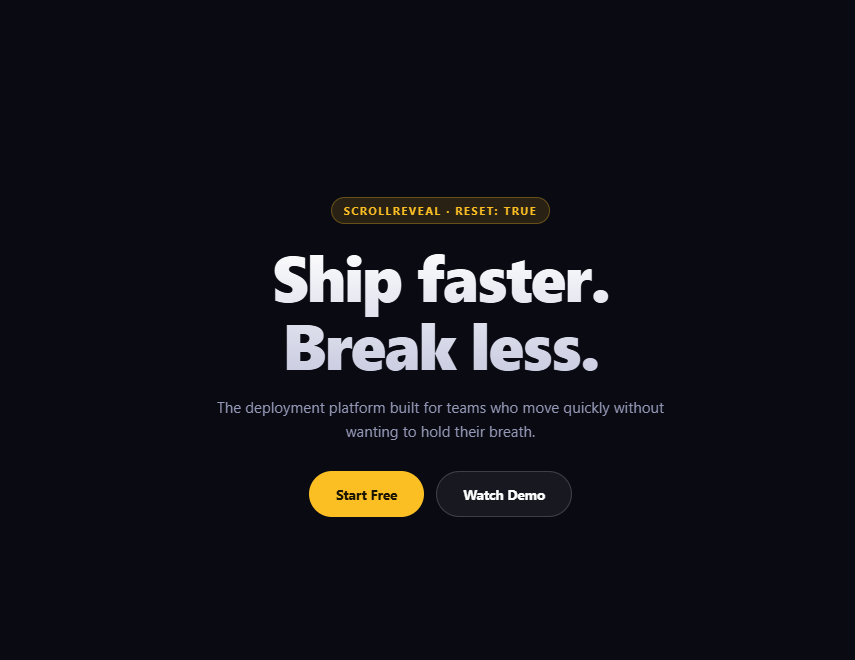
- 3Scroll down past the heroThe tag, heading, subtext, and CTAs reveal in sequence as the hero enters view.
- 4Keep scrolling, then scroll back upAs the hero leaves the viewport it resets instantly (no animation); re-entering plays the full sequence again.
- 5Compare with reset: falseSee the staggered-feature-grid snippet — same library, opposite reset choice, for content that should reveal once.
- 6Retune the pacingAdjust each element's delay to change how much of an "announcement" feel the sequence has.
Real-world uses
Common Use Cases
reset: true where most ScrollReveal content should reveal only once.reveal() calls and explicit delays producing an announcement sequence.reset: true and reset: false.Got questions?
Frequently Asked Questions
With reset: false, ScrollReveal unobserves an element after its first reveal, so nothing fires when it leaves or re-enters the viewport afterward. With reset: true, the observer stays attached indefinitely: it fires again when the element's intersection ratio returns to zero (instantly reverting it to its hidden state, no transition) and again when it re-enters (replaying the full animated reveal).
ScrollReveal applies the hidden state instantly rather than transitioning back to it when an element with reset: true exits the viewport. If it animated the reverse too, you'd see the hero visibly un-animate every time you scrolled past it, which reads as broken rather than intentional — instant reset keeps only the entrance, not the exit, animated.
interval assumes a set of visually equivalent, same-type elements (like grid cards) that should stagger uniformly. A hero's tag, heading, subtext, and CTAs are different element types needing different, hand-picked gaps to feel like a deliberate announcement sequence rather than a mechanical list cascade — explicit per-call delay values give full control over that pacing.
Generally no — for a feature grid, timeline, or anything a user reads once and scrolls past, replaying the entrance every time they scroll back up over it feels repetitive rather than delightful. reset: true is best reserved for hero/intro sections a visitor might intentionally return to, such as by scrolling to the top or clicking a logo/anchor link.
Marginally — the observer for each element stays alive for the life of the page instead of being torn down after one reveal, so ScrollReveal keeps doing a small amount of bookkeeping on every intersection change. For a handful of hero elements this is negligible; it would be worth reconsidering only if reset: true were applied to hundreds of elements simultaneously.
Scroll down until the hero fully leaves the viewport (the bottom spacer's prompt confirms this), then scroll back up — the tag, heading, subtext, and CTAs will replay their entrance in the same 0/120/260/400ms sequence as on first load, since the observer never stopped watching them.
Build with AI
Build, Understand, Optimize, and Extend It With AI
This snippet's entire purpose is to make one configuration option's behavior tangible, so treat it as a debugging/understanding exercise. Paste it into an AI assistant like Claude and ask it to explain step by step what happens to the IntersectionObserver ScrollReveal creates internally as you scroll a reset: true element out of and back into the viewport, contrasted with what would happen if it were reset: false — walk through the unobserve call that never happens. Then ask why the exit reset is instant while the entrance is animated, and what UX problem an animated exit would cause. For extension, ask it to add a subtle blur-to-sharp transition alongside the existing translate/fade, make the CTA buttons get a small pop/bounce distinct from the text reveals, or build a small on-screen indicator that visibly logs each reveal/reset event as it fires, to make the observer's behavior fully visible rather than inferred.
Prompt to recreate it
Copy this into your AI assistant of choice to build the effect from scratch, or as a jumping-off point for your own variant:
Build a hero section that replays its entrance animation using ScrollReveal.js (v4, from a CDN) in plain HTML, CSS, and JavaScript.

Requirements:
- A tall spacer section above the hero and another below it (each roughly 70vh) with a short scroll-hint message, so the hero starts off-screen and the enter/exit/re-enter cycle is demonstrable.
- A centered hero section containing an eyebrow tag, a large two-line gradient-text heading, a subtext paragraph, and two CTA buttons (primary + ghost style).
- Construct the ScrollReveal instance with reset: true explicitly, and add a code comment explaining this is the opposite, deliberate choice from a typical content section (which would use reset: false) because a hero benefits from replaying its entrance whenever a visitor scrolls back to it.
- Reveal the tag, heading, subtext, and CTAs with FOUR SEPARATE reveal() calls (not one shared selector with an interval option), each with its own explicit increasing delay value (e.g. 0, 120, 260, 400ms) so the sequence reads as a hand-paced announcement rather than a uniform mechanical stagger.
- All four elements should animate a combination of opacity and a translate (origin/distance).
- Style it as a dark theme with a gold/amber accent color, a large gradient-clipped headline, and pill-shaped CTA buttons.
Want to tighten it up first? Run this prompt through the AI Prompt Studio to score it across 8 quality dimensions, catch anti-patterns, and tune the wording for Claude, ChatGPT, or Gemini before you paste it in.
Source Code
<div class="shr-spacer">
  <p>↓ Scroll down to leave the hero, then scroll back up ↓</p>
</div>
<section class="shr-hero">
  <span class="shr-tag" id="shrTag">scrollreveal · reset: true</span>
  <h1 id="shrTitle">Ship faster.<br />Break less.</h1>
  <p id="shrSub">The deployment platform built for teams who move quickly without wanting to hold their breath.</p>
  <div class="shr-ctas" id="shrCtas">
    <button class="shr-btn shr-primary">Start Free</button>
    <button class="shr-btn shr-ghost">Watch Demo</button>
  </div>
</section>
<div class="shr-spacer">
  <p>↑ Scroll back up — the hero replays every time ↑</p>
</div>*{box-sizing:border-box;margin:0;padding:0}
body{font-family:system-ui,-apple-system,sans-serif;background:#0a0b12;color:#fff}
.shr-spacer{height:70vh;display:flex;align-items:center;justify-content:center;color:#4b4e63;font-size:13px;text-align:center;padding:24px}
.shr-hero{min-height:70vh;display:flex;flex-direction:column;align-items:center;justify-content:center;text-align:center;gap:18px;padding:24px}
.shr-tag{display:inline-block;font-size:11px;font-weight:700;letter-spacing:.14em;text-transform:uppercase;color:#fbbf24;background:rgba(251,191,36,.12);border:1px solid rgba(251,191,36,.3);padding:5px 12px;border-radius:99px}
.shr-hero h1{font-size:clamp(34px,7vw,64px);font-weight:800;letter-spacing:-.03em;line-height:1.06;background:linear-gradient(180deg,#fff,#c9cbe0);-webkit-background-clip:text;background-clip:text;color:transparent}
.shr-hero p{max-width:460px;font-size:15px;color:#9497b5;line-height:1.6}
.shr-ctas{display:flex;gap:12px;margin-top:10px}
.shr-btn{padding:13px 26px;border-radius:99px;font:700 13.5px system-ui;cursor:pointer;border:1px solid transparent}
.shr-primary{background:#fbbf24;color:#1a1400}
.shr-ghost{background:rgba(255,255,255,.06);border-color:rgba(255,255,255,.16);color:#fff}// reset: true here is the opposite choice from the feature-grid snippet's
// reset: false, made deliberately: a hero is the first thing a visitor sees,
// and if they scroll away and come back to the top later in the session,
// replaying the entrance makes the page feel alive rather than "already used."
var sr = ScrollReveal({ reset: true });
sr.reveal('#shrTag', { origin: 'top', distance: '16px', duration: 500, opacity: 0 });
sr.reveal('#shrTitle', { origin: 'bottom', distance: '30px', duration: 700, delay: 120, opacity: 0 });
sr.reveal('#shrSub', { origin: 'bottom', distance: '24px', duration: 650, delay: 260, opacity: 0 });
sr.reveal('#shrCtas', { origin: 'bottom', distance: '20px', duration: 600, delay: 400, opacity: 0 });