


Sticky Add to Cart Bar — Free HTML CSS JS E-Commerce Snippet
Sticky Add to Cart Bar · Navigation · Plain HTML, CSS & JS · Live preview
Copy & paste
Source Code
<div class="satc-page">
  <div class="satc-product">
    <div class="satc-gallery" aria-hidden="true">
      <svg viewBox="0 0 200 200" width="100%" height="100%"><rect width="200" height="200" rx="16" fill="#eef2ff"/><circle cx="100" cy="85" r="42" fill="#c7d2fe"/><rect x="55" y="130" width="90" height="48" rx="10" fill="#a5b4fc"/></svg>
    </div>
    <div class="satc-info">
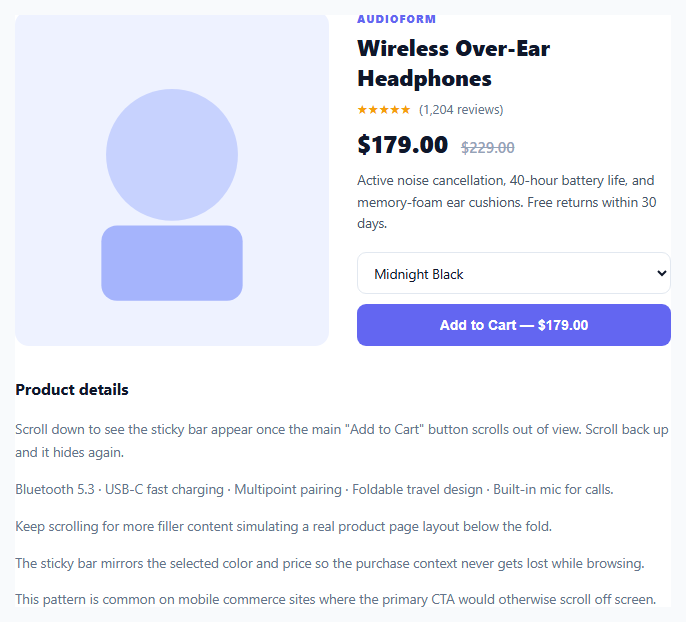
      <p class="satc-brand">AUDIOFORM</p>
      <h1>Wireless Over-Ear Headphones</h1>
      <div class="satc-rating">★★★★★ <span>(1,204 reviews)</span></div>
      <p class="satc-price">$179.00 <span class="satc-was">$229.00</span></p>
      <p class="satc-desc">Active noise cancellation, 40-hour battery life, and memory-foam ear cushions. Free returns within 30 days.</p>
      <div class="satc-buy" id="satcMainBuy">
        <select id="satcMainColor" class="satc-select">
          <option>Midnight Black</option>
          <option>Cloud White</option>
          <option>Sage Green</option>
        </select>
        <button class="satc-add-btn" id="satcMainAddBtn">Add to Cart — $179.00</button>
      </div>
    </div>
  </div>

  <div class="satc-filler">
    <h2>Product details</h2>
    <p>Scroll down to see the sticky bar appear once the main "Add to Cart" button scrolls out of view. Scroll back up and it hides again.</p>
    <p>Bluetooth 5.3 · USB-C fast charging · Multipoint pairing · Foldable travel design · Built-in mic for calls.</p>
    <p>Keep scrolling for more filler content simulating a real product page layout below the fold.</p>
    <p>The sticky bar mirrors the selected color and price so the purchase context never gets lost while browsing.</p>
    <p>This pattern is common on mobile commerce sites where the primary CTA would otherwise scroll off screen.</p>
  </div>

  <div class="satc-bar" id="satcBar" hidden>
    <div class="satc-bar-info">
      <span class="satc-bar-thumb" aria-hidden="true"></span>
      <div>
        <p class="satc-bar-name">Wireless Over-Ear Headphones</p>
        <p class="satc-bar-color" id="satcBarColor">Midnight Black</p>
      </div>
    </div>
    <div class="satc-bar-right">
      <span class="satc-bar-price">$179.00</span>
      <button class="satc-add-btn" id="satcBarAddBtn">Add to Cart</button>
    </div>
  </div>
  <div class="satc-toast" id="satcToast" hidden>Added to cart</div>
</div>*{box-sizing:border-box;margin:0;padding:0}
body{font-family:system-ui,-apple-system,sans-serif;background:#f8fafc;min-height:100vh;display:flex;align-items:center;justify-content:center;padding:0}
.satc-page{width:100%;max-width:720px;background:#fff;position:relative;min-height:100vh}
.satc-product{display:grid;grid-template-columns:1fr 1fr;gap:28px;padding:32px}
.satc-gallery{border-radius:14px;overflow:hidden;background:#eef2ff}
.satc-brand{font-size:11px;font-weight:800;letter-spacing:.1em;color:#6366f1}
.satc-info h1{font-size:22px;font-weight:800;color:#0f172a;margin:6px 0 8px}
.satc-rating{font-size:13px;color:#f59e0b;margin-bottom:10px}
.satc-rating span{color:#64748b;margin-left:4px}
.satc-price{font-size:24px;font-weight:800;color:#0f172a;margin-bottom:10px}
.satc-was{font-size:15px;font-weight:600;color:#94a3b8;text-decoration:line-through;margin-left:6px}
.satc-desc{font-size:13.5px;color:#475569;line-height:1.6;margin-bottom:18px}
.satc-buy{display:flex;flex-direction:column;gap:10px}
.satc-select{padding:10px 12px;border:1.5px solid #e2e8f0;border-radius:9px;font-size:13.5px;font-family:inherit;color:#0f172a}
.satc-add-btn{padding:13px;background:#6366f1;color:#fff;border:none;border-radius:9px;font-size:14px;font-weight:700;cursor:pointer;white-space:nowrap;transition:background .15s,transform .1s}
.satc-add-btn:hover{background:#4f46e5}
.satc-add-btn:active{transform:scale(.98)}
.satc-filler{padding:0 32px 64px;display:flex;flex-direction:column;gap:14px}
.satc-filler h2{font-size:16px;font-weight:700;color:#0f172a;margin-bottom:4px}
.satc-filler p{font-size:13.5px;color:#64748b;line-height:1.7}
.satc-bar{position:sticky;bottom:0;left:0;right:0;background:#fff;border-top:1px solid #e2e8f0;box-shadow:0 -8px 24px rgba(15,23,42,.08);padding:12px 20px;display:flex;align-items:center;justify-content:space-between;gap:14px;animation:satcSlideUp .25s ease}
.satc-bar[hidden]{display:none}
@keyframes satcSlideUp{from{transform:translateY(100%);opacity:0}to{transform:translateY(0);opacity:1}}
.satc-bar-info{display:flex;align-items:center;gap:10px;min-width:0}
.satc-bar-thumb{width:36px;height:36px;border-radius:8px;background:#c7d2fe;flex-shrink:0}
.satc-bar-name{font-size:12.5px;font-weight:700;color:#0f172a;white-space:nowrap;overflow:hidden;text-overflow:ellipsis;max-width:200px}
.satc-bar-color{font-size:11.5px;color:#64748b}
.satc-bar-right{display:flex;align-items:center;gap:12px;flex-shrink:0}
.satc-bar-price{font-size:15px;font-weight:800;color:#0f172a}
.satc-bar .satc-add-btn{padding:10px 18px}
.satc-toast{position:fixed;bottom:88px;left:50%;transform:translateX(-50%);background:#0f172a;color:#fff;font-size:13px;font-weight:600;padding:10px 18px;border-radius:999px;box-shadow:0 8px 20px rgba(0,0,0,.25);animation:satcToastIn .2s ease;z-index:20}
.satc-toast[hidden]{display:none}
@keyframes satcToastIn{from{opacity:0;transform:translate(-50%,8px)}to{opacity:1;transform:translate(-50%,0)}}
@media (max-width:520px){.satc-product{grid-template-columns:1fr}}(function(){
var mainBuy = document.getElementById('satcMainBuy');
var bar = document.getElementById('satcBar');
var toast = document.getElementById('satcToast');
var colorSelect = document.getElementById('satcMainColor');
var barColor = document.getElementById('satcBarColor');
var mainAddBtn = document.getElementById('satcMainAddBtn');
var barAddBtn = document.getElementById('satcBarAddBtn');
var toastTimer = null;
function showBar() { bar.hidden = false; }
function hideBar() { bar.hidden = true; }
if ('IntersectionObserver' in window) {
var observer = new IntersectionObserver(function (entries) {
entries.forEach(function (entry) {
if (entry.isIntersecting) hideBar();
else showBar();
});
}, { threshold: 0 });
observer.observe(mainBuy);
} else {
// fallback for browsers without IntersectionObserver: use scroll position
window.addEventListener('scroll', function () {
var rect = mainBuy.getBoundingClientRect();
if (rect.bottom < 0) showBar(); else hideBar();
});
}
colorSelect.addEventListener('change', function () {
barColor.textContent = colorSelect.value;
});
function addToCart() {
if (toastTimer) clearTimeout(toastTimer);
toast.hidden = false;
toastTimer = setTimeout(function () { toast.hidden = true; }, 1600);
}
mainAddBtn.addEventListener('click', addToCart);
barAddBtn.addEventListener('click', addToCart);
})();Extend with AI
Take This Snippet Further With AI
The AI prompt for this one is for Patreon supporters ($3 a month, 7 days free), along with a site with no ads. Supporters enter the passcode once and it is remembered in this browser.
What's included
Features
About this UI Snippet
Sticky Add to Cart Bar — IntersectionObserver-Driven Purchase Bar
Once a shopper scrolls past the main "Add to Cart" button, the purchase action disappears from view — on long product pages this is a real source of lost conversions. A sticky add-to-cart bar solves it by re-surfacing a condensed version of the same action at the bottom of the screen exactly when the original button leaves the viewport, and hiding again once it's back in view.
Detecting visibility with IntersectionObserver, not scroll math
Rather than computing getBoundingClientRect() on every scroll event, the snippet observes the main buy block directly: new IntersectionObserver(entries => { entries.forEach(entry => entry.isIntersecting ? hideBar() : showBar()) }). The browser's compositor tracks intersection changes off the main thread, so the bar's visibility toggles without a single scroll listener running expensive layout reads on every frame. A getBoundingClientRect() fallback is included for the rare environment without IntersectionObserver support.
Mirroring state, not duplicating logic
The sticky bar doesn't own its own copy of the product state — it reflects the primary form's current selection. The color <select>'s change event updates barColor.textContent directly, so switching variants above the fold instantly updates what the bar shows below, keeping a single source of truth instead of two independently-tracked selections that could drift out of sync.
A slide-up entrance, not a hard cut
@keyframes satcSlideUp animates transform: translateY(100%) to translateY(0) with a fade, so the bar's appearance reads as a deliberate UI response to scrolling rather than a layout-shifting pop-in. Because the animation only runs once when hidden is removed (not on every scroll tick), it stays cheap even on long pages.
Shared add-to-cart handler with a lightweight toast
Both the main button and the bar's button call the same addToCart() function, which shows a toast and clears/resets its own setTimeout so rapid repeated clicks don't stack multiple toasts on top of each other — each click restarts the same 1.6-second timer instead of scheduling a new one.
Customizing it
Swap the IntersectionObserver's target for your real buy-box container, wire addToCart() to your cart API instead of a toast, or add a slide-in product thumbnail carousel to the bar for multi-image products.
Step by step
How to Use
- 1Paste HTML, CSS, and JSA product page renders with a main "Add to Cart" button near the top.
- 2Scroll downOnce the main button scrolls out of view, a sticky bar slides up from the bottom mirroring the price and variant.
- 3Change the color selectorSwitching the variant above updates the sticky bar's label to match.
- 4Click either Add to Cart buttonA toast confirmation appears near the bottom of the screen.
- 5Scroll back upThe sticky bar disappears once the main button is back in view.
- 6Wire up your cart APIReplace addToCart() with a real fetch() call to your cart endpoint, keeping the toast as the success confirmation.
Real-world uses
Common Use Cases
IntersectionObserver with a getBoundingClientRect fallback where it is unavailable.Got questions?
Frequently Asked Questions
IntersectionObserver lets the browser's own compositor track when an element enters or leaves the viewport, running off the main thread and only firing callbacks on actual state changes. A scroll listener, by contrast, fires dozens of times per second and typically needs getBoundingClientRect() calls that force synchronous layout recalculation — much more expensive at scale.
The <select> element's change event listener directly updates barColor.textContent whenever the shopper picks a different variant above the fold. There's no separate state object — the bar simply reads and mirrors the DOM value at the moment of selection, so the two can never drift out of sync.
Each click calls addToCart(), which first clears any pending toastTimer with clearTimeout() before scheduling a new one. This means rapid clicks reset the same toast's dismiss timer instead of stacking multiple toast elements on top of each other.
Yes — the script checks 'IntersectionObserver' in window and falls back to a scroll listener that manually checks mainBuy.getBoundingClientRect().bottom against 0. This fallback only runs in the rare case the API is unavailable, so the fast path is used whenever possible.
Replace the body of addToCart() with a fetch() POST to your cart endpoint, passing the selected product ID, variant, and quantity. Keep calling the toast display code on a successful response, and add error handling (e.g. a red toast variant) for failed requests.
Yes. While the Sticky Add to Cart Bar snippet gives you one pattern to copy, the free Responsive Navbar Builder at webdevpuneet.com/navbar-builder/ designs a whole navigation bar: logo, links and dropdown menus, a mobile hamburger menu (dropdown panel, slide-in drawer or full screen) and a scroll effect (sticky, shrink, hide on scroll or transparent). It has six presets, a live preview that runs the real code, and exports HTML + CSS + vanilla JS, React, Tailwind, Vue 3 or Angular — or you can click Fork & Edit to keep editing it in My Code.