


Inline Add Row to Table — Editable New-Row Insert HTML CSS JS
Inline Add Row to Table · Tables · Plain HTML, CSS & JS · Live preview
What's included
Features
About this UI Snippet
Inline Add Row to Table — Editable Row Insert With Save, Cancel & Validation
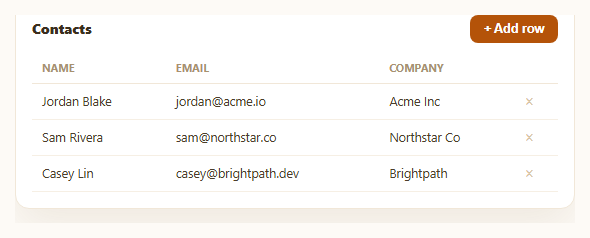
Sending a user to a separate form or modal just to add one row to a table breaks their flow and loses the context of the table they were already looking at. This snippet keeps the whole interaction in place: clicking "Add row" inserts a genuinely editable row directly into the table body, with real input fields, a Save/Cancel action pair scoped to that row, and required-field validation that blocks the commit until the data is valid.
A row that's temporarily a form
Clicking "+ Add row" sets an addingNew flag and re-renders, appending a special .iar-new-row row whose cells contain real <input> elements instead of text — the row briefly becomes a tiny form embedded in the table's own structure, rather than opening a modal that covers the table or navigating to a separate page. The moment Save or Cancel resolves it, the row either becomes a normal data row or disappears entirely.
Scoped Save and Cancel, not a page-level submit
The Save and Cancel buttons live only in that one new row's action cell and are wired up fresh every time the row renders — Cancel simply clears addingNew and re-renders without touching ROWS, while Save runs validation and, only if it passes, pushes the new row into the array. Neither button affects any other row, and there's never more than one new-row form open at a time, keeping the interaction simple to reason about.
Real validation before commit
saveNewRow() checks that the name field is non-empty and that the email field both has a value and matches a basic email pattern via validEmail(). Each failing field gets an .iar-invalid border treatment and an inline error message directly beneath it; if either check fails, the function returns early and the row stays in edit mode — the data never reaches the ROWS array until it satisfies both required-field rules, and errors clear automatically once a field becomes valid on the next Save attempt.
Auto-focus for immediate typing
When the new row renders, the name input receives focus automatically, so a user who just clicked "Add row" can start typing immediately without an extra click into the first field — a small detail that keeps the interaction feeling instant rather than requiring a second deliberate action.
Delete stays independent
Each existing data row also carries its own delete button, unrelated to the add-row flow, splicing that row out of ROWS and re-rendering — demonstrating that the add-row pattern composes cleanly alongside other per-row actions rather than requiring a separate editing mode for the whole table.
Customizing it
Add more required fields, swap the email regex for a stricter validator, or allow editing existing rows inline too (see editable table for that pattern). Pair with a row-drag-reorder table so newly added rows can be repositioned immediately.
Step by step
How to Use
- 1Paste HTML, CSS, and JSA three-row contacts table renders with an "+ Add row" button in the header.
- 2Click "+ Add row"A new editable row appears at the bottom with real input fields, and the name field auto-focuses.
- 3Click Save with empty fieldsName and email show inline validation errors and the row stays open for correction.
- 4Fill in valid data and SaveThe row commits into the table as a normal data row, and the form row disappears.
- 5Click "+ Add row" then CancelThe in-progress row is discarded with no changes to the table's data.
- 6Click × on any existing rowThat row is deleted immediately — independent of the add-row flow.
Real-world uses
Common Use Cases
Got questions?
Frequently Asked Questions
saveNewRow() checks name.trim() is non-empty before considering the row valid, and sets a valid flag to false with an inline error message if it isn't. The function returns before reaching the ROWS.push(...) call whenever valid is false, so nothing is ever added to the underlying data until every required check passes.
Add an input with its own id and error div inside renderNewRow(), read and trim its value in saveNewRow(), add a validity check for it alongside the name and email checks (setting valid = false and an error message if it fails), and include the field in the object pushed to ROWS.
Combine this pattern with the editable table snippet's approach: give each existing row an "Edit" action that swaps its cells for inputs pre-filled with current values (reusing the same Save/Cancel and validation structure as the add-row form), and write the saved values back into that row's object in ROWS instead of pushing a new one.
Add an input event listener to the relevant field that runs the same check used in saveNewRow() (e.g. validEmail(emailInput.value)) and toggles the .iar-invalid class and error text live, rather than waiting for the Save click — the validation functions are already factored out and reusable for either timing.
Keep ROWS and an addingNew boolean in component state; render the extra form row conditionally when addingNew is true, with controlled inputs bound to local field state (or a small draft object). On Save, run the same validation, and if valid append to ROWS via your state setter and clear addingNew; on Cancel, just clear addingNew without touching ROWS.
Build with AI
Build, Understand, Optimize, and Extend It With AI
Rather than tracing the row-as-form pattern by hand, paste this snippet's HTML, CSS, and JS into an AI coding assistant like Claude and ask it to explain exactly why saveNewRow() re-checks both required fields and returns early before ever calling ROWS.push, and why the Save/Cancel button listeners are re-attached on every render rather than attached once — what would break about repeated add-row cycles if they weren't. The same assistant can help you extend it — ask it to add more required fields with their own validation rules, add duplicate-detection (e.g. rejecting an email that already exists in ROWS), or convert existing rows to also be editable inline using the same form-row pattern this snippet already uses for adding. Treat the code less like a finished artifact and more like a starting point for a conversation.
Prompt to recreate it
Copy this into your AI assistant of choice to build the effect from scratch, or as a jumping-off point for your own variant:
Build a table with an inline "add row" feature in plain HTML, CSS, and JavaScript with no library — clicking a button inserts a real editable row directly into the table body, not a separate modal or form page.

Requirements:
- Keep the table's data in a plain array of row objects, and a boolean flag tracking whether a new-row form is currently open.
- An "+ Add row" button in the table header, when clicked, sets that flag true and re-renders the table so a special extra row appears at the bottom of the tbody containing real text input elements (one per column) instead of static text, with the first input automatically focused.
- That new row's last cell contains two buttons scoped only to it: Save and Cancel. Cancel simply clears the open-row flag and re-renders, discarding whatever was typed, without modifying the underlying data array at all.
- Save runs validation on the required fields (at minimum a non-empty name field and an email field that is both non-empty and matches a basic email address pattern) before doing anything else. If any required field fails validation, give that specific input an invalid visual style and show an inline error message directly under it, and do not add anything to the data array or close the row — leave it open so the user can fix the input and try Save again.
- Only when every required field passes validation should Save construct a new row object from the input values, push it into the underlying data array, clear the open-row flag, and re-render so the form row is replaced by a normal display row showing the newly added data.
- Give each existing (already-saved) row its own independent delete button that removes just that row from the data array and re-renders, entirely separate from the add-row flow.
- Ensure only one add-row form can be open at any time, and that re-rendering after every state change (open, cancel, save, delete) keeps the DOM and the underlying data array consistent.
Want to tighten it up first? Run this prompt through the AI Prompt Studio to score it across 8 quality dimensions, catch anti-patterns, and tune the wording for Claude, ChatGPT, or Gemini before you paste it in.
Source Code
<div class="iar-card">
  <div class="iar-head">
    <h3>Contacts</h3>
    <button type="button" class="iar-add-btn" id="iarAddBtn">+ Add row</button>
  </div>
  <table class="iar-table">
    <thead><tr><th>Name</th><th>Email</th><th>Company</th><th></th></tr></thead>
    <tbody id="iarBody"></tbody>
  </table>
</div>*{box-sizing:border-box;margin:0;padding:0}
body{font-family:system-ui,-apple-system,sans-serif;background:#fdfaf6;min-height:100vh;display:flex;align-items:center;justify-content:center;padding:24px}
.iar-card{background:#fff;border-radius:14px;padding:16px;width:100%;max-width:560px;box-shadow:0 18px 44px rgba(120,90,40,.1);border:1px solid #f1e7d8}
.iar-head{display:flex;justify-content:space-between;align-items:center;margin-bottom:10px}
.iar-head h3{font-size:14px;font-weight:800;color:#3a2e1f}
.iar-add-btn{background:#b45309;color:#fff;border:none;border-radius:8px;padding:7px 14px;font-size:12.5px;font-weight:700;cursor:pointer}
.iar-add-btn:hover{background:#92400e}
.iar-table{width:100%;border-collapse:collapse;font-size:12.5px}
.iar-table th{text-align:left;padding:8px 10px;color:#a8916f;font-weight:700;font-size:10.5px;text-transform:uppercase;letter-spacing:.03em;border-bottom:1.5px solid #f1e7d8}
.iar-table td{padding:9px 10px;border-bottom:1px solid #f6efe4;color:#4b3d2a}
.iar-new-row td{padding:7px 6px;background:#fff8ee}
.iar-input{width:100%;border:1.5px solid #e7d9bf;border-radius:7px;padding:6px 9px;font-size:12.5px;font-family:inherit;outline:none;background:#fff}
.iar-input:focus{border-color:#b45309;box-shadow:0 0 0 3px rgba(180,83,9,.12)}
.iar-input.iar-invalid{border-color:#dc2626;box-shadow:0 0 0 3px rgba(220,38,38,.1)}
.iar-err{font-size:10px;color:#dc2626;font-weight:600;margin-top:3px;min-height:12px}
.iar-row-actions{display:flex;gap:6px}
.iar-save-btn,.iar-cancel-btn{border:none;border-radius:6px;padding:6px 10px;font-size:11.5px;font-weight:700;cursor:pointer}
.iar-save-btn{background:#15803d;color:#fff}
.iar-save-btn:hover{background:#116932}
.iar-cancel-btn{background:#f1f5f9;color:#64748b}
.iar-cancel-btn:hover{background:#e2e8f0}
.iar-del-btn{border:none;background:none;color:#d6c4a0;cursor:pointer;font-size:15px}
.iar-del-btn:hover{color:#dc2626}var ROWS = [
{ name: 'Jordan Blake', email: 'jordan@acme.io', company: 'Acme Inc' },
{ name: 'Sam Rivera', email: 'sam@northstar.co', company: 'Northstar Co' },
{ name: 'Casey Lin', email: 'casey@brightpath.dev', company: 'Brightpath' },
];
var body = document.getElementById('iarBody');
var addingNew = false;
function renderDataRow(r, i) {
return '<tr data-index="' + i + '">' +
'<td>' + r.name + '</td><td>' + r.email + '</td><td>' + r.company + '</td>' +
'<td><button type="button" class="iar-del-btn" data-del="' + i + '" title="Delete">\u00d7</button></td>' +
'</tr>';
}
function renderNewRow() {
return '<tr class="iar-new-row">' +
'<td><input class="iar-input" id="iarName" placeholder="Full name"><div class="iar-err" id="iarNameErr"></div></td>' +
'<td><input class="iar-input" id="iarEmail" placeholder="name@company.com"><div class="iar-err" id="iarEmailErr"></div></td>' +
'<td><input class="iar-input" id="iarCompany" placeholder="Company"></td>' +
'<td><div class="iar-row-actions"><button type="button" class="iar-save-btn" id="iarSave">Save</button><button type="button" class="iar-cancel-btn" id="iarCancel">Cancel</button></div></td>' +
'</tr>';
}
function render() {
var rowsHtml = ROWS.map(renderDataRow).join('');
body.innerHTML = addingNew ? rowsHtml + renderNewRow() : rowsHtml;
if (addingNew) {
document.getElementById('iarSave').addEventListener('click', saveNewRow);
document.getElementById('iarCancel').addEventListener('click', function () { addingNew = false; render(); });
document.getElementById('iarName').focus();
}
body.querySelectorAll('[data-del]').forEach(function (btn) {
btn.addEventListener('click', function () {
ROWS.splice(Number(btn.dataset.del), 1);
render();
});
});
}
function validEmail(v) { return /^[^\s@]+@[^\s@]+\.[^\s@]+$/.test(v); }
function saveNewRow() {
var nameInput = document.getElementById('iarName');
var emailInput = document.getElementById('iarEmail');
var companyInput = document.getElementById('iarCompany');
var name = nameInput.value.trim();
var email = emailInput.value.trim();
var company = companyInput.value.trim();
var valid = true;
if (!name) {
nameInput.classList.add('iar-invalid');
document.getElementById('iarNameErr').textContent = 'Name is required';
valid = false;
} else {
nameInput.classList.remove('iar-invalid');
document.getElementById('iarNameErr').textContent = '';
}
if (!email || !validEmail(email)) {
emailInput.classList.add('iar-invalid');
document.getElementById('iarEmailErr').textContent = email ? 'Enter a valid email' : 'Email is required';
valid = false;
} else {
emailInput.classList.remove('iar-invalid');
document.getElementById('iarEmailErr').textContent = '';
}
if (!valid) return;
ROWS.push({ name: name, email: email, company: company || '\u2014' });
addingNew = false;
render();
}
document.getElementById('iarAddBtn').addEventListener('click', function () {
addingNew = true;
render();
});
render();