

Table Loading / Empty / Error States — Skeleton, Empty & Retry (HTML CSS JS)
Table Loading / Empty / Error States · Tables · Plain HTML, CSS & JS · Live preview
Copy & paste
Source Code
<div class="tls-wrap">
  <div class="tls-bar">
    <h3>Transactions</h3>
    <div class="tls-controls">
      <button type="button" class="tls-btn" data-state="loaded">Loaded</button>
      <button type="button" class="tls-btn" data-state="loading">Loading</button>
      <button type="button" class="tls-btn" data-state="empty">Empty</button>
      <button type="button" class="tls-btn" data-state="error">Error</button>
    </div>
  </div>
  <div class="tls-body" id="tlsBody"></div>
</div>*{box-sizing:border-box;margin:0;padding:0}
body{font-family:system-ui,-apple-system,sans-serif;background:#f8fafc;min-height:100vh;display:flex;align-items:flex-start;justify-content:center;padding:32px 20px}
.tls-wrap{background:#fff;border-radius:14px;width:100%;max-width:600px;box-shadow:0 18px 44px rgba(15,23,42,.08);overflow:hidden;border:1px solid #e2e8f0}
.tls-bar{display:flex;align-items:center;justify-content:space-between;padding:14px 16px;border-bottom:1px solid #f1f5f9;flex-wrap:wrap;gap:10px}
.tls-bar h3{font-size:15px;font-weight:800;color:#0f172a}
.tls-controls{display:flex;gap:6px}
.tls-btn{background:#f1f5f9;border:1px solid #e2e8f0;border-radius:7px;padding:6px 11px;font-size:11.5px;font-weight:700;color:#475569;cursor:pointer;font-family:inherit}
.tls-btn:hover{background:#e2e8f0}
.tls-btn.tls-on{background:#4338ca;border-color:#4338ca;color:#fff}
.tls-body{min-height:260px}
/* Loaded table */
.tls-table{width:100%;border-collapse:collapse;font-size:13px}
.tls-table th{text-align:left;padding:10px 14px;background:#f8fafc;border-bottom:1px solid #e2e8f0;font-size:10.5px;font-weight:800;text-transform:uppercase;letter-spacing:.03em;color:#64748b}
.tls-table td{padding:10px 14px;border-bottom:1px solid #f1f5f9;color:#334155}
.tls-table td:last-child{text-align:right;font-weight:700;font-variant-numeric:tabular-nums}
.tls-table tbody tr:hover{background:#f8fafc}
/* Skeleton loading */
.tls-skel-row{display:flex;gap:14px;padding:13px 16px;border-bottom:1px solid #f1f5f9}
.tls-skel{height:12px;border-radius:5px;background:linear-gradient(90deg,#eef1f5 25%,#e2e8f0 37%,#eef1f5 63%);background-size:400% 100%;animation:tls-shimmer 1.3s ease infinite}
@keyframes tls-shimmer{0%{background-position:100% 0}100%{background-position:0 0}}
/* Empty / error states */
.tls-state{display:flex;flex-direction:column;align-items:center;justify-content:center;text-align:center;padding:52px 24px;gap:10px;min-height:260px}
.tls-state svg{color:#cbd5e1}
.tls-state h4{font-size:14px;font-weight:800;color:#334155}
.tls-state p{font-size:12.5px;color:#94a3b8;max-width:280px}
.tls-state.tls-error svg{color:#fca5a5}
.tls-state.tls-error h4{color:#b91c1c}
.tls-action{margin-top:6px;background:#4338ca;color:#fff;border:none;border-radius:8px;padding:8px 16px;font-size:12.5px;font-weight:700;cursor:pointer;font-family:inherit}
.tls-action:hover{background:#3730a3}
.tls-action.tls-ghost{background:#f1f5f9;color:#475569}
.tls-action.tls-ghost:hover{background:#e2e8f0}var ROWS = [
['#TX-8841', 'Stripe payout', '2026-08-20', '$1,240.00'],
['#TX-8842', 'AWS invoice', '2026-08-19', '-$318.44'],
['#TX-8843', 'Client refund', '2026-08-18', '-$96.00'],
['#TX-8844', 'Subscription revenue', '2026-08-17', '$4,020.00'],
];
var container = document.getElementById('tlsBody');
var buttons = Array.prototype.slice.call(document.querySelectorAll('.tls-btn'));
function setActive(state) {
buttons.forEach(function (b) { b.classList.toggle('tls-on', b.dataset.state === state); });
}
function skeletonRow() {
var widths = [22, 40, 18, 15];
return '<div class="tls-skel-row">' + widths.map(function (w) {
return '<div class="tls-skel" style="width:' + w + '%"></div>';
}).join('') + '</div>';
}
function renderLoaded() {
container.innerHTML = '<table class="tls-table"><thead><tr><th>Ref</th><th>Description</th><th>Date</th><th>Amount</th></tr></thead><tbody>' +
ROWS.map(function (r) { return '<tr><td>' + r[0] + '</td><td>' + r[1] + '</td><td>' + r[2] + '</td><td>' + r[3] + '</td></tr>'; }).join('') +
'</tbody></table>';
}
function renderLoading() {
var rows = '';
for (var i = 0; i < 5; i++) rows += skeletonRow();
container.innerHTML = rows;
}
function renderEmpty() {
container.innerHTML = '<div class="tls-state">' +
'<svg width="42" height="42" viewBox="0 0 24 24" fill="none" stroke="currentColor" stroke-width="1.6"><rect x="3" y="4" width="18" height="16" rx="2"/><line x1="3" y1="10" x2="21" y2="10"/><line x1="8" y1="15" x2="14" y2="15"/></svg>' +
'<h4>No transactions found</h4>' +
'<p>Nothing matches the current filters. Try widening the date range or clearing them.</p>' +
'<button type="button" class="tls-action tls-ghost" id="tlsClear">Clear filters</button></div>';
document.getElementById('tlsClear').addEventListener('click', function () { go('loaded'); });
}
function renderError() {
container.innerHTML = '<div class="tls-state tls-error">' +
'<svg width="42" height="42" viewBox="0 0 24 24" fill="none" stroke="currentColor" stroke-width="1.6"><circle cx="12" cy="12" r="9"/><line x1="12" y1="8" x2="12" y2="13"/><line x1="12" y1="16.5" x2="12.01" y2="16.5"/></svg>' +
'<h4>Couldn\'t load transactions</h4>' +
'<p>The request failed. Check your connection and try again.</p>' +
'<button type="button" class="tls-action" id="tlsRetry">Retry</button></div>';
document.getElementById('tlsRetry').addEventListener('click', function () {
go('loading');
// Simulate a retry request resolving into the real loaded state.
setTimeout(function () { go('loaded'); }, 900);
});
}
function go(state) {
setActive(state);
if (state === 'loaded') renderLoaded();
else if (state === 'loading') renderLoading();
else if (state === 'empty') renderEmpty();
else if (state === 'error') renderError();
}
buttons.forEach(function (b) {
b.addEventListener('click', function () { go(b.dataset.state); });
});
go('loaded');Extend with AI
Take This Snippet Further With AI
The AI prompt for this one is for Patreon supporters ($3 a month), along with a site with no ads. Supporters enter the passcode once and it is remembered in this browser.
What's included
Features
About this UI Snippet
Table Loading, Empty & Error States — The Three Paths Every Table Needs
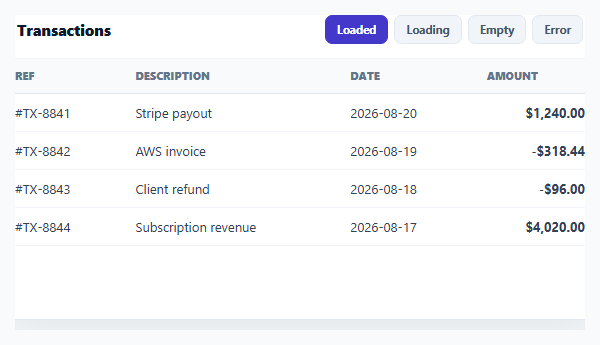
Most table demos only show the happy path — data loaded, rendered, done. Real tables spend meaningful time in three other states: waiting on a request, receiving zero rows back, or failing outright. This snippet builds a single table component that cycles through all four states — loaded, loading, empty, and error — with controls to trigger each, in plain HTML, CSS, and vanilla JavaScript.
A skeleton, not a spinner
The loading state renders five .tls-skel-row placeholder rows, each with differently-sized shimmering bars that echo the loaded table's actual column proportions (a wide description bar, a narrower date bar). A CSS background-position animation on a gradient produces the shimmer. Skeleton placeholders are chosen deliberately over a spinner because they preserve the table's layout while data is in flight — the page doesn't jump when real rows arrive, and the user gets a sense of the shape of what's coming.
A genuine empty state, not a blank table
The empty state isn't "the table with zero rows" (which just looks broken) — it's a dedicated view with an icon, a clear headline, explanatory copy, and a *recovery action*: "Clear filters." That action is real — clicking it calls go('loaded'), actually swapping the view back to data. A well-designed empty state always answers "why is this empty, and what can I do about it," not just "there's nothing here."
A real error state with retry
The error state similarly pairs an icon and message with a functional "Retry" button. Clicking it doesn't just re-show the same error — it transitions to the loading state and, after a simulated delay, resolves into the loaded state, mimicking a real retried network request. This models the actual UX contract of an error state: it must offer a path forward, and that path must be wired to something, not just cosmetic.
One container, one state machine
All four views render into the same #tlsBody container via a single go(state) function, so there's never a case where two states are visible simultaneously or a stale view lingers. The demo controls exist to let you preview every state on demand, but in a real app the same four render*() functions would be called by your actual fetch lifecycle: renderLoading() before the request, then renderLoaded()/renderEmpty()/renderError() depending on the response.
Reusable state-rendering functions
Because renderLoaded, renderLoading, renderEmpty, and renderError are independent functions with no shared mutable UI state beyond the container, you can lift any one of them into a real data-fetching flow directly — swap the demo buttons for actual fetch().then()/.catch() branches. Pair this pattern with a skeleton table if you only need the loading state in isolation, or an empty state component for a full-page (non-table) version of the same idea.
Step by step
How to Use
- 1Paste HTML, CSS, and JSThe table renders in its loaded state with four state buttons above it.
- 2Click LoadingShimmering skeleton placeholder rows replace the table, matching its column widths.
- 3Click EmptyA dedicated empty state appears with an icon, message, and a working Clear filters action.
- 4Click ErrorAn error state appears with a Retry button.
- 5Click RetryIt transitions to loading, then resolves back into the loaded table after a short delay.
- 6Wire it to a real fetchCall renderLoading() before a request and renderLoaded/Empty/Error() based on the real response.
Real-world uses
Common Use Cases
Got questions?
Frequently Asked Questions
A skeleton preserves the table's layout — column widths and row height — while data is in flight, so the page doesn't visibly jump when real rows replace it. A spinner gives no sense of what's coming and often causes a layout shift the moment data arrives. The skeleton bars here are deliberately sized to echo the loaded table's actual columns.
It's a dedicated view — an icon, a clear headline ("No transactions found"), explanatory copy, and a real recovery action (Clear filters) that's wired to actually reset the view back to loaded data. A blank table with a header row and no rows looks like a bug; a proper empty state tells the user why and gives them something to do about it.
Yes — it calls go('loading') to show the skeleton, then after a simulated delay calls go('loaded') to resolve into real data, mimicking what a retried fetch() call would do: show a loading indicator while the new request is in flight, then render whatever it resolves to. In a real app you'd replace the setTimeout with the actual retried request's .then()/.catch().
Call renderLoading() immediately before your fetch() call. In the .then() handler, call renderLoaded() if the response has rows or renderEmpty() if it returns zero rows; in the .catch() handler (or on a non-OK response), call renderError(). The four render functions are already independent and side-effect-free beyond touching the shared container, so they drop into a real fetch lifecycle unchanged.
Model the four states as one status value in state (e.g. 'loading' | 'loaded' | 'empty' | 'error') set by your data-fetching effect, and render a different component/branch for each — the skeleton row markup, empty-state markup, and error-state markup all port directly as JSX/template fragments keyed off that status.