

Quill Rich Text Editor with Custom Toolbar and Character Limit

CodeMirror JSON Editor with Validation Gutter

CodeMirror Code Editor with Line Numbers, Folding and Themes

Marked + DOMPurify Live Markdown Preview

FilePond Image Upload with Preview and Reorder

Cropper.js Aspect-Ratio Presets for Social Posts
Vertical Dual-Handle Range Slider — HTML CSS JS Snippet
Vertical Dual-Handle Range Slider · Forms · Plain HTML, CSS & JS · Live preview
Copy & paste
Source Code
<div class="vdr-wrap">
  <div class="vdr-readout">
    <span id="vdrMax">78°</span>
    <span class="vdr-dash">—</span>
    <span id="vdrMin">62°</span>
  </div>
  <div class="vdr-track" id="vdrTrack">
    <div class="vdr-fill" id="vdrFill"></div>
    <div class="vdr-handle" id="vdrHandleMax" tabindex="0" role="slider" aria-label="Maximum temperature" aria-valuemin="50" aria-valuemax="90" aria-valuenow="78"></div>
    <div class="vdr-handle" id="vdrHandleMin" tabindex="0" role="slider" aria-label="Minimum temperature" aria-valuemin="50" aria-valuemax="90" aria-valuenow="62"></div>
  </div>
  <div class="vdr-scale"><span>90°</span><span>70°</span><span>50°</span></div>
</div>*{box-sizing:border-box;margin:0;padding:0}
body{font-family:system-ui,-apple-system,sans-serif;background:#f6f7f9;min-height:100vh;display:flex;align-items:center;justify-content:center;padding:24px}
.vdr-wrap{display:flex;flex-direction:column;align-items:center;gap:14px}
.vdr-readout{font:800 15px system-ui,sans-serif;color:#1f2937;display:flex;align-items:center;gap:8px}
.vdr-dash{color:#c7cad4;font-weight:600}
.vdr-track{position:relative;width:8px;height:280px;border-radius:6px;background:#e5e7eb}
.vdr-fill{position:absolute;left:0;right:0;border-radius:6px;background:linear-gradient(180deg,#f59e0b,#6366f1)}
.vdr-handle{position:absolute;left:50%;width:24px;height:24px;border-radius:50%;background:#fff;border:3px solid #6366f1;box-shadow:0 2px 8px rgba(15,23,42,.22);transform:translate(-50%,50%);cursor:grab;touch-action:none}
.vdr-handle:active{cursor:grabbing}
.vdr-handle:focus-visible{outline:2px solid #6366f1;outline-offset:3px}
.vdr-scale{position:absolute;display:flex;flex-direction:column;justify-content:space-between;height:280px;margin-left:26px;font:600 10.5px system-ui,sans-serif;color:#9ca3af}
.vdr-wrap{position:relative}var track = document.getElementById('vdrTrack');
var fill = document.getElementById('vdrFill');
var handleMax = document.getElementById('vdrHandleMax');
var handleMin = document.getElementById('vdrHandleMin');
var readoutMax = document.getElementById('vdrMax');
var readoutMin = document.getElementById('vdrMin');
var MIN = 50, MAX = 90;
var valMax = 78, valMin = 62;
function pctFromVal(v) { return (v - MIN) / (MAX - MIN); }
function render() {
var pMax = pctFromVal(valMax);
var pMin = pctFromVal(valMin);
// Track's bottom = MIN, top = MAX. "bottom" CSS offset from track's own bottom edge.
handleMax.style.bottom = (pMax * 100) + '%';
handleMin.style.bottom = (pMin * 100) + '%';
fill.style.bottom = (pMin * 100) + '%';
fill.style.top = ((1 - pMax) * 100) + '%';
readoutMax.textContent = valMax + '°';
readoutMin.textContent = valMin + '°';
handleMax.setAttribute('aria-valuenow', valMax);
handleMin.setAttribute('aria-valuenow', valMin);
}
function valFromClientY(clientY) {
var rect = track.getBoundingClientRect();
var y = Math.max(0, Math.min(rect.height, clientY - rect.top));
var pct = 1 - y / rect.height;
return Math.round(MIN + pct * (MAX - MIN));
}
var activeHandle = null;
function startDrag(handle) {
return function (e) {
activeHandle = handle;
e.preventDefault();
};
}
function onMove(e) {
if (!activeHandle) return;
var clientY = e.touches ? e.touches[0].clientY : e.clientY;
var v = valFromClientY(clientY);
if (activeHandle === handleMax) { valMax = Math.max(valMin + 1, Math.min(MAX, v)); }
else { valMin = Math.min(valMax - 1, Math.max(MIN, v)); }
render();
}
function endDrag() { activeHandle = null; }
handleMax.addEventListener('pointerdown', startDrag(handleMax));
handleMin.addEventListener('pointerdown', startDrag(handleMin));
window.addEventListener('pointermove', onMove);
window.addEventListener('pointerup', endDrag);
handleMax.addEventListener('touchstart', startDrag(handleMax), { passive: false });
handleMin.addEventListener('touchstart', startDrag(handleMin), { passive: false });
window.addEventListener('touchmove', onMove, { passive: true });
window.addEventListener('touchend', endDrag);
function keyHandler(isMax) {
return function (e) {
var step = e.shiftKey ? 5 : 1;
if (e.key === 'ArrowUp') { if (isMax) valMax = Math.min(MAX, valMax + step); else valMin = Math.min(valMax - 1, valMin + step); render(); e.preventDefault(); }
else if (e.key === 'ArrowDown') { if (isMax) valMax = Math.max(valMin + 1, valMax - step); else valMin = Math.max(MIN, valMin - step); render(); e.preventDefault(); }
};
}
handleMax.addEventListener('keydown', keyHandler(true));
handleMin.addEventListener('keydown', keyHandler(false));
render();Extend with AI
Take This Snippet Further With AI
The AI prompt for this one is for Patreon supporters ($3 a month, 7 days free), along with a site with no ads. Supporters enter the passcode once and it is remembered in this browser.
What's included
Features
About this UI Snippet
Vertical Dual-Handle Range Slider — Two Handles, Bottom-to-Top, Never Crossing
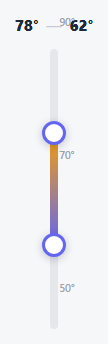
Most range sliders run horizontally. This one runs vertically — the natural orientation for a thermostat, an equalizer band, or a volume-style range — with *two* independent handles instead of one, each holding its own value, and a fill bar that only ever spans the segment between them.
Position measured from the bottom, not the top
Because a vertical track visually reads bottom = low, top = high (the opposite of how a horizontal track reads left = low), every calculation here works in terms of bottom offsets rather than top. Converting a pointer's clientY into a value inverts the fraction: pct = 1 - y / rect.height, so a cursor near the top of the track produces a *high* percentage, matching the visual expectation.
Handles that physically cannot swap positions
Dragging the "max" handle clamps it with Math.max(valMin + 1, ...) — it can never be dragged below the min handle's value plus one whole degree — and dragging the "min" handle clamps the opposite way against the max handle. That mutual clamp is what makes the two handles behave like a genuine range rather than two independent sliders that happen to share a track: they can slide arbitrarily close together, but never cross or overlap in value.
One fill bar spanning exactly the selected range
The fill element's top and bottom offsets are both recalculated from the two handle percentages on every render — so the colored segment always represents precisely "everything between min and max," growing or shrinking as either handle moves, never needing to be manually kept in sync.
Step by step
How to Use
- 1Paste HTML, CSS, and JSA vertical track appears with two handles set to 62° and 78°, and a gradient fill between them.
- 2Drag either handleIt moves along the track and clamps against the other handle — they can't cross past each other.
- 3Watch the readoutThe numbers above the track update live as you drag either handle.
- 4Use the keyboardFocus a handle and press Up/Down to adjust by 1°, or hold Shift for 5° steps.
- 5Adjust the rangeChange the MIN/MAX constants in the JS to fit a different scale entirely.
Real-world uses
Common Use Cases
Got questions?
Frequently Asked Questions
Change the MIN and MAX constants (and update the aria-valuemin/max attributes and the visible scale labels to match) — all position math derives from these two numbers.
Each handle's drag/keyboard update clamps against the other handle's current value plus or minus one unit — this is deliberate, since a "range" where min exceeds max has no meaningful interpretation for most real use cases like temperature or price ranges.
Swap bottom/top for left/right throughout the CSS and JS, and change the position calculation from clientY/rect.height to clientX/rect.width without inverting the percentage (left = low is already the natural horizontal reading).
Yes — valMax and valMin are plain JavaScript variables updated on every interaction; hook a callback or custom event dispatch inside render() to react to changes in a real application.
Both handles carry role="slider" with proper aria-valuemin/max/now and a descriptive aria-label, and are independently focusable and operable via Up/Down (and Shift+Up/Down for larger steps) without a mouse.