
Word Unscramble Puzzle Game — Free HTML CSS JS Snippet
Word Unscramble Puzzle Game · Games · Plain HTML, CSS & JS · Live preview
For supporters
Source Code
Want the source code?
Play the game for free. Become a WebDevPuneet supporter to unlock the complete HTML, CSS and JavaScript source code, the exports (HTML, React, Vue, Angular, Tailwind) and Fork.
Extend with AI
Take This Snippet Further With AI
The AI prompt for this one is for Patreon supporters ($3 a month), along with a site with no ads. Supporters enter the passcode once and it is remembered in this browser.
What's included
Features
About this UI Snippet
Word Unscramble Puzzle Game — Letter Tiles, Scoring, Hints & Vanilla JS Word Logic
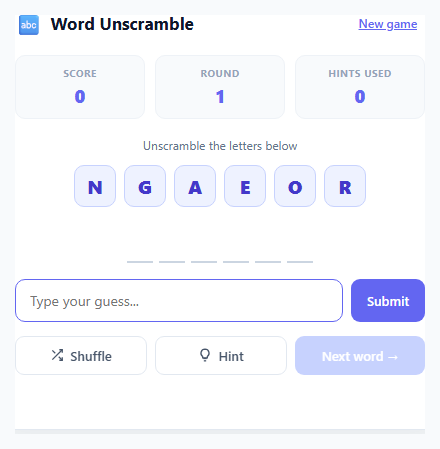
Word unscramble puzzles are one of the oldest and most durable casual game formats because the core loop is instantly understandable — look at a jumble of letters, rearrange them mentally, type the word you see. This snippet implements a complete, replayable version of that loop entirely in vanilla JavaScript: a hardcoded word list, a real Fisher-Yates shuffle algorithm, a scoring system that rewards unaided solves, and a hint mechanic that trades points for help. There is no backend and no dependency — everything runs client-side against a plain JavaScript array.
How the scrambling actually works
The word pool is a flat array of 15 lowercase words of varying length (six to seven letters each, chosen so the puzzle is neither trivially short nor frustratingly long). scrambleWord() splits the target word into a character array and runs the classic Fisher-Yates shuffle: iterate from the last index down to the first, swapping each element with a randomly chosen earlier (or equal) element. This produces a mathematically uniform random permutation, unlike naive sort(() => Math.random() - 0.5) shuffles which are provably biased. Because a truly random shuffle can occasionally return the original word unchanged, the function retries up to ten times if the scrambled result matches the source word exactly.
Rounds, the word pool, and avoiding repeats
Rather than picking a random word from the full list on every round (which can repeat the same word twice in a row), the game shuffles the entire word list once per pass and walks through it sequentially with a poolIndex pointer. When the pointer reaches the end of the shuffled pool, refillPool() reshuffles the same 15 words into a fresh random order and resets the index to zero, so the game stays endlessly replayable while guaranteeing every word is seen once before any repeats.
The hint system and its effect on scoring
Clicking Hint does not spoil the puzzle outright — it reveals exactly one additional letter in its correct position, tracked in a hintedPositions Set keyed by character index. A separate row of boxes beneath the scrambled tiles mirrors the target word's length; unrevealed boxes stay blank while hinted ones display the letter with an accent-coloured underline. Crucially, the scrambled letter tiles themselves are never reordered by a hint — hints only affect the answer-key row, so the player still has to do the unscrambling work for the remaining letters. Because hintedPositions.size is read directly when a correct guess is submitted, scoring naturally and transparently reflects how much help was used.
Scoring formula and the shuffle button
A correct guess awards Math.max(100 - hintsUsed * 25, 25) points — a flawless, no-hint solve is worth 100 points, each hint costs 25, and the score floors at 25 so no correct answer is ever worth zero. The separate Shuffle button is purely cosmetic: it re-runs scrambleWord() on the same target word and re-renders the letter tiles in a new random order, giving players who feel visually "stuck" on one arrangement a fresh look at the same letters without changing the underlying answer or resetting any hint progress.
Feedback, state resets, and accessibility
Submitting the form (via the Submit button or pressing Enter) compares the trimmed, lowercased input against currentWord. A correct match adds a green .correct class to the input, disables further guessing, and reveals the full hint row as confirmation; an incorrect guess triggers a CSS shake keyframe animation on the input by removing and re-adding the class (forcing a reflow with void guessInput.offsetWidth so the animation restarts on consecutive wrong guesses) alongside a red error message. The aria-live="polite" attribute on the feedback paragraph means screen readers announce the result without needing focus to move. New game fully resets score, round count, and the word pool for a clean restart at any time.
Step by step
How to Use
- 1Unscramble and submit a guessRead the scrambled letter tiles at the top of the card, type the word you think they spell into the input, and press Enter or click Submit. handleSubmit() compares your trimmed, lowercased guess against currentWord and shows a green success state or a red shake animation.
- 2Use Shuffle for a fresh lookClick "Shuffle" to re-run scrambleWord() on the same target word, producing a new random letter order with a pop-in tile animation. This is purely visual — it never changes the answer or affects your score, it just gives you a different arrangement to look at if you feel stuck.
- 3Reveal letters with HintClick "Hint" to reveal one additional random letter in its correct position within the answer-key boxes beneath the tiles, tracked in the hintedPositions Set. Each hint reduces the points you can earn for that round from a maximum of 100 down to a floor of 25, so use them sparingly for a higher score.
- 4Advance rounds and track your scoreAfter a correct guess, click "Next word →" to call pickWord() again, which pulls the next word from the shuffled pool, resets hints, and generates a new scramble. The Score, Round, and Hints used counters in the stat row update live via updateStats().
- 5Start a clean run with New gameClick "New game" in the header to reset score to 0, round to 1, and reshuffle the entire 15-word pool via refillPool() before picking the first word — useful for demoing the game from a fresh state or starting a new competitive round.
- 6Customise the word list and difficultyEdit the WORDS array in the JS panel to add your own theme (countries, animals, tech terms). Adjust the scoring formula in handleSubmit() — Math.max(100 - hintsUsed * 25, 25) — to change how steeply hints reduce points, or add difficulty tiers by filtering WORDS by length.
Real-world uses
Common Use Cases
Got questions?
Frequently Asked Questions
Fisher-Yates produces a genuinely uniform random permutation, so for short words there is a real (if reduced) chance that only two or three letters swap position, making the scramble look deceptively close to the answer. The scrambleWord() function retries up to ten times only when the shuffle produces an exact match to the original word — near-misses are intentionally left alone, since eliminating them would bias the randomness and make the puzzle less fair.
Yes — in giveHint(), the unrevealed positions are currently chosen with Math.floor(Math.random() * unrevealed.length). Replace that line with unrevealed[0] to always reveal the leftmost unrevealed letter first, which some players find more intuitive since it lets them build the word left-to-right rather than getting scattered hints.
Add a difficulty selector that filters the WORDS array by string length before calling refillPool() — for example const easyWords = WORDS.filter(w => w.length <= 5) for an easy mode and a longer-word filter for hard mode. You could also maintain three separate arrays (easy/medium/hard) and swap which one populates the pool when the difficulty control changes.
No, this snippet keeps score, round, and the word pool entirely in memory via plain JavaScript variables, so a page reload resets everything. To persist a best score across sessions, add a localStorage.getItem/setItem call similar to the pattern used in the Quick Math Arithmetic Game snippet, storing the highest score achieved in a single New game run.
Yes — add a countdown timer using setInterval alongside the existing round logic, similar to the timer pattern in the Quick Math Arithmetic Game snippet, and call a game-over routine when it reaches zero instead of waiting indefinitely for the next correct guess. You would disable the guess form and hint/shuffle buttons on timeout and show a final score summary.