Desktop · 1280px · shown at 0% · edit the text, images and colours in the panel
Popup & Promo Modal — Free Website Section Template
Popups · v1.0.0 · Updated 2026-10-25 · Responsive · GSAP animation · HTML, React & Vue
What's included
Features
About this section
Popup & Promo Modal — Free Exit-Intent and Timed Popup Template
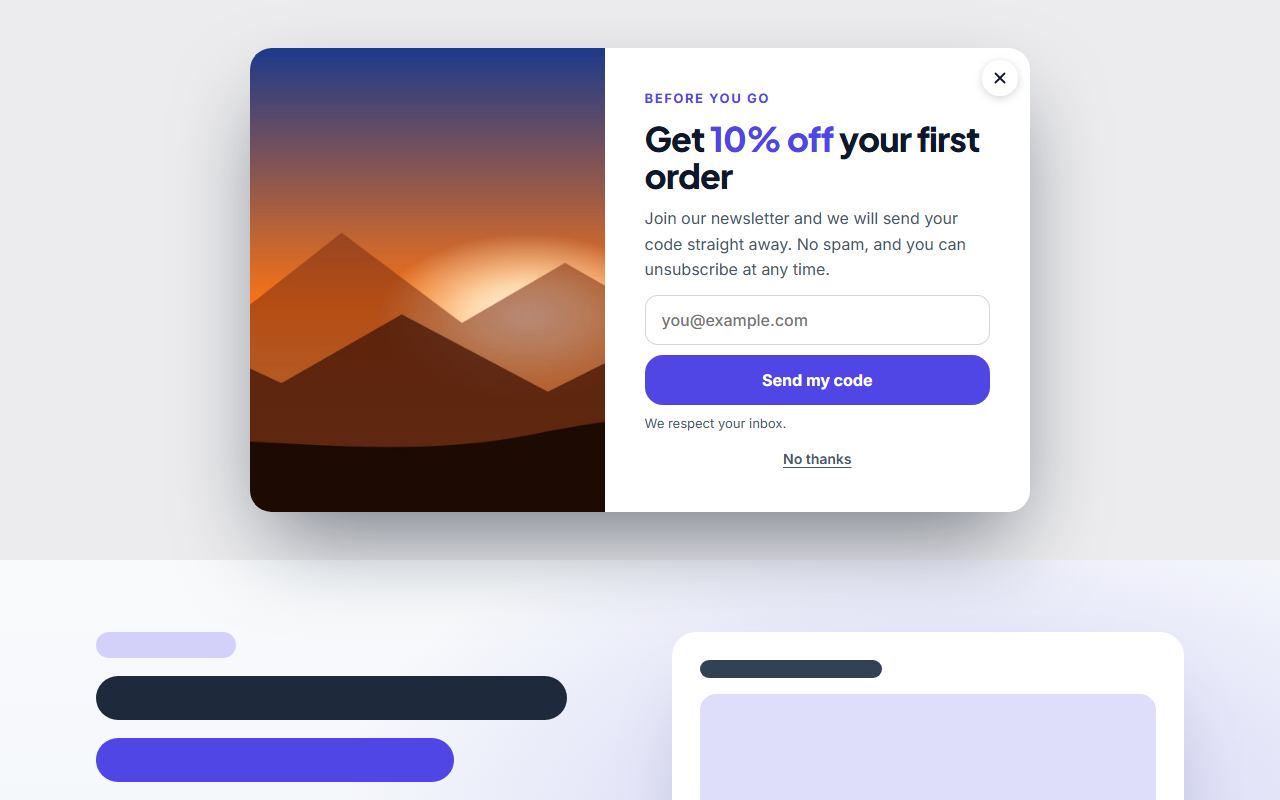
Popup & Promo Modal is a free popup for websites that need to make an offer at the right moment. It opens by itself after a delay you choose, when a visitor moves to leave the page (exit intent) or after they scroll part of the way down, and it takes no space in your layout.
Centre modal or quiet promo card
Show it in the middle of the screen with a dimmed page for a sign-up or an offer you really want seen, or as a small card in the bottom right, bottom left, bottom centre, top right or top left with no overlay. Visitors keep browsing around the card and close it with the × button. On phones the card stretches neatly across the screen.
Everything a promotion needs
Add a label, a heading and a short text, then an image, an image carousel with arrows and dots, or a click-to-play video that loads nothing from YouTube or Vimeo until it is played. Add an email form that posts to Mailchimp, Kit or any service, up to two call-to-action buttons, a "no thanks" link, or your own HTML for anything else.
Polite by design
A visitor who closes it is left alone for the number of days you set, or you can show it on every visit. The popup closes with Esc, keeps keyboard focus inside when it dims the page, announces itself to screen readers and respects reduced motion.
Edit, save and export
Click any text or image in the preview to change it, then match the colours, fonts and corner radius to your brand. Export HTML, a ZIP with your images, React or Vue, or add it to a page in the Website Builder. For the form it works with, see the Newsletter Signup CTA.
Why use it
Why Use the Popup & Promo Modal
How it’s different
How It’s Different From Other Free Section Templates
Step by step
How to Use
- 1Edit the contentFill in the when & where it appears, layout, heading & text, image, image carousel, video, custom html, email form, buttons (ctas) and closing in the panel. Switch the image, image carousel, video, custom html, email form and buttons (ctas) on or off. Wrap words in *asterisks* to colour them.
- 2Add your imagesUpload your own images (resized in your browser and kept on your device) or paste a hosted image URL.
- 3Match your brandPick a colour preset or exact colours, choose heading and body fonts from Google Fonts or your own uploaded font, set the corner radius and width, or apply your brand kit.
- 4Animate and previewChoose a GSAP entrance effect and speed, press Play animation, and check the section on desktop, tablet and mobile.
- 5Save and exportSave it to My designs, then export a single HTML file, a ZIP with your images, a React or Vue component, or fork it into My Code.
Real-world uses
Common Use Cases
In real websites
Website Templates That Use the Popup & Promo Modal Section
The Popup & Promo Modal section is part of 10 complete website templates in the free Website Builder, so you can see it in a full page before you use it on its own: SaaS Landing Page, Restaurant Website, Gym & Fitness Website, Online Course Website, Event & Conference Website, Nonprofit & Charity Website, Boutique Hotel Website, Hair & Beauty Salon Website, Podcast Website, Product Landing Page Store. Open any of them in the builder to edit the whole page, or keep customising this section by itself.
Got questions?
Frequently Asked Questions
A popup that opens when a visitor moves the mouse towards the top of the window, as if to leave. It is a last chance to make an offer. Phones have no mouse, so it opens after a delay there.
Yes. Choose "After some time" and set the delay in seconds. You can also open it after the visitor scrolls a share of the page, for example halfway down an article.
Keep it relevant and easy to close. This one has a clear × button, stays away for the days you set once shown, and takes no space in the layout. Corner cards do not cover the page at all.
Yes. Add a click-to-play video that loads nothing until it is played, an image carousel, or your own HTML for embeds and extra content.
Yes. Paste the form action URL and the field name from your email service. The visitor sees a success message, or an error message if the sending fails.
It saves an editable copy of your Popup & Promo Modal in My Code, the UI Snippets code editor: the section markup goes in the HTML panel, its CSS (theme variables, base styles and layout) in the CSS panel, and the GSAP library is added as a CDN link, so you can keep refining the code and save your own versions.
Yes. It is free for personal and commercial websites, with no sign-up, no watermark and no attribution required. Everything runs in your browser and your edits are saved locally.