
Desktop · 1280px · shown at 0% · edit the text, images and colours in the panel
Single Plan Pricing — Free Website Section Template
Pricing · v1.0.0 · Updated 2026-10-20 · Responsive · GSAP animation · HTML, React & Vue
Extend with AI
Take This Section Further With AI
The AI prompt for this one is for Patreon supporters ($3 a month), along with a site with no ads. Supporters enter the passcode once and it is remembered in this browser.
What's included
Features
About this section
Single Plan Pricing — Free One-Price Section Template
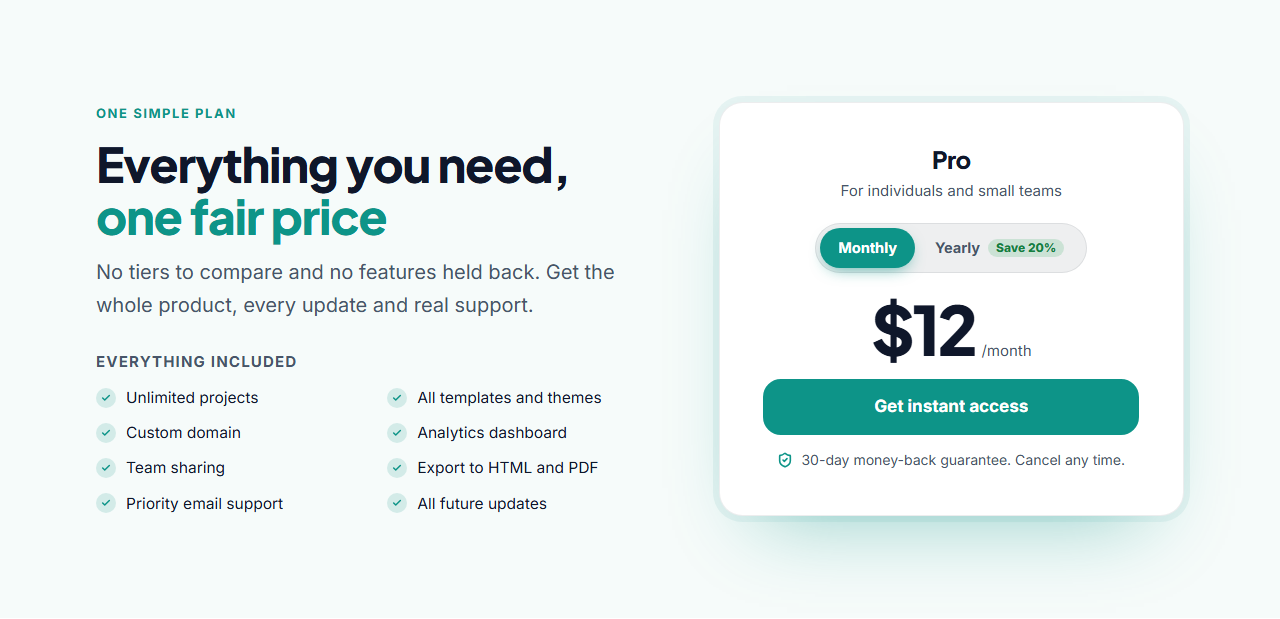
Single Plan Pricing is for products that don't need tiers. Instead of three cards that make visitors compare, it puts everything that's included in a two-column checklist on the left and one confident price card on the right, with the plan name, a monthly/yearly switch, the price, a large button and a money-back guarantee.
Built to convert
One price removes the "which plan?" hesitation. The checklist shows the full value at a glance, the guarantee line lowers the risk and the large button makes the next step obvious. Leave the guarantee empty to hide it, or switch off the billing toggle for a single price.
Edit in seconds
Type the included items one per line and they flow into two columns (one on phones). Set the plan name, the line under it, both prices, the button text and its link to your checkout page. The monthly/yearly switch slides with GSAP Flip and the price rolls over when it changes.
Theme and motion
It ships in a calm teal theme; switch presets, set exact colours or apply your brand kit. The heading reveals with SplitText, the checklist fades up and the price card rises in on scroll.
Export it
Download HTML or a ZIP, copy a React or Vue component with the switch included, or fork it into My Code. Need tiers after all? Try Three-Tier Pricing.
Why use it
Why Use the Single Plan Pricing
How it’s different
How It’s Different From Other Free Section Templates
Step by step
How to Use
- 1Edit the contentFill in the heading, what’s included, price card and monthly / yearly switch in the panel. Switch the monthly / yearly switch on or off. Wrap words in *asterisks* to colour them.
- 2Add your imagesUpload your own images (resized in your browser and kept on your device) or paste a hosted image URL.
- 3Match your brandPick a colour preset or exact colours, choose heading and body fonts from Google Fonts or your own uploaded font, set the corner radius and width, or apply your brand kit.
- 4Animate and previewChoose a GSAP entrance effect and speed, press Play animation, and check the section on desktop, tablet and mobile.
- 5Save and exportSave it to My designs, then export a single HTML file, a ZIP with your images, a React or Vue component, or fork it into My Code.
Real-world uses
Common Use Cases
In real websites
Website Templates That Use the Single Plan Pricing Section
The Single Plan Pricing section is part of 2 complete website templates in the free Website Builder, so you can see it in a full page before you use it on its own: Online Course Website, Product Landing Page Store. Open any of them in the builder to edit the whole page, or keep customising this section by itself.
Got questions?
Frequently Asked Questions
Yes. Switch off the Monthly / yearly switch group, set the monthly price to your one-off price and change the price suffix to something like "one-time payment".
As many as you like; type one per line. Eight items fill two balanced columns, and the list drops to one column on phones.
Usually to your checkout page, such as Stripe Checkout, Lemon Squeezy, Gumroad or Paddle, or to your sign-up page for a free trial.
Yes. HTML, ZIP, React and Vue exports all include the small switch script, and GSAP with the Flip plugin loads from a CDN for the animation.
It saves an editable copy of your Single Plan Pricing in My Code, the UI Snippets code editor: the section markup goes in the HTML panel, its CSS (theme variables, base styles and layout) in the CSS panel, and the GSAP library is added as a CDN link, so you can keep refining the code and save your own versions.
Yes. Every section is free for personal and commercial work, with no account, no watermark and no attribution: export it on its own as HTML, React, Vue or Next.js from its page, or use it in a website you build and export in the Website Builder.