Click any text to edit it · drag a photo to reposition it, scroll to zoom, click to replace
Checklist Post — Free How-To & Education Social Post Template
How-To & Education · v1.0.0 · Updated 2026-11-02 · Instagram, Facebook & X · HTML + CSS
What's included
Features
About this template
Checklist Post — Free Notebook-Paper Checklist Template for Instagram
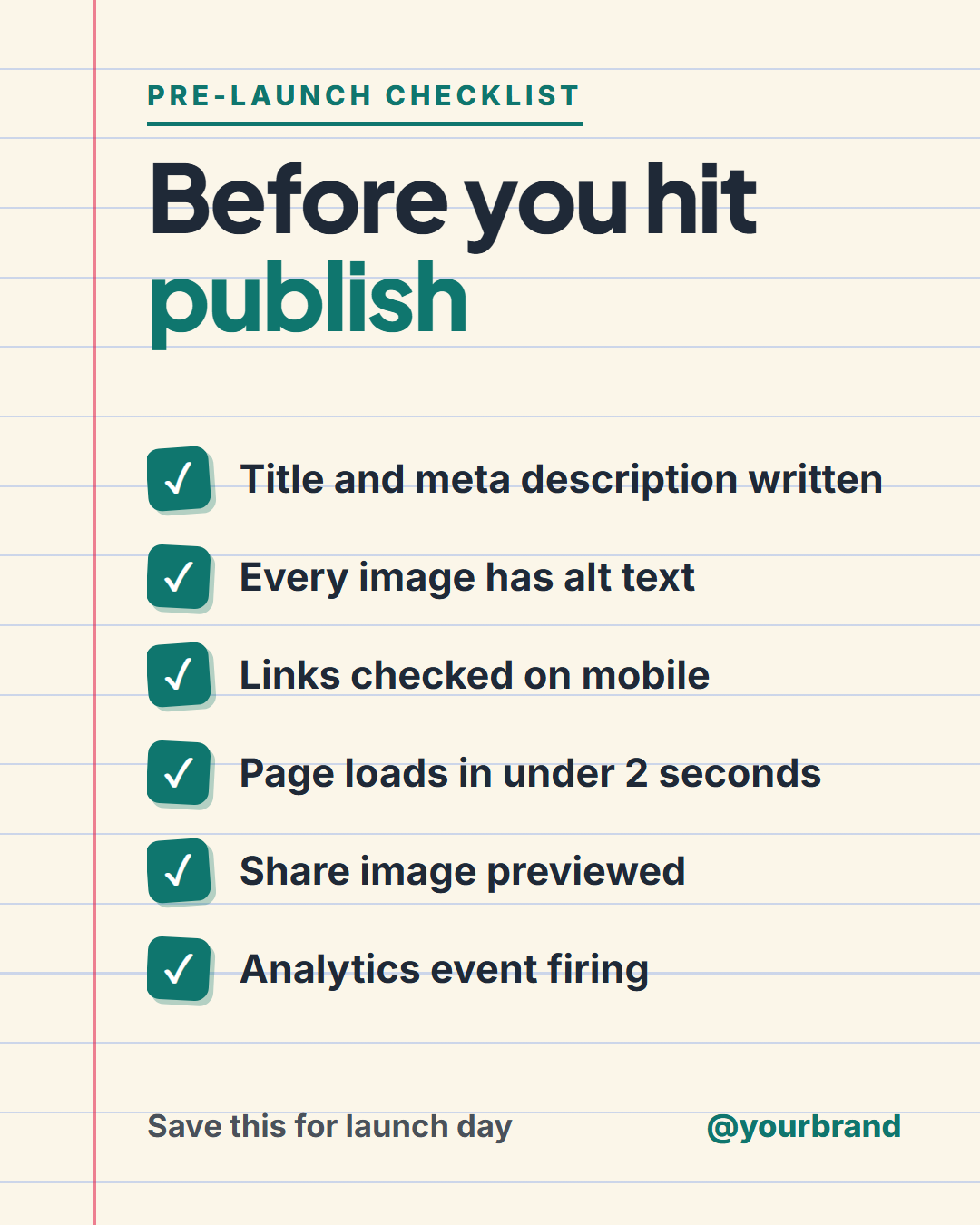
Checklist Post is a free social media template that dresses a to-do list as a page torn from a notebook: cream paper, faint blue ruled lines, a red margin line down the left and up to six tick-marked items. It is made for the posts people screenshot and save, such as a pre-launch routine, a packing list or a monthly audit.
Why a checklist gets saved
A paragraph of advice is read once. A checklist is something you come back to while you do the work, which is why these posts collect saves on Instagram and bookmarks on LinkedIn. The template ends with a note line you can reword, such as "Save this for launch day", so the ask is part of the design. Items are short on purpose: one bold line each, with a tick box tilted a few degrees so the page feels handled rather than printed.
Six rows, no gaps
Fill in anywhere from one to six items. A row you leave empty disappears and the rest re-centre, so a four-item list never leaves a blank band at the bottom. Long items shrink to fit instead of running into the margin. Wrap a word in *asterisks* in the headline to colour it in the tick colour, as in "Before you hit *publish*".
Every size from one design
On the 4:5 portrait feed size the items stack in one column. On the 16:9 and LinkedIn sizes they switch to two columns so six items still fit, and the Story size keeps text clear of Instagram's top and bottom bars. Paper, ink and tick colours are editable, and you can export PNG, JPEG, PDF, an animated video where the items appear one after another, or the HTML.
Need more room? Continue a long list in a carousel with Carousel Step slides, or show an ordered process with How-To Steps.
Extend with AI
Take This Post Further With AI
Ask an AI assistant to adapt the Checklist Post HTML and CSS: write six items for your own routine, turn the card into a component that renders any array of tasks, or produce a matching carousel with one detail slide per item.
Prompt to recreate it
Copy this into your AI assistant of choice to build the effect from scratch, or as a jumping-off point for your own variant:
Create a 1080×1350 checklist social post in plain HTML and CSS.

- Cream notebook paper (#fbf6e9) with faint blue horizontal ruled lines every 7% of the width and a thin red vertical margin line near the left edge.
- A small uppercase teal label with an underline, then a bold headline "Before you hit publish" with the last word in teal.
- Six checklist rows: a rounded teal square with a white tick, tilted a few degrees alternately left and right, followed by one bold line of text.
- A footer with a "Save this for launch day" note on the left and the handle on the right.
- Size everything with a CSS variable --u equal to 1% of the shorter side.
Want to tighten it up first? Run this prompt through the AI Prompt Studio to score it across 8 quality dimensions, catch anti-patterns, and tune the wording for Claude, ChatGPT, or Gemini before you paste it in.
Why use it
Why Use the Checklist Post Template
How it’s different
How It’s Different From Canva-Style Templates
Step by step
How to Use
- 1Pick the sizeChoose Portrait 4:5 (the Instagram feed default), Square, Story / Reel, Landscape 16:9 for X, a 1200×627 LinkedIn image or a 1000×1500 Pinterest pin. Checklist Post opens at 1080×1350.
- 2Edit the textClick any text in the preview, or use the fields on the left (label, headline, item 1, item 2 and more). Wrap words in *asterisks* to colour them.
- 3Match your brandApply your saved brand kit or one of 12 palettes, set exact colours, and choose heading and body fonts from any Google Font or your own uploaded font.
- 4Preview it in the feedSwitch the preview to Instagram, Story, X or LinkedIn to see the post with your name, handle and caption, and fix anything the quality checks flag.
- 5Download, save or bulk createDownload PNG, JPG or PDF, every size as a ZIP, or copy the HTML. Save it to My designs to reuse later, or turn a CSV into dozens of posts with Bulk create.
Real-world uses
Common Use Cases
Got questions?
Frequently Asked Questions
Open the Checklist Post template, type your headline and up to six items, reword the note at the bottom, then download the 4:5 PNG (1080×1350). Upload it as a single image, or as the first slide of a carousel that adds more detail.
Between four and six. Fewer than four feels thin, and more than six makes the text too small to read on a phone. If you have more, split the list into two posts or continue it in a carousel.
Yes. Paper, text and tick colours are all editable, and your choices are saved in your browser for this template. A dark paper with a bright tick colour suits technical topics.
Yes. The 1200×627 LinkedIn image size switches the list into two columns so all six items stay readable in the feed. For a document-style post, export a carousel PDF with extra slides.
Portrait post 1080×1350 (4:5): Instagram feed (recommended), Facebook and LinkedIn feeds, X portrait. Square post 1080×1080 (1:1): Instagram, Facebook, LinkedIn and X feeds. Story / Reel 1080×1920 (9:16): Instagram and Facebook Stories, Reel covers. Landscape post 1600×900 (16:9): X feed image, Facebook landscape. LinkedIn image 1200×627 (1.91:1): LinkedIn shared image and link posts, Facebook link images. Pinterest pin 1000×1500 (2:3): Pinterest standard pin (the recommended 2:3 ratio). Switch sizes in the editor and the layout adapts, or click "All sizes (ZIP)" to download every size at once.
Yes. Choose Export, then "Bulk create from CSV", and paste rows from a spreadsheet or upload a CSV whose column names match the Checklist Post fields. Every row becomes one post, and you download them all as a ZIP.
Yes. The preview switches between the plain design and mock-ups of an Instagram feed post, an Instagram Story, an X post and a LinkedIn post, using the name, handle and logo from your brand kit and the caption you type.
Yes. "Copy HTML" and "Download .html" give you one self-contained file: the markup, all the CSS and links to the Google Fonts it uses. "Fork to My Code" saves an editable copy in the UI Snippets editor. The file records the template name and version (v1.0.0).
Yes. It is free for personal and commercial posts, with no sign-up and no watermark. Everything runs in your browser and nothing you type or upload is sent to a server.