Click any text to edit it · drag a photo to reposition it, scroll to zoom, click to replace
Giveaway Contest — Free Promo & Sales Social Post Template
Promo & Sales · v1.0.0 · Updated 2026-10-20 · Instagram, Facebook & X · HTML + CSS
What's included
Features
About this template
Giveaway Contest — Free Instagram Giveaway Post Template
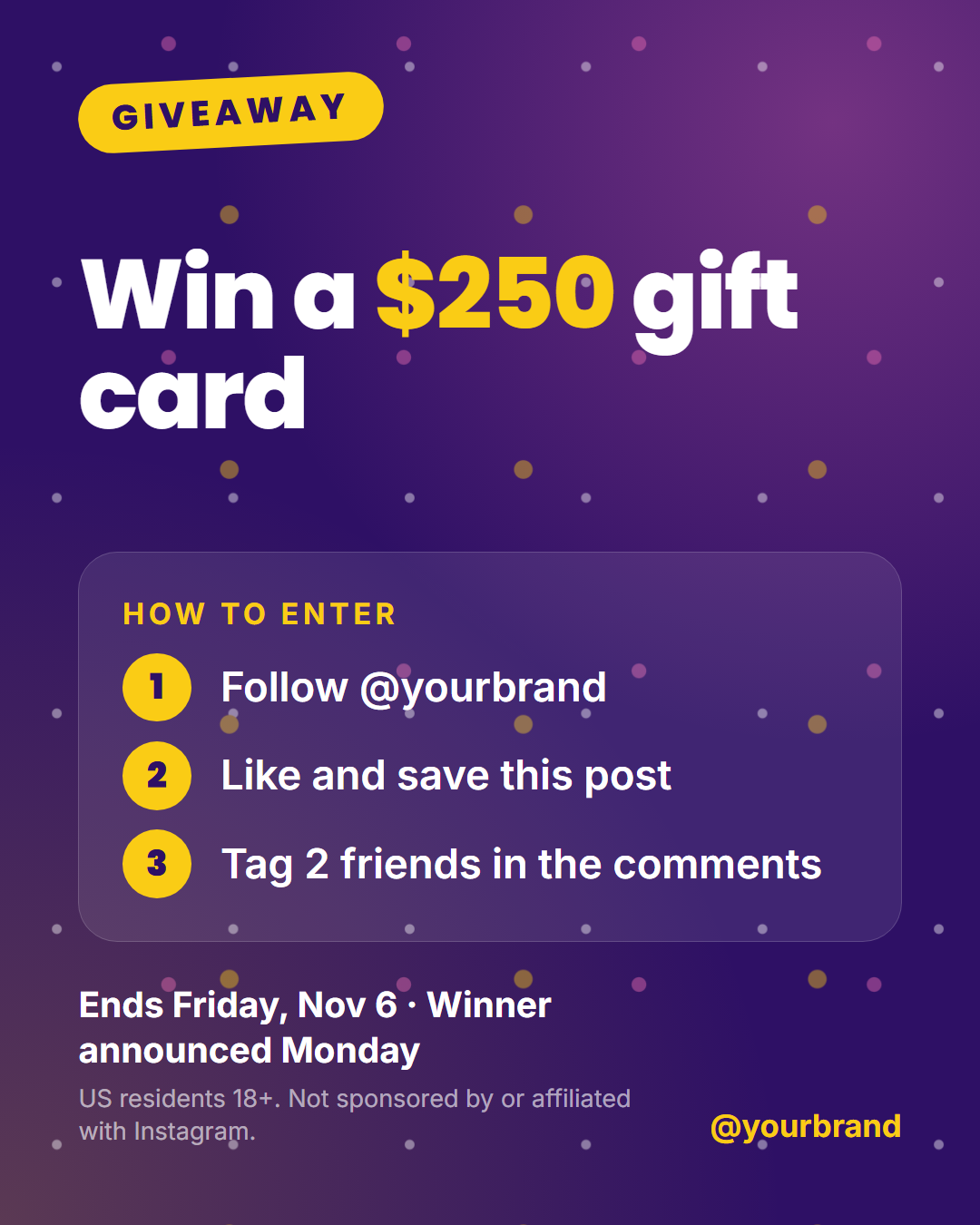
Giveaway Contest is a free Instagram giveaway post template that turns a contest into a post people understand in two seconds: a tilted "Giveaway" badge, the prize as a huge headline, an optional photo of the prize, three numbered "how to enter" steps, the deadline and a short rules line. It works for Instagram, Facebook, LinkedIn, X and Pinterest from one design.
Why giveaways need a clear layout
Giveaways are one of the fastest ways to grow followers and reach, but only if people instantly see what they can win and what to do. That is why the prize is the biggest thing on the post and the entry steps sit in their own numbered panel. Wrap words in *asterisks* to colour them, for example the prize value, so the most exciting part pops.
Rules that keep you compliant
Instagram's promotion guidelines ask you to include official rules and to say that the promotion isn't sponsored, endorsed or administered by Instagram. The template has a dedicated rules line for that, plus a deadline line for the end date and when the winner is announced. Keep the full terms in your caption or on a landing page and use the line for the short version.
Made for every placement
The design is drawn with CSS: the confetti, the badge and the glowing background need no images. Add a photo of the prize and it appears in a tilted frame next to the headline. Switch to the Story size and the layout stacks with the photo larger, or to 16:9 for X and LinkedIn, where the steps move into a second column. Download PNG or JPEG, export a short animated video for Reels, or copy the HTML.
Celebrating a follower milestone? Pair it with the Milestone post, and promote the launch with Coming Soon Teaser.
Why use it
Why Use the Giveaway Contest Template
How it’s different
How It’s Different From Canva-Style Templates
Step by step
How to Use
- 1Pick the sizeChoose Portrait 4:5 (the Instagram feed default), Square, Story / Reel, Landscape 16:9 for X, a 1200×627 LinkedIn image or a 1000×1500 Pinterest pin. Giveaway Contest opens at 1080×1350.
- 2Edit the textClick any text in the preview, or use the fields on the left (badge, prize headline, steps heading, step 1 and more). Wrap words in *asterisks* to colour them.
- 3Add your imagesClick a photo area in the preview or use Images to upload your prize photo. Images stay in your browser.
- 4Match your brandApply your saved brand kit or one of 12 palettes, set exact colours, and choose heading and body fonts from any Google Font or your own uploaded font.
- 5Preview it in the feedSwitch the preview to Instagram, Story, X or LinkedIn to see the post with your name, handle and caption, and fix anything the quality checks flag.
- 6Download, save or bulk createDownload PNG, JPG or PDF, every size as a ZIP, or copy the HTML. Save it to My designs to reuse later, or turn a CSV into dozens of posts with Bulk create.
Real-world uses
Common Use Cases
Got questions?
Frequently Asked Questions
Open the Giveaway Contest template, type the prize and the three entry steps, set the deadline and rules line, and optionally upload a photo of the prize. Keep the 1080×1350 portrait size for the feed or switch to Story, then download the PNG. Everything runs in your browser.
The prize, how to enter, the end date, when the winner is announced, who can enter, and a statement that the giveaway is not sponsored, endorsed or administered by Instagram. The template has a place for each, and the full rules can go in your caption.
Keep it to three simple actions, such as follow the account, like or save the post, and tag one or two friends. Instagram's guidelines don't allow asking people to tag themselves in content they don't appear in, so ask them to tag friends in the comments instead.
Yes. Switch the size to Story / Reel (1080×1920) and the layout stacks with a larger prize photo. Use Animated video in the Export menu to get a short MP4 for Reels.
Portrait post 1080×1350 (4:5): Instagram feed (recommended), Facebook and LinkedIn feeds, X portrait. Square post 1080×1080 (1:1): Instagram, Facebook, LinkedIn and X feeds. Story / Reel 1080×1920 (9:16): Instagram and Facebook Stories, Reel covers. Landscape post 1600×900 (16:9): X feed image, Facebook landscape. LinkedIn image 1200×627 (1.91:1): LinkedIn shared image and link posts, Facebook link images. Pinterest pin 1000×1500 (2:3): Pinterest standard pin (the recommended 2:3 ratio). Switch sizes in the editor and the layout adapts, or click "All sizes (ZIP)" to download every size at once.
Yes. Choose Export, then "Bulk create from CSV", and paste rows from a spreadsheet or upload a CSV whose column names match the Giveaway Contest fields. Every row becomes one post, and you download them all as a ZIP.
Yes. The preview switches between the plain design and mock-ups of an Instagram feed post, an Instagram Story, an X post and a LinkedIn post, using the name, handle and logo from your brand kit and the caption you type.
Yes. "Copy HTML" and "Download .html" give you one self-contained file: the markup, all the CSS and links to the Google Fonts it uses. "Fork to My Code" saves an editable copy in the UI Snippets editor. The file records the template name and version (v1.0.0).
Yes. It is free for personal and commercial posts, with no sign-up and no watermark. Everything runs in your browser and nothing you type or upload is sent to a server.