Click any text to edit it · drag a photo to reposition it, scroll to zoom, click to replace
Just Listed (Real Estate) — Free Promo & Sales Social Post Template
Promo & Sales · v1.0.0 · Updated 2026-10-20 · Instagram, Facebook & X · HTML + CSS
What's included
Features
About this template
Just Listed — Free Real Estate Instagram Post Template for Realtors
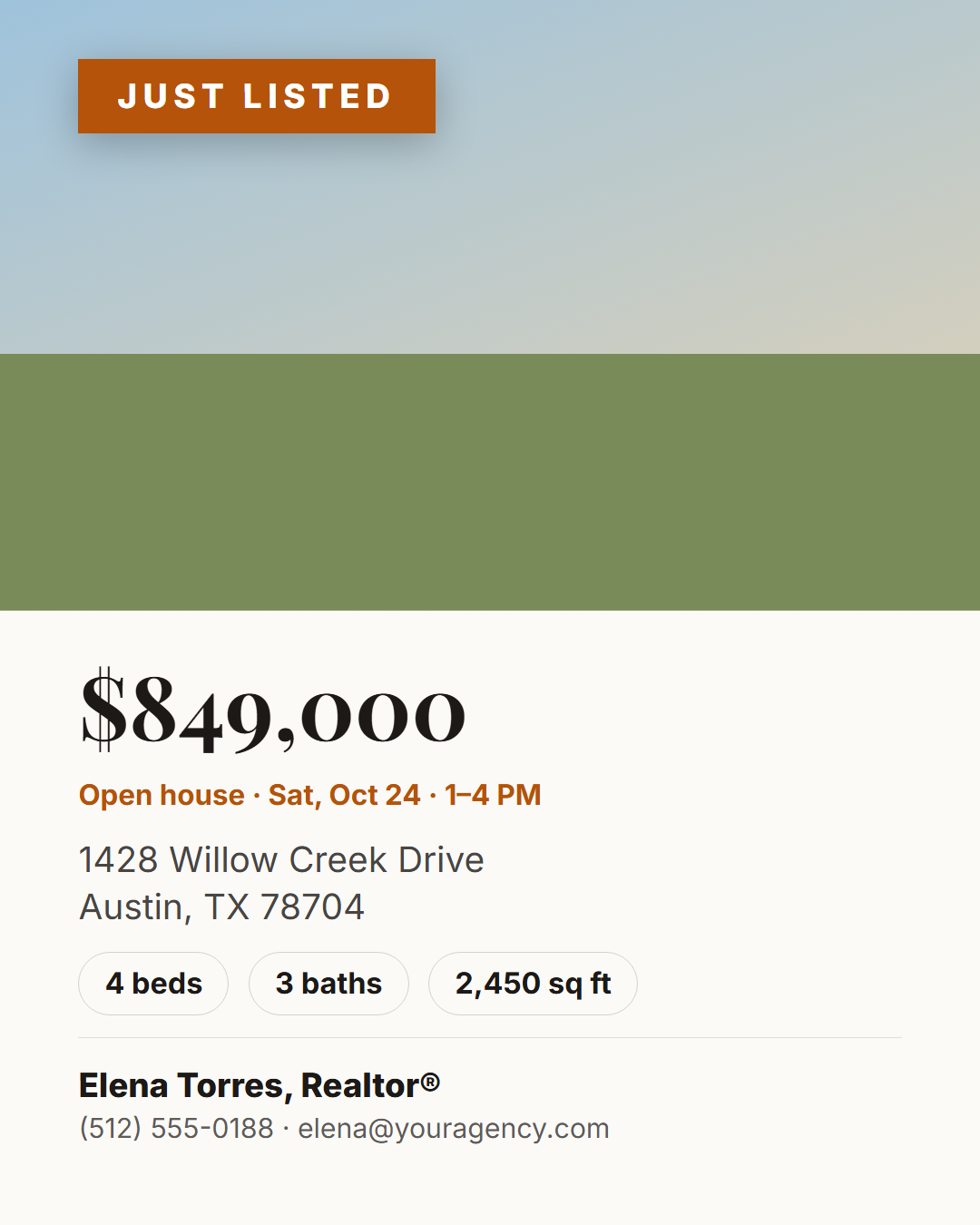
Just Listed (Real Estate) is a free social media post template for real estate agents, brokerages and property managers. A large property photo with a "Just listed" ribbon fills the top of the post, and a clean information panel below shows the asking price, the address, a beds / baths / square feet row, an optional open-house line and the agent's name, photo and contact details.
Built for how buyers browse
Buyers scroll quickly and decide in seconds, so the photo does the selling and the price is the biggest piece of text. The specs sit in tidy pills that are easy to scan on a phone, and the open-house line stands out in the accent colour. An elegant serif price and warm neutral palette suit most brokerages, and every colour can be changed to match your brand.
One template, every listing moment
Change the ribbon text to reuse the design for the whole listing journey: "Just listed", "Open house", "Price reduced", "Under contract" and "Just sold". Upload the property photo straight from your computer; it's cropped to fill the frame, you can drag to choose the best part of the shot, and it never leaves your browser. The agent photo is optional and disappears when empty.
Ready for every platform
Export the 4:5 portrait post for Instagram and Facebook, a 9:16 Story with a taller photo, a 16:9 version for X and Facebook with the photo on the left and the details on the right, or a 2:3 Pinterest pin for property boards. Pair it with Countdown for an open-house countdown and Customer Testimonial for client reviews.
Why use it
Why Use the Just Listed (Real Estate) Template
How it’s different
How It’s Different From Canva-Style Templates
Step by step
How to Use
- 1Pick the sizeChoose Portrait 4:5 (the Instagram feed default), Square, Story / Reel, Landscape 16:9 for X, a 1200×627 LinkedIn image or a 1000×1500 Pinterest pin. Just Listed (Real Estate) opens at 1080×1350.
- 2Edit the textClick any text in the preview, or use the fields on the left (ribbon, price, address, beds and more). Wrap words in *asterisks* to colour them.
- 3Add your imagesClick a photo area in the preview or use Images to upload your property photo and agent photo. Images stay in your browser.
- 4Match your brandApply your saved brand kit or one of 12 palettes, set exact colours, and choose heading and body fonts from any Google Font or your own uploaded font.
- 5Preview it in the feedSwitch the preview to Instagram, Story, X or LinkedIn to see the post with your name, handle and caption, and fix anything the quality checks flag.
- 6Download, save or bulk createDownload PNG, JPG or PDF, every size as a ZIP, or copy the HTML. Save it to My designs to reuse later, or turn a CSV into dozens of posts with Bulk create.
Real-world uses
Common Use Cases
Got questions?
Frequently Asked Questions
Open the Just Listed template, upload the property photo, and fill in the price, address, beds, baths, square feet and your contact details. Keep the 1080×1350 portrait size for the feed or switch to Story, then download the PNG.
Yes. Change the ribbon text to "Just sold", "Open house", "Price reduced" or "Under contract", and use the open-house line for dates and times.
A bright, horizontal exterior or main-living-area photo at least 1600 px wide. You can drag the photo to choose which part shows in the frame.
No. Photos are processed in your browser and saved only on your device, which keeps client and listing photos private.
Portrait post 1080×1350 (4:5): Instagram feed (recommended), Facebook and LinkedIn feeds, X portrait. Square post 1080×1080 (1:1): Instagram, Facebook, LinkedIn and X feeds. Story / Reel 1080×1920 (9:16): Instagram and Facebook Stories, Reel covers. Landscape post 1600×900 (16:9): X feed image, Facebook landscape. LinkedIn image 1200×627 (1.91:1): LinkedIn shared image and link posts, Facebook link images. Pinterest pin 1000×1500 (2:3): Pinterest standard pin (the recommended 2:3 ratio). Switch sizes in the editor and the layout adapts, or click "All sizes (ZIP)" to download every size at once.
Yes. Choose Export, then "Bulk create from CSV", and paste rows from a spreadsheet or upload a CSV whose column names match the Just Listed (Real Estate) fields. Every row becomes one post, and you download them all as a ZIP.
Yes. The preview switches between the plain design and mock-ups of an Instagram feed post, an Instagram Story, an X post and a LinkedIn post, using the name, handle and logo from your brand kit and the caption you type.
Yes. "Copy HTML" and "Download .html" give you one self-contained file: the markup, all the CSS and links to the Google Fonts it uses. "Fork to My Code" saves an editable copy in the UI Snippets editor. The file records the template name and version (v1.0.0).
Yes. It is free for personal and commercial posts, with no sign-up and no watermark. Everything runs in your browser and nothing you type or upload is sent to a server.